Download the
Paisabazaar app Today!
Paisabazaar app Today!
Get instant access to loans, credit cards, and financial tools — all in one place

Win Assured Cashback

Our Advisors are available 7 days a week, 9:30 am - 6:30 pm to assist you with the best offers or help resolve any queries.


Get instant access to loans, credit cards, and financial tools — all in one place

Scan to download on


 Personal Loan
 Business Loan
 Home Loan
 Other Loans


Our Advisors are available 7 days a week, 9:30 am - 6:30 pm to assist you with the best offers or help resolve any queries.
PNB provides the mini statement facility for its customers to enquire and check their latest bank account transactions. With the help of mini statements, account holders can instantly view their latest deposits and withdrawals. Read to know the various methods to check your PNB mini statement by accessing both online and offline modes.
600 or 750? What's your credit
score? Check for FREE.


Let’s Get Started
 +91
+91
The entered number doesn't seem to be correct
PNB Mini Statement and various other banking products and services are offered to provide a hassle-free banking experience to its customers. The account holder can access their PNB Mini Statement with the help of bank’s toll-free number, net banking and mobile banking facility, missed call and SMS service, and via mPassbook and ATM.
Getting an account statement or knowing the account balance is no longer time-consuming. PNB’s net banking, mobile banking, and SMS banking services have made tasks quick, convenient, and hassle-free.
It is now easy for an account holder to check the mini statement instantly using the PNB Mini Statement number. An account holder can even use an SMS banking service to get the mini statement. Punjab National Bank mini statement shall contain information on the last 5 transactions, including deposits and withdrawals, along with the account balance.

Get Your Latest Credit Score in Just 2 minutes Check Now
Every service comes with some prerequisites, for instance, to avail PNB mobile banking services, the customers should get their phone numbers registered at the bank. Also, to access the PNB Net banking Portal or Mobile Applications, the user needs to have a smartphone and an Internet connection. So, let us know more about the ways of checking mini statements from PNB.
Also Know: How to Check PNB Balance
Also Read: How to Download PNB Statement
Now Get your Credit Score and Credit Report for FREELifetime FREE |
* Terms and conditions apply
It is essential to get the mobile number registered at Punjab National Bank to avail the PNB mini statement as well as to get the SMS banking service activated
To get PNB Mini Statement, give a missed call to:
To avail PNB Mini Statement, PNB account holders will be required to give a missed call to the PNB Mini Statement toll-free number 1800-180-2223 and 01202303090 (chargeable). The account holder can give a missed call by the registered mobile number to avail PNB mini statement in no time.
Users can avail PNB Mini Statement using the missed call service by following the below-mentioned steps:
Now Get Credit Score for FREE in your Language Check Now
To get the PNB mini statement by SMS, the account holder is required to send an SMS – ‘MINSTMT’ /space/ 16-digit Account Number and send it to 5607040.
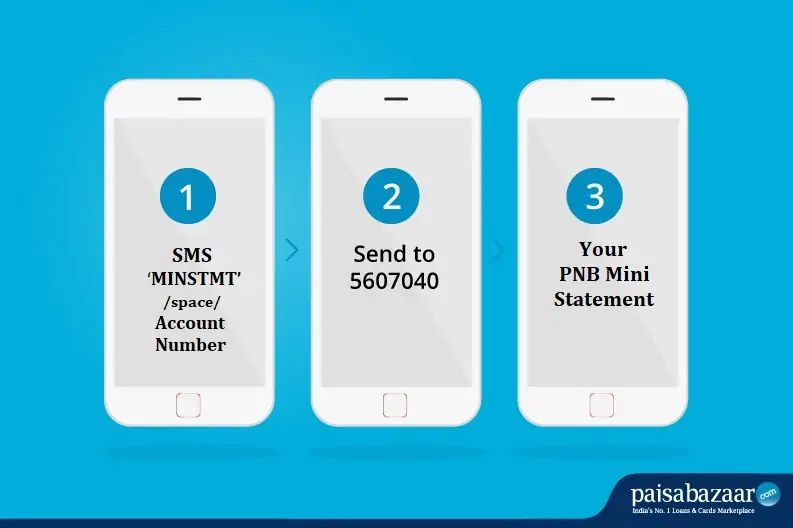
Step 1: For PNB Mini Statement by SMS banking service, SMS ‘MINSTMT’ /space/ Account number.
Step 2: Send the message to 5607040.
Step 3: Check the Punjab National Bank Mini Statement of the recent 5 transactions made from the account.
It is recommended to check the account number thoroughly. As soon as the SMS is sent, one receives the mini statement via SMS. In case, an account holder has multiple accounts with PNB, the mini statement will be sent to the provided account number via SMS. The SMS service of PNB is available 24 hours, all days of the week. The charge for the SMS service is Rs 15 + GST quarterly (except Senior Citizen Accounts, Vidyarthi Accounts, Mitra Accounts, Accounts opened under PMJDY, and Staff & Ex-staff accounts).
Also Know: How to link Aadhar with PNB bank account
Following are some of the advantages and benefits of using the SMS banking service of PNB:
Following are the steps to avail Punjab National Bank Mini Statement using Mobile Banking:
Step 1: Download the ‘PNB mPassbook” app from the Google Play Store or Apple App Store.
Step 2: Log in to the PNB mPassbook app using the MPIN.
Step 3: Select the savings/current account from the list to check the PNB Mini Statement.
Step 4: On the next menu, select “Mini Statement” to proceed further.
Step 5: On the next screen, check the PNB Mini Statement which contains the last 10 transactions.
Step 6: Account holder can also check the transaction details of every transaction mentioned in the mini-statement.
Step 7: With PNB mPassbook, users also get the facility of downloading their PNB Mini Statement for further reference or use.
Don’t know your Credit Score? Check it here for FREE Check Now
Ans. The fastest way to get a PNB mini statement is to give a missed call to the bank’s toll-free number 1800-180-2223 from your registered mobile number. After the missed call gets disconnected after two rings, you will receive an SMS with the details of your last five transactions.
Ans. The various methods to fetch your last 10 account transaction details are by giving a missed call, reaching out to the customer care team, sending an SMS, using mobile banking services, and via email statements.
Ans. You can check your PNB mini statement multiple times and as many times as you want. PNB mini statement services are available 24×7 for your convenience and support.
Ans. As it is a mini statement, the bank allows you to show only the last five transactions of your bank account. If you want to view even far-back transactions, then you shall have to request for complete bank statement for the desired month or specific date range.
Ans. You can check your PNB mini statement in varied ways. You can give a missed call to 1800-180-2223 or 0120-2303090, or you can send ‘MINSTMT<space>Account Number’ to 5607040. If you have an internet connection, you can download and use the PNB mobile application or log in to the PNB net banking portal. Mini statements can also be viewed from PNB or any other bank’s ATM.
Ans. You can download the ‘PNB One’ app from the Play Store and fetch your account’s mini statement from PNB.
Ans. If you do not have an internet connection, you can either give a missed call on 1800-180-2223 or 0120-2303090 or send ‘MINSTMT<space>Account Number’ to 5607040 from your registered mobile number. You will receive an SMS instantly with the details of your last 5 transactions.
Also Know: PNB Bank Timings
Ans. To check the details of your last 5 transactions in PNB, you can easily send an SMS ‘MINSTMT<space>Account Number’ to 5607040 or give a missed call at 1800-180-2223 or 0120-2303090. If you have a smartphone and internet connection, you can use the PNB mobile app to view the mini statement. Besides that, you can also log in to the PNB Net Banking Portal using your customer ID and check your transactions. Bank ATMs also allow users to check mini statements instantly.
Ans. Yes, you can view your mini statement using the PNB mPassbook mobile application. Log in to the app using your MPIN, select ‘Mini Statement’, and proceed. This will show your last 10 transactions.
Ans. If you are using the PNB toll-free number i.e. 1800-180-2223, no charges will be applied. However, you will be charged by the bank if you are using the 0120-2303090 number.
Ans. All customers who have current, savings, OD, and CC accounts with PNB can register for email statements.
Ans. The account holders will receive monthly email statements.
Ans. If you register for email statements, your physical statement of accounts will be discontinued. However, customers can visit their branch for duplicate statements.
| Related Links | ||
| SBI Mini Statement | Canara Bank Mini Statement | ICICI Bank Mini Statement |
| BoB Mini Statement | HDFC Bank Mini Statement | Bank of Maharashtra Mini Statement |