Download the
Paisabazaar app Today!
Paisabazaar app Today!
Get instant access to loans, credit cards, and financial tools — all in one place

Win Assured Cashback

Our Advisors are available 7 days a week, 9:30 am - 6:30 pm to assist you with the best offers or help resolve any queries.


Get instant access to loans, credit cards, and financial tools — all in one place

Scan to download on



 Personal Loan
 Business Loan
 Home Loan
 Other Loans


Our Advisors are available 7 days a week, 9:30 am - 6:30 pm to assist you with the best offers or help resolve any queries.
600 or 750? What's your credit
score? Check for FREE.


Let’s Get Started
 +91
+91
The entered number doesn't seem to be correct
DBS Bank offers various types of banking and financial services to its customers such as deposit accounts, investment options, loans, credit and debit cards. Accountholders having savings account can do DBS Bank balance enquiry and stay updated with the balance and transactions carried out in their account. To check the DBS account balance, you can do it via DBS toll-free number, SMS, mobile banking, net banking, etc.
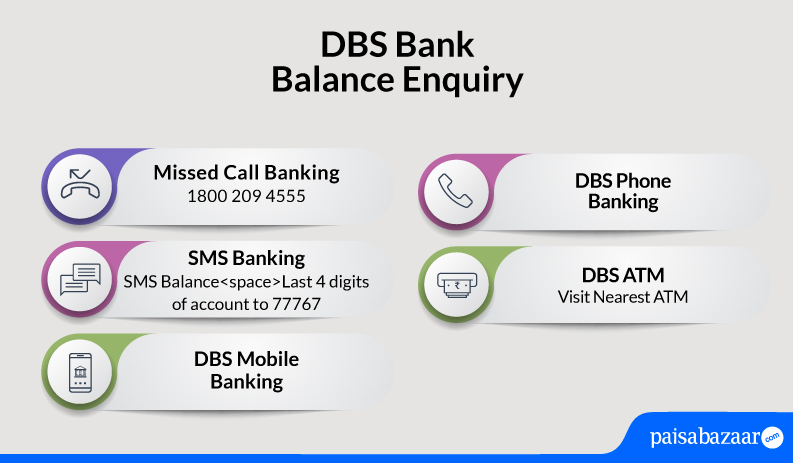
You can use the SMS banking services to check balance in DBS Bank savings account or receive a mini-statement. All you need to do is give a missed call or send a SMS from your registered mobile number on DBS balance enquiry toll-free number. In a few seconds, you will receive their balance details on your phone.
You can check DBS account balance by giving a missed call on-
To check DBS Bank Balance via SMS, you need to send Balance<space>Last 4 digits of Account to 77767 from your registered mobile number.
In case, you have not yet registered to DBS SMS Banking Register <space> NRIC/Passport number<space> preferred account’s last 4 digits.
There are various other ways through which you can check your DBS Account Balance. They are as follows:
Step 1: You must login to digibank Mobile via your Touch/Face ID or digibank user ID and PIN
Step 2: Your account balance will automatically appear on the screen
All you need to do is enter your net banking credentials to get access to all the banking services such as funds transfer, bill payment and account balance check as well.
Step 1: Click on the Digitbot located at the bottom right of the bank’s website
Step 2: You need to type Account balance into the chat
Step 3: Now, click on the ‘Authenticate Me’ to complete the authentication process either via iBanking Login or Card & PIN
Step 4: You have to select your account and choose the type of balance you want to know
Step 5: In case, you select the available and ledger balance, amount on hold then your account balance will appear on the screen
Step 6: In case you select Hold Balance (for cheques), then your holding balance for cheques will be shown
Step 1: You need to Dial 1800 111 1111 (from Singapore) or (+65) 6327 2265 (from Overseas)
Step 2: Press 1 for a menu in English
Step 3: Enter your NRIC, Debit or Credit Card Number or your Phone Banking UID followed by # to proceed
Step 4: Enter your Phone Banking PIN followed by # to proceed
Step 5: Select your Deposit Account Related Services
Step 6: Press 1 to listen to your Account Balance(s)
Step 1: Insert your ATM/Debit/Credit Card and key in your PIN
Step 2: Select Balance Inquiry
Step 3: Select your Account Type
Step 4: Your Account Balance will appear on the screen
Step 5: Select End and remove ATM card
Step 1: Insert your NRIC, ATM/Debit/Credit Card or scan your Passport and complete the authentication process
Step 2: Select the Balance Enquiry under the main menu
Step 3: Your Account Number, Ledger Balance and Available Balance will be reflected on the screen
Note: You must collect your NRIC, ATM/Debit/Credit Card before you leave our Video Teller Machine (VTM)
Consumer ExperienceWhat is the best method for DBS Bank balance enquiry online? I have been using DBS bank’s mobile banking app called digibank to view my account balance online. I really like the features provided by this app. I like that I can monitor all my transactions through this app. The app is safe and secure to use. I would highly recommend using this app. What is the best method for DBS Bank balance enquiry offline? To view my balance offline in DBS Bank, I use its SMS banking service. I simply send an SMS from my registered mobile number and receive my account balance instantly. -Sudesh Malhotra, DBS Bank customer for the past 1 year |
Q. Where can I use digibank Online?
You can easily use digibank Online anywhere in India.
Q. Is digibank Mobile Banking facility available 24*7?
Yes, digibank Mobile Banking facility is available 24*7.
Q. Will I be charged for checking account balance via DBS Bank Phone Banking?
No, you will not be charged for checking account balance via DBS Bank Phone Banking.