Download the
Paisabazaar app Today!
Paisabazaar app Today!
Get instant access to loans, credit cards, and financial tools — all in one place

Win Assured Cashback

Our Advisors are available 7 days a week, 9:30 am - 6:30 pm to assist you with the best offers or help resolve any queries.


Get instant access to loans, credit cards, and financial tools — all in one place

Scan to download on



 Personal Loan
 Business Loan
 Home Loan
 Other Loans


Our Advisors are available 7 days a week, 9:30 am - 6:30 pm to assist you with the best offers or help resolve any queries.
In case your mobile number is not linked with Aadhaar or you want to update/change your registered mobile number, you can easily update it by visiting the nearest Aadhaar enrollment center or Aadhaar Seva Kendra. Read on to find out the complete Aadhar card mobile number linking process, charges involved, benefits and more.
600 or 750? What's your credit
score? Check for FREE.


Let’s Get Started
 +91
+91
The entered number doesn't seem to be correct
Linking Aadhaar with your mobile number is necessary to avail various Aadhaar-related services, use the online Self Service Update Portal (SSUP), mAadhaar App, etc. Read on to know all about how to link mobile number with Aadhar card offline, documents required, charges involved and more.
Table of Contents :

Get Free Credit Score with monthly updates. Check Now
You can link your Aadhaar card with mobile number by visiting the nearest Aadhaar Enrolment/Update centre. To register/update your mobile number in Aadhaar card, you need to follow the steps given below:
Step 1: Locate the nearest Aadhaar enrolment/update centre by clicking on https://appointments.uidai.gov.in/bookappointment.aspx
Step 2: Mention your mobile number in the Aadhaar Enrolment Form in case you are new to the UIDAI ecosystem to register your mobile number with Aadhaar card. Alternately, you can fill out the Aadhaar Correction Form in case you have changed your existing mobile number or did not register the same earlier.
Step 3: Submit the form, provide your biometrics for authentication and make the payment
Step 4: You will receive an acknowledgement slip from the executive
Step 5: The slip contains an Update Request Number (URN) which can be used to track the status of your Aadhaar or Aadhaar update. You can also track the status of your Aadhaar by calling UIDAI’s toll-free number 1947
Step 6: You are not required to get another Aadhaar card after updating mobile number in Aadhaar
Step 7: Once your mobile number is linked to Aadhaar card, you will start receiving Aadhaar OTPs for availing a number of facilities.
Find out more details about How to book an appointment to link Aadhaar with mobile number
A Good Credit Score ensures you manage Your Finances Well Check Now
*This service has been temporarily discontinued by UIDAI.
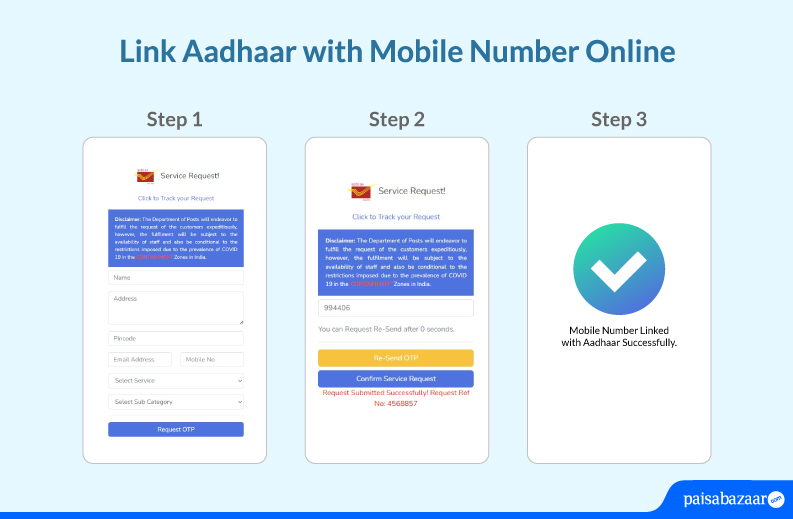
Here is a step-by-step guide on how to link Aadhar with mobile number online without visiting an Aadhaar Seva Kendra:
He/she will complete the update/linking process and charge you a fee for the service.
The only document required for linking Aadhaar card with a mobile connection is a self-attested copy of your Aadhar card. You do not have to provide any other document, address proof or identity proof for this purpose.
You are not required to pay any charges to link your Aadhaar card with mobile number at the time of Aadhaar enrolment. However, in case you wish to link/change/update your mobile number registered with Aadhaar, you will be required to pay Rs. 50 (inclusive of GST) for the same. Do note that, in case multiple fields are updated in one instance, no additional fee needs to be paid.
Here are a few key reasons why you should link your Aadhaar with mobile number:
Get Free Credit Score with monthly updates. Check Now
The following are the different means to verify if your Aadhaar is linked to your mobile number:
Read more about: Aadhaar Card Verification
| Link Aadhar with PAN Card | Link Aadhar with EPF Account | Link Aadhar with Bank Account |
| Link Aadhar with Ration Card | Link Aadhar with Driving License | Link Aadhar with LIC Policy |
A. You can only link/register a single mobile number with your Aadhaar card.
A.One mobile number can be linked to multiple Aadhaar cards.
A. Yes, you can change/update the mobile number linked to your Aadhaar card by visiting the nearest Aadhaar update centre.
A. No, you can visit any of the Aadhaar Seva Kendras to update Aadhaar details.
A. No, your Aadhaar number will remain same even after the update.
A. You can use the Aadhaar card verification process to check if your Aadhaar card is linked to your mobile number. Go to the Aadhaar verification page, enter your Aadhaar number, mobile number, captcha code and receive an OTP on your mobile number. Enter the OTP received and know if your mobile number is linked to your Aadhaar or not.
Click to know more about Aadhaar Card Verification
A. In case you have not received an OTP, it could mean that your mobile number is not linked to your Aadhaar card. You can verify the same through the UIDAI website.
A. At present, you can only link your mobile number with Aadhaar by visiting an Aadhaar Seva Kendra.
A. This facility is not yet offered by UIDAI. You can link your mobile number with Aadhaar only by visiting an Aadhaar Seva Kendra.
A. You can link one mobile number with 5 Aadhaar cards at the same time.
A. You can visit the nearest Aadhaar Seva Kendra to get your mobile number updated/corrected.
A. Yes, you simply need to fill up and submit the Aadhaar card update/correction form at your nearest Aadhaar Seva Kendra and pay a fee of Rs. 50 to change your mobile number in Aadhaar card.
A. You can check if your mobile number has been linked/updated with your Aadhaar card via the UIDAI official website using your URN or Update Request Number. You can also visit the nearby Aadhaar Sewa Kendra or Aadhaar Enrolment Centre to check your Aadhar update status. Moreover, you can track your Aadhaar card update status by calling UIDAI’s toll-free number 1947 using your registered mobile number or mAadhaar app.
Click to find out more details about How to Check Aadhar card status.
A. You can mention your mobile number in the Aadhaar Enrolment Form when you visit the Aadhaar Enrolment Centre for your Aadhaar card enrolment. In case you have not mentioned your mobile number at the time of Aadhaar enrolment, you can update the same by visiting an Aadhaar Seva Kendra, filling up and submitting an Aadhaar Update Form mentioning your mobile number along with a fee of Rs. 50.
A. In case the user is not getting the OTP on the registered mobile number, he can check whether the number registered is the same by clicking on Verify Mobile Number at the UIDAI portal.
A. You cannot avail online services if your mobile number is not registered with Aadhaar. An OTP is sent to the registered mobile number of the user that has to be entered to avail the online services.
A. No, it is not mandatory to link your Aadhaar with your mobile number. However, you can only avail various Aadhaar related online services as well as use the mAadhaar app only when your mobile number is linked to your Aadhaar.
A. You just need to fill up the Aadhaar update/correction form, provide your biometrics and pay a fee of Rs. 50 to get a new mobile number linked to your Aadhaar card.
A. You can only link your Aadhaar with a single mobile number.
A. There is no means to unlink your Aadhaar from a mobile number. However, you can change the mobile number linked to your Aadhaar card by visiting an Aadhaar Seva Kendra and submitting the Aadhaar update/correction form along with the applicable fees.
A. Yes, you can link your Aadhaar card with a mobile number that is not in your name. However, it is recommended to use a mobile number you have access to for OTP-based authentication.
A. It generally takes anywhere between 2-5 days to link your mobile number with Aadhaar card. However, according to UIDAI, the linking process may take up to 30 days to get completed.
A. Yes, you can update your Aadhaar details by visiting any Aadhaar Kendra Seva in India.
A. There is no last date for linking Aadhaar with your mobile number.
A. It is completely safe to link your Aadhaar with mobile number as it adds an extra layer of security and prevents misuse of your personal information.
A. At present, there is no provision to register your mobile number in Aadhaar card via SMS.