Download the
Paisabazaar app Today!
Paisabazaar app Today!
Get instant access to loans, credit cards, and financial tools — all in one place

Win Assured Cashback

Our Advisors are available 7 days a week, 9:30 am - 6:30 pm to assist you with the best offers or help resolve any queries.


Get instant access to loans, credit cards, and financial tools — all in one place

Scan to download on



 Personal Loan
 Business Loan
 Home Loan
 Other Loans


Our Advisors are available 7 days a week, 9:30 am - 6:30 pm to assist you with the best offers or help resolve any queries.
The Employees’ Provident Fund Organisation (EPFO) has made provision for employees to link their Aadhaar with their Universal Account Number (UAN). A person can link Aadhaar with EPF account both online and offline. Let us have a look at how we can do it easily.
600 or 750? What's your credit
score? Check for FREE.


Let’s Get Started
 +91
+91
The entered number doesn't seem to be correct
The EPFO has made it mandatory for member employees to link UAN with Aadhaar to continue availing the facilities and have access to EPF. It has made provisions for all employees across India to manage their PF accounts online. Members can validate their Aadhaar with UAN using the online EPFO e-KYC facility available on the EPF member portal or visit the nearest EPFO office in person. Read the complete article to have a detailed insight into the different ways to link Aadhaar with EPF account, benefits of EPFO Aadhar update/link and more.

Here is the step-by-step guide on how to link Aadhar with EPF account online:
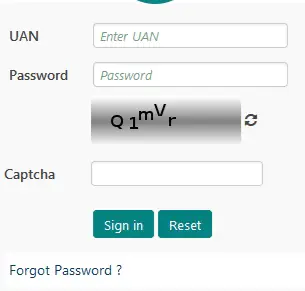
Step 1. Visit the EPFO Member home page or Member e-SEWA portal at https://unifiedportal-mem.epfindia.gov.in/memberinterface/
Step 2. Login to your EPF account. Do keep in mind that you can login to your EPF account only after your UAN activation online/UAN login registration process has been completed.
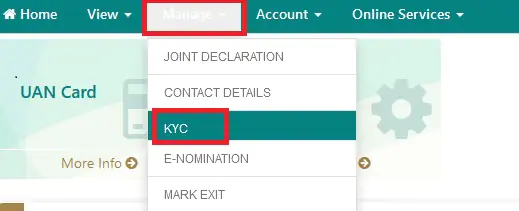
Step 3. In the “Manage” section, click on the KYC option.
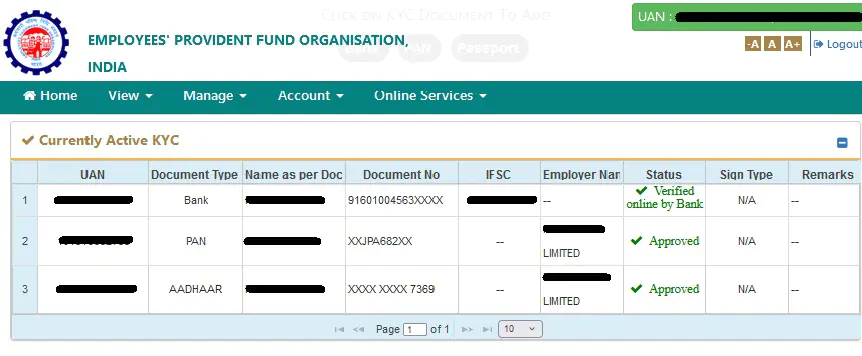
Step 4. You will be redirected to a new page, from where you can select “Aadhaar” to link with your EPF account.
Step 5. Now, click on “Aadhaar” and enter your Aadhaar number and your name as per your Aadhaar card and click on the save option.
Step 6. Once you have saved your Aadhaar details, your Aadhaar will be verified from UIDAI’s data.
Step 7. On successful approval of your KYC document, your Aadhaar will be linked with your EPF account and you will find “Approved” written against your Aadhaar details.
Read more on EPFO Member e-Sewa Portal/ UAN Member Portal
To make it easier for those individuals who are not adept in availing online services, EPFO has made provisions for linking Aadhaar with their EPF account offline. Such employees can get their EPF account linked with Aadhaar by visiting the EPFO office (Find EPFO Office near you) and submitting the application in person. It can be done easily by following these simple steps:
Step 1: Fill out the “Aadhaar Seeding Application” form
Step 2: Enter your UAN and Aadhaar in the form along with other relevant details
Step 3: Attach self-attested copies of your UAN, PAN and Aadhaar with the form
Step 4: Submit it to the executive at any of the field offices of EPFO or Common Service Centres (CSC) outlets
Step 5: After proper verification, your Aadhaar will be linked with your EPF account and you will get a message related to this on your registered mobile number.
Note: The option to link Aadhaar with EPF account though UMANG App is currently unvailable.
The Ministry of Electronics and Information Technology (MeitY) and National e-Governance Division (NeGD) launched UMANG (Unified Mobile Application for New-age Governance) to promote Mobile Governance in India.
If you want to claim your EPF online, it is mandatory to link your Aadhaar with UAN i.e. (Universal Account Number). If you link your UAN with Aadhaar, your EPF account will also be linked to Aadhaar. Following are the steps that you must follow for EPF Aadhaar link online using UMANG APP:
Step 1: Login to the UMANG App using your “MPIN” or the OTP that you can receive on your registered mobile number
Step 2: Once logged in, go to “Services” tab and select “EPFO”
Step 3: Under the EPFO section, click on “e-KYC services”
Step 4: Under “e-KYC services” select the Aadhaar Seeding option
Step 5: Now enter your UAN and click on the “Submit” button
Step 6: You will receive an OTP on your mobile number registered with the EPF account
Step 7: Enter your Aadhaar details
Step 8: You will now again receive an OTP on your registered mobile number and email address
Step 9: Once the OTP verification is done, your Aadhaar will be linked to your UAN
Click to know more about how you can download the UMANG App and set up your account.
To know if your Aadhaar number is linked to your PF account, you need to follow the steps mentioned below:
Step 1: Visit https://unifiedportal-mem.epfindia.gov.in/memberinterface/
Step 2: Use your UAN, Password and OTP received on your registered mobile number to login
Step 3: Now, the UAN Member home page will open; find Aadhaar from the details mentioned on the page under Profile Information
Step 4: If you see “ Verified ( OTP, DEMOGRAPHIC )” written against your Aadhaar number, it means your Aadhaar is linked to your EPF account and verified by UIDAI
Benefits of Linking Aadhaar with EPF AccountKey benefits of linking your Aadhaar number with your EPF account are:
|
Link Aadhaar and Activate UAN by January 15 to Secure EPFO Benefits
|
Ans. There are no charges to link Aadhaar with EPF Account through the UMANG app.
At present, there is no deadline to link Aadhaar with EPF account or EPFO Aadhar update.
Ans. It is mandatory to link UAN with Aadhaar and also advisable to file EPF e-nomination. So it is recommended that you carry out both processes at the earliest.
Ans. No, only one mobile number can be linked with one EPF Account.
Ans. Here are the various ways on how to link Aadhaar card with EPF account:
Step 1: Download the UMANG App from either Google Play Store or Apple Store
Step 2: Enter your registered mobile number if you have already registered
Step 3: Login with either “MPIN” or “Enter OTP” and click on “Continue”
Step 4: Now, enter the OTP sent to your registered mobile number
Step 5: To continue using the APP, you need to set an MPIN
Step 6: Set the MPIN, and you will be logged into the UMANG APP
Ans. It is mandatory to provide your registered mobile number with Aadhaar Card for the OTP authentication as without it, seeding of Aadhaar with EPF Account is not possible.
Ans. If you don’t remember your UAN password, you need to follow the below steps:
Step 1: Click on the ‘Forgot Password’ option at Member Interface of Unified Portal
Step 2: Provide your UAN with captcha.
Step 3: Provide your name, date of birth and gender and click on ‘Verify’
Step 4: Enter the captcha code, your Aadhaar number, give consent and click on ‘Verify’
Step 5: Verify your registered mobile number on which you will receive an OTP
Step 6: Fill in the OTP that you have received on your registered mobile number to be redirected to the password reset page
Step 7: Fill in the new password, confirm it and click on ‘Submit’ to complete the password reset process.
Ans. If you want to file an online claim of your EPF, then it is mandatory to seed your UAN with Aadhar. Also, your employer will be able to file Employee-cum-Return (ECR) challans and deposit funds to your EPF account only if your PF account is linked to your Aadhaar card.
Ans. You can visit the unified portal of Employees’ Provident Fund Organisation, India i.e. https://unifiedportal-mem.epfindia.gov.in/memberinterface/ to verify if your Aadhaar Card is linked with EPF or not.
Ans. Yes, once your Aadhaar Card is linked with your EPF Account, you will be informed about the same on your registered mobile number and email address.
Ans. The KYC data is generally verified within 3-5 working days. An SMS notification is sent to the registered mobile number once the approval is completed successfully.
Ans. You can contact EPFO helpdesk on their toll free number 1800118005 between 09:15 AM to 05:45 PM on all seven days for any query relating to UAN / KYC Services.
Ans. At present, there is no provision to link UAN with Aadhaar via SMS.
Ans. No, the employee needs to link his Aadhaar with UAN himself.
Ans. You need to first get your name updated/corrected in the EPFO or the UIDAI database. Once updated, you can link UAN with Aadhaar.
Ans. It is the EPFO member portal and UMANG app through which the online e-KYC facility is offered to validate your Aadhaar with UAN.