Download the
Paisabazaar app Today!
Paisabazaar app Today!
Get instant access to loans, credit cards, and financial tools — all in one place

Win Assured Cashback

Our Advisors are available 7 days a week, 9:30 am - 6:30 pm to assist you with the best offers or help resolve any queries.


Get instant access to loans, credit cards, and financial tools — all in one place

Scan to download on



 Personal Loan
 Business Loan
 Home Loan
 Other Loans


Our Advisors are available 7 days a week, 9:30 am - 6:30 pm to assist you with the best offers or help resolve any queries.
Union Bank of India Account Statement is a document provided by the bank which acts as a record of all the financial activities happening in a customer’s account.
600 or 750? What's your credit
score? Check for FREE.


Let’s Get Started
 +91
+91
The entered number doesn't seem to be correct
Union Bank of India Bank statement summarizes the fees charged, money owed, money withdrawn, interest earned, etc.
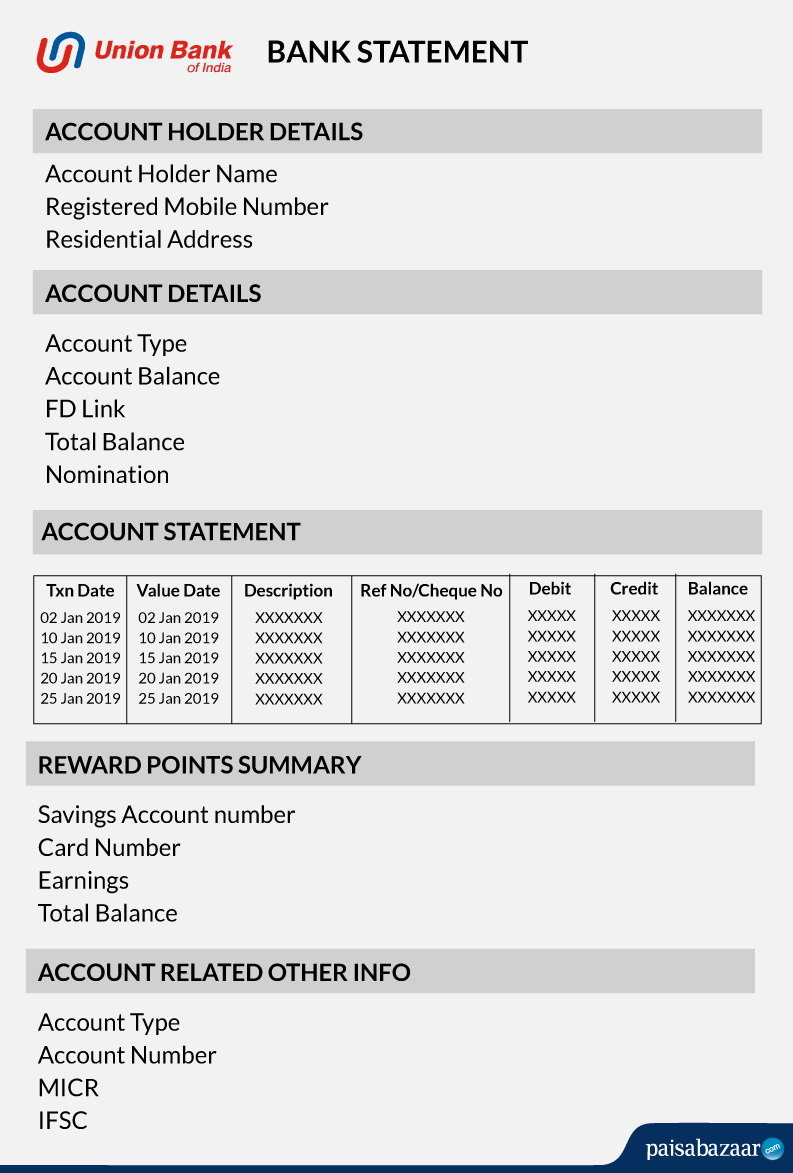
Union Bank of India account statement is usually divided into two parts:

Don’t know your Credit Score? Check it here for FREE Check Now
A customer can get his/her Union Bank of India account statement for any desired time via the following ways:
| Online | Offline | ||
| Union Bank of India Netbanking | Union Bank of India Mobile Banking | E-statements | Visiting bank branch |
Union Bank of India net banking provides its customers a simple way to register, use, access, and transact on their account 24×7.
One needs to login to the net banking account and select the transaction date range, and the format for the account statement and click on the ‘Statement’ button. One will get the option to download the UBI account statement PDF.
Union Bank of India’s mobile banking application helps its account holders to avail all the banking services on the go. There are various other mobile banking apps offered by Union Bank of India that allow users to access a wide array of banking facilities from the convenience of their homes.
Union Bank of India m-passbook is one such app that can be used by account holders to access their account statements on their phones. Here are the steps to use m-passbook:
Step 1: Download m-passbook from the Google Play Store or Apple App Store.
Step 2: Select the desired language, choose the country code, and enter the registered mobile number.
Step 3: Enter the 6-digit OTP received on the registered mobile number and accept the “Terms and Conditions” & then click on “Proceed”.
Step 4: As soon as the OTP is validated, set the 4-digit numeric PIN to access the app.
Step 5: Now use the app to get the Union Bank of India Account Statement.
E-statement is the electronic account statement, which is sent via mail to a customer having an account with Union Bank of India.
Hence, accessing the Union Bank of India e-statement is convenient, easily accessible, and free of cost.
Below find the simple steps to obtain your Union bank statement with the help of WhatsApp:
Step 1: You need to save the bank’s WhatsApp number, 9666606060, to send ‘Hi’ from your registered mobile number.
Step 2: After the registration process is complete, send ‘Hi’ again to start obtaining the bank statement.
Step 3: Enter the numbers as mentioned to perform services like getting bank statements or balance enquiries.
UVConn is an initiative from the bank for its customers to remotely access the banking services using their WhatsApp Chat messenger. UVConn supports the WhatsApp communication platform to connect with customer for inquiries related to their accounts. UVConn can be accessed live in 7 languages, such as English, Hindi, Bangla, Marathi, Tamil, Kannada and Telugu.
Customers can also visit any Union Bank of India branch in order to get their account statement. Just specify the statement period for which the bank statement is required and avail the statement.
The bank may ask an account holder to write an application for the same. Alternatively, the account holder can also give a call at Union Bank of India Customer Care Number for any queries regarding the same.
A Good Credit Score ensures you manage Your Finances Well
Check Now
Ans. You can download the Union Bank of India statement without netbanking by sending an SMS ‘UMNS’ to 09223008486 from your registered mobile number to get a mini statement. You can also visit the bank branch with the passbook to get it updated, as well as by dialling the toll-free number and requesting the bank’s customer care representative to send an email of your bank statement.
Ans. Your password to open a Union Bank of India statement PDF is an alphanumeric code that includes the first four letters of your name and your birth date and month. For example, if your name is Rohit Sharma and your birthday is November 22, 1996, your password will be ROHI2211.
Ans. To download the Union Bank of India statement in pdf, you need to login to the netbanking portal, select the account summary section to further check the statement tab, and click ‘Go’ Click on ‘View Statement’ and the period of the transaction to get for desired months and select the print option to download the PDF.
Ans. To get assistance from the bank’s customer care team, you may dial its toll-free numbers 1800-208-2244 / 1800-425-1515 / 1800-425-3555.
A bank statement shows a record of all transactions (both debit and credit) in one’s account. So, if in case of any fraudulent activity or theft, account holder can search for the specific transaction to see if it’s a result of theft or a bank error. Also, account holders can avail the certified bank statement by visiting the nearest bank branch
Ans. A customer should hold an account with the bank and he/she needs to download and then sign up for the m-passbook app to avail this facility.
Ans. Union Bank of India offers the facility of net banking and mobile banking via which the customers can get their account statements online.
Ans: United Bank of India account holders can give a missed call from their registered mobile number to 09015431345 and get their account balance on the registered mobile number.