Download the
Paisabazaar app Today!
Paisabazaar app Today!
Get instant access to loans, credit cards, and financial tools — all in one place

Win Assured Cashback

Our Advisors are available 7 days a week, 9:30 am - 6:30 pm to assist you with the best offers or help resolve any queries.


Get instant access to loans, credit cards, and financial tools — all in one place

Scan to download on



 Personal Loan
 Business Loan
 Home Loan
 Other Loans


Our Advisors are available 7 days a week, 9:30 am - 6:30 pm to assist you with the best offers or help resolve any queries.
600 or 750? What's your credit
score? Check for FREE.


Let’s Get Started
 +91
+91
The entered number doesn't seem to be correct
ICICI Bank issues bank statement to its account holders that shows the detailed activity in their accounts. It allows the account holder to see all the transactions processed on their savings account and current account for any specific tenure in the ICICI Bank statement.
ICICI Bank allows its customers to view and download savings account statement by authenticating their debit card details. The account holder needs to login with their User ID and password to view and download their account statement or they can also register to receive their statements on their email-id. Click here to view or download your savings bank statement. The below-mentioned image shows how ICICI Bank’s savings account statement looks like.
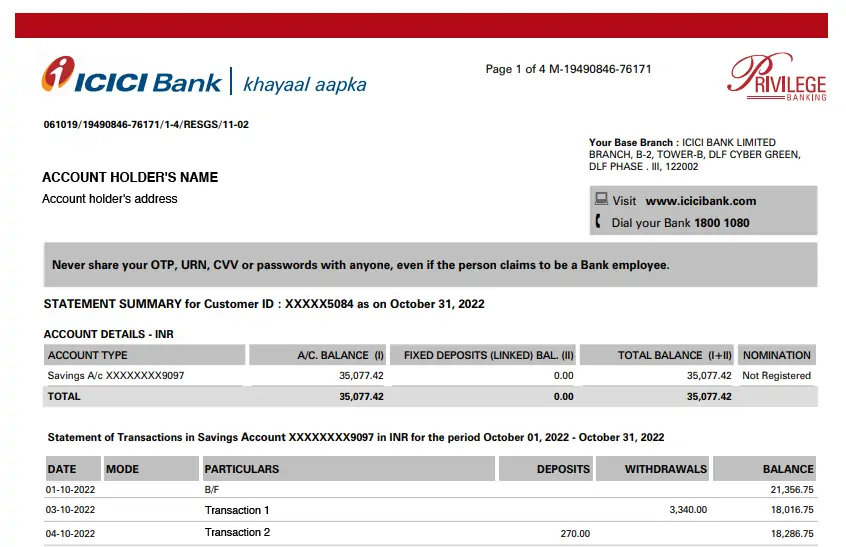
Note: The account holders can now download the statement using the iMobile Pay app and Internet Banking.
ICICI Bank statement usually contains:
Account holder details are mentioned at the top of the bank statement. These include Name, registered mobile number, and residential address. After account holder details, the account summary is presented that holds the account number, account type, ICICI Bank FD (if any linked with the bank account), total balance, etc.

Check Free Credit Report with monthly updates. Check Now
There are two ways to get the ICICI Bank statement:
Customers can avail ICICI Bank statement by email once they get their mail IDs registered with the bank. ICICI bank offers a subscription for one month wherein customers will receive the account statement in the first week of every month.
These ICICI Bank e-statements are free of cost and can be accessed easily without visiting the branch.
Here are the steps to subscribe for monthly ICICI Bank e-statements via mail –
Step 1: Log in to the ICICI net banking portal by providing User ID and Password.
Step 2: Go to the “Banking” section and then click on the “Account Statement by Email” option and carry out the subscription process.
Alternatively, one can contact the ICICI Bank Customer Care Number to enquire about the ICICI Bank statement.
Account-holders can view and download their ICICI Bank statement online via iMobile – ICICI Bank mobile banking app or ICICI net banking portal. Here are the steps to view and generate ICICI Bank statement via net banking portal:
Step 1: Log in to ICICI Bank Corporate Internet Banking and click on “Continue to login”.
Step 2: Enter the Corporate ID, User ID & Password and click on “Login”.
Step 3: On the next page, click on “E-statement”.
Step 4: Select account number, time period and click on “PDF” to generate the statement.
Also Read: ICICI Net banking
ICICI Bank provides an account statement in the physical form on a quarterly as well as on a monthly basis free of cost. One can subscribe to monthly or quarterly account statements in the physical form to avail of this facility. The account holder can subscribe for ICICI Bank statements by following the steps mentioned below:
Check Free Credit Score with monthly updates. Check Now
| Frequency of Bank Statement | Mode of Receipt | Charges |
| Monthly | Free | |
| Monthly | Physical | Rs. 200 |
| Quarterly | Physical | Free |
| Issue of Duplicate Statement | At the branch | Rs. 100 |
| Issue of Duplicate Statement | Customer Care, ATM, Net Banking | Rs. 50 |
Don’t know your Credit Score? Check it here for FREE. Check Now
Q. How to open ICICI Bank Statement PDF password?
A. ICICI Bank sends statements via email to the customers that can be downloaded as a PDF. ICICI Bank automatically sends monthly statements by mail which are password protected and can only be accessed by using the right password only.
ICICI Bank Statement PDF Password is usually the combination of the first 4 letters of the name and date of birth.
For example, if the account holder’s name is Sumit Kumar and his date of birth is 01 February 1982. The ICICI Account Statement password will be “SUMI0102”.
Q. How is ICICI Bank Mini Statement different from the ICICI Account Statement?
A. Mini statement of ICICI Bank is different from the ICICI Account statement by the following ways:
| Bank Statement | Mini Statement |
| ICICI Account statement is a list of all transactions for a bank account over a set period, usually monthly/quarterly. | ICICI mini statement is a list of recent 3 transactions carried out by a customer. |
| Accountholders can avail ICICI Account Statement using mobile banking, net banking and by visiting the branch. | Account holders can avail ICICI Bank Mini Statement using missed call service, SMS Banking, mobile banking, and net banking |
Q. How to download ICICI Account Statement online?
A. ICICI Bank sends a monthly bank statement if the customer has registered their email address with them. All bank statements sent through emails are password protected hence make sure to read the password instructions in the email to download ICICI Account Statement PDF.
Q. How many years bank statement can I avail in ICICI Bank?
Ans. You can avail ICICI Bank statement up to the last 4 years.
Q. What is the process to check transaction time in ICICI Bank?
Ans. To check your transaction history in ICICI Bank follow the below-mentioned steps:
ICICI Bank is India’s largest private sector bank with total consolidated assets of Rs.11,242.81 billion as of March 31, 2018. ICICI Bank was established in 1955 at the initiative of the World Bank with the objective of creating a developed financial institution for providing medium-term and long-term project financing to Indian businesses.