Download the
Paisabazaar app Today!
Paisabazaar app Today!
Get instant access to loans, credit cards, and financial tools — all in one place

Win Assured Cashback

Our Advisors are available 7 days a week, 9:30 am - 6:30 pm to assist you with the best offers or help resolve any queries.


Get instant access to loans, credit cards, and financial tools — all in one place

Scan to download on



 Personal Loan
 Business Loan
 Home Loan
 Other Loans


Our Advisors are available 7 days a week, 9:30 am - 6:30 pm to assist you with the best offers or help resolve any queries.
600 or 750? What's your credit
score? Check for FREE.


Let’s Get Started
 +91
+91
The entered number doesn't seem to be correct
Banking has reached from a cubicle to your fingertips with advancements in technology. You can perform all banking activities right from your smartphone or your laptop from the comforts of your home. Almost all financial providers offer an online banking facility today. Vijaya Bank offers a myriad of financial products and services to its customers, and internet banking is one such facility. To avail these facilities, one has to go for Vijaya Bank net banking registration. The internet banking of Vijaya Bank is also termed as Vnet Banking.
The Vijaya Bank net banking registration is easy and can be done online as well as offline mode. Below mentioned are the steps to register in Vnet banking online:

Get Your Free Credit Report with Monthly Updates Check Now
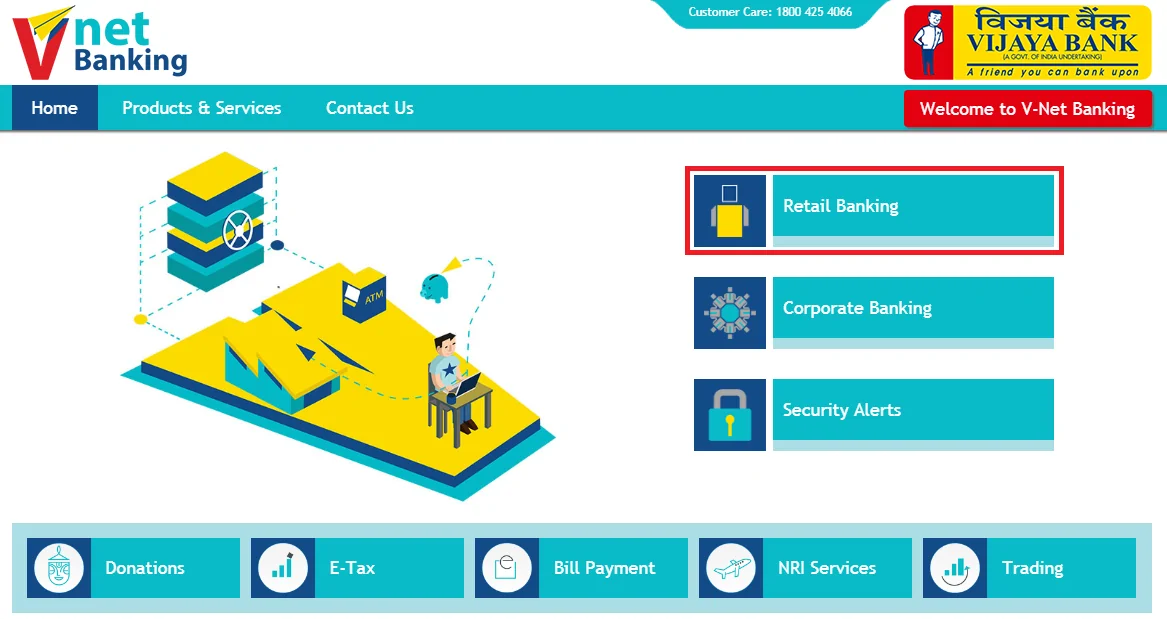
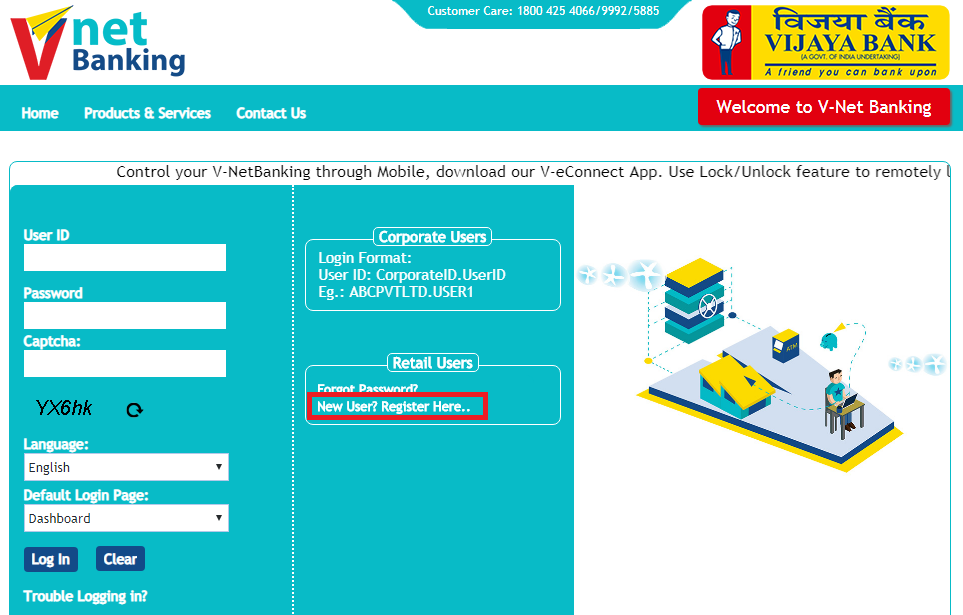
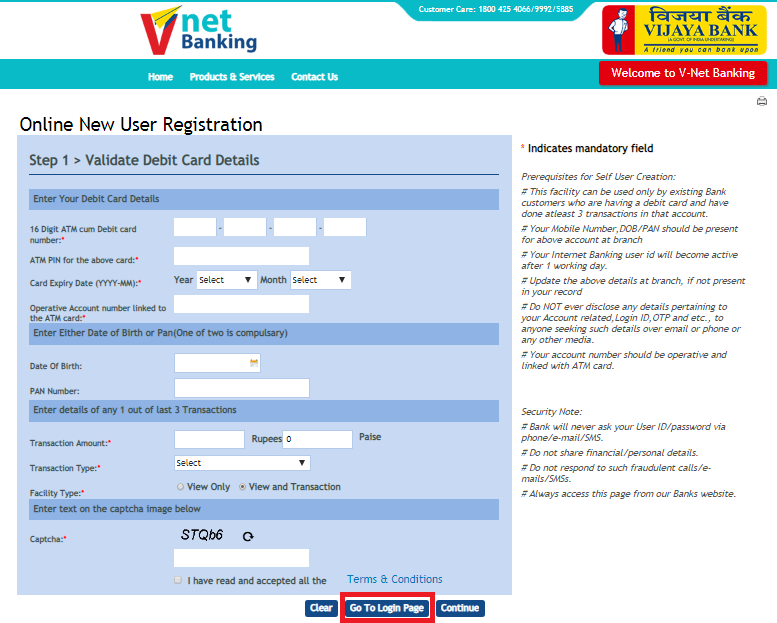
An SMS regarding the confirmation of successful registration will be sent to your registered mobile number. You can log in after the completion of one working day after the registration using your User ID and password.
You can download the net banking app provided by Vijaya Bank named V-eConnect+ application. You can find this application on the android app store as well as the IOS app store. You can find all the Vijaya Bank applications and other required links from this pin-protected application.
Following are the features of Vnet banking:
In case you have forgotten your login password or want to change the same, follow these steps-
Your password will be changed instantly.
Given below are some of the popular services offered by Vijaya Bank internet banking-
| Services Available at Vijaya Net-banking | |||
| View Account Details | E-Tax | Fund Transfer | View Transaction History |
| Make Donations | Make Bill Payments | Manage Trading | Start Investments |
| Apply for Loans | Manage Demat Account | Open/Close Term Deposits | Hotlisting Cards |
| Manage Savings Account | Insurance | File ITR | Remittances |
| Online Shopping | Grievance Redressal | Avail International Banking | Government Saving Schemes |
Your Credit Score and Report Is Now Absolutely Free Check Now
Q. How can I register for internet banking in Vijaya Bank?
To register for internet banking in Vijaya Bank, you can either download the net banking application form, fill the same and submit at the bank branch or register online by following the given steps-
Q. What is the user ID for Vijaya Bank net banking?
After registering, you will receive a unique user ID for Vijaya net banking which is similar to your identity number. This customer ID is used to login to internet banking.
Q. Can I reset my VNet Banking password?
When you log in for the very first time, you are required to change the issued net-banking password. And, the same can be changed anytime later on. However, you cannot change the user ID.
Q. Who can avail the Vnet banking facility?
If you hold an operative account or a loan account with any of the Vijaya Bank branches, you can avail the Vnet banking facility.
Checking Credit Report Monthly has no impact on Credit Score Check Now
You need to download the Vnet banking registration form from the website of Vijaya Bank. You need to submit the duly filled form to your Vijaya Bank branch. Once the verification procedure is complete, the User ID and password will be sent to you through your registered email.