Download the
Paisabazaar app Today!
Paisabazaar app Today!
Get instant access to loans, credit cards, and financial tools — all in one place

Win Assured Cashback

Our Advisors are available 7 days a week, 9:30 am - 6:30 pm to assist you with the best offers or help resolve any queries.


Get instant access to loans, credit cards, and financial tools — all in one place

Scan to download on



 Personal Loan
 Business Loan
 Home Loan
 Other Loans


Our Advisors are available 7 days a week, 9:30 am - 6:30 pm to assist you with the best offers or help resolve any queries.
With the help of digital banking services, Bank of Baroda is able to deliver many convenient and customer-centric services. Account holders can avail Bank of Baroda mini statement service using missed call facility, SMS banking and mobile banking.
600 or 750? What's your credit
score? Check for FREE.


Let’s Get Started
 +91
+91
The entered number doesn't seem to be correct
Bank of Baroda mini statement is a banking service that allows customers to access information about their recent transactions done from their BOB savings account, current account, etc. The bank provides this service through different ways, such as missed call service, SMS and mobile banking, visiting bank branches or ATMs, etc. The customers/users of this service will have to register themselves with the bank by visiting the branch or mobile banking. Let us discuss in detail about different ways to check and download the Bank of Baroda mini statement.

Checking Credit Report monthly has no impact on Credit Score
Check Now
Let us discuss in brief all the ways through which an account holder can view his/her BOB mini statement. It should be noted that you need to get your mobile number registered at the bank to use any of these services.
To avail Bank of Baroda mini statement, give a missed call to –
Users can follow the below-mentioned steps to get the Bank of Baroda mini statement:
In case, the customer has registered the same mobile number with multiple Bank of Baroda accounts, then the system will check whether the customer has registered the preferred account number or not. In case, the customer has not registered a preferred account number, he/she will be notified by an SMS to register his preferred number to avail the account-specific services.
Check Free Credit Score with Complete Analysis of Credit Score
Check Now
To register the mobile number for Bank of Baroda Mini Statement, the user needs to note down the account number and send an SMS to the bank. The structure of SMS is given below:
to
Also Read: Cabinet passes merger of Dena Bank & Vijaya Bank with Bank of Baroda
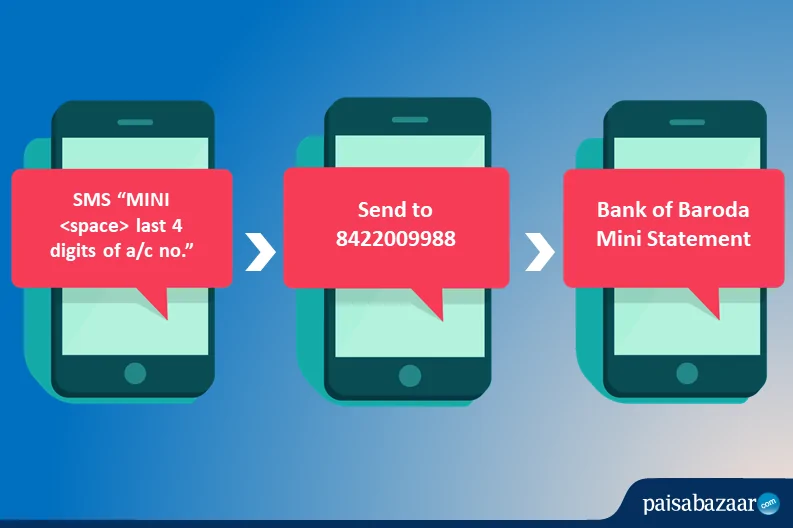
Step 1: To avail Bank of Baroda Mini Statement by SMS service, account holders will be required the following SMS –
Step 2: Send the SMS to 8422009988
Step 3: Account holder will receive Bank of Baroda Mini Statement by SMS which consists of the last 5 transactions (both debit and credit).
*To unsubscribe for the facility, account holder will be required to SMS
to
Following are the steps to get Bank of Baroda Mini Statement using Bank of Baroda Mobile Banking:
Step 1: Download the Baroda M-Connect Plus from the Google Play Store or Apple App Store.
Step 2: Register via Bank of Baroda net banking or by visiting the ATM.
Step 3: Login to the Bank of Baroda mobile banking app.
Step 4: Select ‘Transaction History’.
Step 5: After selecting ‘Transaction History’, the account holder will be able to check the recent transactions.
Points To Remember
Ans. To get the statement for the time duration as per wish, you need to download Bank of Baroda’s mobile banking app bob World, and log in with your customer ID and MPIN. After logging in to the app, you need to select the desired time or month of the mini statements you want and download the PDF. You can also login to your BOB net banking account and select a custom date for downloading the account statement.
Ans. You can check your BOB account’s last 5 transactions by giving a missed call on 8468001122. By dialing this number you can check up to last transactions, as well.
Ans. No, there is no way to hide any transaction in a mini-statement. Whatever transactions you do, all of them will reflect in your mini statement of your savings account or current account.
Ans. The most feasible way to check the Bank of Baroda mini statement is by downloading Bank of Baroda’s mobile application bob World. Log in using your customer ID and MPIN to get access to your mini statement quickly.
Ans. Bank of Baroda mini statement facility is free of cost. There are no charges applicable. The only charges applicable would be by your network provider to send an SMS to the bank to avail the statement. However, if you want an account statement hard copy, you may have to pay a nominal fee for it.
Ans. To get your mini statement on the mobile, you can either give a missed call on 8468001122 or send ‘MINI<space>last 4-digits of A/C No.’ to 8422009988 from your registered mobile number. You will receive an SMS instantly with the details of your last 5 transactions.