Download the
Paisabazaar app Today!
Paisabazaar app Today!
Get instant access to loans, credit cards, and financial tools — all in one place

Win Assured Cashback

Our Advisors are available 7 days a week, 9:30 am - 6:30 pm to assist you with the best offers or help resolve any queries.


Get instant access to loans, credit cards, and financial tools — all in one place

Scan to download on


 Personal Loan
 Business Loan
 Home Loan
 Other Loans


Our Advisors are available 7 days a week, 9:30 am - 6:30 pm to assist you with the best offers or help resolve any queries.

Check your Credit Score for Free and Get Monthly Updates

Let’s Get Started
 +91
+91
The entered number doesn't seem to be correct

After you apply for an Aadhaar Card, it may take up to a month for you to get it. However, at times, people do not receive it even after the stipulated timeframe. If you have not received your Aadhaar card at your address yet, you can now get it online as well as offline. However, make sure that your Aadhaar has been generated. To ensure that your Aadhaar has been generated, you can check your Aadhaar card status.
You may have to apply for Aadhaar once again in case you have not received the Aadhaar card due to any of the following circumstances:
However, if your Aadhaar has been generated, you can download it online or get it offline. Let us find out how to get Aadhaar card when it has been generated but has not been received.

Get Free Credit Report with monthly updates. Check Now
You can get your Aadhaar copy online from either the Aadhar website or mAadhaar, UIDAI’s mobile app:
If you have not received Aadhar by post, download e-Aadhaar card from the UIDAI’s website. An e-Aadhaar card is a soft copy of your Aadhaar card. It is acceptable at all places and can be downloaded from UIDAI’s website. To do so, follow these steps:
Step 1: Visit the eAadhaar download page on the UIDAI website
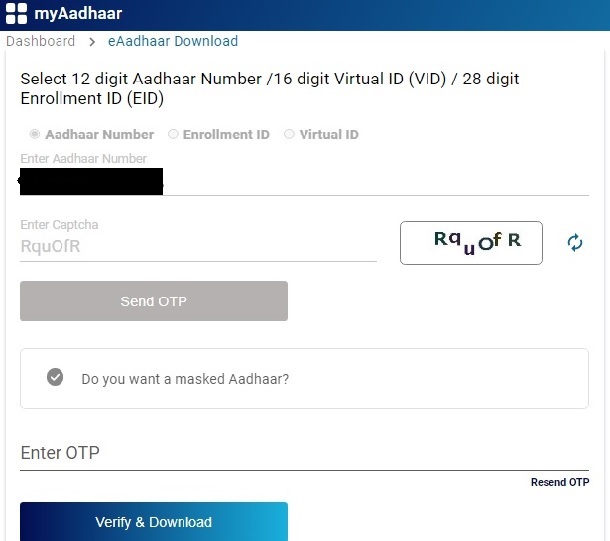
Step 2: Select “Aadhaar Number”, “VID” or “Enrolment ID” as per the data you have. If you do not have either, retrieve them here
Step 3: Fill out the form with details including your Aadhaar number/Enrollment ID/Virtual ID, captcha code and click on “Send OTP” to receive an OTP on your mobile number registered with Aadhaar
Step 4: Choose if you want to receive a masked Aadhaar card and enter the OTP that you receive
Step 5: Click on “Verify & Download” to download your eAadhaar.
You will get your e-Aadhaar in the PDF format, therefore, ensure that you have Adobe Reader installed on your computer; otherwise, you will not be able to open the file. The eAadhaar PDF can be opened by entering the first four letters of your name in capital and your year of birth as password. You can take a printout of the file and use it wherever required. However, validate its digital signature first.
Once you get your Aadhaar number, but haven’t received your hardcopy yet, you can order Aadhaar PVC card online. This card contains various security features that would enable you to check for its authenticity. Here’s how to order Aadhaar PVC card online:
Step 1: Visit UIDAI’s website and in the Get Aadhaar section, select the “Order Aadhaar PVC Card” option
Step 2: Login to your Aadhaar account using your registered mobile number and OTP
Step 3: Verfiy your details and click on “Submit”
Step 4: Confirm and make the payment of Rs. 50
Step 5: A Service Request Number (SRN) is generated that can be used to check the delivery status of the Aadhaar PVC Card.
Read in Detail: Aadhaar PVC Card
If your Aadhaar has been generated, then you may carry it even on your mobile using mAadhaar mobile application. The app syncs the user’s Aadhaar details such as name, date of birth, gender, residential address, photograph and biometrics. With mAadhaar app, people don’t need to carry physical Aadhaar cards at all times. Also, the app allows users to share their KYC and QR code easily with the service provider. The app is now available for both android and iOS devices.
Read More: How to install and set up mAadhaar on your phone
To download the mAadhaar app, you require Aadhaar number or QR code, which are given on the Aadhaar card. If you have not received Aadhaar card yet, you can get your Aadhaar number through SMS.
Step 1: Visit the website at https://myaadhaar.uidai.gov.in/retrieve-eid-uid
Step 2: Fill out the 28-digit enrolment number given in your acknowledgement slip, your registered mobile number and the security code displayed in the form.
Step 3: Click the “Send One Time Password” button.
Step 4: Enter the OTP that you might have received on your registered mobile number and click the “Submit” button.
After verification, you will receive your Aadhaar details via SMS on your mobile phone.
People, who are not well-versed or comfortable with the technology, can visit the nearest Aadhaar enrolment centre.
At the enrolment centre, fill and submit the form. Get your information and biometrics verified. Once your details are verified, you’ll receive Aadhaar at your residential address.
Get Free Credit Report with monthly updates. Check Now
If you face any issue in getting your Aadhaar details, you may seek help from the Government helpline numbers or website. Some of the important contact information, which you may require are given as follows:
Unique Identification Authority of India
Government of India
Bangla Sahib Road, Behind Kali Mandir,
Gole Market, New Delhi – 110001
Phone: 011-23478653
Read More: Aadhar Card Customer Care
Get FREE Credit Report from Multiple Credit Bureaus Check Now
A. You can download the Aadhaar card online from UIDAI’s official website if you know your Aadhaar number. Alternatively, you can visit the Aadhaar Enrolment Centre to get a print out of your Aadhaar card.
A. You can verify your mobile number linked with Aadhaar. If the number mentioned in Aadhaar is not the same, you can get it updated by visiting a nearby Aadhaar Enrolment Centre.
A. The Aadhaar card is received on the residential address of the applicant within 90 days of Aadhaar enrolment.
A. You can instead download the updated e-Aadhaar as soon as the data is corrected in your Aadhaar. It is easy and instant and you can download it as many times as you want to.
A. UIDAI sends the Aadhaar card by post in case you get your address, name, gender or date of birth updated.
A. You can visit India Post’s website and enter the tracking number to check the delivery status.
A. In case you do not receive your updated Aadhaar letter, you can download your Aadhaar from UIDAI’s website.
Get Free Credit Report with monthly updates. Check Now