Download the
Paisabazaar app Today!
Paisabazaar app Today!
Get instant access to loans, credit cards, and financial tools — all in one place

Win Assured Cashback

Our Advisors are available 7 days a week, 9:30 am - 6:30 pm to assist you with the best offers or help resolve any queries.


Get instant access to loans, credit cards, and financial tools — all in one place

Scan to download on



 Personal Loan
 Business Loan
 Home Loan
 Other Loans


Our Advisors are available 7 days a week, 9:30 am - 6:30 pm to assist you with the best offers or help resolve any queries.
600 or 750? What's your credit
score? Check for FREE.


Let’s Get Started
 +91
+91
The entered number doesn't seem to be correct
UCO Bank has added a new facility for the customers by offering them a unique personalised remote banking experience. With internet banking, customers can have access to their bank accounts 24×7 and also avail various services such as fund transfer, bill payments, account statements, etc. However, every account-holder needs to be registered for Internet Banking to avail online services. Let us know more.
UCO Bank Internet Banking can be accessed by its account-holders who have registered for online banking at the bank. Account-holders are required to fill the application form which can be generated online and submit the form at the bank branch. Here are the steps which should be followed to register for internet banking:

Check Your Free Credit Report with Monthly Updates Check Now
After registering at the bank, new users can follow the UCO Bank net banking application process to start using the service:
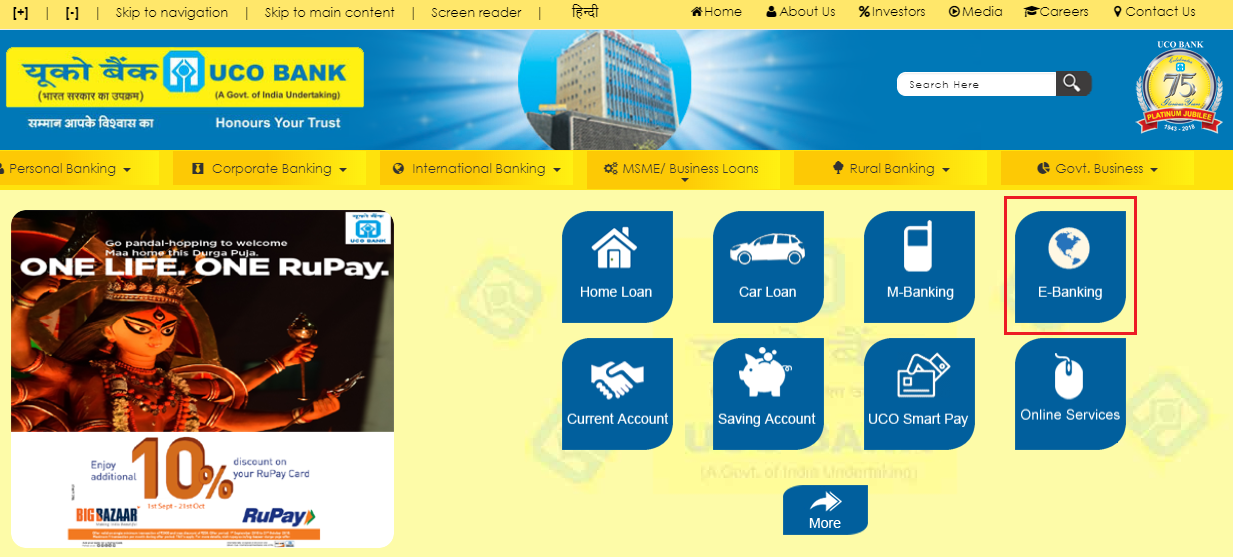
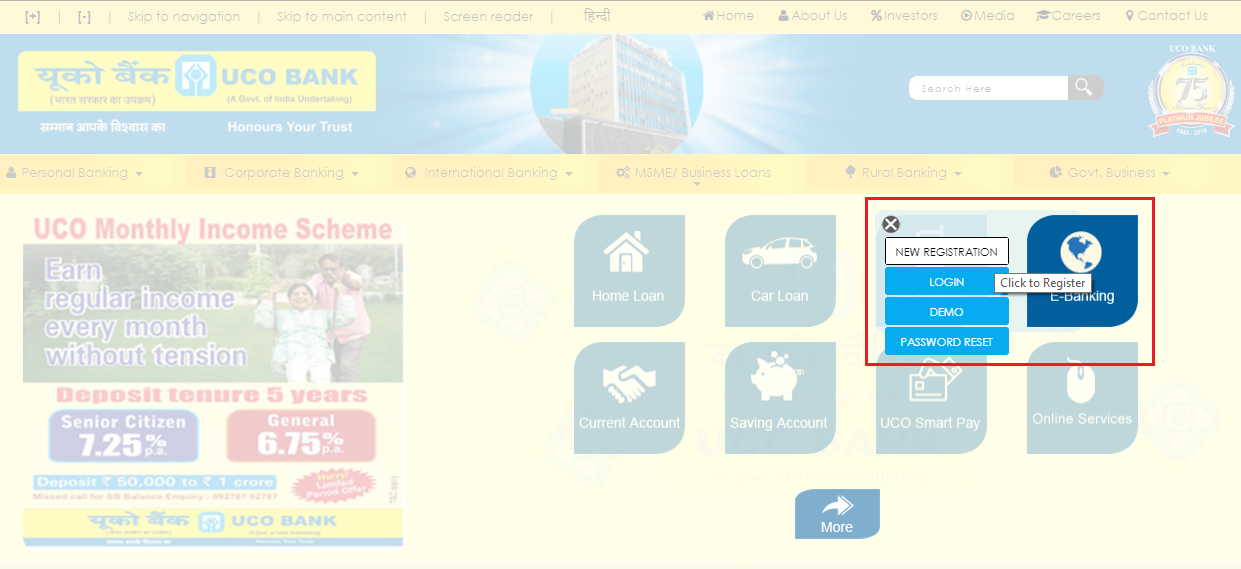
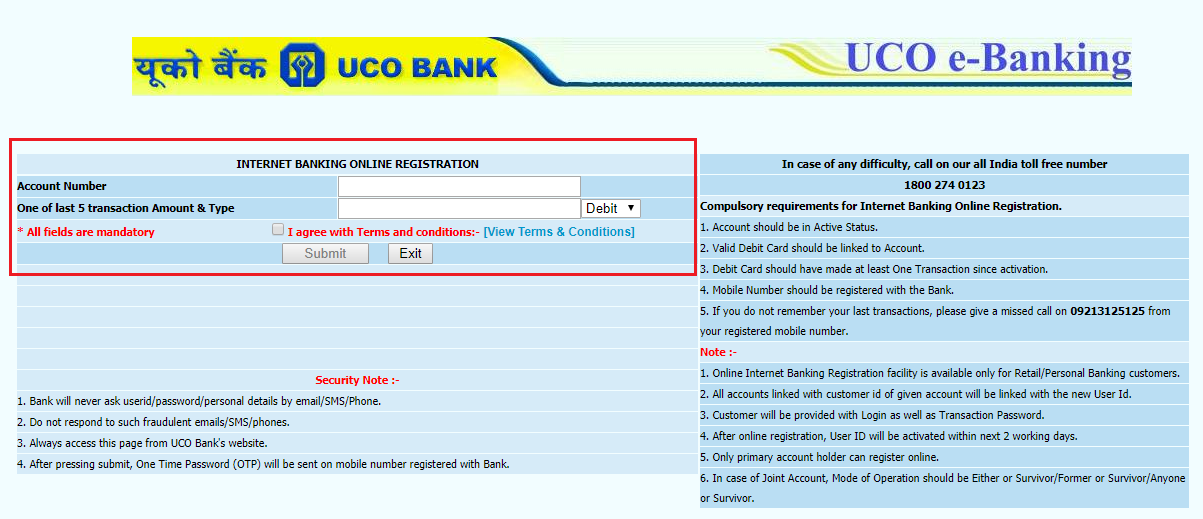
Note: User ID gets activated within 2 days after issuance. If the customer tries to log in before the activation of the User ID, the system will simply show an error message.
Get Free Credit Report with Complete Analysis of Credit Score Get Report
In case you have forgotten your UCO Net Banking password or want to change it, follow the given steps-
Here are the services which can be availed by users of UCO Bank Net Banking-
| View Account Summary | Transaction Enquiry | Self Account Transfer | Third-Party Transfer |
| Account Opening | Cheque Book Issuance | View Statement | Request for Demand Draft |
| Open/Close Fixed Deposit | Loan Request | Switching of Mailing Address | Utility Bills Payment |
| Mail Service | View projections on loans/deposits | Profile Customisation | FD Renewal |
An Excellent Option to Build your Credit Score
After registering with UCO Bank’s net banking service, account-holders can enjoy the following advantages-
Given below are some parameters which must be fulfilled to register for UCO Bank Net Banking:
Checking Credit Report Monthly has no impact on Credit Score Check Now
Q. Who can use UCO Internet Banking Service?
UCO Bank Net Banking is available for all the customers of CBS branches of the UCO Bank, who are resident Customers holding either a single or joint operating account. Joint account holders cannot do all financial transactions on the Internet Banking. Nonetheless, as for joint accounts with the operating mandate ‘Either or Survivor’, both the holders are allowed to view and transact subject to the submission of application with joint signatures.
Q. Do I have to pay for using UCO Bank Internet Banking?
No, there are no extra charges for using internet banking.
Q. How can I access UCO Bank internet banking?
To use internet banking, you need to have an account at any UCO Bank branch. Then, you need to register yourself for the Internet Banking Service by filling and submitting the application form.
Q. How can I apply for UCO Bank net-banking?
To apply for UCO Bank internet banking, you need to download the application form from the official website, fill all the details and submit the same at your home branch.
Q. Can I change the User ID and password?
For new users, it is mandatory to change the issued User ID and password at first login. You can change your passwords any number of times subsequently, but you can not change your User Id.
Q. I am unable to login with the issued User ID and password. What to do?
The password issued is case sensitive. Make sure you are entering the credentials carefully. If you are still unable to login, contact your branch.
Your Credit Score and Report is Now Absolutely Free Check Now