Download the
Paisabazaar app Today!
Paisabazaar app Today!
Get instant access to loans, credit cards, and financial tools — all in one place

Win Assured Cashback

Our Advisors are available 7 days a week, 9:30 am - 6:30 pm to assist you with the best offers or help resolve any queries.


Get instant access to loans, credit cards, and financial tools — all in one place

Scan to download on



 Personal Loan
 Business Loan
 Home Loan
 Other Loans


Our Advisors are available 7 days a week, 9:30 am - 6:30 pm to assist you with the best offers or help resolve any queries.
Bank of Maharashtra is one of the leading public sector banks that offers a wide range of banking and financial services that also specialises in offering various additional services, such as balance check, mini statement enquiry, email alerts, customer support, etc. Bank of Maharashtra balance check can be done by its customers by done with the help of various online and offline methods as discussed below:
600 or 750? What's your credit
score? Check for FREE.


Let’s Get Started
 +91
+91
The entered number doesn't seem to be correct
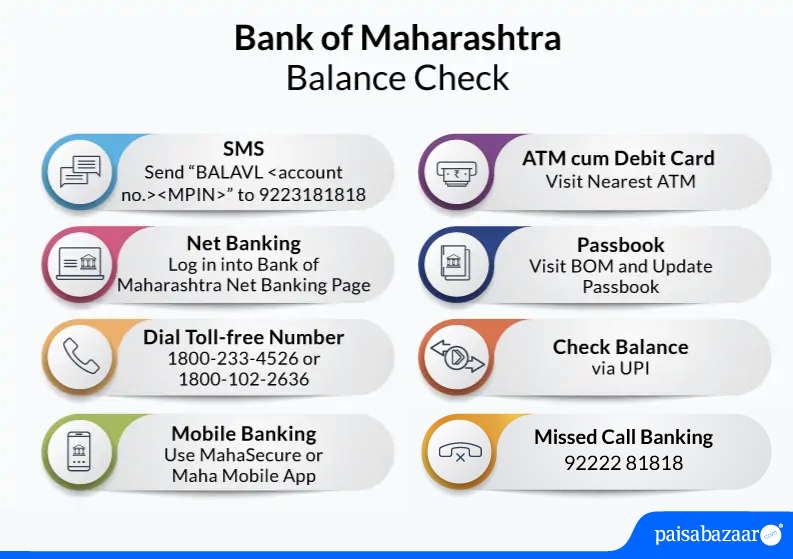
Customers can call on Bank of Maharashtra balance check number which are mentioned below.
Bank of Maharashtra balance check can be performed from its customers by calling on its balance enquiry toll-free number
1800-102-2636/1800-233-4526
Bank of Maharashtra balance enquiry can be made by following these steps:

Get Free Credit Report with monthly updates. Check Now
Also Read: Bank of Maharashtra Customer Care
The passbook that customers receive on opening an account with Bank of Maharashtra can be used for Bank of Maharashtra balance check. To do this customer can head to the nearest Bank of Maharashtra branch or Passbook machine and update their passbook.
Bank of Maharashtra balance enquiry can be made through an ATM as well. To do this follow the steps mentioned below:
Also Know: How to get Bank of Maharashtra Mini Statement
Consumer ExperienceWhat is the best method for Bank of Maharashtra balance enquiry online? To view my account balance online in Bank of Maharashtra, I use its WhatsApp banking service. The facility is instant and convenient to use on-the-go. In fact, I use this service to locate the nearest branch of the bank or ATM. I am happy to use this service because it’s hassle-free. What is the best method for Bank of Maharashtra balance enquiry offline? To enquire my balance offline in Bank of Maharashtra, I use SMS service. I just send an SMS from my registered mobile number and receive my account balance instantly. The service is quite quick and convenient. -Rashmi Verma, Bank of Maharashtra customer for past 2 years |
Get Free Credit Report with monthly updates. Check Now
Ans. No, checking your account balance via missed call is free of charge, however, a nominal SMS fee will be charged by for checking your account balance via SMS.
Ans. Yes, you can check your account balance without an Internet connection by using various methods, such as making a missed call to 98333-35555 from your registered mobile number, from the bank’s USSD code, visiting a nearest ATM, or dialling the bank’s toll-free number 1800-233-4526.
Ans. No, to check your balance while using the Bank of Maharashtra banking service, you need to first register with its mobile banking services and then only you can access your account and check the account balance.
Ans. Yes, you can check the account balance of your multiple accounts with the help of net banking and mobile banking services. However, the registered mobile number should be the same for each account with the Bank of Maharashtra and all the accounts should be under your name.
Ans. If you do not receive the balance via SMS, you can either SMS ‘BALAVL'<Account no.><MPIN> to 9223181818 or dial the toll-free number 1800-102-2636.
Ans. Type LATRAN<Account no.><MPIN> and send it to 9223181818 from your registered mobile number. Your last 3 transactions details will be sent to your mobile number.
Ans. To check your account statement, download Maha Mobile app or MahaSecure app on your android or iOS device. Log in with your user ID and MPIN, go to ‘Account Statements’, select the period and click on ‘Detailed Statement’.
Ans. Account-holders can give a missed call to 1800-233-4526 or 1800-102-2636 to check their Bank of Maharashtra account balance in no time. Also, account holders can do quick balance enquiry by SMS Banking, Net Banking, Mobile Banking, Passbook Printing and ATM amongst others.
Ans. To check your mini statement, you can send ‘LATRAN<Account no.><MPIN>’ to 9223181818 or give a missed call on 1800-233-4526 or 1800-102-2636. You can also view your statement using Maha Net Banking or Maha Mobile Banking app.
Ans. Give a missed call on 1800-233-4526 or 1800-102-2636 using the registered mobile number and your BOM account balance will be sent via message.
Ans. To check account balance without a mobile number, you need to visit the bank’s nearest ATM and insert the bank’s ATM card along with a 4-digit PIN to check the account balance by clicking on the ‘Balance Enquiry’ tab.
Ans. Firstly, you need to activate the banking service on your WhatsApp and save the number 7066036640 of BoM in your smartphones. After the activation of WhatsApp facility, you shall be able to receive information and services related to your account’s mini statement and balance enquiry, cheque status inquiry, cheque book request, cheque book request, locate branch/ ATM, etc.
Ans. The SMS number of Bank of Maharashtra mini statement is 9223181818 and the operation code for SMS banking is ‘LATRAN’.
| Related Links | ||
| SBI Balance Check | Canara Bank Balance Check | PNB Balance Check |
| Indian Bank Balance Check | UCO Bank Balance Check | IOB Balance Check |