Download the
Paisabazaar app Today!
Paisabazaar app Today!
Get instant access to loans, credit cards, and financial tools — all in one place

Win Assured Cashback

Our Advisors are available 7 days a week, 9:30 am - 6:30 pm to assist you with the best offers or help resolve any queries.


Get instant access to loans, credit cards, and financial tools — all in one place

Scan to download on



 Personal Loan
 Business Loan
 Home Loan
 Other Loans


Our Advisors are available 7 days a week, 9:30 am - 6:30 pm to assist you with the best offers or help resolve any queries.
The Unique Identification Authority of India (UIDAI) offers residents the facility to check Aadhaar linking status with bank account or Aadhaar-bank account seeding status. The data is verified against the data available in NPCI (National Payments Corporation of India) mapper and helps you know if your Aadhaar is linked to your bank account.
600 or 750? What's your credit
score? Check for FREE.


Let’s Get Started
 +91
+91
The entered number doesn't seem to be correct
The Government of India provides subsidies under Direct Benefit Transfer (DBT) schemes for all government welfare schemes in bank accounts of the beneficiaries. In order to avail these subsidies, the beneficiary is required to link his Aadhaar with the welfare scheme to receive funds in the bank account.
A beneficiary can link his bank account with Aadhaar online, through mobile banking, SMS, phone banking, ATM or by visiting the bank. If no bank account is linked with Aadhaar, there will be issues while transferring the subsidy under DBT in the beneficiary’s account. You can check Aadhaar-bank link status or bank-Aadhaar seeding status by visiting UIDAI’s website, using your mobile phone and through the mAadhaar app.
Now Get your Credit Score and Credit Report for FREELifetime FREE |
* Terms and conditions apply
You can check whether any of your bank accounts are linked with Aadhaar or not. You can also find out the bank account that is linked with Aadhaar. Here is a step-by-step guide on how to check aadhaar linking/seeding status to bank account or to check your Aadhaar and bank account linking status in NPCI mapper:
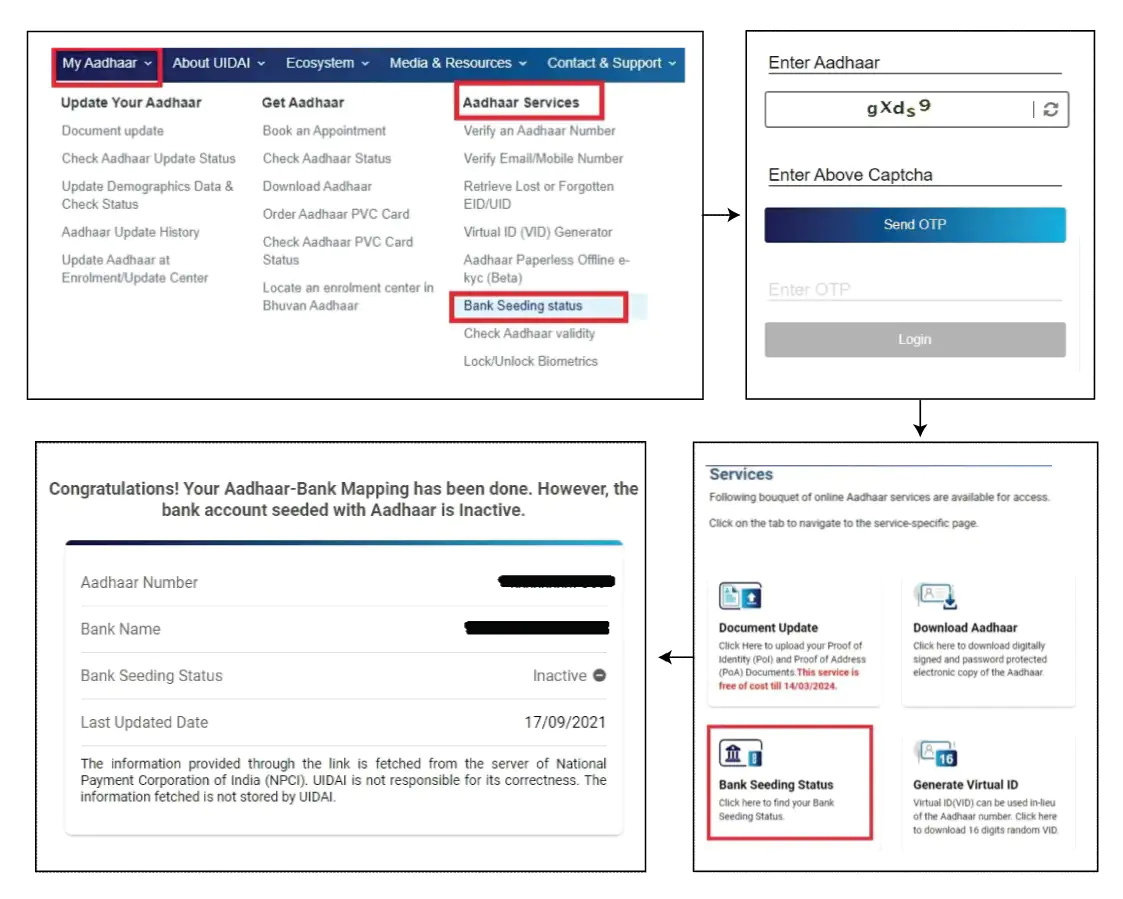
Step 1: Visit the UIDAI website and click on “My Aadhaar”
Step 2: Click on “Bank Seeding Status” listed under the Aadhaar Services section
Step 3: Login to your UIDAI account using your Aadhaar number, captcha code and the OTP that you get on your registered mobile number
Step 4: Under the Services section, click on “Bank Seeding Status” to know your Aadhaar Bank account linking status. The bank account linked with Aadhaar will be displayed on the screen. However, if you have multiple bank accounts in the same bank, you will have to visit the bank to confirm the linked bank account number.
Note: This service is temporarily unavailable.
You can also check the Aadhaar and bank account linking status through the USSD code from mobile number. This facility can be availed only when your mobile number is registered with your Aadhaar card in UIDAI’s database. Follow the steps mentioned below to know your Aadhaar seeding status with bank:
Step 1: Dial *99*99*1# with your mobile number registered with UIDAI
Step 2: Now enter your 12 digit Aadhaar number
Step 3: Re-enter the Aadhaar number and click on “Send”
If your bank account is linked with Aadhaar, the status will be displayed. If no result is displayed, there may be a case that your bank account is not linked with Aadhaar.
Read More on Aadhar Card Status
Note: This service is temporarily unavailable.
You can also check the Aadhaar bank account linking status through the mAadhaar app by following the steps given below:
Step 1: Login to the mAadhaar app
Step 2: Click on ‘My Aadhaar‘ and select ‘Aadhaar-Bank Acc Link Status‘
Step 3: Next, enter your Aadhaar number, security captcha and click on ‘Request OTP‘
Step 4: Enter the OTP received on your registered mobile number and click on ‘Verify‘ to know your Aadhaar Bank account linking status.
It is worth mentioning that your bank account need not be linked with Aadhaar if you do not intend to receive government welfare benefits in that account. As per the ruling of the Supreme Court regarding Aadhaar linking with various instruments, it is not mandatory to link your bank account and mobile number with Aadhaar.

Get Credit Score from Multiple Credit Bureaus with monthly updates for FREE Check Now
Consumer ExperienceHow long will it take for me to check Aadhaar and bank account linking status online? I had checked my Aadhaar and Bank account linking status online via the UIDAI website. The whole thing just took a couple of minutes and I could find out the bank account linked with my Aadhaar. The process was quick and hassle-free. -Arun Garg |
Linking Aadhaar with bank account is not mandatory for banking services such as transferring funds, opening a bank account, etc. However, given below are a few key reasons why is it always good to link Aadhaar with your bank account:
No, to check your Aadhar Bank linking status your mobile number should be linked to your Aadhaar.
No, you are not required to pay any charges to check your Aadhaar Bank account linking status.
You can link your Aadhar card with only one bank account.
In case your Aadhaar bank seeding status is shown as “inactive”, it means that your bank account has not yet been linked to your Aadhaar card. You will have to visit the bank branch physically and fill up and submit the linking form again.
You will get your DBT benefits in only one account, which you specified when you submitted the consent form and mandate to link your bank account with Aadhaar. The bank will link this account to the NPCI mapper in order for it to function as a DBT account.
You need to visit your nearest bank branch and submit a copy of your Aadhaar card along with the mandate and consent form from your bank in order to change/upgrade your bank account to receive DBT funds.
Yes, you can visit your bank’s home branch to check your Aadhaar bank seeding status or Aadhaar seeding status. You can ask the bank’s representatives to confirm if your bank account has been linked to Aadhaar. Carrying your bank passbook can help you know the Aadhaar bank linking status more easily.
Alternatively, the bank may ask you for details such as your Aadhaar, PAN and date of birth before confirming the Aadhaar bank seeding status.
You can wait and try again after sometime. Moreover, ensure that the details you enter such as your Aadhaar number are correct and your mobile number is linked with UIDAI.
If you are receiving subsidy or any kind of DBT benefits in your bank account that means that your Aadhaar is linked to your bank account.
To find out which bank is linked to your Aadhaar card, you can visit the UIDAI website, click on “Bank Seeding Status” and enter the necessary details.
Some of the common issues include linking personal information and financial data, identity theft and fraud as well as mismatches in details such as name, gender and date of birth of the account holder. Other issues may include authentication errors, biometric failures, fake Aadhaar cards, Aadhaar registrations, etc.
It is not mandatory to link your Aadhaar with bank account and you won’t face any trouble in case you have not linked your Aadhaar with your bank account. However, it is mandatory to link your Aadhaar with your bank account in case you wish to receive government scheme benefits and subsidies in your bank account.