Download the
Paisabazaar app Today!
Paisabazaar app Today!
Get instant access to loans, credit cards, and financial tools — all in one place

Win Assured Cashback

Our Advisors are available 7 days a week, 9:30 am - 6:30 pm to assist you with the best offers or help resolve any queries.


Get instant access to loans, credit cards, and financial tools — all in one place

Scan to download on



 Personal Loan
 Business Loan
 Home Loan
 Other Loans


Our Advisors are available 7 days a week, 9:30 am - 6:30 pm to assist you with the best offers or help resolve any queries.
600 or 750? What's your credit
score? Check for FREE.


Let’s Get Started
 +91
+91
The entered number doesn't seem to be correct
Internet Banking has simplified banking services for customers with an easy to use interface, the convenience of transacting, and 24×7 banking access. United Bank of India is one of the banks which have furnished a net-banking platform for all banking products and services. To access internet banking, customers are required to fulfil the United Bank of India net banking registration.
United Bank of India Net Banking allows customers to perform banking transactions and access banking facilities online. It is a 24×7 available service which minimizes the need to visit the bank for small transactions. Customers can transfer funds, check account balance, make utility bill payments, open new deposits, etc. via net banking. Let us know how to register for United Bank of India net banking.
Get Your Free Credit Report with Monthly Updates
Check Now

United Bank of India Net Banking Online Registration
Step 1: Visit the United Bank of India official website
Step 2: Click on the ‘e-Banking’ button on the left-hand side menu. Then select ‘Register Online’
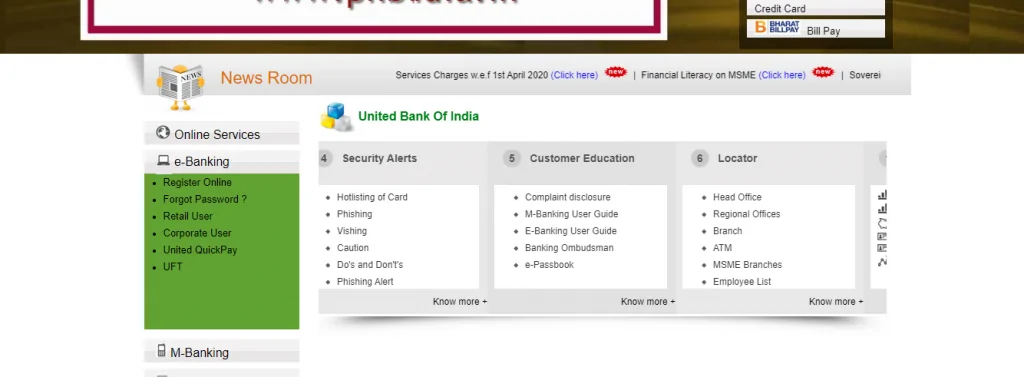
Step 3: You will be redirected to ‘Self User Creation’ page
Step 4: Enter all the necessary details such as debit card number, debit card PIN, expiry date, account number, DOB, etc. and click ‘Submit’
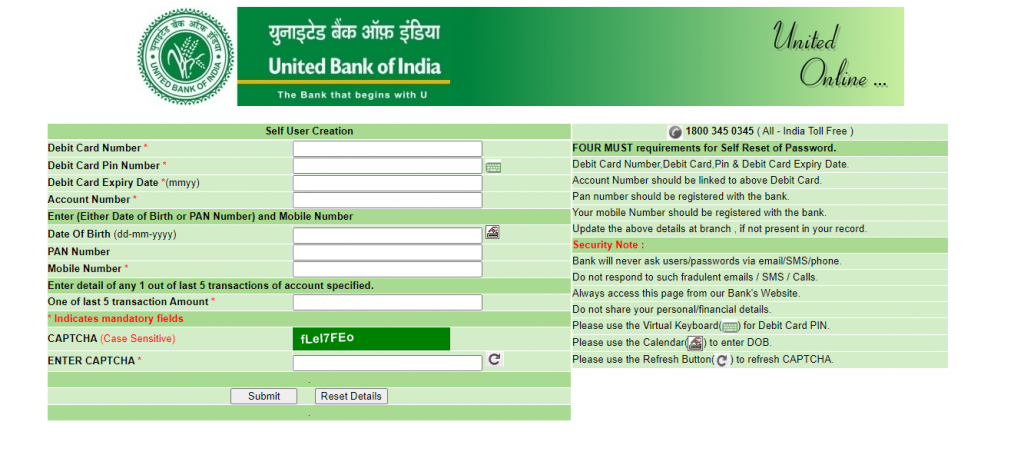
Your internet banking user ID will be created online and services can be accessed after 2 working days.
Prerequisites of Self User Creation:
United Bank of India Net Banking Registration by visiting the Branch
Get Free Credit Report with Complete Analysis of Credit Score Check Now
Once you receive the ID and password, you need to go to the website of United Bank of India.
Step 1: Visit United Bank of India’s net banking portal
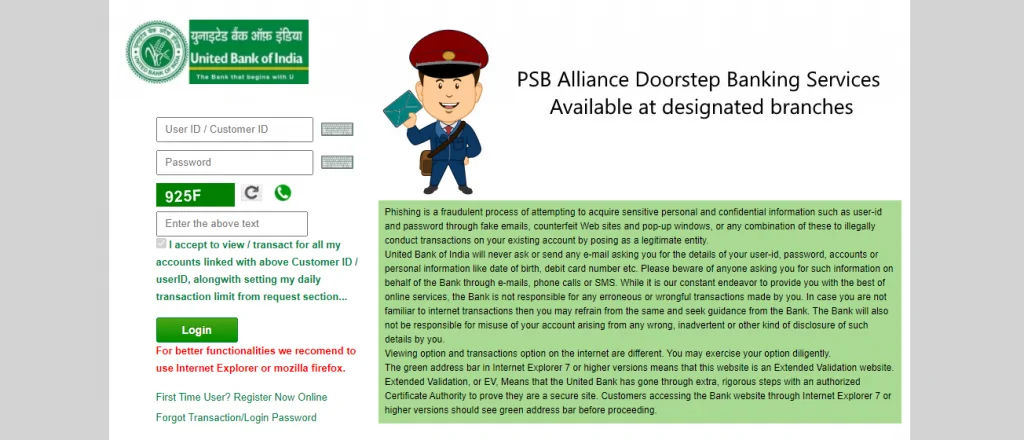
Step 2: Enter your user ID and PIN
Step 3: Agree to the terms and conditions for availing the net banking facility from United Bank of India to register successfully
After the first login, you need to change your login password and transaction password as per the instructions given on the bottom of the page. Once you successfully change the passwords, a message, ‘Password Changed Successfully’ will be displayed on the screen. After your login, your account page will be displayed on the screen.
Step 1: Visit the United Bank of India official website
Step 2: Click on the ‘e-Banking’ button on the left-hand side menu. Then select ‘Forgot Password?’
Step 3: Enter all the required details, select the password which you want to change from the two options- Change Sign-on Password, Change Transaction Password. You can also select both if you wish to change both
Step 4: Click ‘Submit’
Step 5: Now, you can enter a new password for your net banking account
Under the password alert tab, the expiry of your password is shown. In case you forget your password later, you need to apply for a duplicate password to your branch. If you face issues in logging in to your net banking account, you need to send the error message to your branch or ebankhelpdesk@unitedbank.co.in.
Your Credit Score and Report Is Now Absolutely Free Check Now
Here are some of the services which can be availed by users of United Bank of India Net Banking-
| View account details | Manage Term Deposits | Manage credit, debit and other cards | Open a Savings Account | View all transactions |
| Apply for loans | Manage Demat account and trading | Get Insurance | Start and Manage Investments | Remittances |
| E-Filing ITR | Pay taxes | Make bill payments | Online shopping | Make donations |
Q. Who is eligible to register to United Online?
Every customer registered with the United Bank of India can use the net banking facility provided by the bank.
Q. What is a user ID in the United Bank of India?
United Bank of India net banking users are allotted a unique ID which works like their name to log-in to net banking.
Q. What if I do not have an account with United Bank of India?
You need to have an active account at any United Bank of India branch to use net banking.
Q. How do I get User-Id and password for the United Online?
After registration and verification, your user ID and password will be sent to you either by post or on your registered email id.
Q. Can I change the User Id and Password?
Yes, you can change your password any time you want. Also, you must change the password issued by the bank after you have logged in for the first time. However, you cannot change your user ID.
Q. What happens if I forget my User Id for Internet Banking?
In case you have forgotten your user ID for internet banking, please contact your branch or call on customer care number- 1800 345 0345
An Excellent Option to Build your Credit Score