Download the
Paisabazaar app Today!
Paisabazaar app Today!
Get instant access to loans, credit cards, and financial tools — all in one place

Win Assured Cashback

Our Advisors are available 7 days a week, 9:30 am - 6:30 pm to assist you with the best offers or help resolve any queries.


Get instant access to loans, credit cards, and financial tools — all in one place

Scan to download on



 Personal Loan
 Business Loan
 Home Loan
 Other Loans


Our Advisors are available 7 days a week, 9:30 am - 6:30 pm to assist you with the best offers or help resolve any queries.
600 or 750? What's your credit
score? Check for FREE.


Let’s Get Started
 +91
+91
The entered number doesn't seem to be correct
Standard Chartered Bank provides a comprehensive online banking platform for its account-holders to access banking services conveniently. The bank continuously endeavours to improve the banking experience by offering a wide range of services within a click’s reach. All SCB account-holders can register for net banking services and use the Standard Chartered Net Banking login procedure to start using online banking. Let us know more about Standard Chartered net banking login.
Here is a step-by-step guide for users who have already registered for digital banking services at Standard Chartered Bank:
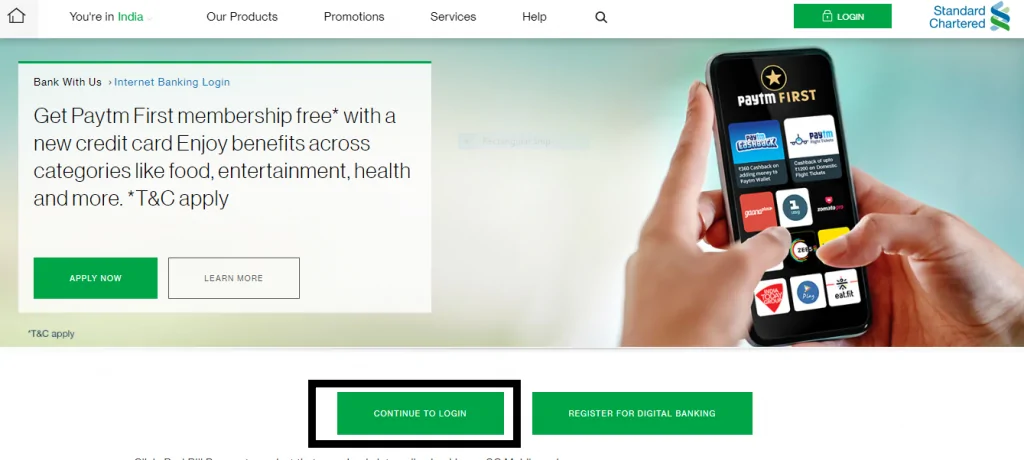
Step 1: Visit the official SCB online banking website and click on the ‘Continue to Login’ button
Step 2: On the next screen, enter your net-banking username and password
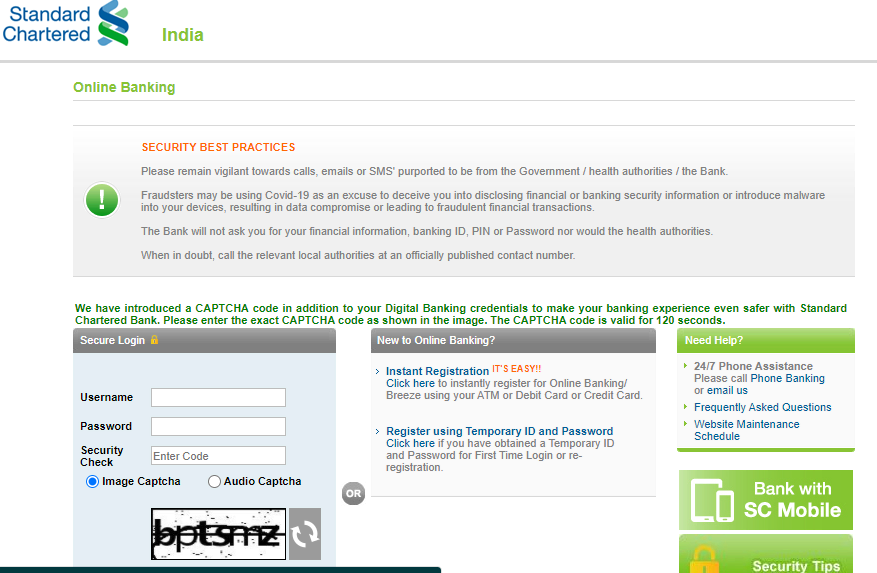
Step 3: Click on the ‘Login’ button
For Standard Chartered net-banking first-time users, here are the steps to register for the services online-
Step 1: Visit the official SCB online banking website and click on the ‘Register for Digital Banking’ button
Step 2: On the next screen, you will see three options to register for digital banking and the steps associated with each of these options-
Register using Temporary ID & password
Note: The temporary ID is sent to your registered email id from online.banking@sc.com and the temporary password is sent via SMS on your registered mobile number
Register using credit card number & OTP
Register using your ATM PIN and debit card
The Standard Chartered banking customer can also use Phone Banking or Credit Card Helpline and request for the registration form. The registration form can be delivered to the customer at the correspondence address provided by the customer to the bank. Once the form is duly filled by the customer, he/she can send to:
Standard Chartered Bank
P.O. Box #8888
Chennai, India
One must carefully go through all the terms and conditions mentioned online on the bank’s website. It is advised to understand the guidelines and legalities involved while managing individual banking portfolios. However, the bank does not provide this facility to the account holders for Joint Accounts.
Step 1: Visit the official SCB online banking website and click on the ‘Continue to Login’ button
Step 2: Click on the ‘Forgot Username and Password’ button
Step 3: On the next screen, agree to the terms and conditions and then click on the ‘Accept’ button
Step 4: You will receive a temporary password on your registered mobile number. Verify your registered mobile number and then enter the temporary password
Step 5: Create your new password and proceed to use net banking
Q. How to register for Standard Chartered net banking online?
Standard Chartered Bank account holders can also register for net-banking services online by visiting the official SCB website. There are three ways of registering online for net-banking- via debit card, via credit card, via temporary ID and password.
Q. How to get the Standard Chartered Bank net banking registration form?
One can visit any of the SCB branches and ask for the internet banking registration form or download the net banking form from the official SCB website.
Q. I forgot my Standard Chartered Bank net-banking password. How to login?
If you have forgotten your login password, go to the SCB Login page and click on ‘Forgot Login Password’. On the next screen, enter your mobile number and click on the ‘Submit’ button. Enter the OTP received on the registered mobile number and then set your new login password.
Q. Does SCB charge for net-banking?
No, SCB does not apply any extra charges for availing the net-banking services. Nonetheless, the third-party transfers using NEFT, RTGS, or IMPS may be charged with some transfer fees.
Q. Can I use a mobile phone to register for an online banking service?
Yes, you can use your mobile phone to register for online banking services at SCB.
Q. Can I change my password?
Yes, you may change your password by using the ‘Change Password’ function after logging into Online Banking.
Q. What kind of Funds Transfers can be done via Online Banking?