Download the
Paisabazaar app Today!
Paisabazaar app Today!
Get instant access to loans, credit cards, and financial tools — all in one place

Win Assured Cashback

Our Advisors are available 7 days a week, 9:30 am - 6:30 pm to assist you with the best offers or help resolve any queries.


Get instant access to loans, credit cards, and financial tools — all in one place

Scan to download on



 Personal Loan
 Business Loan
 Home Loan
 Other Loans


Our Advisors are available 7 days a week, 9:30 am - 6:30 pm to assist you with the best offers or help resolve any queries.
PNB account-holders are provided with an array of banking services, facilities, and channels to have easy access to PNB account balance check, transfers, and much more. Let us learn about how to check PNB Account Balance, PNB Enquiry Number and Internet/Mobile Banking.
600 or 750? What's your credit
score? Check for FREE.


Let’s Get Started
 +91
+91
The entered number doesn't seem to be correct
Punjab National Bank offers a range of banking products and services to its customers, such as loans, deposits, credit cards, investments, insurance, etc. Accountholders having savings accounts can use the PNB balance check number for PNB account balance enquiry. Further, let’s discuss online and offline methods to check PNB account balance.
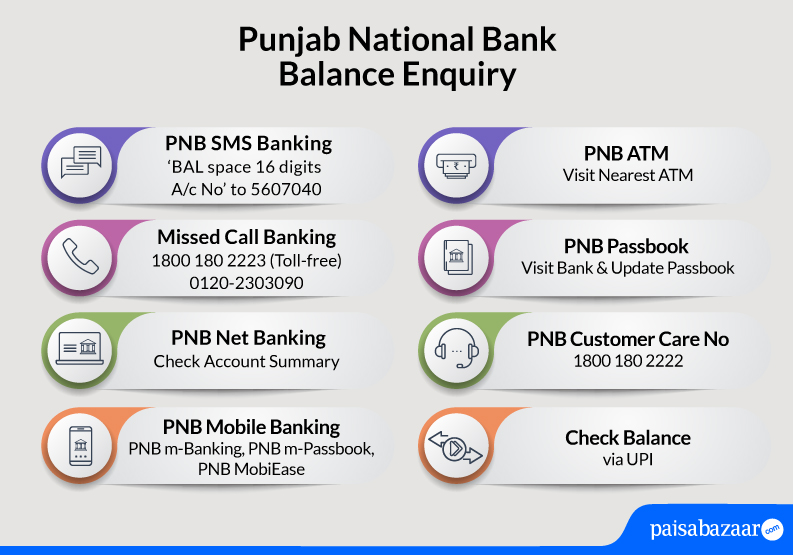
Accountholders can also call the PNB balance enquiry number to know the account balance via toll-free number:
To check PNB Account balance using the toll-free number given above, account holders will have to select a language and follow the IVR instructions.
Also Know: PNB Customer Care
Account holders can give a missed call on the PNB Balance check number mentioned below:
Users should remember the following points while performing PNB balance enquiry by missed call:

Don’t Know your Credit Score? Now Get it for FREE Check Now
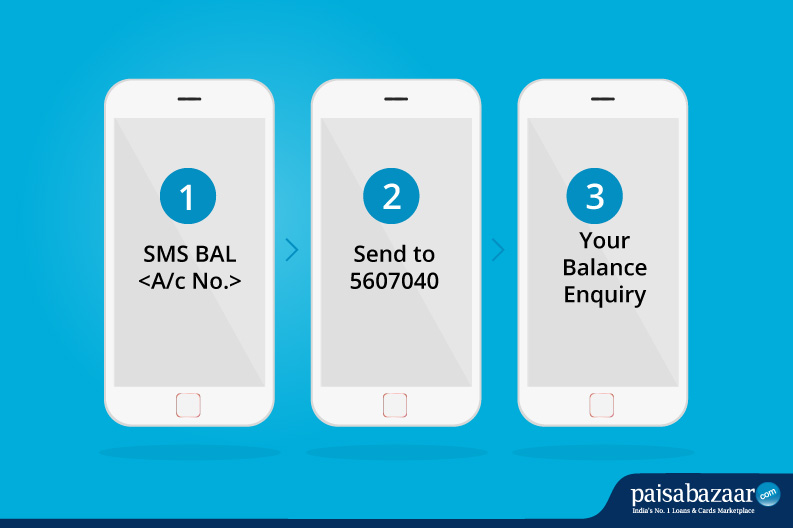
For PNB Balance Enquiry by SMS, account holders can easily opt to send an SMS and check account balance. To check PNB account balance, SMS – BAL space 16 digits Account Number to 5607040.
PNB savings account holders can check account balances through WhatsApp as well. They need to add the number +91-9264092640 to the contact list and send ‘Hi’ on the provided number from the registered mobile number on WhatsApp.
Account numbers associated with the registered mobile number will be displayed. Choose the appropriate option and select the PNB account to check the balance. It is worth mentioning that availing this facility is free of cost.
Also Know: How to link Aadhar with PNB Account
Customers of the bank can also enquire about other banking services.
Also Know: PNB Bank Timings
Presently, Punjab National Bank comes with a few active apps that customers can use to carry out their online transactions and check their PNB account balance on the go. Following are all the PNB mobile applications with which account holders can check their account balance using mobile banking:
Punjab National Bank customers can download and install the PNB ONE app on their Android or iOS devices to avail banking services like PNB balance enquiry, mini statements, fund transfers, chequebook requests, and much more.
Punjab National Bank provides an e-Passbook facility for its account holders to check their account balance using the app.
Accountholders will be able to view mini statements and detailed statements.
They will also be able to save detailed statements on their mobile phones.
PNB mPassbook app is available for both Android and iOS devices.
To know more about PNB mobile apps, click here.
Now Get your Credit Score and Credit Report for FREELifetime FREE |
* Terms and conditions apply
Punjab National Bank offers net banking facility to its customers. Customers can register for net banking when they open an account with the bank post, they can log in to their net banking accounts using the “User ID” and password provided by the bank. Accountholders can check their PNB Account Balance by following the below-mentioned steps:
PNB passbook is being provided to every account holder opening a bank account with them. Accountholders can update their passbook by visiting the bank to check all the transactions and PNB account balances.
Customers who have registered their mobile number with the bank can avail banking services through USSD. Users need to dial *99# and follow the prompted instructions. Customers can access the below-mentioned services:
Customers can avail other services as well through USSD. Refer to the bank’s website to know more about such services.
Accountholders having a bank account with Punjab National Bank can visit the nearest PNB ATM or any other bank ATM to check their account balance instantly. Accountholders will be required to visit the nearest PNB ATM and follow the steps given below:
Consumer ExperienceWhat is the best method for Punjab National Bank to check their balance online? What is the best method for Punjab National Bank balance check offline? -Karan Gogia, Punjab National Bank customer |
A Good Credit Score ensures you manage Your Finances Well Check Now
Ans. To register for PNB retail mobile and Internet banking, you can visit the PNB’s official website and select ‘Register with Debit Card’ option. You may enter your account number, and date of birth/PAN and select the registration type. Enter the OTP received on your registered mobile number and select ‘Type of Facility’ to further enter your debit card and PIN to authenticate. Finally, you need to set the login and/or transaction passwords. After this, a message for successful registration will be displayed on the screen.
Ans. Yes, you can use your registered mobile number to check the balance of multiple PNB accounts.
Ans. If you receive incorrect account balance information, you need to immediately contact the bank directly by dialling the toll-free or customer care numbers. Secondly, you can visit the nearest bank branch to notify them of incorrect information and submit a written application requesting the bank to reverse the incorrect entry.
Ans. No, there is no charge for checking your balance at non-PNB ATMs. However, the bank does charge Rs. 50 per transaction, after the first 3 transactions which are free in a month.
Ans. You can use the SMS banking services by dialling 9264092640 to enable or disable SMS alerts for balance enquiry. You can also call the bank’s toll-free number on 1800-1800/1800-2021 for the same.
Ans. If your PNB account is blocked or inactive, you can access your balance by giving a missed call at 1800-180-2223 or sending an SMS ‘BAL’ space 14-digit account number to 5607040. Further, to activate your inactive account, you can visit the nearest bank branch and submit the required KYC documents.
Ans. PNB Account holders can register their mobile numbers for missed calls and SMS banking by filling a form and submitting the same at the branch office. One can also register by calling the toll-free number 1800-180-2223 for PNB balance check number missed call service.
Ans. There are different ways to check your PNB account balance on your mobile phone. You can give a missed call on the PNB balance inquiry no 1800-180-2223 or send ‘BAL<16-digit a/c no.>’ to 5607040. SMS and Missed call banking services are available for customers with mobile no. registered at the bank. Besides this, you can also use PNB net banking or mobile banking to access your account.
Ans. To check your mini statement, you can send ‘MINSTMT<16-digit a/c no.>’ to 5607040 or give a missed call on the PNB Bank balance check number at 1800-180-2223.
Also Check: PNB Account Statement
Ans. Yes, you can view your mini statement using the PNB mPassbook mobile application. Log in to the app using your MPIN, select ‘Mini Statement’, and proceed. This will show your last 10 transactions.
Also Check: PNB Mini Statement
Ans. To check your last 5 PNB transactions, you can use SMS, missed calls, or mobile banking service. Just send ‘MINSTMT<16-digit a/c no.>’ to 5607040 or give a missed call on the PNB balance check number 1800 180 2223. You can also log in to the PNB mPassbook app using MPIN to view the ‘Mini Statement’ for the last 5 transactions.
Ans. No, PNB levies only regular SMS charges on the SMS facility, and there are no extra service charges.
| SBI Balance Check | Canara Bank Balance Check | Union Bank Balance Check |
| Indian Bank Balance Check | UCO Bank Balance Check | IOB Balance Check |