Download the
Paisabazaar app Today!
Paisabazaar app Today!
Get instant access to loans, credit cards, and financial tools — all in one place

Win Assured Cashback

Our Advisors are available 7 days a week, 9:30 am - 6:30 pm to assist you with the best offers or help resolve any queries.


Get instant access to loans, credit cards, and financial tools — all in one place

Scan to download on



 Personal Loan
 Business Loan
 Home Loan
 Other Loans


Our Advisors are available 7 days a week, 9:30 am - 6:30 pm to assist you with the best offers or help resolve any queries.
600 or 750? What's your credit
score? Check for FREE.


Let’s Get Started
 +91
+91
The entered number doesn't seem to be correct
Corporation bank Netbanking or CorpNet is the internet banking facility provided by the bank to its users. It allows the customers to conveniently bank anytime and from anywhere. CorpNet permits customers to make easy and safe transactions all the time. Following are the services available on the Corporation Bank netbanking portal.
| Services Offered by Corporation Bank Netbanking | ||
| Open Term Deposits | Register beneficiaries online | NEFT/RTGS features |
| Apply for demand drafts | Mobile/DTH recharge | Book railway/flight tickets |
| Pay for insurance | Download e-statements | Cheque book issuance |
| Tax payment | Balance enquiry | Transaction history |
| Credit Card Payment | EMI Payment | Change Password |

Get Your Free Credit Report with Monthly Updates Check Now
Step 1: Customers get user ID and password in the kit received after submitting the registration form at Corporation Bank. One needs to change this login and authorization password during the first login.
Step 2: Visit the Corporation Bank netbanking portal and select “Online Services” from the menu featured on the right side of the webpage. One will get redirected to a new page displaying several instructions. Click on “Click to Continue” button to proceed ahead.
Step 3: On next page enter the User ID received in the kit and click on “continue” option.
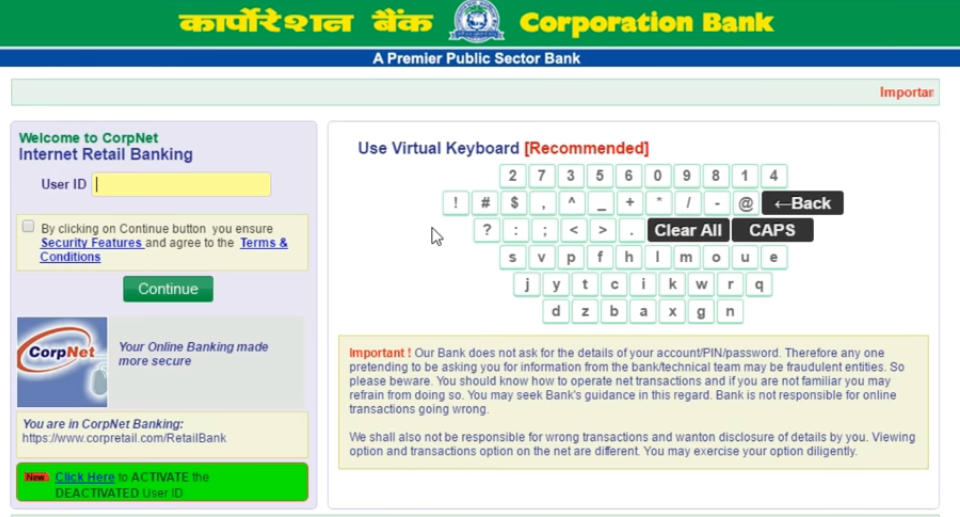
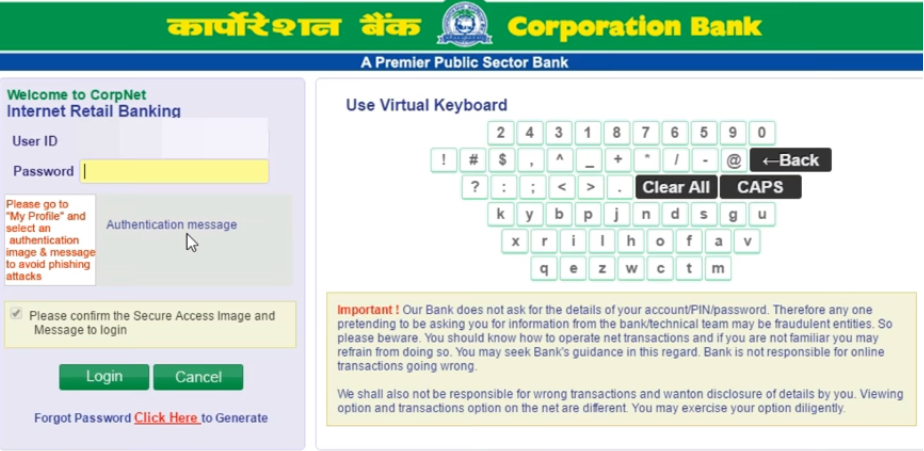
Step 4: Enter the password and click on “Login” option.
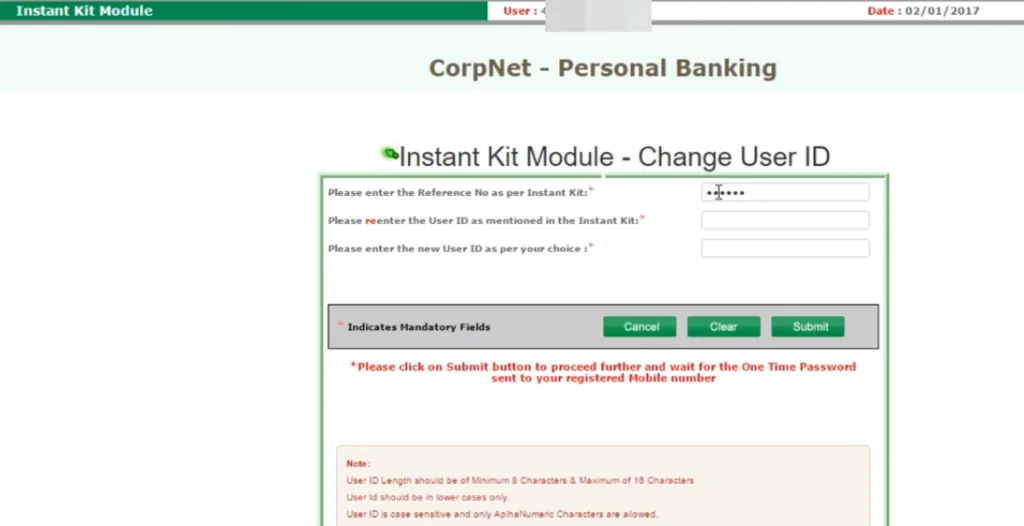
Step 5: On the next page, enter the reference number that is provided in the Instant Kit along with the new User ID and click on “Submit”.
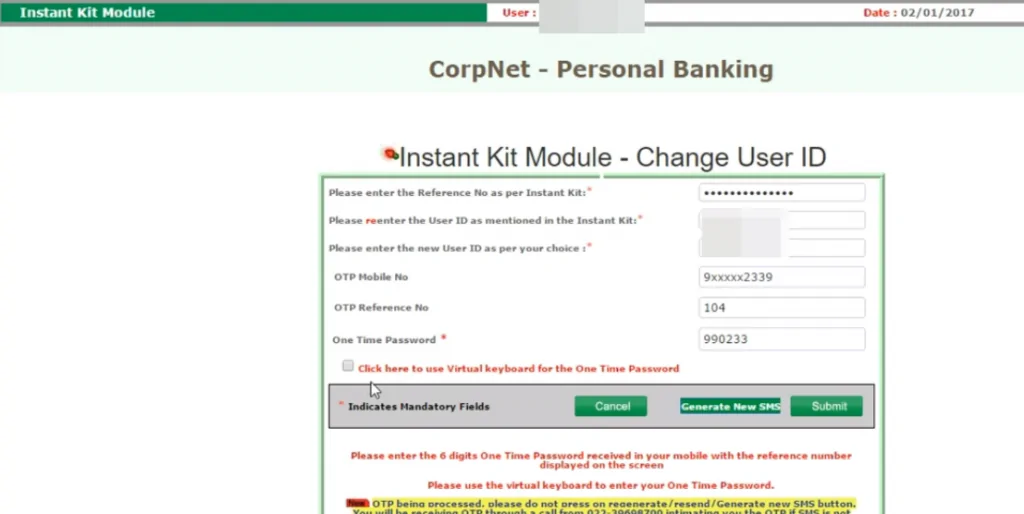
Step 6: Now Enter the OTP number received on the registered mobile number and click on “Submit” button.
Step 7: A success message for the change of User ID will be displayed on the screen. Click on “Exit” option and wait for some time as it would take a few minutes to register the newly set User ID.
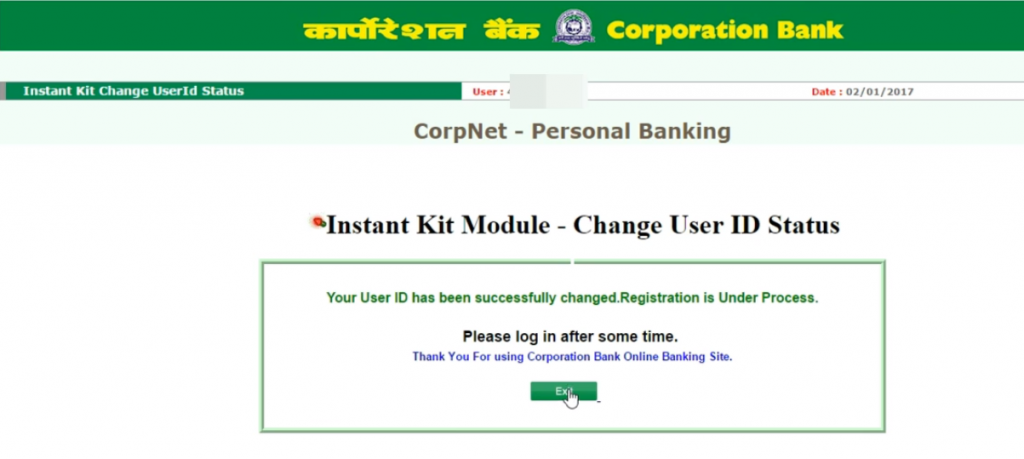
Step 8: Once again visit Corporation Bank’s internet banking page and click on “Online Services” option under “Personal Banking” option. Next select Personal Banking and click on “Click here to continue” button.
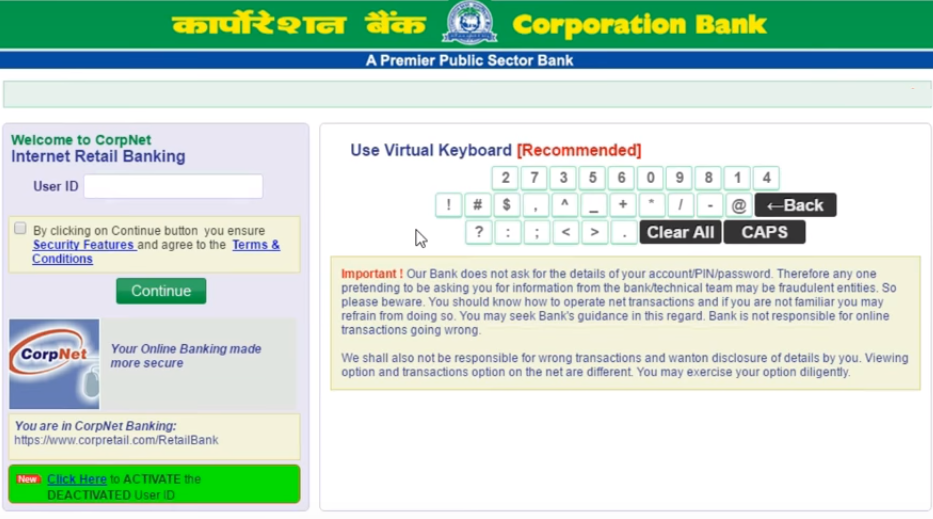
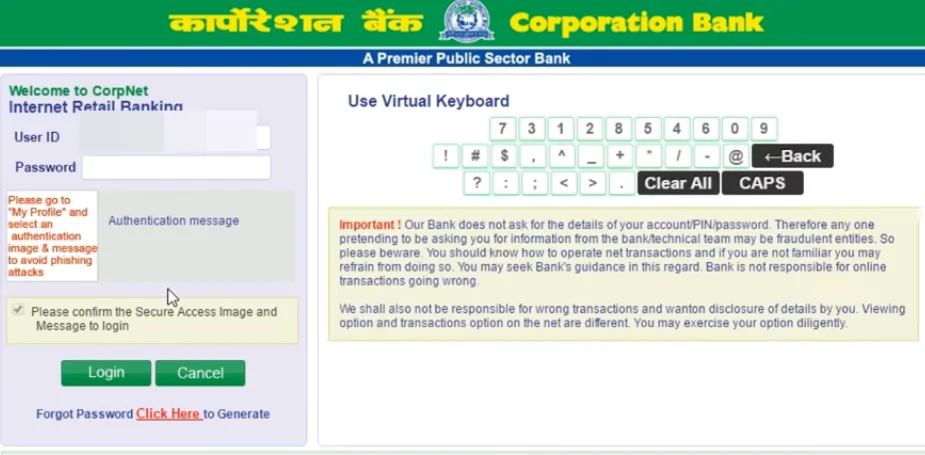
Step 9: Login with the new User ID and click on “Continue”. Now enter the old password received in the kit and click on “Login”.
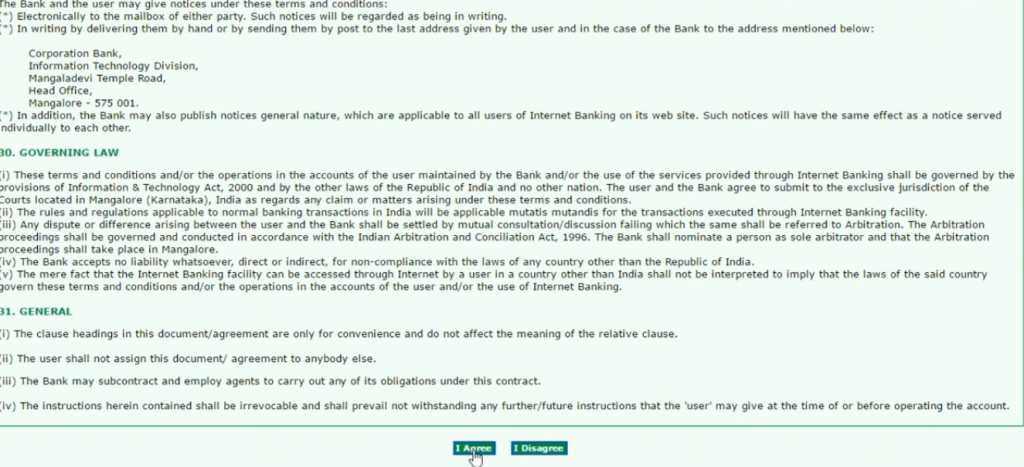
Step 10: On the next page, click on “I Agree” option.
Step 11: In the new page displayed on the screen, follow the instructions and enter the credentials likewise. Enter the password as per the Kit and also enter the New Password.
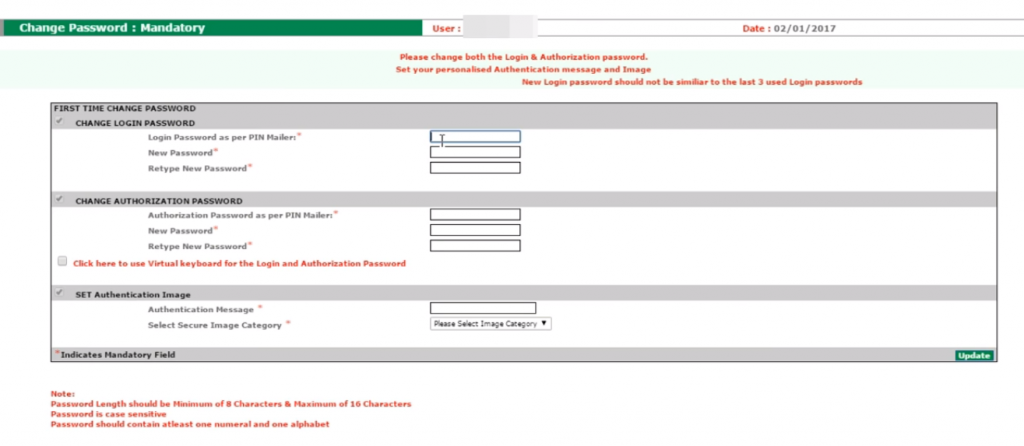
Step 12: Now enter the Authorization Password that is provided in the kit and set a new Authorization Password as well.
Step 13: Select Secure Image Category and click on “Update” button.
Step 14: On the next page, a success message will be displayed on the screen.
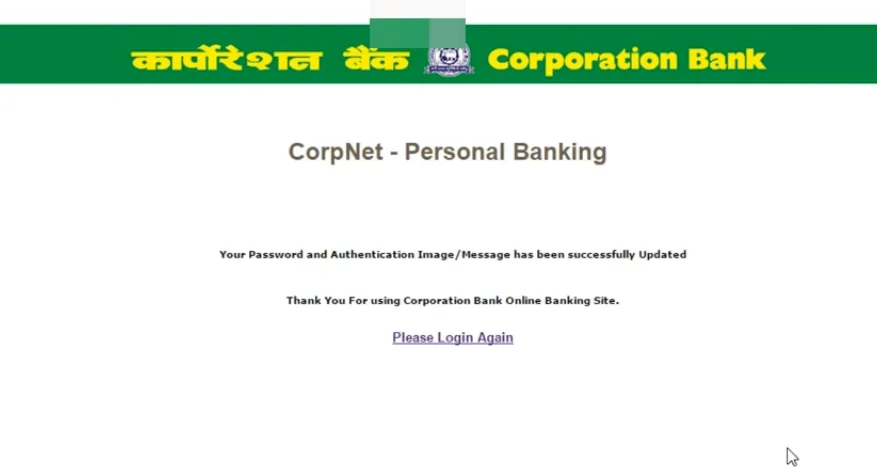
Step 15: Here click on ‘Please Login Again’ option and login into the netbanking account using the new Id and password.
Get Free Credit Report with Complete Analysis of Credit Score Get Report
Corporation Bank net-banking allows fund transfer of up to Rs. 5,00,000 per day for retail banking customers. You can do so by following the steps mentioned below:
Transfer of funds will be completed successfully.
The table below states the various daily transaction limits under Corporation netbanking:
| Retail Netbanking Users | Corporate Netbanking Users |
| Fund Transfer = Rs 5 lakh | Fund Transfer = Rs 50 lakh |
| Online Shopping = Rs 3 lakh/day | Online Shopping = Rs 10 lakh/day |
| Tax Payments = Unlimited | Tax Payments = Unlimited |
| GST Payment/EPF = Unlimited | GST Payment/EPF = Unlimited |
Checking Credit Report monthly has no impact on Credit Score Check Now
Following people can avail Corporation Bank netbanking facility:
Some of the prime features of Corporation Bank netbanking facility are as follows:
Your Credit Score is Now Absolutely Free Get Report
Corporation Bank account holders can make online requests for issuance of demand drafts, cheque books or issue instructions to the Bank to stop payment of a cheque. Other special requests which can be made online include-
Corporation Bank Net Banking allows simple and safe access to the account (savings and current account) and also allows easy transactions for various platforms such as e-shops. Net Banking is surely a boon to those who have no time to stand in the long queues in the bank’s branch. In case of any queries related to Corporation bank netbanking, customers can reach out to following options or click here to know more.
Q. What is CorpNet?
CorpNet is the internet banking service provided by the Corporation Bank. All Corporation Bank account holders can use the net-banking service.
Q. Does Corporation Bank charge any fee for using CorpNet?
No, Corporation Bank does not have any charges for using CorpNet banking service.
Q. Who can avail Corporation Bank net-banking?
All account holders who are above 18 years of age and have operative accounts can avail net-banking service. In case of joint accounts, if the operation clause is ‘Any One’ then the account holders can use internet retail banking. If the operation clause is ‘Jointly’ then one can opt for Internet Banking (Corporate) facility.
Q. How to get the Corporation Bank net banking registration form?
One can visit any of the Corporation Bank and can ask for the internet banking registration form or can also download the net banking form from the official Corporation Bank website.
Q. How to register for Corporation Bank net-banking facility?
Customers willing to avail net-banking service should submit an application form to the base branch where their respective accounts are maintained.
Q. How can I start using Corporation Bank net-banking?
You can log-in to the net banking portal using your user-id and password, and start using internet banking. If you do not have an account, register as a new user and change authorization password.
Q. How do I add a beneficiary to my corporation net-banking?
To add a beneficiary, account-holders can log in to the net-banking portal and go to ‘Transfers’. After that, click on ‘Add Beneficiary’. Enter all the beneficiary details and ‘Save’. Post that, your beneficiary will be added to your account for future transactions.
Q. How do I get the Corporation Bank statement online?
To get your Corporation Bank account statement online, log in to net-banking and click on ‘My Account’. Now, click on the ‘Account Statements’ option and then select the period for which you want to view the statement. And then, click on ‘download’.
A Better Credit Score can get your Loan Approved Quickly Check Now