Download the
Paisabazaar app Today!
Paisabazaar app Today!
Get instant access to loans, credit cards, and financial tools — all in one place

Win Assured Cashback

Our Advisors are available 7 days a week, 9:30 am - 6:30 pm to assist you with the best offers or help resolve any queries.


Get instant access to loans, credit cards, and financial tools — all in one place

Scan to download on



 Personal Loan
 Business Loan
 Home Loan
 Other Loans


Our Advisors are available 7 days a week, 9:30 am - 6:30 pm to assist you with the best offers or help resolve any queries.
600 or 750? What's your credit
score? Check for FREE.


Let’s Get Started
 +91
+91
The entered number doesn't seem to be correct
An Aadhaar card is considered to be one of the most important documents to avail various government-related services. This card is your unique identity that contains all your relevant information like biometric and demographic details. The Unique Identification Authority of India (UIDAI) issues the Aadhaar Card. You can use this card to open a bank account, FD investment, apply for a personal loan, linking with government documents, etc. Aadhaar card verification is done to check if the Aadhaar mentioned in a document actually belongs to the applicant or not.
Table of Contents :

Get Free Credit Report with monthly updates. Check Now
To ensure the validity of the card and also to make sure that it has been issued, you can verify your Aadhar card. You can also update any details online. At the time of the verification process, the following information of the individual is displayed on the Aadhar card official website:
If you notice any discrepancy, you can contact the UIDAI either by sending an email or by calling the toll-free number.
To verify your Aadhaar card online, it is essential for you to have your Aadhaar number or the UID. The basic steps that you need to follow for Aadhaar card online verification are as follows:
Step 1. Go to the official UIDAI website i.e. https://uidai.gov.in/
Step 2. At the bottom of the page, you have to choose the option “Aadhaar services”
Step 3. Now click on “Verify an Aadhaar Number”
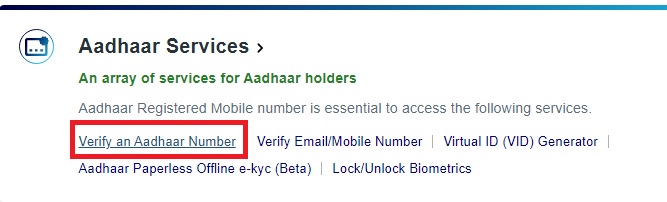
Step 4. You will be redirected to a new page for Aadhaar Verification
Step 5. Enter your 12-digit Unique Identification Number, i.e. Aadhaar Number
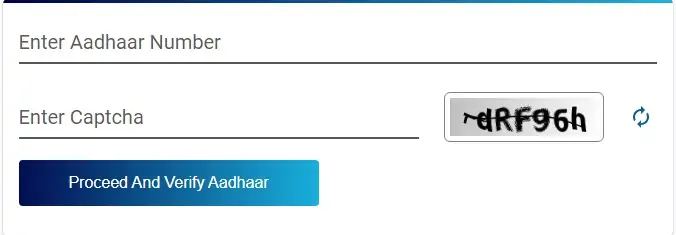
Step 6: Enter “Captcha Verification” from the given box
Step 7: Click on “Proceed And Verify Aadhaar”
Step 8: Your Aadhaar verification will be done
Aadhaar paperless offline e-KYC is a secure document that can be shared and used by an Aadhaar cardholder for offline verification of identification. The following are the key steps that you need to follow for Aadhaar card offline verification:
Step 1. Visit the official UIDAI website i.e. https://uidai.gov.in/
Step 2. Click on “My Aadhaar” and select “Aadhaar Paperless Offline e-kyc (Beta)” listed under “Aadhaar Services”.
Step 3. Enter your 12 digit Aadhaar Number or 16 digit Virtual id
Step 4. Create a Share Code of 4-characters and enter the “Security Code” that you see on your screen
Step 5. Verify using an OTP or TOTP
Step 6: A password-protected (with Share Code as the password) ZIP file containing the Paperless Offline eKYC will be downloaded into your desktop/device. To avail the service, you need to share the ZIP file, the Share Code and registered mobile number with the service provider.
This process allows the service provider/ Offline Verification Seeking Entity (OVSE) to easily verify a person’s Aadhaar offline without the need to store or collect their Aadhaar number. They can simply verify by matching the last four digits of a person’s Aadhaar number and their demographic information with information contained in the central database.
Here is how you can verify your Aadhaar card using the Aadhaar QR code Scanner app:
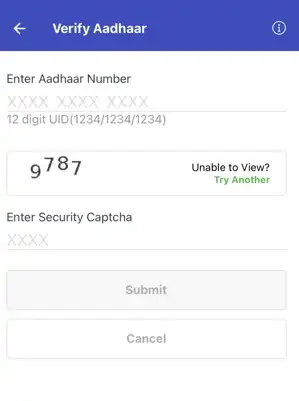
There are two ways to verify Aadhaar using the mAadhaar app:
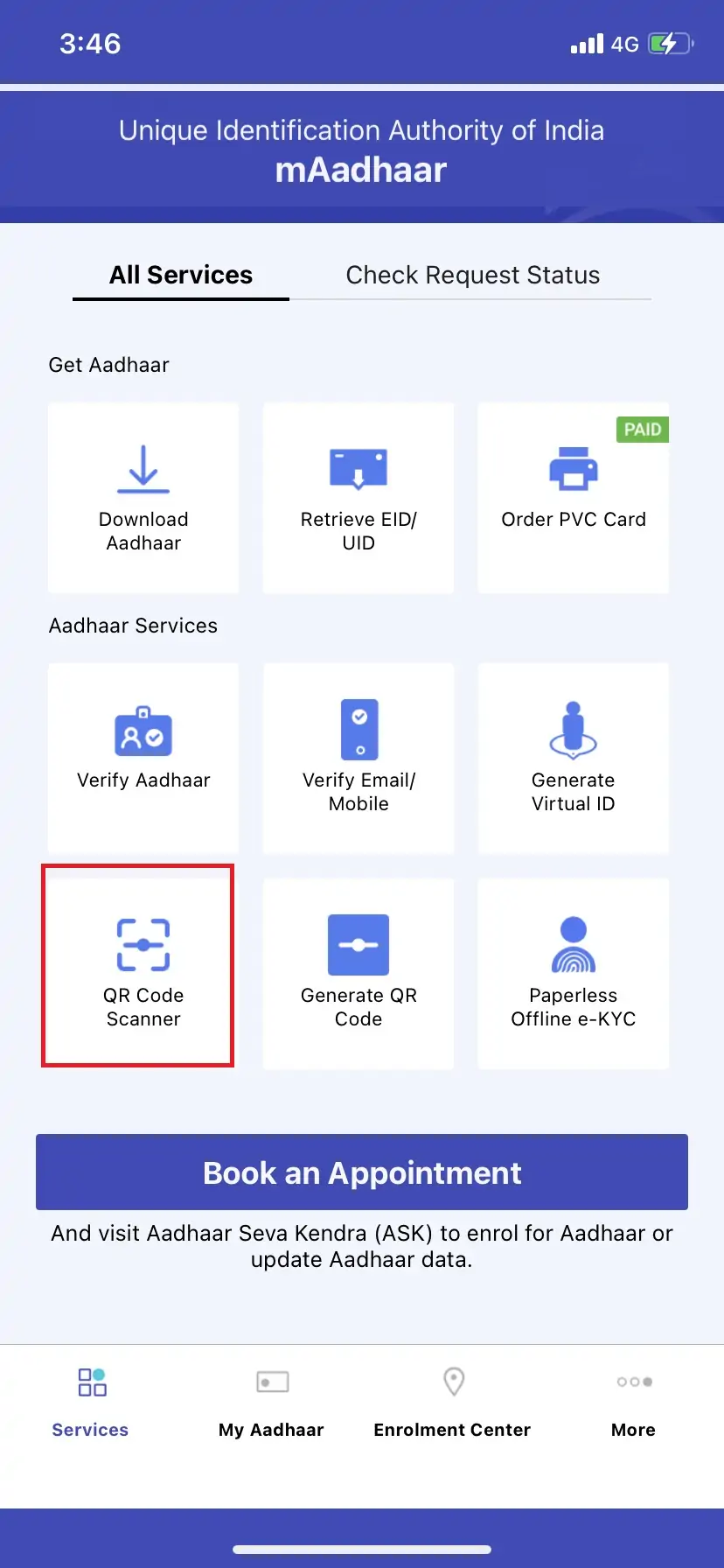
3. Proceed to scan the QR code available on your Aadhaar to complete the verification.
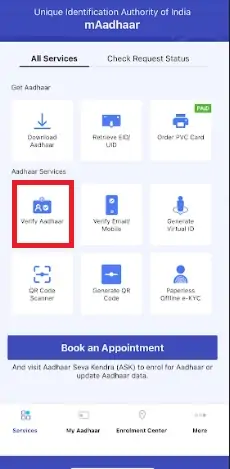
3. Enter your Aadhaar number, captcha code and click on “Submit” to complete the Aadhaar verification
Step 1: Visit UIDAI’s website
Step 2: Click on the “Verify Aadhaar Number” option under the “Aadhaar Services” section
Step 3: You will be redirected to the Aadhaar verification website page
Step 4: Enter your 12-digit Aadhaar number and the security code in boxes provided on the page
Step 5: Now click on the “Verify” button to know that your aadhaar card is active or deactivated
Step 6: If your Aadhaar is active, a message will be displayed stating “Aadhaar Verification Completes!”
Step 7:Also If a green tick mark appears, It means that your Aadhaar card has not been deactivated
Step 8:Other details such as your age band, gender, state and mobile number will also be mentioned
The main aim of introducing the card was to have a single document which will work as both identity and address proof. The Aadhaar card should not be and cannot be treated as the proof of citizenship of India. From the time the card was introduced to the present times, the Aadhaar card has become very useful and it can be used in many places and is not just an identity proof.
Some of the advantages of Aadhaar card verification are as follows:
Other Advantages:
There are no documents required for Aadhaar card verification. It is an online process and the data is validated against that already fed in UIDAI’s database.
A number of documents can be verified using an Aadhaar card. Some of those are a driving license, PAN card, passport, voter’s ID card, birth certificate, marriage certificate, etc. Also, the person has to be physically present at the center in order to record the biometric data.
Read more about The documents required when applying for an Aadhar card
A Good Credit Score can help in getting Loan Approvals Easily Check Now
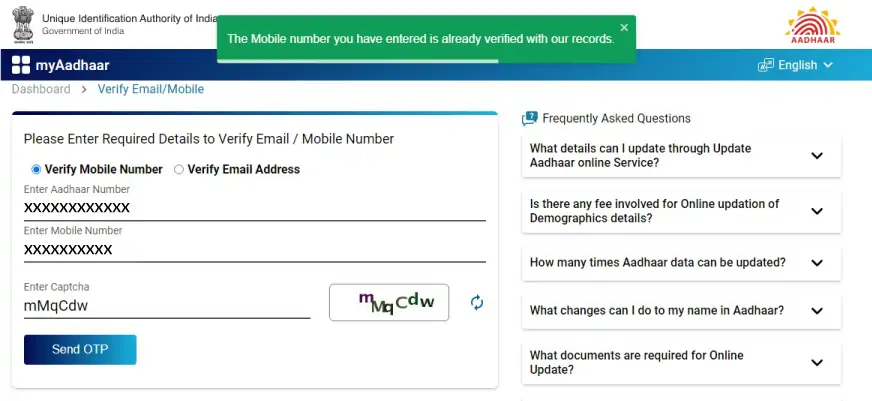
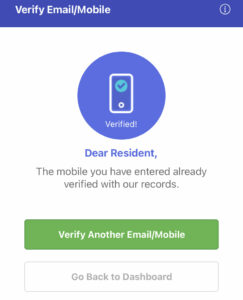
Here is a step-by-step guide to verify email/mobile number online and using the mAadhaar app:
Q. How much does Aadhaar verification cost?
You are not required to pay any charges to verify your Aadhaar card irrespective of the verification method that you may choose to use.
Q. Is it possible to verify Aadhaar on someone else’s behalf?
Yes, you can verify Aadhaar on behalf of someone else using their Aadhaar QR code or Aadhaar number. This helps in gauging the authenticity of an Aadhaar card. However, only generic details like your age band, gender and state are shared and therefore, your Aadhaar data cannot be misused in any way.
Q. How much time does it take to verify Aadhaar?
Aadhaar card verification be easily carried out online at your convenience and usually takes just a couple of minutes.