Download the
Paisabazaar app Today!
Paisabazaar app Today!
Get instant access to loans, credit cards, and financial tools — all in one place

Win Assured Cashback

Our Advisors are available 7 days a week, 9:30 am - 6:30 pm to assist you with the best offers or help resolve any queries.


Get instant access to loans, credit cards, and financial tools — all in one place

Scan to download on



 Personal Loan
 Business Loan
 Home Loan
 Other Loans


Our Advisors are available 7 days a week, 9:30 am - 6:30 pm to assist you with the best offers or help resolve any queries.
600 or 750? What's your credit
score? Check for FREE.


Let’s Get Started
 +91
+91
The entered number doesn't seem to be correct
Over the past years, new technology has showed way for the human civilization to gain information about innovative ways to achieve the same tasks that they used to do in an old way. Now, since technology has become so sophisticated and smart, we are finally able to utilize it for the better of the civilization and develop new ways to do age old tasks that are usually a monopoly of old systems. Having walked along the path of innovation and development, the Indian economy has been able to make the dream of a cashless economy a reality. Aiding in that dream is the arm of mobile banking, which contributes in a significant way towards ensuring that customers of a bank can make use of the services of that bank in an ergonomic manner. To be on the right path, Karnataka Bank launched its KBL Mobile Banking application to assist its users in banking transactions on-the-go using their mobile.

Get Your Free Credit Report with Monthly Updates Check Now
Mobile banking is defined as the innovation of sophisticated technology wherein, banking services are provided at the comfort of the mobile screen of a bank customer. Mobile banking is a conglomeration of various services that have been traditionally rendered at a bank until now. It achieves the target of digitization and cashless economy that the Indian financial system is striving to move forward to.
Mobile banking is one such innovation that makes the achievement of that dream a clear reality. Offered by most banks in India, Karnataka Bank mobile banking allows a customer to transact using digital tools, available right at the comfort of his mobile screen. Read on to find out more about Karnataka Bank mobile banking.
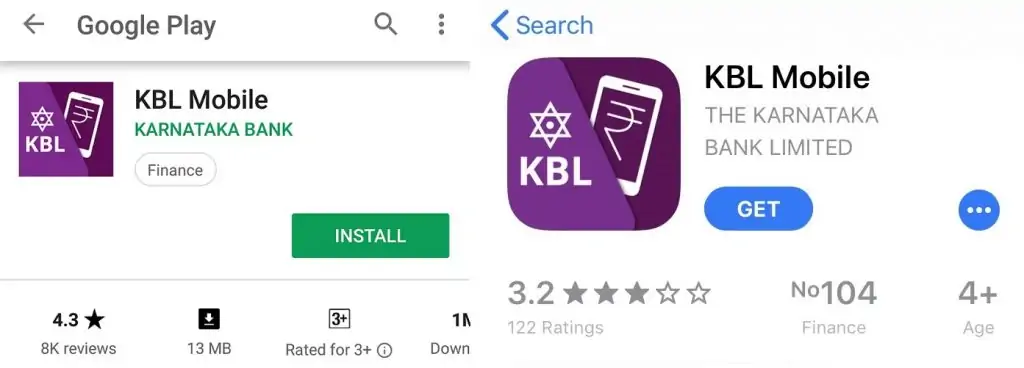
Karnataka Bank has the mobile banking app by the name “KBL Mobile” which is available for iPhone, Android and Windows users and facilitates all users to use the following mentioned services.
| Services offered by KBL Mobile Banking Application | ||
| Find Customer ID | Locate Bank Branches | Account Balance Enquiry |
| Loan Account Enquiry | Mini Statement Request | Transfer Payments |
| Manage Payee | Manage MMID | Check Cheque Status |
| Search IFSC Code | Request Debit Card | Other Cheque Services |
| Deposit Request | New Account Request | Investments |
| Utility Bill Payments | DTH / Mobile Recharge | Customer Care Details |
To provide its users with an additional and easier way of banking, Karnataka Bank has launched the following mobile apps:
|
Karnataka Bank Apps |
Primary Features |
|
KBL Mobile App |
|
|
BHIM KBL UPI App |
|
|
KBL Apna App |
|
|
KBL mPassBook App |
|
|
KBL Mobile App |
Features |
|
Enquiry |
Enquire Account Balance, Mini Statement, Cheque Status, IFSC code, Customer Care number, Deposit Account & Loan Account Enquiry |
|
Request |
Request Change of Primary Account, Stop Cheque Payment, Cheque Book, Debit Card, Debit Card PIN & New Account |
|
Fund Transfer |
Fund Transfer within own accounts, within bank, other banks, IMPS, NEFT, RTGS, MMID, Manage & Regenerate MMID, Credit Card Payment & Scheduled Transactions |
|
Branch Locator |
Branch, ATM & elobby locator |
|
Bill Payments & Recharges |
Utility Bill Payments, Mobile & DTH Transactions |
|
Other Services |
Open FD & RD, Block Debit Card, Aadhaar Seeding |
|
Eligibility |
Savings Account & Current Account holders |
|
BHIM KBL UPI App |
Features |
|
Two Factor Authentication |
Yes, enable with a single click |
|
Virtual Payment Address |
Yes, use VPA for sending & receiving money. (For instance: abhishek@kbl) |
|
Link Multiple Accounts |
Link any bank account linked to your registered mobile number (with Debit Card) |
|
Money Collection Request Facility |
Available |
|
Fund Transfer |
Using Aadhaar Number, Virtual Address, IFSC Code, Mobile Number and MMID |
|
Eligibility |
Any customer (need not be a KBL customer) can download this app and use several facilities available |
|
KBL Apna App |
Features |
|
SMS Banking Mobile App |
Android OS based SMS Banking Mobile App |
|
Internet Connectivity |
Not Required |
|
Enquiry |
Enquire Account Balance, Mini Statement, Cheque Status, IFSC code, Fixed Deposit & Loan Account Enquiry |
|
Transfer |
Fund transfer to own account and other’s account within Bank using NEFT / IMPS |
|
App Compatibility |
Only Available for Android users |
|
KBL mPassBook App |
Features |
|
Account Information |
Check details like Name, Account Number, Balance Outstanding, Branch address & phone number |
|
Personalised Ledger Facility |
Yes, Available |
|
Multi-Languages Available |
Yes, Available in 12 languages |
|
Account Statement |
Yes, Available (in PDF / Excel) |
|
Other Features |
Share account details using SMS/Email, Get bank holiday list, Locate bank branch and ATM |
Karnataka Bank customers can register for KBL Mobile by following the below mentioned steps:
Step 1: Download the Karnataka Bank App (KBL Mobile) from Google Play Store, iOS App Store or Windows Store for your smart phone and register for the service through your bank.
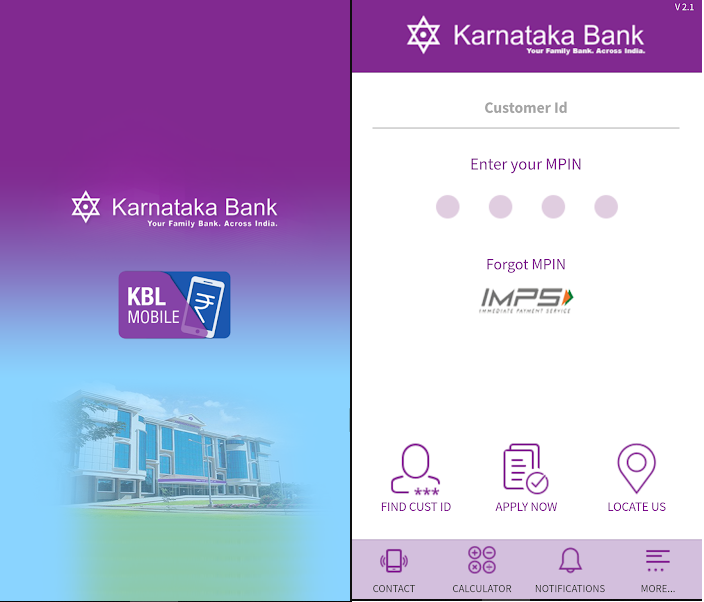
Step 2: Enter your ‘’Customer ID” and “MPIN” to login to the Karnataka Bank App.
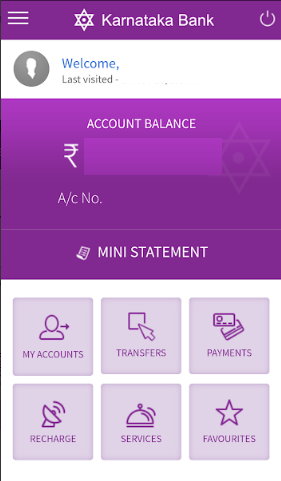
Step 3: After successful login, you will be able to check your account number, account balance and other features on the home screen of the Karnataka Bank app.
 Step 4: You can check the menu by tapping on the button at the top left corner of the mobile screen and select between different features like transfers, payments and services.
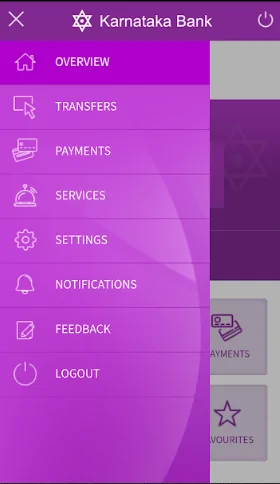
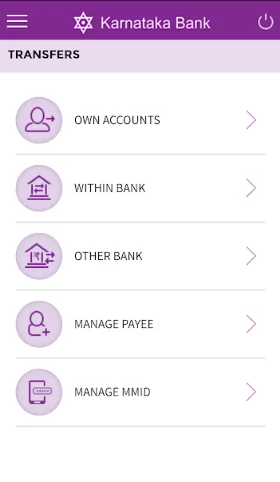
Step 5: Click on “Transfers” to transfer funds to own accounts, within bank, other bank. You can also Manage Payee and MMID under “Transfers” tab.
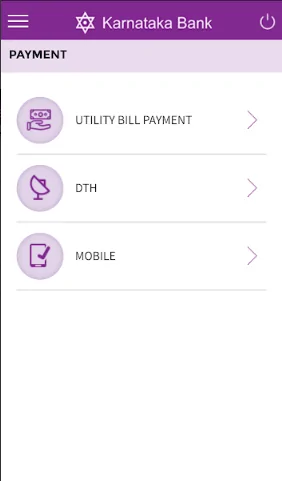
 Step 6: Click on “Payment” to make any utility bill payment, DTH and mobile recharge.
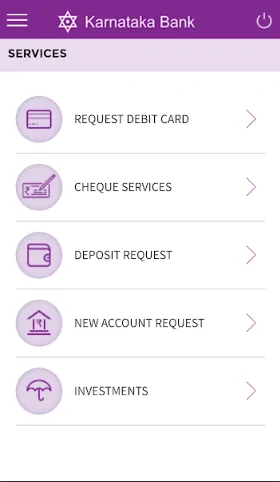
Step 7: Click on “Services” to request for debit card, cheque and deposit services. You can also make investments and request for new account with Karnataka Bank app.
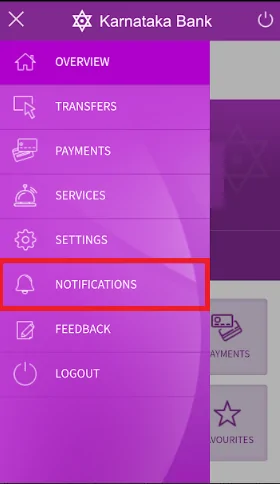
Step 8: The mobile banking application also provides the facility to receive important notifications regarding transactions made at bank. For this, you need to click on “Notifications” tab under main menu.
There are many benefits of using Karnataka Bank mobile banking that a customer can derive at the comfort of his home and in the power of his hands. Read on to find out what are such advantages:
There are many other advantages of mobile banking that make it a worthy technology to operate. With its fair share of benefits, a large section of the banking customers from all over India are showing an inclination to make use of the service.
Given the pace of technological development, many people feel skeptical about using new ways of doing things that have been done since many years. True, technology does cover the set back of some limitations but for the major part of it, technology has given the world a new way to do something, which is probably always for the best for people in general. It might happen that some form of cons might creep in but for the major part of it, Karnataka Bank mobile banking is a must have for any person who is a customer at Karnataka bank.
Customers using the Karnataka Bank app can make use of the service of mobile banking without any fear or need to understand too many terms and formalities. The procedure to make use of a mobile banking application is quite simple and can be easily understood through the steps that guide the customer throughout the application. So, if you wish to avail banking services at the comfort of your home, without the need to step inside the branch of a bank and that too, at any time of the day, then mobile banking is an absolutely promising notion for you to try and use.
Checking Credit Report monthly has no impact on Credit Score Check Now
Which mobile platforms support the Karnataka Bank Mobile Banking apps?
Karnataka Bank apps can be downloaded by the customers using Android / Windows / iOS platforms.
What is MPIN?
MPIN is a temporary mobile banking PIN which is sent on the registered mobile number after successful registration. Once you receive the temporary PIN, you can log in with the same. You will also be required to change the MPIN instantly.
Who all are eligible to use KBL Mobile App?
All the savings account & current account holders are eligible to use the KBL Mobile app except ineligible accounts, which are not allowed to use this service.
Ineligible accounts include SBNRE / NRO, Accounts with Joint operations, Accounts of Illiterate Persons, Blind people, Minor Accounts, Accounts operated by holders of Mandate, Accounts operated in representative capacity like Clubs, Trusts, Society, Associations, Institutions, Partnership Firms, Corporate Accounts, Overdraft Accounts, Encumbered Accounts.
Would I be able to transfer funds instantly using Karnataka Bank app?
Yes, you can use IMPS service to transfer funds instantly. Transfer funds to KBL accounts or non KBL accounts using IMPS.
Is Karnataka Bank Mobile Banking service chargeable?
KBL Mobile Banking service is currently offered free of cost to all the KBL customers.
How can I update my mobile number?
You will be required to submit an application to your bank branch for the change in mobile number and your new mobile number will be accepted as the registered mobile number once you log out and log in again to the Karnataka Bank app.
How can I reset my MPIN?
You can reset your MPIN online by furnishing your Customer ID, Account number, Mobile number, Date of Birth and One Time Password (OTP) which will be sent to the registered mobile number. Alternatively, you can also visit the branch and submit an application requesting the base branch to reset your MPIN.