Download the
Paisabazaar app Today!
Paisabazaar app Today!
Get instant access to loans, credit cards, and financial tools — all in one place

Win Assured Cashback

Our Advisors are available 7 days a week, 9:30 am - 6:30 pm to assist you with the best offers or help resolve any queries.


Get instant access to loans, credit cards, and financial tools — all in one place

Scan to download on



 Personal Loan
 Business Loan
 Home Loan
 Other Loans


Our Advisors are available 7 days a week, 9:30 am - 6:30 pm to assist you with the best offers or help resolve any queries.
600 or 750? What's your credit
score? Check for FREE.


Let’s Get Started
 +91
+91
The entered number doesn't seem to be correct
Citibank provides various financial and banking services to its customers such as internet banking, deposit accounts, debit cards, credit cards and much more. With Citibank netbanking service, customers can access various banking facilities from the comfort of their house or office.
Services available at Citibank net-banking can be availed by the account-holders who have registered for internet banking. Here are some of the services available online:
| Services offered by Citibank Netbanking | ||
| Fund Transfer | Tax payment | View Transaction History |
| Cheque Book Issuance | Bill payment | CitiAlerts (Account Alerts) |
| Link Multiple Accounts | Review/View Bills Online | Order Demand Drafts |
| Open/Close Online FD | Transfer Funds- NEFT/RTGS/IMPS | Repay Home Loan |
| Access Personal Loan details | Pay Utility Bills | Balance Enquiry |
| Sign-up for eStatements | View, Buy, Sell Mutual Funds | Services and Support Centre |
| Online Shopping | Online Ticket Booking | Change Account Details |
| Access Spend Analyser | Hotlist Credit/Debit Cards | Apply for Insurance |
Here are the steps one needs to follow in order to register for Citibank netbanking:
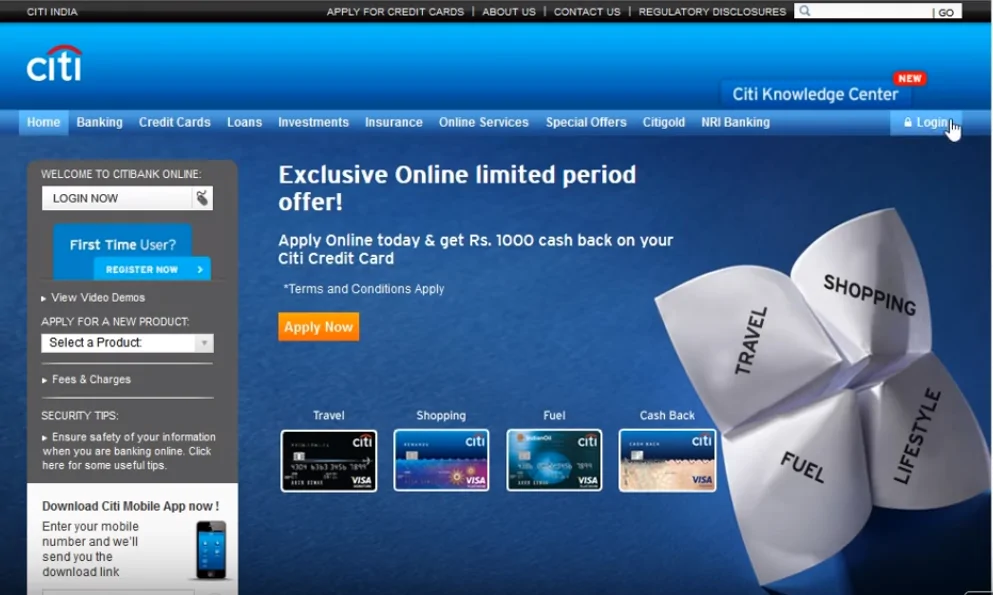
Step 1: Go to Citibank’s official website and click on “Login now” option.
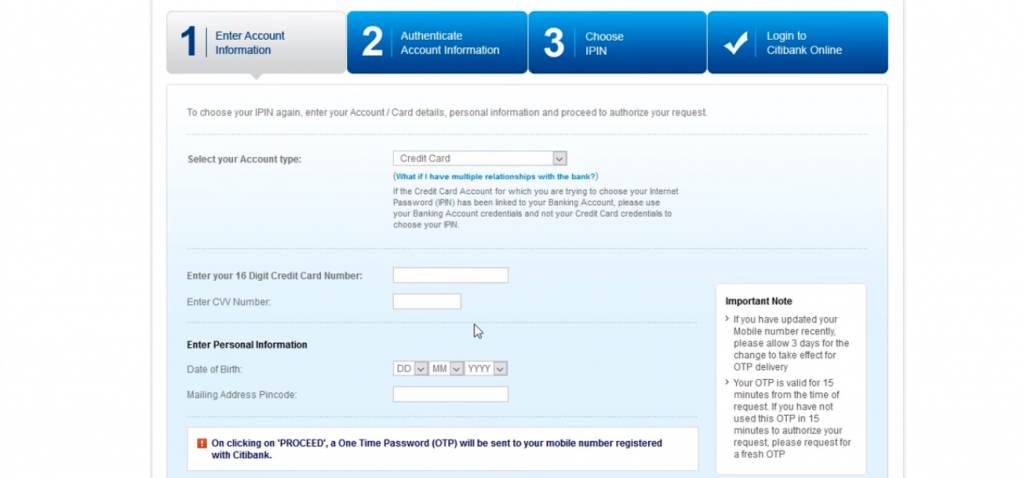
Step 2: On the next page select “First time user? Register” option. Select credit card from account information dropdown and enter Citibank credit card details – card number, CVV and date of birth and click on “Proceed”.
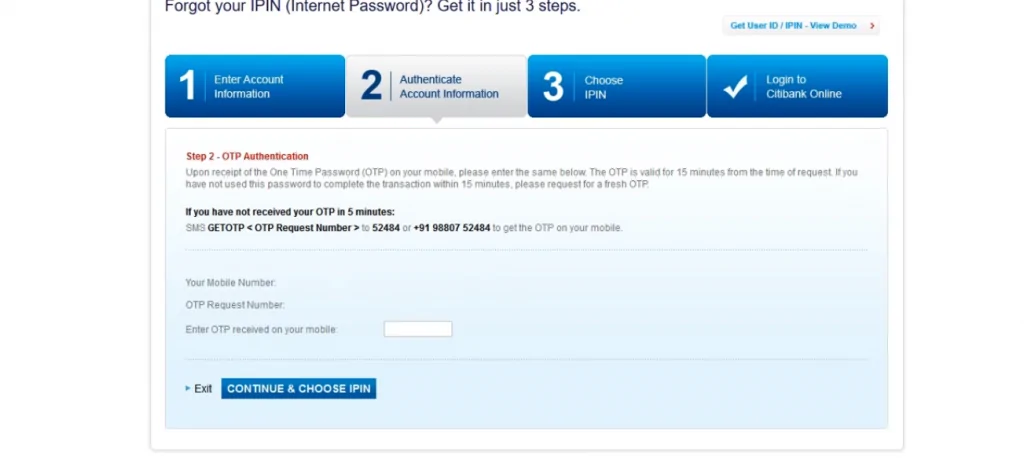
Step 3: Authenticate the account and the card details by entering the OTP received on the registered mobile number.
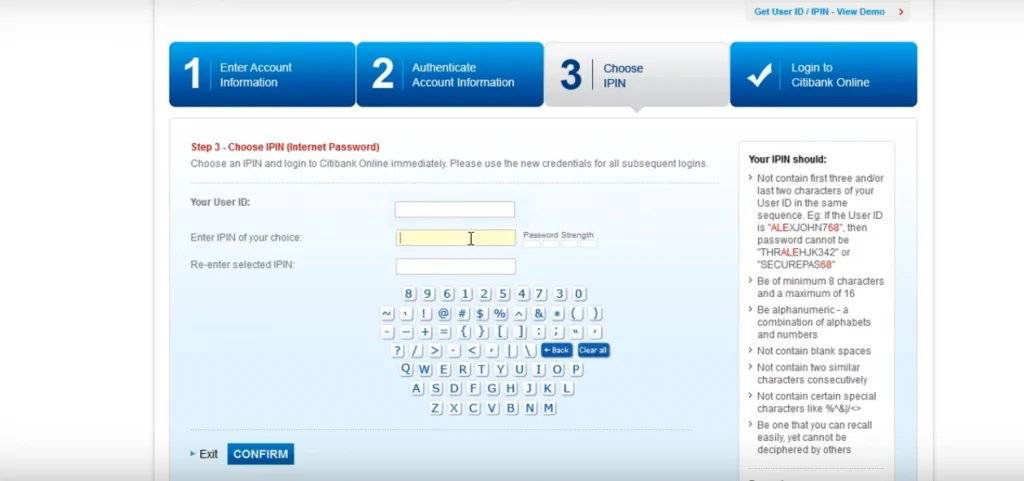
Step 4: Choose a confidential and secure user ID and password and login into Citibank netbanking account.
After successful registration, the users can log into Citibank Netbanking using the Login ID and password and can make a host of financial and non-financial transactions and avail a variety of banking service provided by the bank.
Citibank allows one to electronically transfer funds online to a person with an account with any bank in the country. Citibank offers various convenient modes of Online Funds Transfer.
Immediate Payment Service (IMPS) fund transfer service allows customers to instantly transfer money online using the registered mobile number. This service is available 24×7 with immediate confirmation of transaction. Below are the steps to carry out fund transfer via Citibank IMPS mode:
National Electronic Funds Transfer (NEFT) is a payment utility that allows Citibank customers to transfer funds from their accounts to their own or any other individual having an account with any other bank in the country which is a part of the NEFT network.
Real Time Gross Settlement (RTGS) is a funds transfer utility that allows Citibank customers to transfer funds to their own or other bank accounts promptly. Funds transfer via RTGS happens in real time and is generally used for transfer of large amounts.
Below are the steps to carry out fund transfer using Citibank NEFT/RTGS-
| Payment Mode | Daily transaction limit |
| IMPS | Up to Rs.2 lakh |
| NEFT | In case of CPC and Citigold customers: Up to Rs.50 lakh
In case of Citibank customers: Up to Rs.15 lakh |
| RTGS | The minimum transfer amount: Rs.2 lakh
In case of CPC and Citigold customers: Up to Rs.50 lakh In case of Citibank customers: Up to Rs.15 lakh |
One needs to follow the below mentioned steps to reset Citi netbanking password:
Step 1: Visit the official website of Citibank and click on “Forget PIN?’’ option.
Step 2: On the next page select Card from account information dropdown and enter the details of credit card – card number, CVV and date of birth and click on “Proceed”.
Step 3: One will receive an OTP on the registered mobile once the above step is complete.
Step 4: Enter the OTP and set up the new IPIN as per the instructions.
Step 5: After the above step is completed, a success message will be displayed on the screen. Now one can go for Citibank netbanking login.
Account-holders can easily make credit card payments using the internet banking portal. Nonetheless, the credit card must be added as a beneficiary to make the payment. After adding the card as beneficiary,
To check the account balance using net-banking, customers can-
Q. How to link Citibank products through the online self-select option?
To link Citibank products, please log in to Citibank Online and follow the steps below:
Step 1: Select ‘Banking’ / Credit card
Step 2: Click ‘Other Services and Queries’ on the left navigation panel
Step 3: Select ‘Link my accounts’ and follow the instructions
The credit card will be linked to the account within two working days if the name, date of birth and address match in both. Once the accounts are linked, one will be able to see the linked card account number on the account summary page.
Q. Is it necessary to visit Citibank to get registered for net banking?
Citi net banking can be done online just by entering details such as account number, card details, registered mobile number, etc. Hence, there is no need to visit the bank.
Q. What are the charges for making NEFT transactions using Citibank net banking?
There are no transaction service charges for Citi net banking facility.
Q. How to update contact information using Citibank net banking account?
One needs to login to his/her Citibank net banking account and edit contact details under the “Your Contact Details” link on the left navigation.
Q. Is it ok to use blank spaces while creating a net banking password?
It is not advisable to use blank spaces while creating a Citibank net banking password.
Q. What if I forget my IPIN?
In case you have forgotten your IPIN or want a new pin, you can go to “Citibank Retrieve Login” and click on ‘Get IPIN’. Post that, you can select an IPIN online instantly.