Download the
Paisabazaar app Today!
Paisabazaar app Today!
Get instant access to loans, credit cards, and financial tools — all in one place

Win Assured Cashback

Our Advisors are available 7 days a week, 9:30 am - 6:30 pm to assist you with the best offers or help resolve any queries.


Get instant access to loans, credit cards, and financial tools — all in one place

Scan to download on



 Personal Loan
 Business Loan
 Home Loan
 Other Loans


Our Advisors are available 7 days a week, 9:30 am - 6:30 pm to assist you with the best offers or help resolve any queries.
600 or 750? What's your credit
score? Check for FREE.


Let’s Get Started
 +91
+91
The entered number doesn't seem to be correct
Bank of Maharashtra has provided the customers with net banking service, a facility to save the time of the customer and offer all the banking services 24×7, conveniently. To use net banking, it is important to understand registration as well as Bank of Maharashtra Net Banking login process.

Get Your Free Credit Report with Monthly Updates Check Now
Bank of Maharashtra has regulated its MahaConnect app allowing the customers to access their bank accounts online. To apply for net banking, here is what you need to do-
Follow the steps mentioned below for Bank of Maharashtra net banking login:
Step 1: Visit the BOM net banking official login page
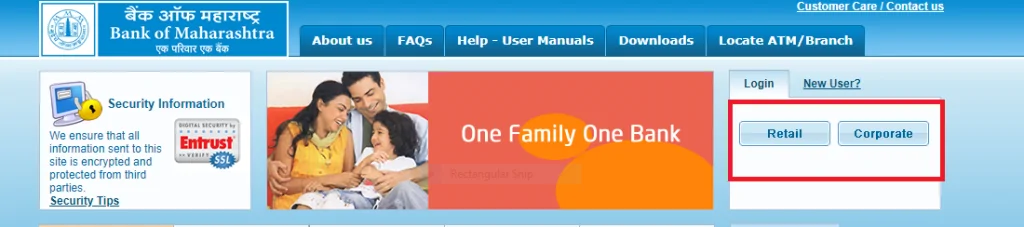
Step 2: Select the option ‘Retail’ or ‘Corporate’
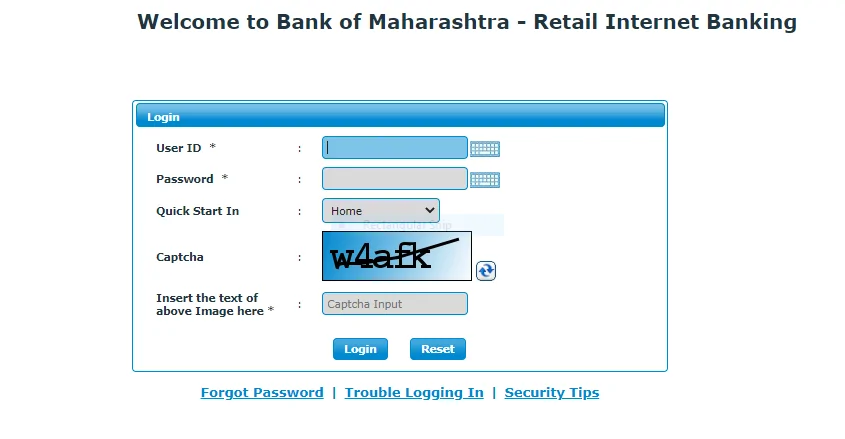
Step 3: Enter your user ID, password and the tab from where you want to avail the service and click on Login
Step 4: You will be logged in to the net banking portal from where you can avail all net banking facilities
In case you forget your net banking login password, follow these steps:
Step 1: On the login page, click on Forgot Password
Step 2: Enter details such as user ID, type of user, registered mobile number, mode of delivery
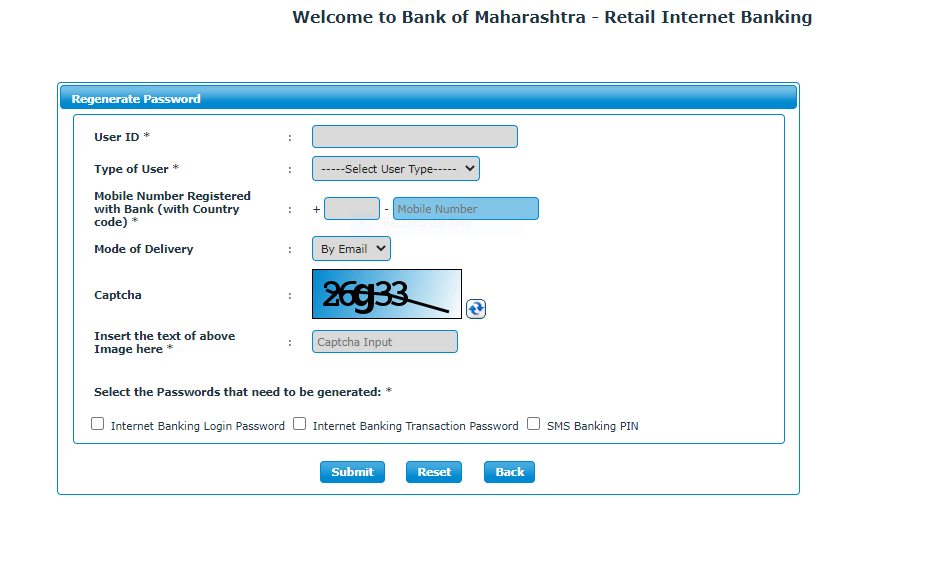
Step 3: Select the service for which the password has to be generated
Step 4: Click on Submit to reset your password
Apart from operating net banking service on the bank’s site, the customer can use the MahaSecure – an online app for net banking by the Bank of Maharashtra. The customer can also download the app- MahaSecure from the site. It should be made sure that the customer has got the necessary credentials from the bank to use the application. The bank provides app activation details to the customer on his/her registered mobile number with the bank. The process for Bank of Maharashtra Net Banking Login is as under:
The bank provides some contact information modes to assist the customer in Bank of Maharashtra Net Banking Login process. The customer should note them and use for his convenience and future reference.
Checking Credit Report monthly has no impact on Credit Score Check Now
Q. How do I get User-Id and password for the Internet Banking Services?
After you have applied for internet banking service, your user Id & Passwords will be sent to your address registered with the bank. In case your current address is not updated in the bank’s record, you should get it updated at the earliest.
Q. Can I change the User Id and Password?
Yes, you can change your password any number of times. However, you cannot change your user ID. You must change the machine-generated passwords at first login.
Q. What is the process to unblock a Blocked User ID?
Bank has provided a Toll-free number i.e. 1800 233 1808 to solve the issue. You can call on this from your registered mobile number.
Q: How can I have a duplicate password, if I forget the earlier one?
There is a button on the Login page ‘Forgot password’. Customers with a lost password can submit a request for the login password under this section.
Q: Is mobile number necessary for Bank of Maharashtra net banking login?
Yes, you have to register your mobile number with the bank to avail net banking facilities online.