Download the
Paisabazaar app Today!
Paisabazaar app Today!
Get instant access to loans, credit cards, and financial tools — all in one place

Win Assured Cashback

Our Advisors are available 7 days a week, 9:30 am - 6:30 pm to assist you with the best offers or help resolve any queries.


Get instant access to loans, credit cards, and financial tools — all in one place

Scan to download on



 Personal Loan
 Business Loan
 Home Loan
 Other Loans


Our Advisors are available 7 days a week, 9:30 am - 6:30 pm to assist you with the best offers or help resolve any queries.
An EPF subscriber gets the facility to check contributions made to the account through the EPF passbook. One can access it by visiting the EPFO passbook portal, login using the UAN and password and download the passbook for future reference.
600 or 750? What's your credit
score? Check for FREE.


Let’s Get Started
 +91
+91
The entered number doesn't seem to be correct
EPFO members and their employers make monthly contributions to their EPF account. They earn a relatively higher interest rate on these contributions than regular savings accounts and fixed deposits. These contributions and other entries are mentioned in an EPFO passbook. Let us understand what is an EPF passbook, how to login and download it and other details below.

An EPF passbook is a document that contains all contributions made by the employee as well as the employer in EPF and EPS accounts. Details of all the monthly contributions made as well as the interest accumulated in the beneficiary’s account are listed in the passbook. It is noteworthy that if you have multiple EPF accounts, you will have separate passbooks for each account that can be accessed using the specific member ID after logging in to the account. However, you will have to register your UAN (Universal Account Number) on the official EPFO website to access your EPF passbook.

Get FREE Credit Report from Multiple Credit Bureaus Check Now
Table of Contents :
Members of EPFO can download and print their EPF passbook online. This service can be availed through the EPF website. Let us have a look at how an employee can download e-passbook from the EPF portal:
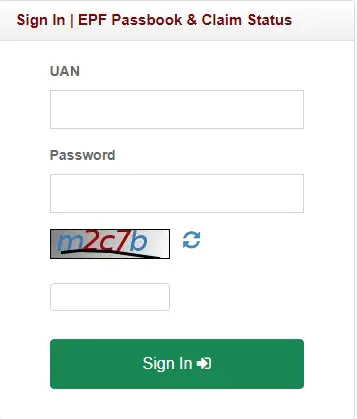
Step 1. Visit the EPF Member Passbook page/EPF Passbook Login page on EPFO Website (https://passbook.epfindia.gov.in/MemberPassBook/Login.jsp)
Step 2. Enter your UAN and password generated at the EPF member portal along with the captcha code that you see on the screen. Now click on the “Sign In” button to login to EPF passbook member homepage.
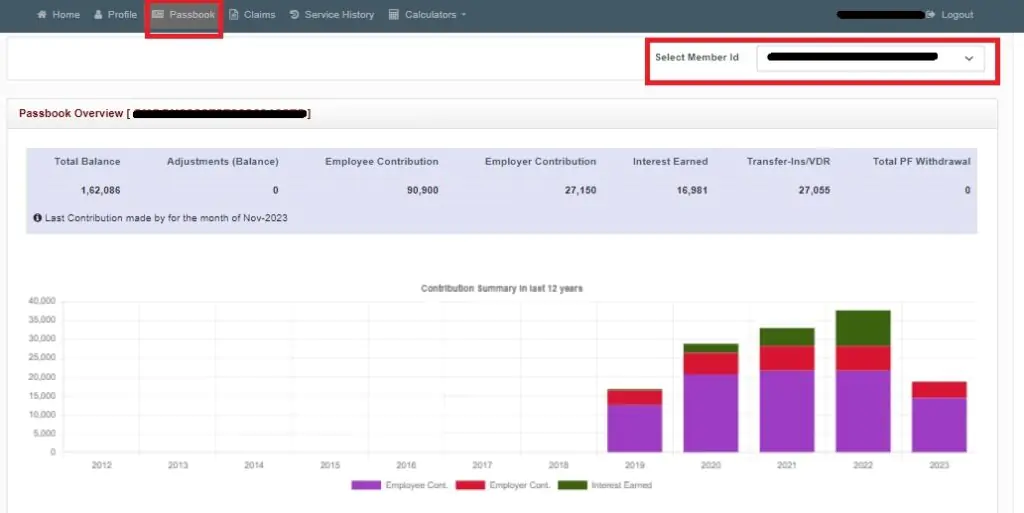
Step 3. Once you have logged in to the EPF passbook portal, click on the “Passbook” tab and select the member id from the different EPF accounts linked with your UAN.
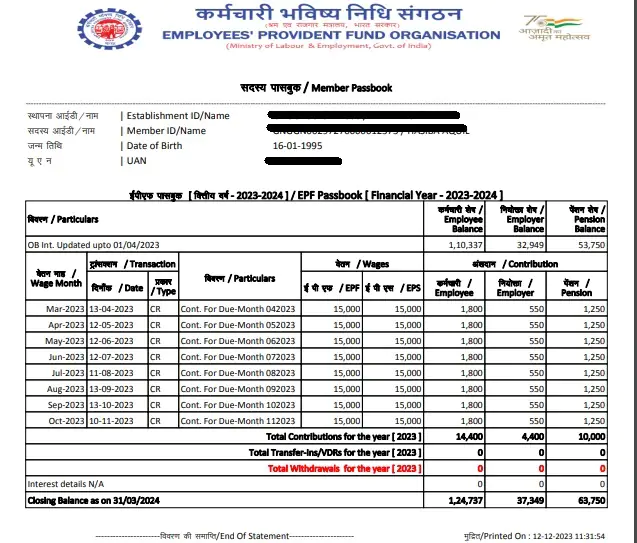
Step 4. You EPFO passbook will be displayed on the screen and you can download it in PDF format that can be printed for future reference.
Know More: EPFO Member Portal – Login, Registration, Services, Password Reset & Passbook
This method allows you to download EPF passbook online without visiting the EPF passbook login/EPF member passbook login portal. For EPF Passbook download using the UMANG app, simply follow the steps given below:
Step 1. Download the UMANG app from Google Play Store or App Store.
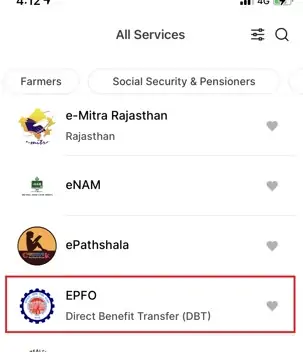
Step 2. Select the “EPFO” option listed under ‘All Services’ tab
Step 3. Under ‘Employee Centric Service’, click on ‘ View Passbook’
Step 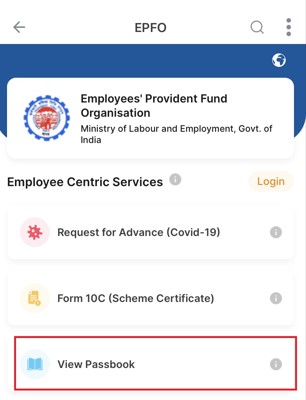
Step 4. Enter your UAN to get an OTP on your registered mobile number
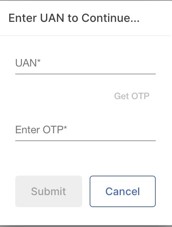
Step 5. To proceed further, enter the OTP received
Step 6. You will see Member IDs of all EPF accounts linked with your UAN. Click on the EPF Member ID for which you wish to view and download the EPF passbook.
Read More: Why you should download Umang App for EPF
Get FREE Credit Report from Multiple Credit Bureaus Check Now
Once you login to the EPF member passbook portal, there are array of services that you can avail such as:
If total contribution to your EPF account exceeds Rs. 2.5 lakh in a financial year, then the interest on that additional amount is taxable at the rate of 10% (if PAN has been submitted) and 20% (in case no PAN is submitted). You can now also check the amount of tax payable every month on your EPF account balance. Here is a step-by-step guide to do so:
Step 1: Login to the EPF member passbook portal using your UAN and password
Step 2: Click on the Passbook tab and select the member ID of the EPF account for which you want to check tax payable details
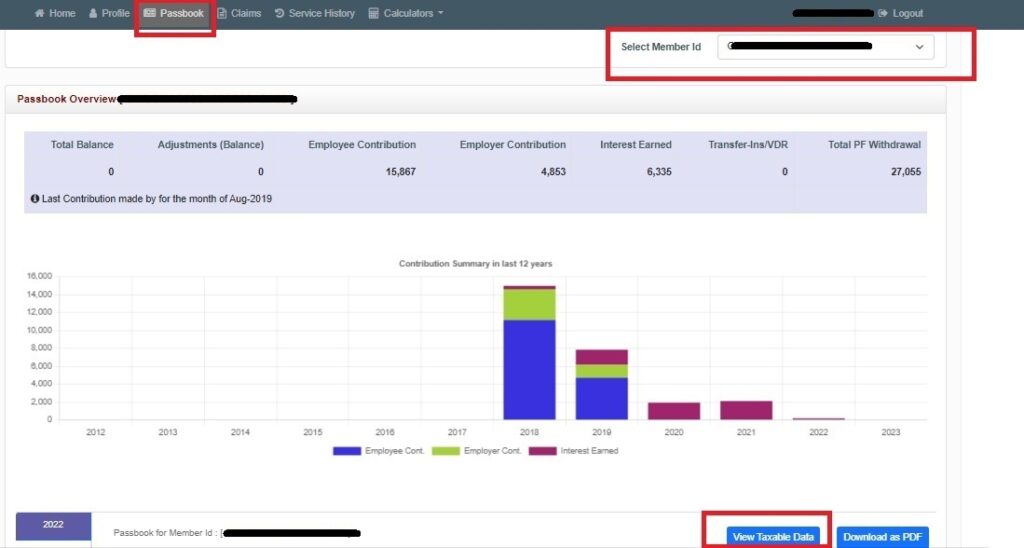
Step 3: Click on the “View Taxable Data” button to view your taxable balance for each month
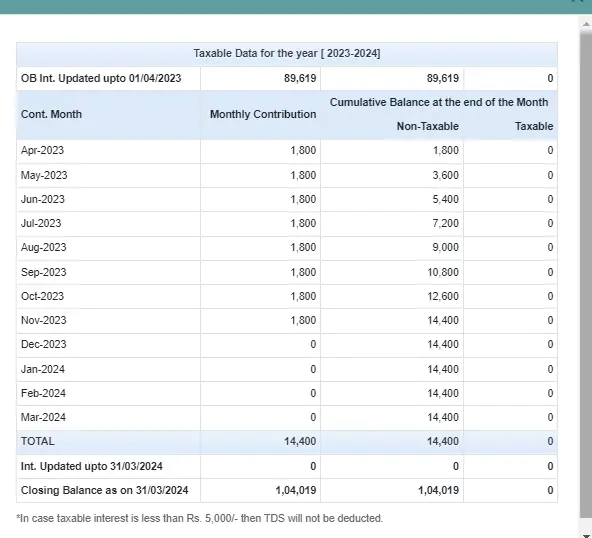
Step 4: You can download this passbook and print it for future reference.
Given below is the step-by-step guide to check your EPF passbook claim status online via the EPF passbook portal:
Step 1: Login to the EPF member passbook portal using your UAN and password
Step 2: Click on the Claims tab
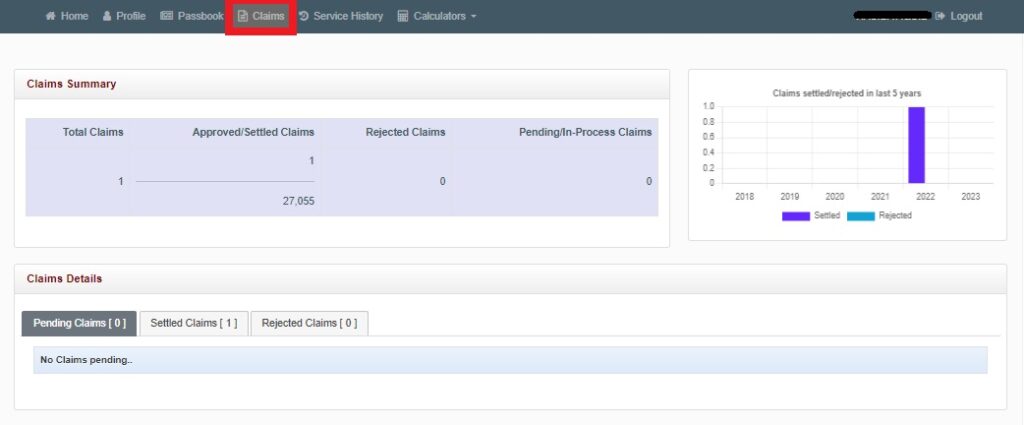
Step 3: Claims Summary as well as Claims Details including the total number of claims, number of approved/settled claims, rejected claims and pending/in-process claims will be displayed on screen
You can also view your employment/service history via the passbook portal online. Given below are the steps to do so:
Step 1: Login to the EPF passbook portal using your UAN and password
Step 2: Click on the Service History tab
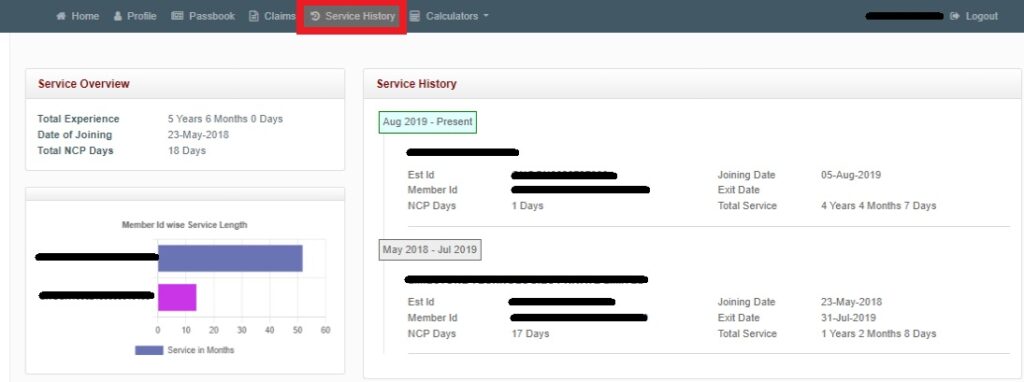
Step 3: Your service history and service overview will be displayed on your screen which will include details such as your total experience, date of leaving and joining the different organizations, total NCP days, employer details and total service in each organization.
You can also use the EPF passbook portal to calculate your EPF, EDLI and EPS or pension amount. Given below are the steps to check EPF-related forecasts:
Step 1: Login to the EPF passbook portal using your UAN and password
Step 2: Click on the Calculators tab and select if you want to use the EPF, EDLI or Pension Calculator

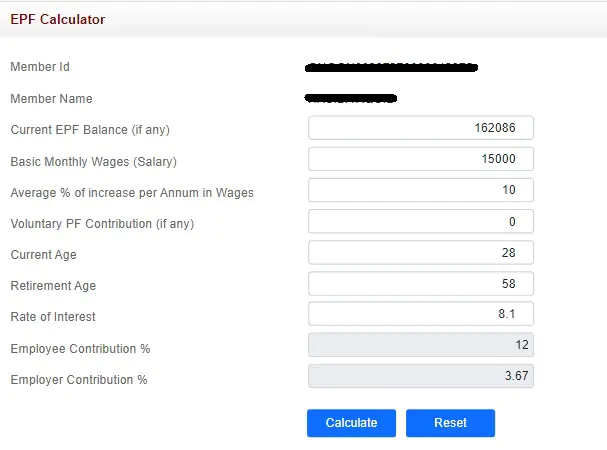
Step 3: Fill in the relevant details or go ahead with the pre-filled data (wherever appropriate) and click on “Calculate” to know your EPF, EDLI and EPS balances and account summary.
The EPF passbook of an employee contains the following details:
EPF passbook is updated by EPFO as soon as a contribution is made to the employee’s account. It contains the month and year in which the contribution is made. In case you do not find your EPF passbook updated, it is advisable that you wait for a few days and log in to the portal again to get the updated passbook.
The employer contributes 8.33% of the employee’s basic salary and dearness allowance in the EPS account of the employee every month. In case this salary component of the employee comes to be around Rs. 15,000, the employer contributes Rs. 1,250 in the EPS account of the employee. The pension contribution can be seen in the last column of the EPF passbook.
If you do not want to go for the EPF passbook download and only want to do an EPF passbook balance check, you can do so through SMS, missed calls, EPF e-passbook, etc. Let us understand how to check EPF balance online and offline:
To know your EPF account balance via SMS simply type “EPFOHO UAN” and send an SMS to 7738299899 from your registered mobile number. Do note that ENG stands for English. You can receive your account balance in ten different vernacular languages.
You can also check your EPF passbook balance using your mobile number. To know your EPF account balance via missed call, simply dial 9966044425 from your registered mobile number.
EPFO provides the facility to view the e-passbooks online only to those members who are registered at the EPF member portal.
The EPF interest rate is reviewed annually. EPF interest rate for FY 2024-25 is 8.25% p.a.
The passbook is generated within 6 hours of registration of the member at the EPF portal.
Any updated details or changes made on the portal will reflect in the EPF member passbook after 6 hours.
The entries in the e-passbook are reconciled in the field offices of EPFO and updated in the passbook.
No, the EPF member passbook facility is not available for all entities. The following entities cannot avail this facility online :
The downloaded passbook is in pdf format and it does not require any password to open the document. You do not need the password that was set for the EPF member portal to open this document.
In case you have forgotten the EPF passbook password, you can go for EPF password reset or EPF passbook password change at the EPF unified member portal.
UAN EPF passbook statement download is not possible without using UAN as it is mandatory to login to the EPF account to download the PF passbook online as well as through the Umang app.
EPFO members can check their EPF balance and interest accrued by sending an SMS “EPFOHO UAN״ to 7738299899.
Your EPF passbook is updated as soon as the money is transferred to your EPF account. In some cases, it may take up to 4 hours to reflect the latest updates.