Download the
Paisabazaar app Today!
Paisabazaar app Today!
Get instant access to loans, credit cards, and financial tools — all in one place

Win Assured Cashback

Our Advisors are available 7 days a week, 9:30 am - 6:30 pm to assist you with the best offers or help resolve any queries.


Get instant access to loans, credit cards, and financial tools — all in one place

Scan to download on



 Personal Loan
 Business Loan
 Home Loan
 Other Loans


Our Advisors are available 7 days a week, 9:30 am - 6:30 pm to assist you with the best offers or help resolve any queries.


UPI allows to transfer funds to and from savings accounts directly using the BHIM app or other third-party UPI apps. NPCI has now integrated RuPay credit cards with the UPI platform to make payments directly using these cards.
Let us discover how convenient it has become to link RuPay credit card with the BHIM app and carry out transactions using your RuPay credit card on UPI.
Linking RuPay credit card on UPI has benefitted users in many ways. Some ways are mentioned below:
Linking your RuPay credit card on BHIM UPI is a quick and easy process. The below-mentioned steps explain how you can link your RuPay credit card with the BHIM UPI app:
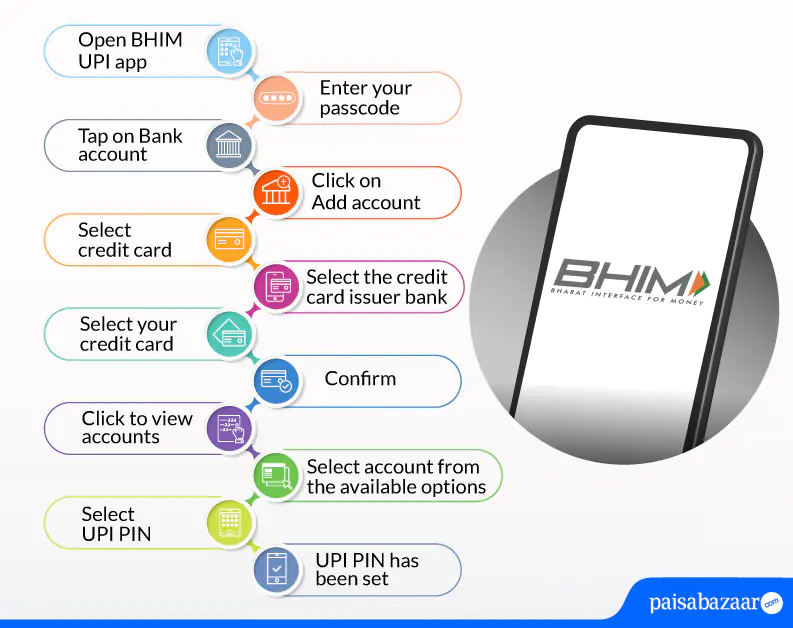
Step 1: Open BHIM UPI app on your phone
Step 2: Enter your passcode
Step 3: Tap on the “Bank Account” option on the left side of your screen
Step 4: Click on “Add Account” on the right side of the screen below
Step 5: Select “Credit Card”
Step 6: Select the credit card issuer bank
Step 7: Select your credit card and confirm
Step 9: Click to view accounts
Step 10: Select account from available options
Step 11: Select UPI PIN
Step 12: UPI PIN has been set
Step 13: You can start making transactions now
The below-mentioned steps explain how to make payments with RuPay credit card on BHIM UPI:
Step 1: Scan the UPI QR code of the merchant
Step 2: Enter the amount that needs to be sent or the amount will be auto-fetched upon scanning
Step 3: Select your RuPay credit card from which the payment needs to be made and enter the UPI PIN
Step 4: The transaction will be done successfully
| Do’s | Don’ts |
| The user will have to allow the UPI app to read user’s SMS, contacts, and call history so that UPI can be linked to the user’s credit card | Never share your UPI PIN with anyone |
| Set up a different UPI PIN in order to authenticate credit card transactions on UPI, while you link your credit card on UPI | Avoid keeping your credit card UPI PIN and card PIN same |
| Make sure you make payments only QR codes of merchants or e-commerce portals using credit card on UPI | Never share OTP with anyone which you receive while doing the registration |
| You can also set up UPI Autopay to make payments of your credit card bills on time | Never breach the credit limit assigned by your bank |
| You need to keep your mobile number updated with your credit card issuing bank in order to link your RuPay credit card on UPI | Don’t make payments using your RuPay credit card for categories such as person to person, digital account opening, lending platforms, cash withdrawal at merchant, cash withdrawal at ATM, card-to-card payment, ERUPI, IPO, foreign inward remittances, mutual funds and any other categories that are restricted by the issuing bank or RBI from time to time |
| Check your available balance and outstanding amount on UPI before you initiate any merchant payment |
| Axis Bank | Canara Bank |
| HDFC Bank | Indian Bank |
| Kotak Mahindra Bank | Punjab National Bank |
| Union Bank | Paytm Payments Bank |
| YES Bank | |
| Most Asked Questions
I have forgotten my UPI PIN, how can I regenerate? It is easy to regenerate your UPI PIN. Select the credit card account for which you need to generate UPI PIN, select ‘Forgot UPI PIN’ from the drop down menu and follow the steps to generate your new UPI PIN. Can I link my Visa/Mastercard credit card on UPI? No. Currently, only RuPay credit cards can be linked on UPI. How many RuPay credit cards can I link on UPI? There is no restriction on linking the number of RuPay credit cards on UPI. Is it possible to make my linked credit card as a default account to receive money? No. You cannot make a credit card account as your default option to receive money. |

 Limited Time Offer


 with Every Card
Choose a Card Matching Your Lifestyle
Please enter a valid full name
 +91
+91
The entered number doesn't seem to be correct
