


You can simply scan a merchant QR, choose your RuPay credit card as the payment mode, and authenticate the transaction using a UPI PIN. If you are a first-time RuPay Card user, read on to know how to link RuPay credit cards to UPI.
How to Link RuPay Credit Card With UPI
Why Choose Paisabazaar ?

Compare India’s best credit cards
See cards from top Banks & issuers

Choose card matching your lifestyle
Wide choice of 100+ credit cards

Pre-qualified offers, zero docs
Offers ranked according to eligibility


4.5/5
15.8L Reviews
6Cr+Happy Customers
2 M+Cards Issued
100+ CardsMultiple Choices
 Airport Lounge Access
with every credit card


Get a with Every Card
with Every Card
Choose a Card Matching
Your Lifestyle
How to Link RuPay Credit Card with UPI (Step-by-Step Guide)
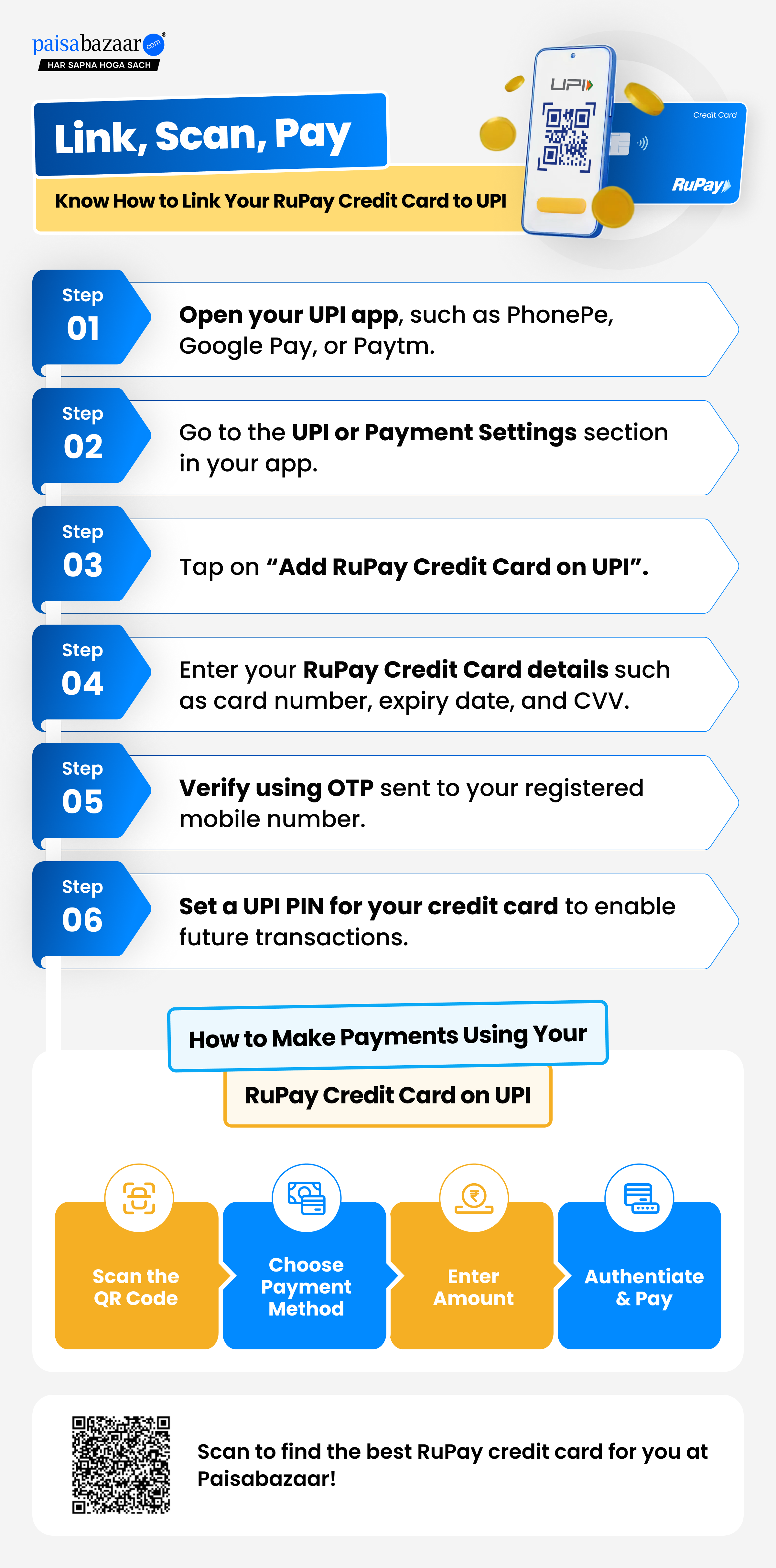
Benefits Of Linking Your RuPay Credit Card To UPI
Quick Tips to link RuPay Credit Card with UPI
Given below are some do’s and don’ts consumers should follow before linking a credit card to UPI:
Do’s:
Don’ts
How to Apply for a Credit Card Online?
Step 1: Enter your mobile number
Step 2: Enter OTP to verify your mobile number
Step 3: Explore pre-qualified credit card offers from top issuers
Step 4: Select your preferred card and complete the digital application
How to Apply for a Credit Card Online?
Step 1: Enter your mobile number
Step 2: Enter OTP to verify your mobile number
Step 3: Explore pre-qualified credit card offers from top issuers
Step 4: Select your preferred card and complete the digital application
FAQs
Why is my RuPay credit card not showing in UPI apps?
Your RuPay credit card may not show in UPI apps if it’s newly issued (taking 24–48 hours), your mobile number isn’t registered, the bank doesn’t support UPI onboarding, or due to technical glitches. Other reasons include using a non-RuPay card or having multiple customer IDs causing mismatches.
Is RuPay credit card UPI available for all banks?
Yes, RuPay credit card UPI is increasingly available as major banks expand their offerings. Consumers can now find multiple RuPay credit card options across the network, allowing seamless UPI payments for merchant transactions through popular apps, making it easier to enjoy rewards and cashback benefits.
Can I earn rewards on RuPay credit card UPI payments?
Yes, you can earn rewards, cashback, and loyalty points on RuPay credit card UPI payments. For example, SBI RuPay Credit Cards and ICICI RuPay Credit Cards offer rewards for UPI transactions, often with accelerated points for payments above Rs. 2,000. These rewards typically apply to merchant transactions via apps like Paytm, PhonePe, and Google Pay.
Are there any charges for RuPay credit card UPI transactions?
RuPay credit card UPI transactions generally have no direct charges for consumers, especially for amounts up to Rs. 2,000. For transactions above Rs. 2,000, merchants may pay a Merchant Discount Rate (MDR) of 1.1%–1.9%, which could sometimes indirectly affect consumers. Check with your bank for card-specific fees.
Can I withdraw cash using RuPay Credit Card on UPI?
You cannot withdraw cash via UPI using a RuPay credit card, as UPI is only for digital payments, transfers, and bill payments. However, like other credit cards, RuPay cards do allow cash withdrawals at ATMs, but these come with high interest and fees.
Can I earn rewards on RuPay credit card UPI payments?
Yes, you can earn rewards, cashpoints, or cashback on UPI payments made using a linked RuPay credit card, depending on your card issuer’s reward structure and applicable terms and conditions.
Why is my bank not supporting RuPay credit cards on UPI?
RuPay credit cards on UPI may not work if your bank hasn’t enabled the feature, the card isn’t a RuPay variant, or the merchant doesn’t accept credit cards–based UPI (P2M only). This functionality is limited to Person-to-Merchant payments and cannot be used for peer-to-peer transfers.
What steps should I take if I encounter difficulties while connecting my RuPay credit card to UPI?
If you face issues connecting your RuPay credit card to UPI, ensure your card is activated, your mobile number is registered with the bank, and your UPI app is updated. You can also clear the app cache, verify the card is supported, and contact your bank if problems persist.
Is RuPay credit card better than Visa for UPI?
Yes. In India, RuPay credit cards are currently the only cards that can be linked directly to UPI apps like BHIM, Paytm, PhonePe, and Google Pay for QR code payments. This enables seamless digital payments with often no transaction fees and higher domestic acceptance.
Can I use RuPay credit card UPI for merchant payments only?
Yes, RuPay credit card UPI is designed for merchant (P2M) payments only. You can scan QR codes or pay online via UPI apps, but they cannot be used for P2P transfers, cash withdrawals, or bank transfers. Linking an enabled RuPay credit card to apps like BHIM, Google Pay, or Paytm is required.
Credit Cards Articles

What is RuPay Credit Card and Its Benefits and Uses?

Rupanshi Thapa30 Oct 2026

MDR Charges on RuPay Credit Card UPI: How to Avoid Them
Rupanshi Thapa26 Oct 2026

IDFC FIRST Bank Introduces Zero Forex Mark-up Across Credit Cards
Rupanshi Thapa10 Sept 2026

Latest Axis Bank Credit Card Updates 2026

Lepakshi Phogat12 Aug 2026

What is a Supplementary Credit Card?
Rupanshi Thapa05 Aug 2026
What is a Forex Markup Fee? Meaning and How to Avoid It

Shruti Sharma26 Jun 2026

Benefits of a Secured Credit Card: A Smart Way to Build Credit History
Shruti Sharma25 Jun 2026

Cooling-Off Period After Credit Card Rejection: How Long Should You Wait?
Rupanshi Thapa22 Jun 2026

Credit Card Spending & Income Tax Scrutiny Limit 2026
Shruti Sharma22 Jun 2026

Does an FD-backed Credit Card Help Housewives Build Credit in India?
Shruti Sharma26 May 2026
Disclaimer
Paisabazaar is a loan aggregator and is authorized to provide services on behalf of its partners
*Applicable for selected customers
