Download the
Paisabazaar app Today!
Paisabazaar app Today!
Get instant access to loans, credit cards, and financial tools — all in one place

Win Assured Cashback

Our Advisors are available 7 days a week, 9:30 am - 6:30 pm to assist you with the best offers or help resolve any queries.


Get instant access to loans, credit cards, and financial tools — all in one place

Scan to download on


 Personal Loan
 Business Loan
 Home Loan
 Other Loans


Our Advisors are available 7 days a week, 9:30 am - 6:30 pm to assist you with the best offers or help resolve any queries.

Check Free Credit Score & Win up to ₹1 lakh


Let’s Get Started
 +91
+91
The entered number doesn't seem to be correct

HDFC Netbanking is a 24*7 digital banking platform that enables its customers to transfer funds online, access their bank accounts, avail various other banking services online. To access HDFC netbanking services online, customers need to login to their netbanking account using customer ID and password to manage accounts, transfer funds, pay bills, make investments, and much more. Your netbanking services are confidential with the bank and cannot be viewed by the merchants.
| Table of Contents: |
In order to provide convenience to all its account holders, HDFC Bank introduced the netbanking facility for all its account holders. With HDFC Netbanking service, account holders can avail various banking services from the convenience of their home or workplace 24*7. Customers are only required to get their account registered for HDFC netbanking services using their login credentials.
Account holders can avail the below-mentioned services through HDFC netbanking facility:
| HDFC Bank Net banking services | ||
| Transact | ||
| Fund Transfer (within HDFC Bank) | Fund Transfer (Outside HDFC Bank) | Open Fixed Deposit |
| Open Recurring Deposit | Fixed Deposit Sweep-in | Overdraft against FD |
| Enquire | ||
| Account Summary | HDFC Balance Check | HDFC Mini Statement |
| View / Download Account Statement | View Cheque Status | TDS Enquiry |
| Request | ||
| View / Add GST Number | CIBIL TU Score | Confirm KYC Details |
| Change Login Password | Update profile details | View Tax Credit Statements |
| Stop Payment of Cheque | Cheque Book | Demand Draft |
| IPO Application | Form 15G/Form 15H | Download Interest Certificate |

Get FREE Credit Report from Multiple Credit Bureaus Check Now
To avail HDFC Net banking facility, account holders are required to do HDFC net banking registration. For HDFC netbanking registration, account holders can follow any one of the below mentioned ways:
To register for HDFC Bank netbanking facility, account holders can visit the HDFC netbanking online and register using OTP. HDFC Bank account holders need to follow the below-mentioned steps for HDFC netbanking registration:
Step 1: Visit HDFC Bank net banking registration portal
Step 2: Enter the Customer ID
Step 3: Confirm the registered mobile number
Step 4: Input the OTP (One Time Password) which the account holder must have received on his / her mobile
Step 5: Select and provide the HDFC Debit card details
Step 6: Set the HDFC Net banking IPIN
Step 7: Login to HDFC Netbanking using the newly set IPIN
Account holders can register for HDFC netbanking facility using customer ID and IPIN. Users can find the customer ID and IPIN in the HDFC welcome kit.
Account holders can register for HDFC net banking online by following the steps mentioned below:
Step 1: Download the NetBanking registration form (individual or corporate) or visit the nearest bank branch for the same
Step 2: Fill in the form and submit it to the HDFC Bank branch
Step 3: HDFC Bank will courier the IPIN to the account holder’s mailing address
Step 4: Visit HDFC net banking portal
Step 5: Enter “Customer ID”
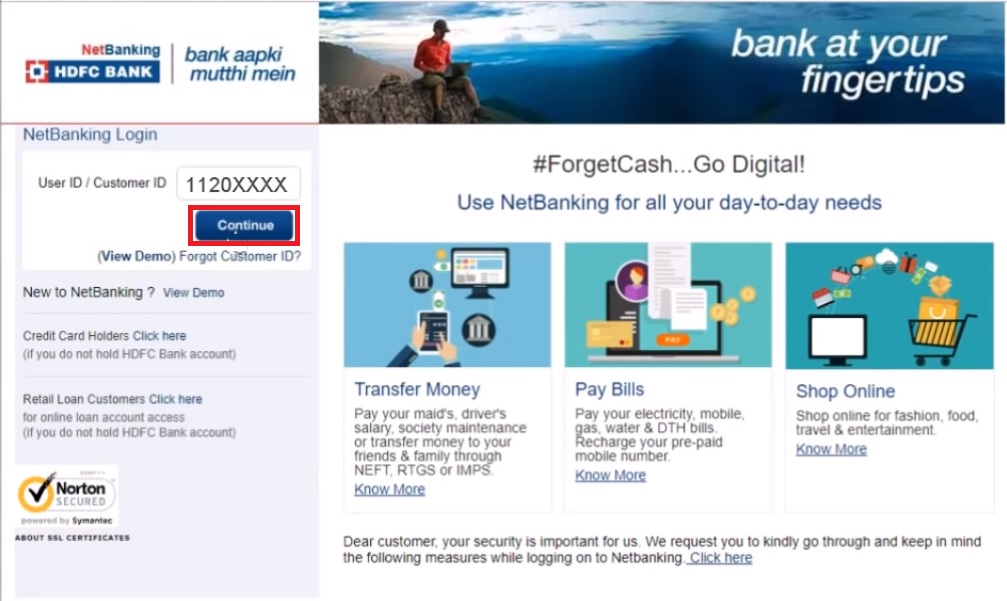
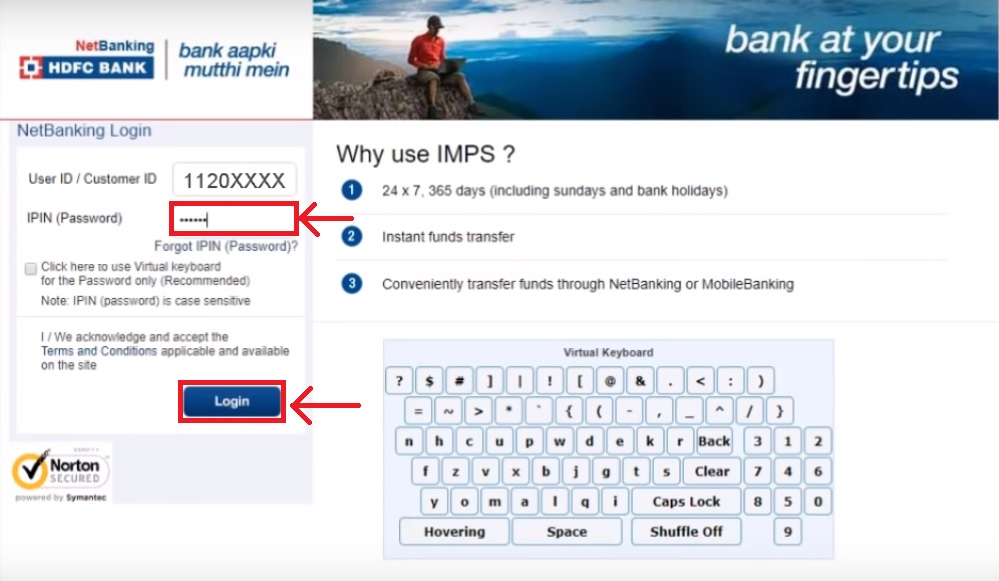
Step 6: Enter IPIN (mentioned in the HDFC Bank internet banking welcome kit) and click on “Login”
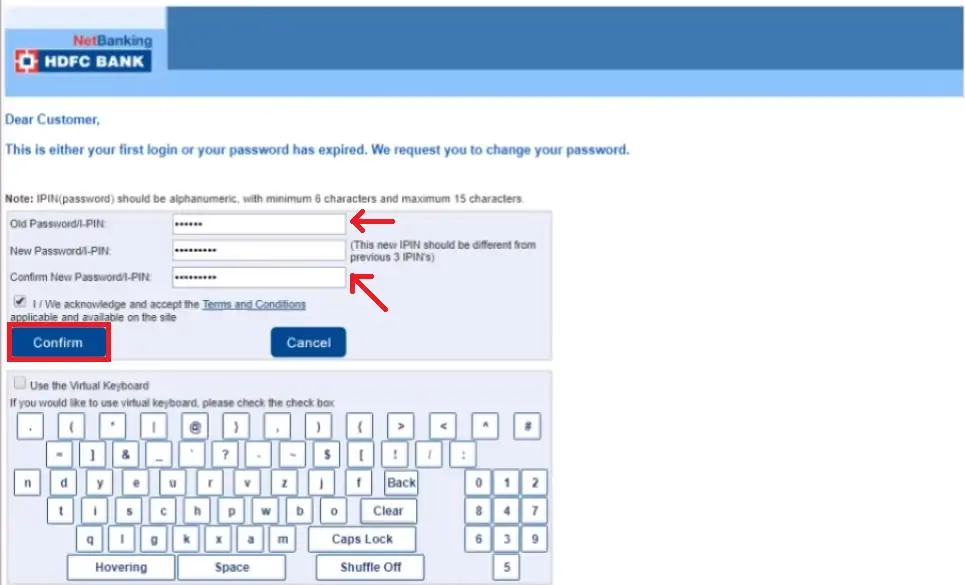
Step 7: On the next page, the account holder will be required to provide the old password (IPIN), new password for HDFC net banking and also confirm it
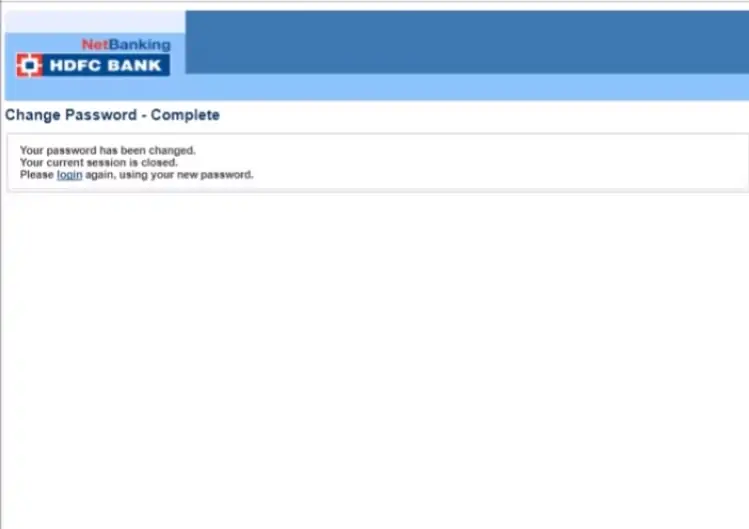
Step 8: HDFC net banking password will be updated and the account holder can login with the same
Step 1: Visit the nearest HDFC Bank ATM
Step 2: Insert HDFC Bank Debit Card and enter the ATM PIN
Step 3: From the main menu, select “Other Option”
Step 4: Select “NetBanking Registration” and confirm
Step 5: HDFC Bank will send the HDFC Netbanking IPIN by courier to the account holder’s mailing address
Step 1: Account holder should give a call to the HDFC Phone Banking number and provide the customer ID and Telephone Identification Number (TIN) or Debit Card and PIN for verification
Step 2: HDFC PhoneBanking agent will take the HDFC NetBanking registration request
Step 3: HDFC Bank will courier the IPIN to the account holder’s mailing address within 5 days
To login to HDFC netbanking portal, account holders need to follow the steps mentioned below:
Step 1: Visit HDFC Bank official website
Step 2: Click on “Login”
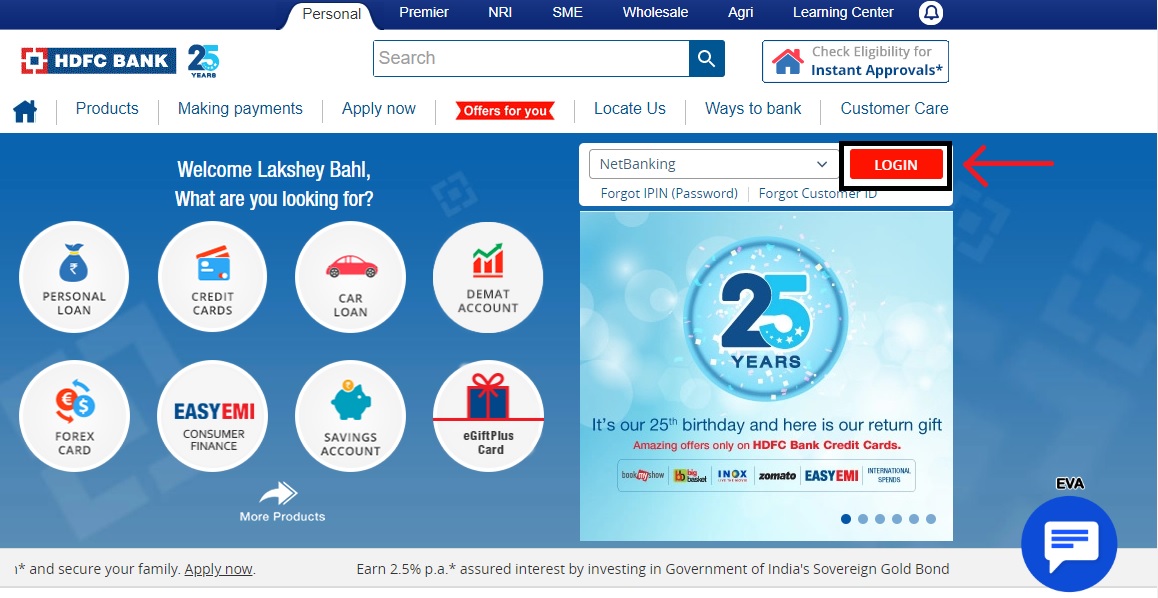
Step 3: On the next page, click on “Continue to Netbanking” button to visit HDFC Netbanking login page

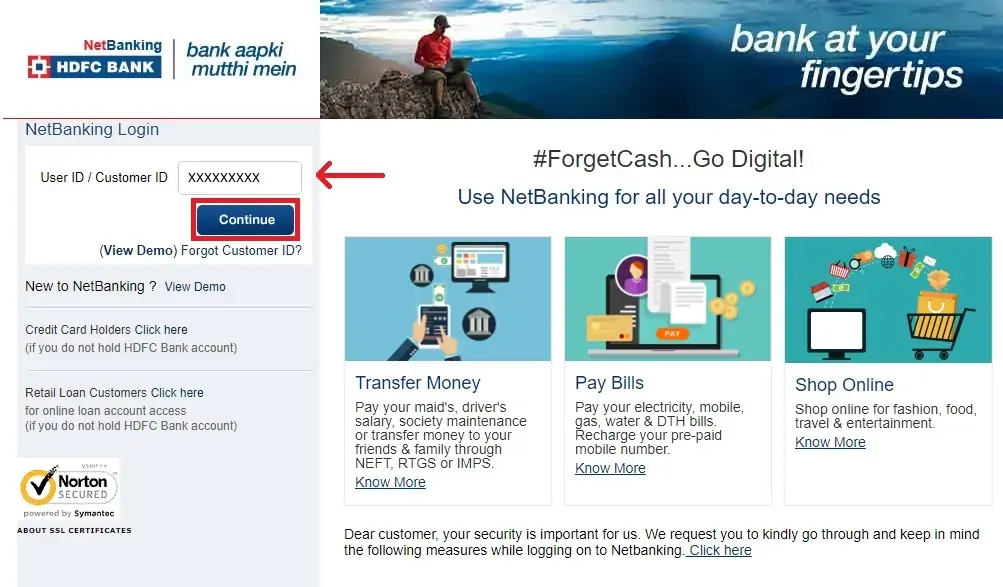
Step 4: Enter User ID / Customer ID and click on “Continue”
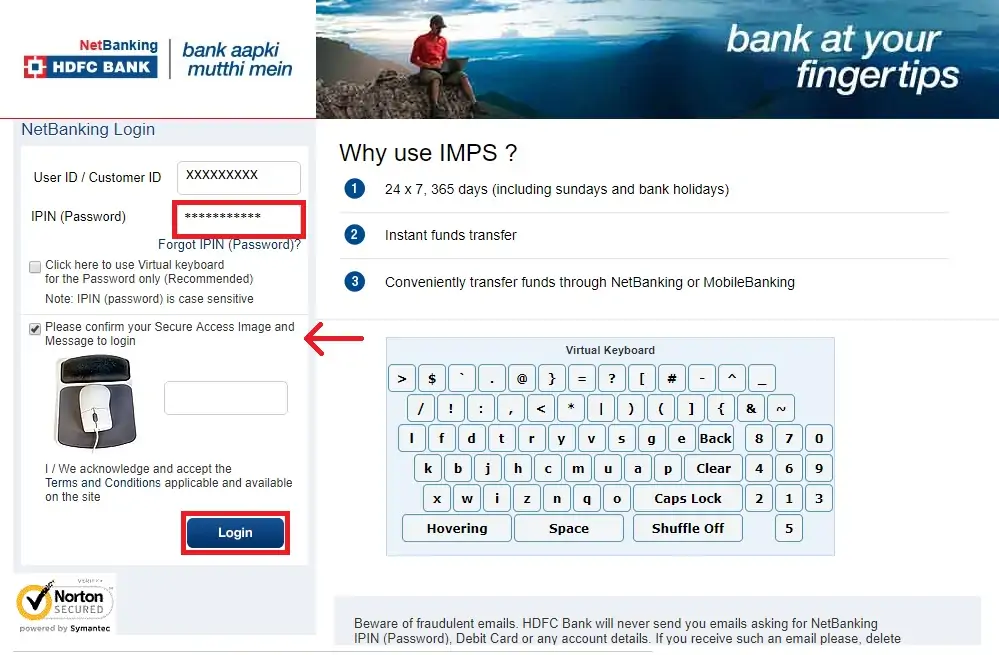
Step 5: Enter IPIN / HDFC Netbanking password & confirm secure access image & message to login successfully.
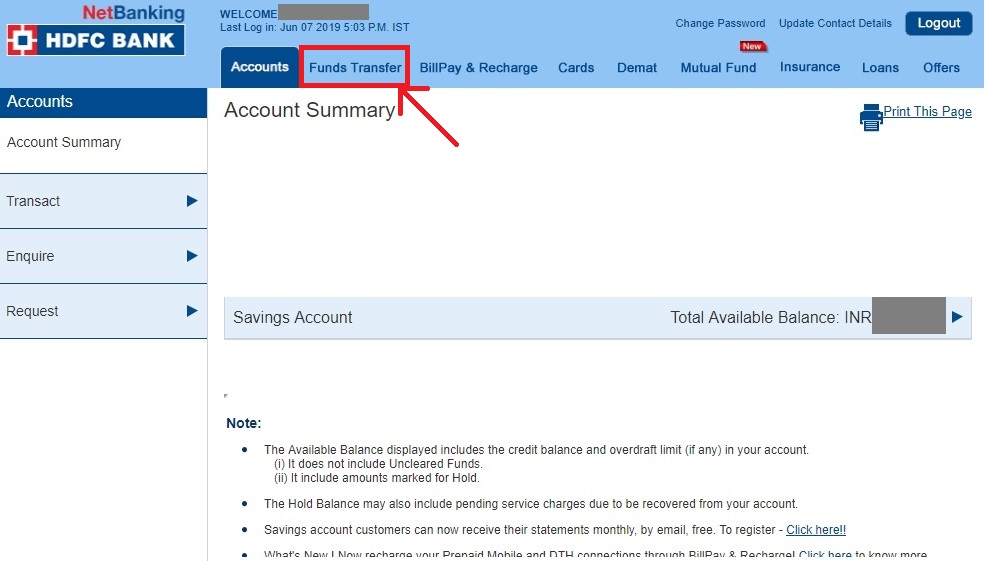
After a successful HDFC Netbanking login, account holders should follow the below mentioned steps to make fund transfer easily:
Step 1: After HDFC Net banking login, Click on “Fund Transfer” tab
Step 2: On the next page, select transaction type by clicking on “Go” button next to options mentioned below:
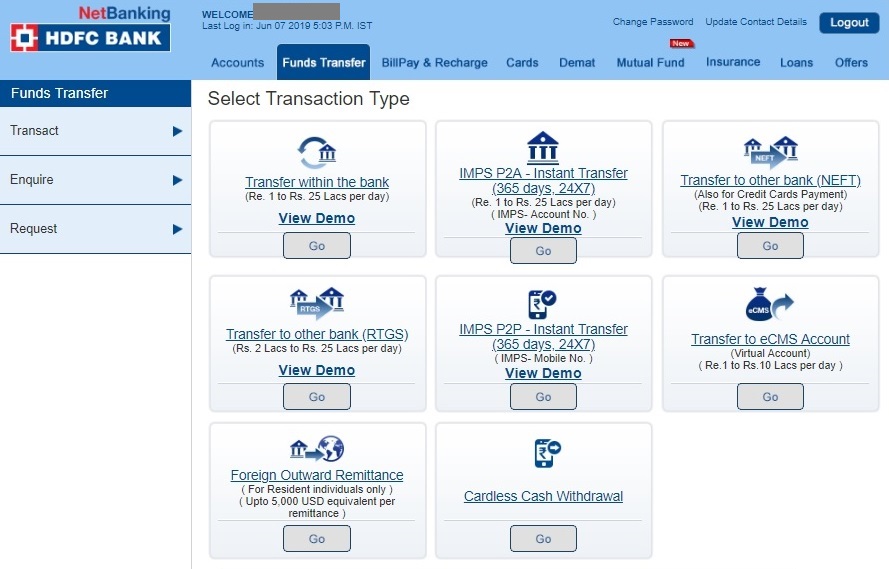
Step 3: After selecting any one of the above mentioned options, the account holder will be required to select a drawee account, beneficiary, transfer amount, transfer description. The account holder also needs to select transfer type and choose where he / she wants to receive fund transfer status
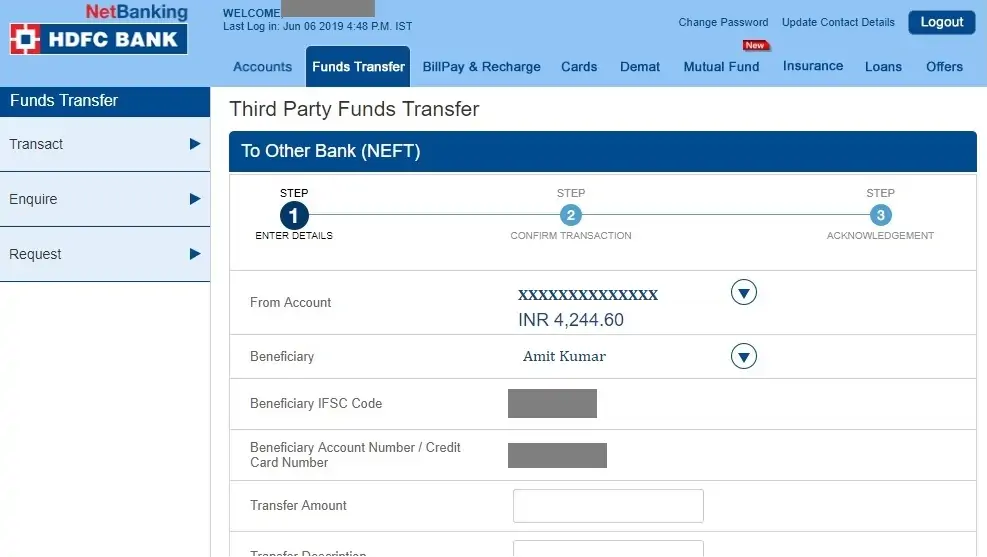
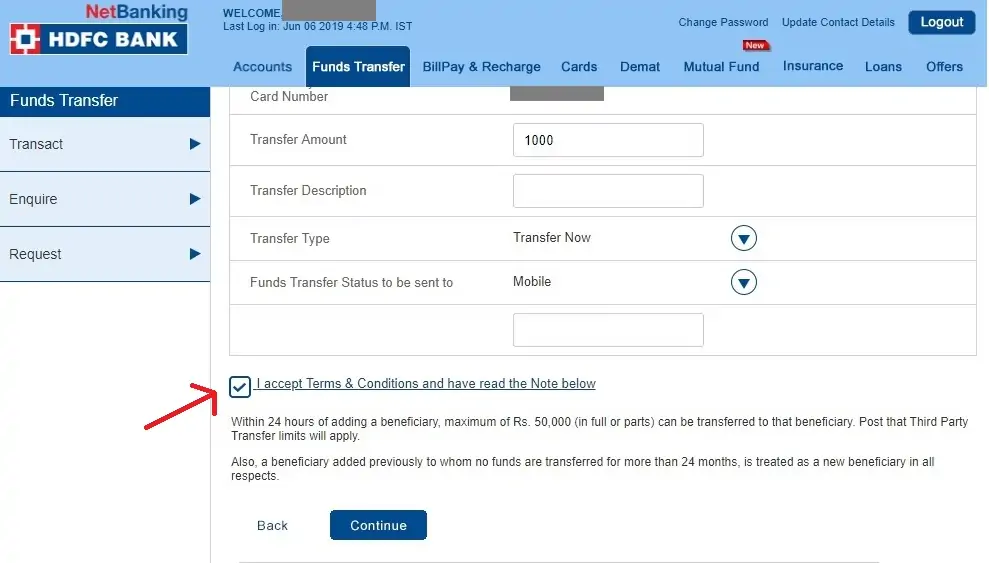
Step 4: Accept the terms and conditions and click on “Continue”
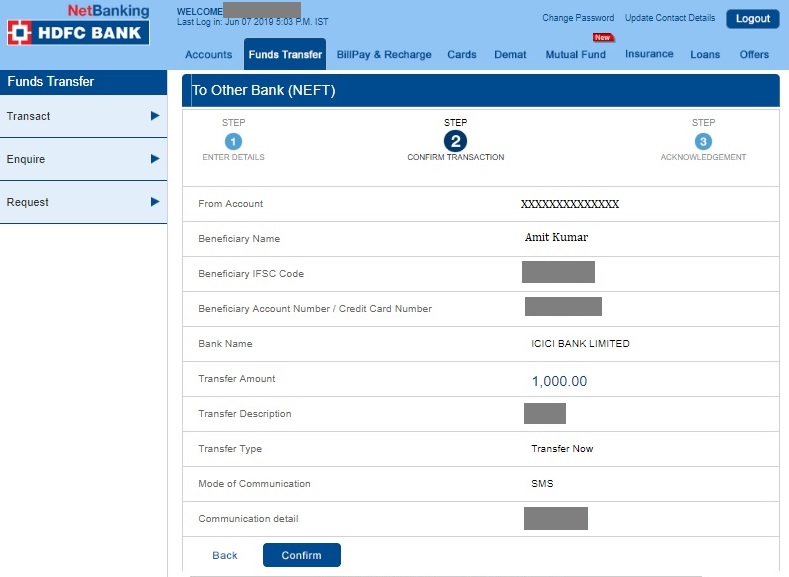
Step 5: On the next page, check all the details and confirm the transaction by clicking on “Confirm”
Step 6: On the next page, the account holder can get the reference number and acknowledgment of the fund transfer in order to track it at a later stage
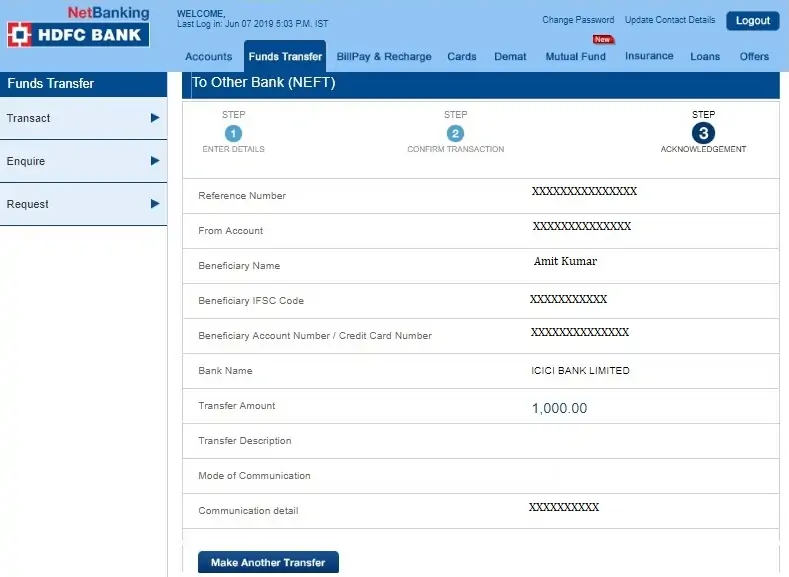
Note: If any account holder gets “Add Beneficiary” option after selecting transaction type, then he / she will be required to first add a beneficiary before transferring funds. Once the account holder has completed adding beneficiary, then he / she can continue with the fund transfer process.
Get FREE Credit Report from Multiple Credit Bureaus Check Now
In case any account holder doesn’t remember HDFC netbanking login, forgot password option can help him/her recover it. An accountholder can instantly reset or regenerate the HDFC Net banking password or IPIN by following the below-mentioned steps:
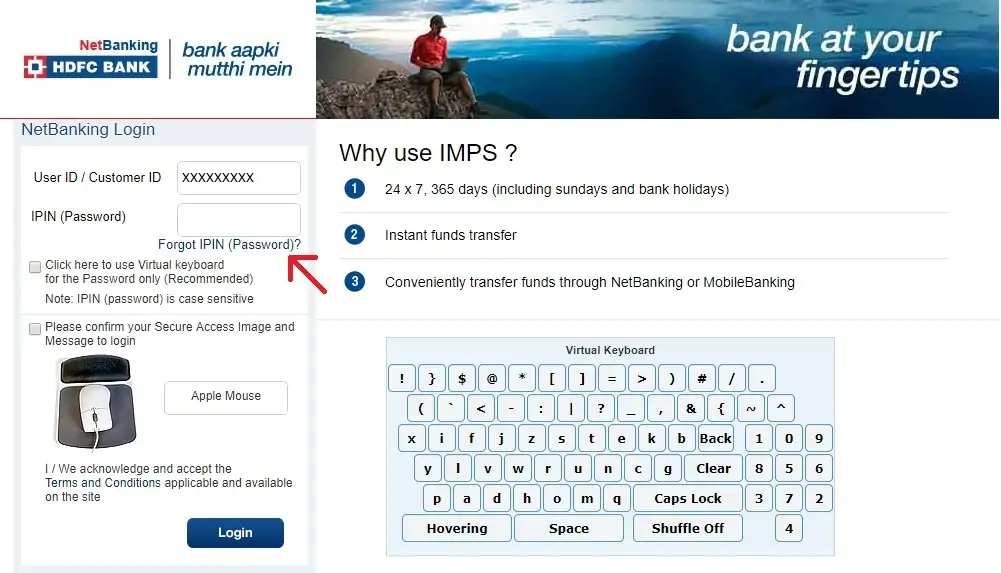
Step 1: Visit HDFC netbanking portal, enter HDFC Bank Customer ID & click on “Continue”
Step 2: Click on “Forgot IPIN (Password)”
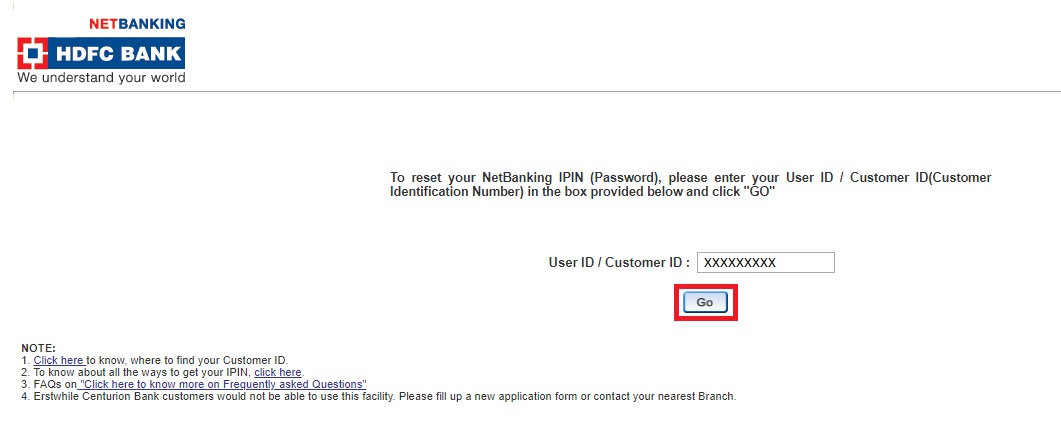
Step 3: On the next page, enter the “Customer ID” and click on “Go”
Step 4: Select one of the methods mentioned below to authenticate –
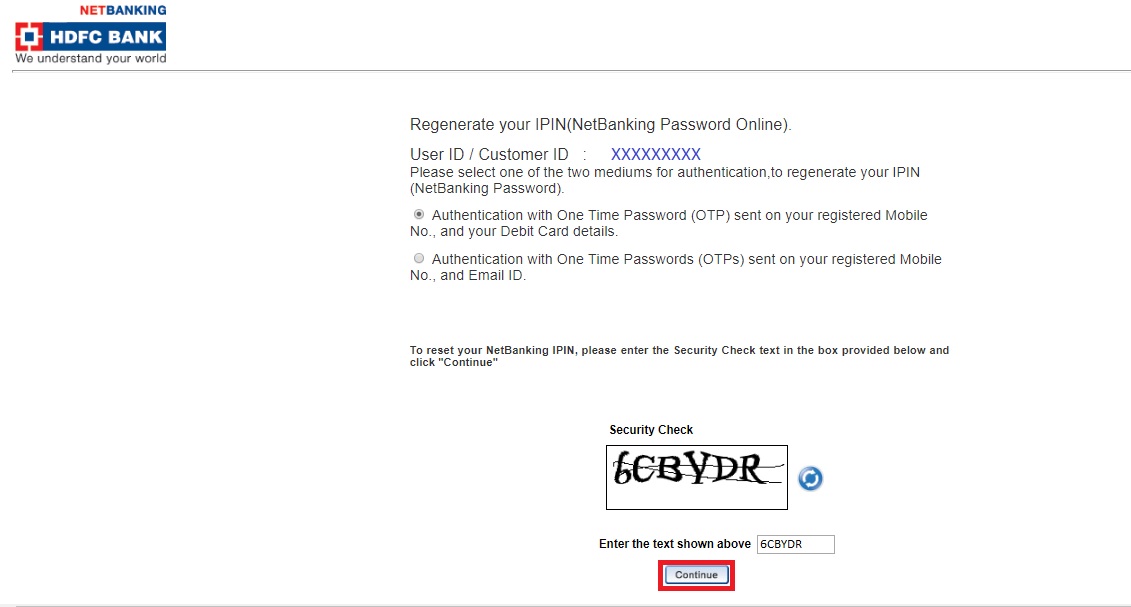
Step 5: Provide the details requested
Step 6: Enter the new HDFC Net banking IPIN
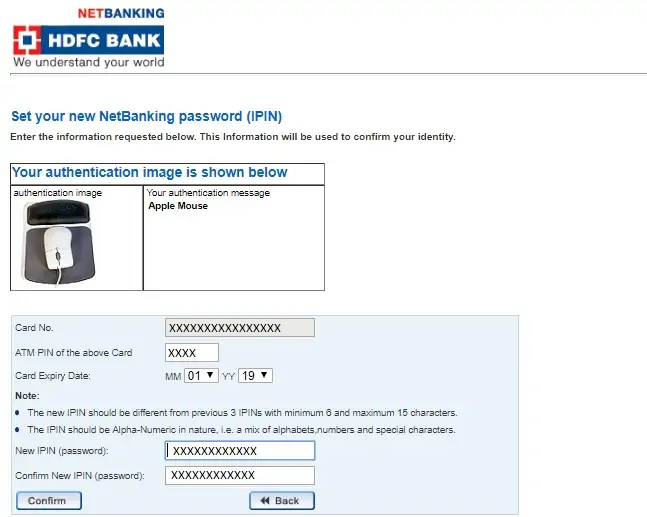
Step 7: Do HDFC Net banking login using the new net banking IPIN or password
Account holders can make their HDFC Credit card bill payment through HDFC Net banking. Account holders having other bank credit card can also do the same. Users will be required to follow the below mentioned steps to avail the same:
Step 1: Visit HDFC Bank official website
Step 2: Click on “Login”
Step 3: On the next page, click on “Continue to Netbanking” button to go to the HDFC Netbanking login page
Step 4: On the HDFC Netbanking login page, enter the User ID / Customer ID and click on “Continue”
Step 5: Enter IPIN / HDFC Netbanking password
Step 6: After successful login, click on “Cards” tab
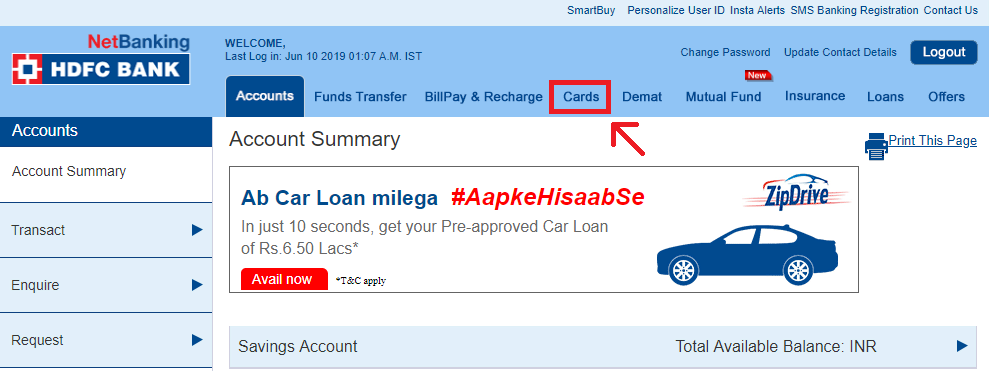
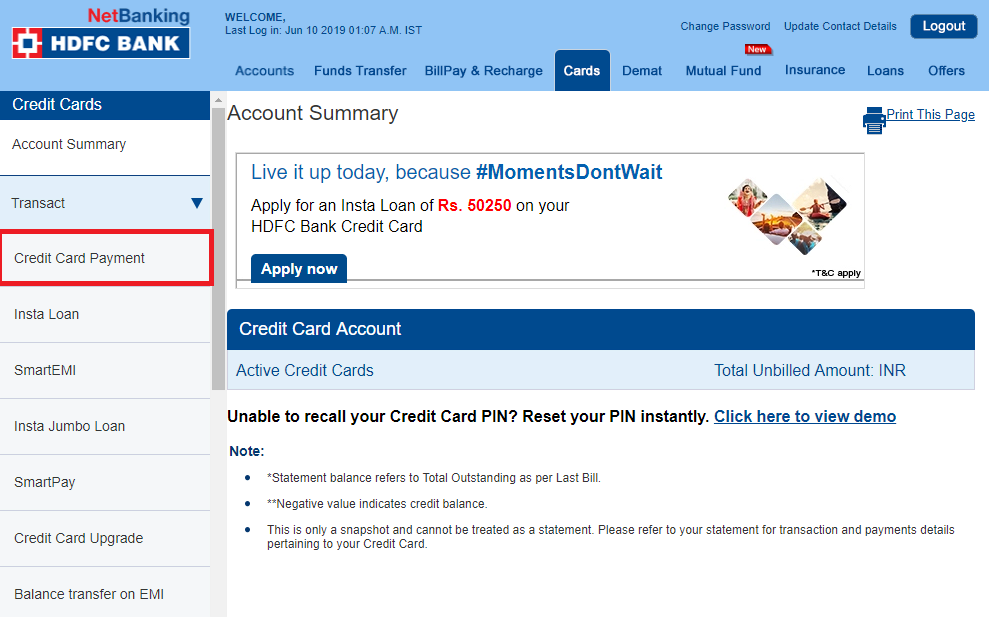
Step 7: Click on “Transact” and then click on the “Credit Card Payment” option from the dropdown menu
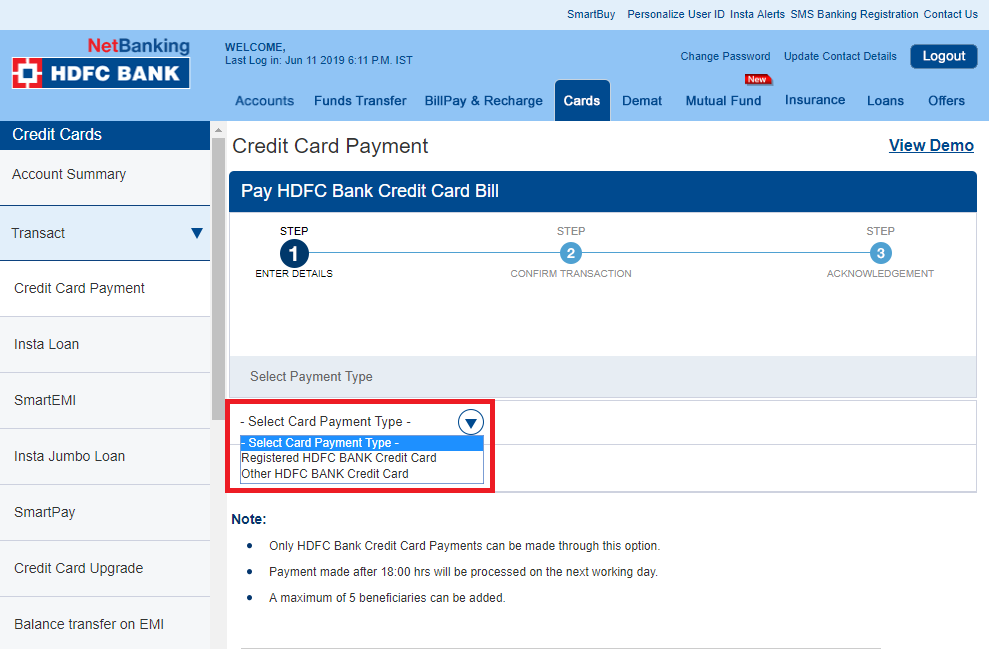
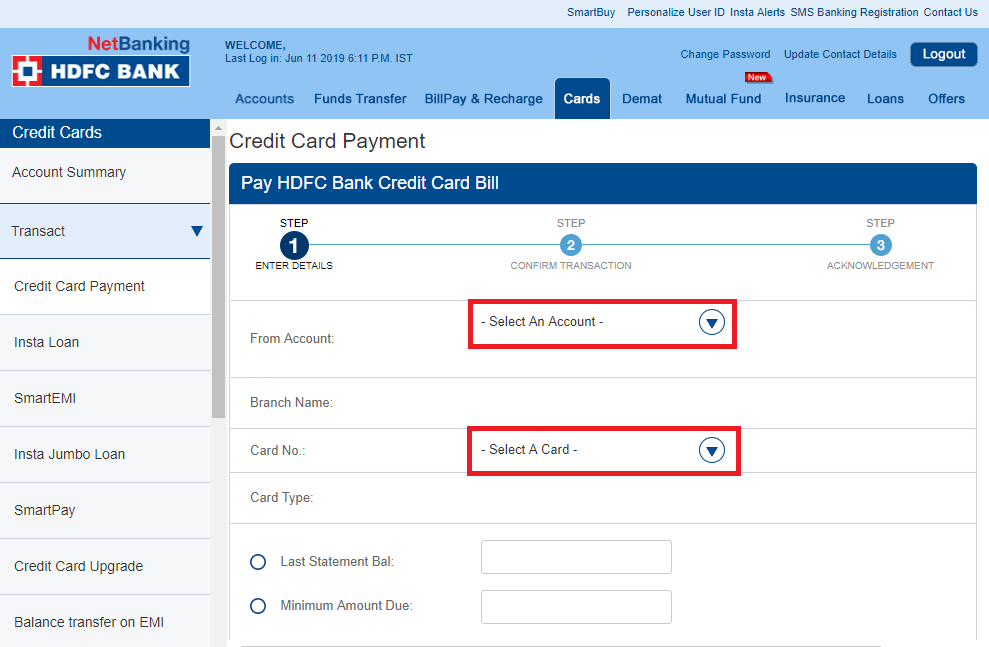
Step 8: Select the type of credit card by clicking on the “Select Card Payment Type” dropdown. An account holder can select between Registered HDFC Bank Credit Card and Other HDFC Bank Credit Card
Step 9: Select the account from which the account holder wants to make HDFC credit card payment through net banking & select HDFC credit card number as well
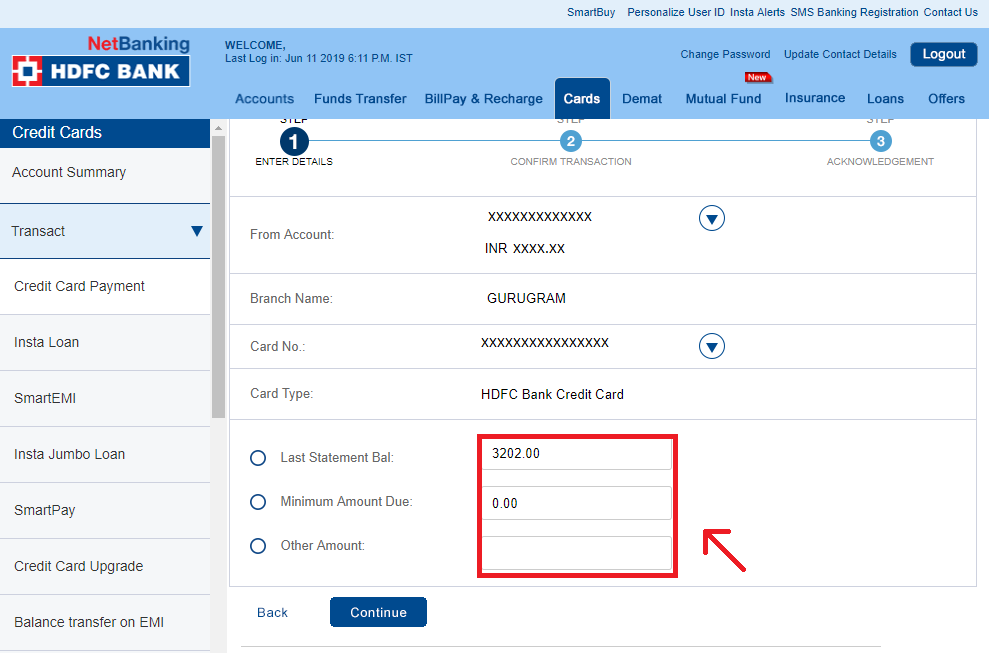
Step 10: Choose between “Last Statement Balance”, “Minimum Amount Due” and “Other Amount” and confirm the transaction to successfully make HDFC credit card payment through net banking
With the availability of HDFC Net banking service, its customers are offered multiple features, as well as benefits that make it easier to manage their savings account and related transactions.
Let us discuss some of the prominent features associated with this service:
In case of any queries, account holders using HDFC net banking services can call the HDFC net banking customer care number given below –
| City | HDFC Customer Care Number |
| Ahmedabad | 079 6160 6161 |
| Bengaluru | 080 6160 6161 |
| Chandigarh | 0172 6160 616 |
| Chennai | 044 6160 6161 |
| Cochin | 0484 6160 616 |
| Delhi & NCR | 011 6160 6161 |
| Hyderabad | 040 6160 6161 |
| Indore | 0731 6160 616 |
| Jaipur | 0141 6160 616 |
| Kolkata | 033 6160 6161 |
| Lucknow | 0522 6160 616 |
| Mumbai | 022 6160 6161 |
| Pune | 020 6160 6161 |
Customers travelling abroad can call on +9122 61606160
Ans. HDFC Bank gives net banking registration free for all its customers. Users can register for free for net banking.
Ans. Yes. It is mandatory to provide mobile number to access HDFC net banking facility in order to access net banking services.
Ans. The HDFC bank’s WhatsApp number to perform various banking activities 70-700-222-22.
Ans. There is no need to register for multiple savings accounts in HDFC Bank. Only one-time registration is required to access other savings accounts.
Ans. HDFC Bank gives you the freedom to set the limit on your account for any amount from Rs. 10,002 to Rs. 50,00,000. The limit can be reset as often as you need and, the preset limit for all accounts is Rs. 2 lakhs. However, if you have changed the limit, it will not change till you change it.
Ans. If you want to increase your Third Party Transfer limit, you need to login to net banking and follow these steps:
Ans. You can make fund transfer to the added beneficiary. The funds can be transferred to the payee only after 30 minutes cooling period.
Ans. The other way of transferring money from HDFC Bank to an account without adding the beneficiary is through an IMPS transfer using MMID. The Mobile Money Identification Number is a seven-digit unique number.
Ans. Account holders can avail various types of insurances using HDFC net banking services, such as life Insurance, medical insurance, health insurance, home insurance, motor insurance and many more. To avail/purchase insurance through HDFC Netbanking account holders can follow the below-mentioned steps: