Download the
Paisabazaar app Today!
Paisabazaar app Today!
Get instant access to loans, credit cards, and financial tools — all in one place

Get the app — instant card and loan offers!

Our Advisors are available 7 days a week, 9:30 am - 6:30 pm to assist you with the best offers or help resolve any queries.


Get instant access to loans, credit cards, and financial tools — all in one place

Scan to download on


 Personal Loan
 Business Loan
 Home Loan
 Other Loans


Our Advisors are available 7 days a week, 9:30 am - 6:30 pm to assist you with the best offers or help resolve any queries.
Aadhaar Virtual ID is a 16-digit temporary code that can be used for Aadhaar authentications. You can provide the UIDAI virtual ID instead of your Aadhaar number to agencies and protect your Aadhaar details from being accessed by someone else. Find out more about how to generate Aadhaar virtual ID.
600 or 750? What's your credit
score? Check for FREE.


Let’s Get Started
 +91
+91
The entered number doesn't seem to be correct
UIDAI issues virtual ID to address the issue of Aadhaar data breach as it would become almost impossible to track the Aadhaar number from the virtual ID. You can provide the Aadhaar virtual ID to get your e-KYC done at both private and government organisations. Virtual ID can also be used for Aadhar card download from UIDAI’s online portal.
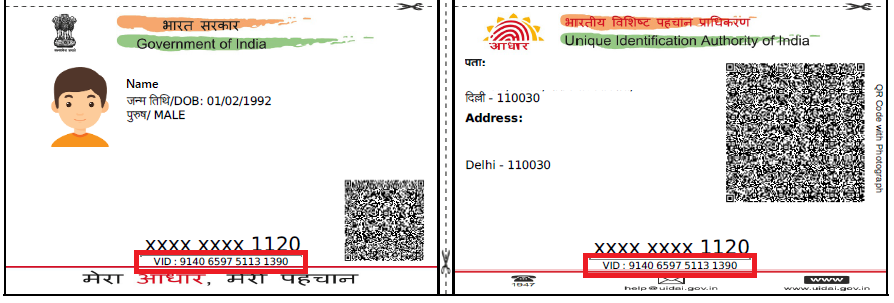
Virtual ID is an alternative to Aadhaar number. This temporary code consists of 16 numerals that are generated against an Aadhaar number. However, the virtual ID or VID in no case can be used to retrieve the original Aadhaar card.
At a time, only one virtual ID is generated against an Aadhaar number. It can be generated as many times as the user wants. This revocable code is valid for at least one day and can be changed with the change in date, i.e. at 00:00 am.

Now Get Free Credit Report every month from multiple credit bureaus Check Now
You have to generate the virtual ID (VID) to use it against your Aadhaar. The virtual ID can be generated online by visiting the UIDAI’s official site. However, it is worth mentioning that you should have the mobile number registered with UIDAI to avail this service as the virtual ID will be sent to your mobile number.
In case you have not registered your mobile number with UIDAI, you will have to first link your mobile number with Aadhaar card. The process for retrieving a virtual ID is same as that of the VID generation. To generate Aadhaar virtual ID online, you can follow these steps:
Step 1: Visit UIDAI’s website at http://uidai.gov.in/
Step 2: Click on the “Virtual ID (VID) Generator” from Aadhaar Services section
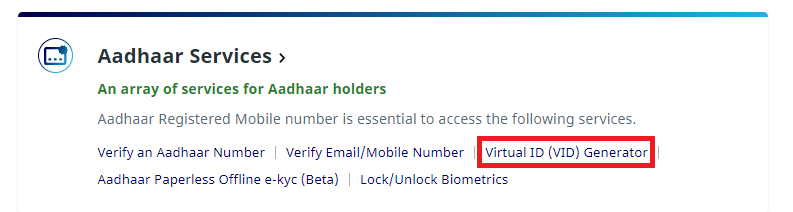
Step 3: You will be taken to a new VID Generation page
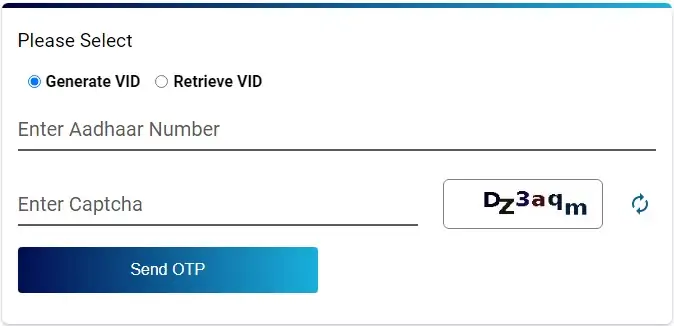
Step 4: Select if you want to generate a new VID or retrieve your old VID.
Step 5: Enter your 12 digit Aadhaar Number, security code and click on the “Send OTP” button
Step 6: Enter the OTP that you receive on your registered mobile number and click on the “Verify & Proceed” button
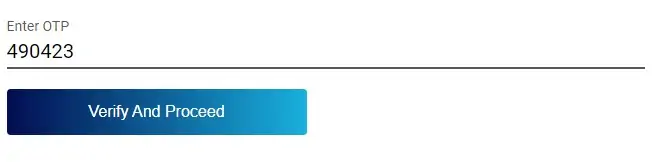
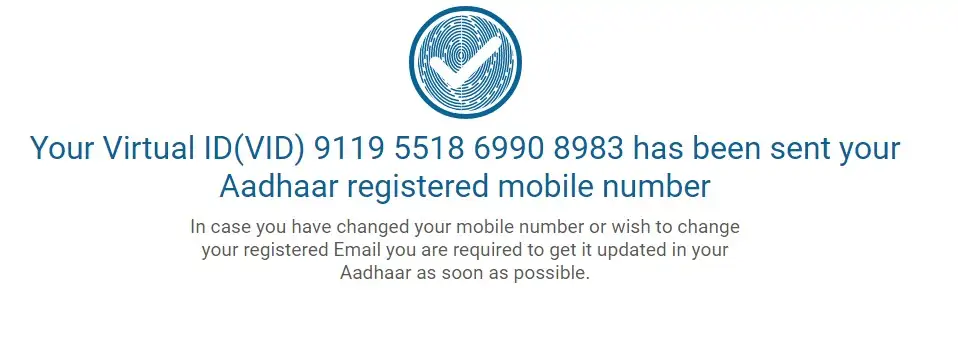
Step 7: You will get a message like “Your VID (16-digit VID) has been sent to your Aadhaar registered mobile.”
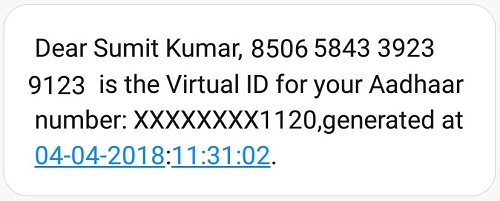
Step 8: You will get the message on your registered mobile number mentioning the 16-digit virtual ID for Aadhaar number and the last 4 digits of Aadhaar
Note: You can generate virtual IDs for other Aadhaar numbers as well for your family
Get FREE Credit Report from Multiple Credit Bureaus Check Now
You can generate virtual ID (VID) using the mAadhaar app by following the steps given below:
To generate Aadhaar Virtual ID (VID) via SMS simply type “GVID Last 4 digits of Aadhaar Number” from your registered mobile number and send it to 1947 (Aadhaar helpline number).
For instance: Type “GVID 1234” from your registered mobile number and send it to 1947 to receive your VID via SMS.
UIDAI has made various upgrades in its system through the VID. Some of the salient features of the virtual ID are:
Now Get Free Credit Report every month from multiple credit bureaus Check Now
The following are the key benefits of Aadhar card virtual ID or Aadhaar VID:
A: Virtual ID is generated against the Aadhaar number. If you do not have an Aadhaar card, you will have to first enrol for the same and when you get your Aadhaar, you can generate your virtual ID as well.
A. Yes, Aadhaar Virtual id can be used in place of an Aadhaar number in Authentication API input. Entities have to update their Aadhaar authentication application by 31st May 2019 to accept VID as input for authentication.
A. Yes, you can get a virtual ID without receiving an OTP on your registered mobile number when you generate and Aadhaar VID via SMS. Simply, type ‘GVID (Last 4 digits of Aadhaar Number)’ and sent it to 1947. However, do note that your mobile must be registered with UIDAI to avail this service and you must send the SMS from the same number.
A. Aadhaar ID is your UID or Aadhaar number, whereas, Aadhar virtual ID is your VID. While both serve similar purposes of authentication, Aadhaar VID or VID provides an extra layer of security as it can be easily regenerated and revoked.
A. No, the virtual ID does not have any expiry date. It remains valid until you generate a new VID.