Download the
Paisabazaar app Today!
Paisabazaar app Today!
Get instant access to loans, credit cards, and financial tools — all in one place

Win Assured Cashback

Our Advisors are available 7 days a week, 9:30 am - 6:30 pm to assist you with the best offers or help resolve any queries.


Get instant access to loans, credit cards, and financial tools — all in one place

Scan to download on


 Personal Loan
 Business Loan
 Home Loan
 Other Loans


Our Advisors are available 7 days a week, 9:30 am - 6:30 pm to assist you with the best offers or help resolve any queries.
With the help of UCO bank's missed call, SMS banking and Internet/Mobile banking services, customers can perform balance check, funds transfers, etc. Further, let us learn more about how to check UCO Bank balance by various online and offline methods.
Get your FREE Credit Score with monthly updates


Let’s Get Started
 +91
+91
The entered number doesn't seem to be correct
Customers availing and maintaining savings accounts with UCO Bank get the facility to check their bank balances through various methods. It helps them stay updated with the transactions carried out using their bank account and also detect any fraudulent activities, if any, at the earliest. UCO Bank balance inquiry can be done online through netbanking, mobile banking, or e-passbook and offline through SMS banking, calling the toll-free number, or by visiting the branch or a nearby ATM.
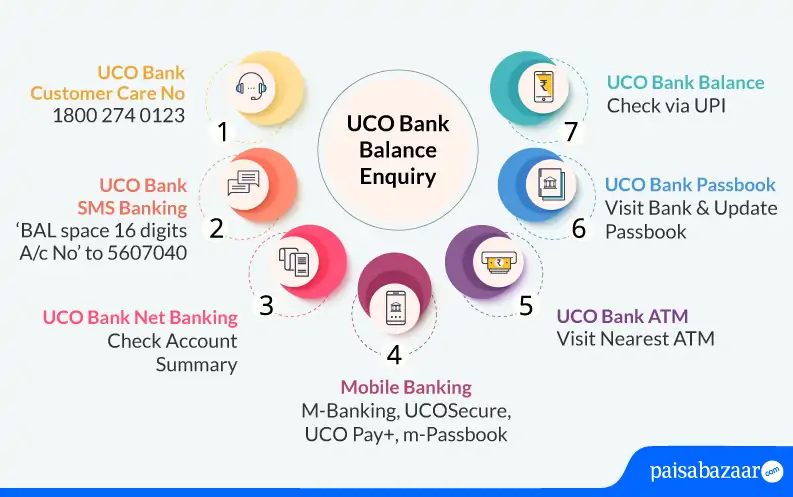
Customers of UCO Bank can enquire about their account balance by calling at UCO Bank balance check number on the provided toll-free number:

Don’t know your Credit Score? Check it here for FREE. Check Now
UCO Bank does not provide balance inquiry service using the missed call facility. However, UCO Bank provides a balance inquiry facility by calling their toll-free number given above. Account holders can call on 18002740123 (toll-free) to check their UCO Bank account balance for free. Also, UCO Bank savings account holders will not be required to register to avail of this facility.
Given below are some of the ways using which account holders can check their UCO Bank account balance for free:
UCO Bank provides Internet banking facilities to its account holders. One can check the account balance through UCO Bank netbanking as well.
Accountholders can make use of UCO Bank mobile banking services through UCO Bank M-Banking, UCOSecure, UCO Pay +, BHIM UCO UPI & UCO mobile passbook. Following are UCO Bank mobile banking applications with which account holders can check their account balance on the go:
UCO Bank account holders can download and install the UCO Bank mBanking app on their Android or iOS devices to avail banking services like UCO Bank Balance inquiries, mini statements, fund transfers, cheque book requests, and much more.
UCOSecure mobile app from UCO Bank helps to provide more safety and secure all the digital products offered by the bank. It helps to instantly block & unblock all digital products including e-banking, m-banking, Debit Cards, BHIM UCO UPI, and UCOPAY (e-wallet) & secure the digital platform.
This mobile app is a wallet offering by UCO Bank available only on the Android platform. With this wallet, users can load money and spend it on all their recharges and bill payments including Gas, electricity, insurance, mutual funds, etc. Users can also add money from their net banking/debit card/credit card, receiving/paying money from/to their friends.
UCO Bank provides the BHIM UPI app which allows account holders to pay and receive money using the UPI facility via Virtual Private Address.
UCO mPassbook application allows its users to check all the transactions on the electronic passbooks on the go. Account holders can register and even use the mobile application in offline mode. With mPassbook, account holders can also do UCO Bank Balance Enquiry in both online & offline modes.
A Good Credit Score ensures you manage Your Finances Well Check Now
UCO Bank provides a passbook to all its account holders to help them keep a check of all their banking transactions.
UCO Bank account holders can visit their nearest bank ATM for instant UCO Bank Balance Enquiry. Individuals will be required to visit their nearest ATM & follow the steps mentioned below:
For UCO Bank Balance Enquiry by SMS, account holders can easily opt to send an SMS and check their account balance. To check the UCO Bank account balance, SMS UCOBAL <mPIN> to 56161.
If the account holder has multiple UCO Bank accounts linked with the same mobile number, he/she can do an instant UCO Bank Balance Enquiry by sending an SMS UCOBAL <mPIN> <14-digit Account number> to 56161.
UCO Bank offers WhatsApp Banking services to its customers to get their queries resolved. Customers need to send Hi on 8334001234.
Users can access the below-mentioned services through UCO Bank WhatsApp Banking:
It is to be noted that this service can be availed by both customers and non-UCO Bank users. However, customers need to register their mobile number with the bank to avail all types of services. Non-UCO bank customers will be provided limited services through WhatsApp banking.
Consumer ExperienceWhich is the best method for UCO Bank balance inquiry online? I have been using UCO Bank WhatsApp banking services lately and I must say that it is one of the easiest methods to check my account balance instantly. I use this service to find out my other banking details as well such as a mini statement or locate the nearest branch of the bank. I highly recommend UCO Bank’s WhatsApp banking service to check account balances instantly. Which is the best method for UCO Bank balance check offline? I have been using UCO Bank’s missed call service to check my balance offline. To check my balance, I call on 1800 274 0123 which is a toll-free number from my registered mobile number. I find this service quite quick and the best part is that there are no charges levied to avail this service. I get my account details quickly after giving a missed call. -Megha Khanna, UCO Bank customer for the past 10 years |
Ans. No, account holders can check their balance from any ATM.
Ans. No, there are no charges applied by UCO Bank. However, operator charges are applied for SMS services.
Ans. You need to fill out the registration form mentioning your mobile number and submit it to the bank’s representative along with your identification ID. Once the submission is successful, the account will be updated with your phone number.
Ans. Yes, you can get the mini statement for UCO Bank by giving a missed call from your registered mobile number to 09213125125 and receiving a message having your last 5 transactions.
Ans. Yes, once the account has been synced and data has been loaded, the application can be used even in offline mode. The balance will be available as per the last synced date.
Ans. To check your UCO bank balance without a registered mobile number, you can dial the Toll-free number 1800-274-0123, which is available 24*7 at your service.
Ans. You can visit the nearest ATM if you want to check your account balance without using mobile banking. Insert your debit card along with your Identification PIN and select the balance inquiry option to check your account balance.
Ans. To check your account balance via missed call, you can give a missed call at 1800-274-0123. The bank shall further call back to inform you of your account balance via automated voice message.
Ans. Once you have downloaded the mobile banking app UCO mBanking Plus, then the mobile banking services become free.
Ans. No, there is no charge for checking your UCO bank account balance. However, nominal charges apply to your mobile services provider on SMS banking services.
Ans. Customers can dial a specific USSD code on their registered mobile number linked with their bank account. From the USSD menu, you can select the balance inquiry option to receive their account balance details.
Ans. It is a digital version of the passbook which is available in 12 languages. You can choose the language at your convenience. All savings/current account holders including those who have loan accounts can register for UCO m-Passbook by downloading the application from the Google play store/App Store.
Get Free Credit Score with monthly updates. Check Now