Download the
Paisabazaar app Today!
Paisabazaar app Today!
Get instant access to loans, credit cards, and financial tools — all in one place

Win Assured Cashback

Our Advisors are available 7 days a week, 9:30 am - 6:30 pm to assist you with the best offers or help resolve any queries.


Get instant access to loans, credit cards, and financial tools — all in one place

Scan to download on


 Personal Loan
 Business Loan
 Home Loan
 Other Loans


Our Advisors are available 7 days a week, 9:30 am - 6:30 pm to assist you with the best offers or help resolve any queries.
The Unique Identification Authority of India (UIDAI) provides the facility of checking Aadhaar Card status online and offline. This page mentions the ways how to check Aadhar card update status or Aadhaar card enrolment status online and offline. You can also read steps to check Aadhaar PVC card status.

Once you get the Aadhaar Acknowledgement Slip, you can check your Aadhaar card status online as well as offline. You just have to provide your Aadhaar enrolment number to track your Aadhar card status. Below-mentioned are the ways how you can check Aadhaar update status or Aadhaar card enrolment status online and offline with or without a registered mobile number.

Table of Contents:
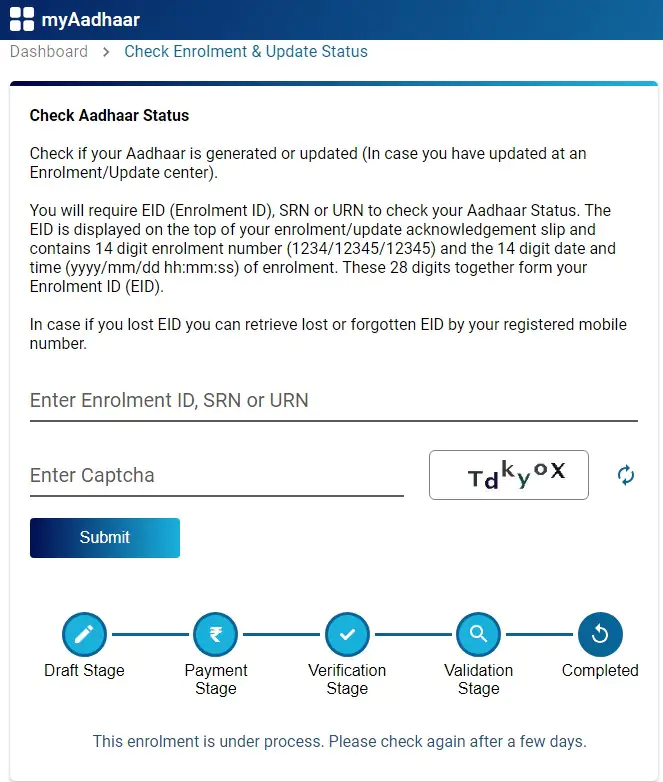
The applicant can check the status of the Aadhaar card online by visiting the online portal of UIDAI official website. There are no fees/charges to check Aadhar card status on UIDAI’s official website. Follow the steps given below to check the application status of your Aadhaar card online:
Step 1: Go to https://myaadhaar.uidai.gov.in/CheckAadhaarStatus
Step 2: Enter your EID (Enrolment ID) available on the top of your enrolment/update acknowledgement slip and captcha code to check the status of your Aadhaar card.
Step 3: The step-wise status of the Aadhaar generation will be displayed in the format
Draft Stage > Payment Stage > Verification Stage > Validation Stage > Completed
In case you have forgotten your enrolment number or have misplaced your acknowledgement slip, you can find your enrolment number and then check Aadhar card status with enrolment number. Here’s how to check Aadhaar card status without enrolment number:
Step 1: Visit https://myaadhaar.uidai.gov.in/retrieve-eid-uid to retrieve your enrolment number
Step 2: Select if you want to retrieve Aadhaar number or Enrolment number
Step 3: Enter the details such as your name, email address or mobile number and security code to send an OTP to your registered mobile number
Step 4: Enter the OTP received to verify
Step 5: Upon verification, your Enrolment number/Aadhaar will be sent to your registered mobile number or email address
Step 6: Using this enrolment number, you can now check the status of Aadhaar
You can request for updating details in your Aadhaar card both online and offline. The details usually get updated within 30 days of making the update/correction request. However, there can be a few delays in some cases. In such cases, here is how to track Aadhaar update status using URN:
Step 1: Visit UIDAI’s website at https://myaadhaar.uidai.gov.in/CheckAadhaarStatus
Step 2: Enter the URN (Update Request Number) and captcha code
Step 3: The status of your update request will be displayed on the screen.
UIDAI provides the facility for people to get their Aadhaar card in the form of a specialized PVC card that comes with a number of security features. It generally takes up to 15 days for the delivery of PVC Aadhar card to the address mentioned in the Aadhaar database. Here’s how you can check the Aadhaar PVC card order status/PVC Aadhar card status:
Step 1: Go directly to https://myaadhaar.uidai.gov.in/checkStatus
Step 2: Provide your SRN and captcha code
Step 3: The status of your Aadhaar PVC order request will be displayed
Also Read: Have you linked Aadhaar with PAN? Here’s how to check the status online

You can also check your Aadhaar card enrollment, update and Aadhaar PVC card order status by calling on the UIDAI official helpline number 1947 from your registered mobile number.Here is a step-by-step guide to do so:
There are various other services apart from checking your Aadhaar card status that you can avail by calling on UIDAI’s helpline number 1947 from your registered mobile number. These services are mentioned below:
Here is a step-by-step guide to check your Aadhar card complaint status:
Step 1: Visit the UIDAI website and click on “Contact & Support”.
Step 2: Under Grievance Redressal Mechanism, click on “Check Compaint Status”.
Step 3: Enter your 14-digit complaint id, captcha verification code and click on “Submit” to know the status of your complaint.
To know if your Aadhaar is locked/unlocked simply follow the steps given below:
Step 1: Open the mAadhaar app on your phone, click on “My Aadhaar” and enter your 4-digit PIN
Step 2: If your Aadhaar is locked, the Aadhaar Lock icon will appear in red and you will have to use your Virtual ID (VID) instead of your Aadhaar number for authentication.
To check if your Aadhaar biometrics are locked/unlocked simply follow the steps given below:
Step 1: Open the mAadhaar app on your phone, click on “My Aadhaar” and enter your 4-digit PIN
Step 2: If your Aadhaar biometrics are locked, the Biometrics Lock icon will appear in red on screen and you will not be able to authenticate using your fingerprints or iris. The red Biometric Lock icon will also appear if you login to your UIDAI account.
Know more: mAadhaar App – Download, Register, Update, Status, Biometric Locking
You can find out if your Aadhaar card is linked to your bank account by following the below mentioned steps:
Step 1: Visit the UIDAI website and click on “My Aadhaar”.
Step 2: Under the Aadhaar Services section, click on “Bank Seeding Status”.
Step 3: Login to your account using your Aadhaar number, captcha code and the OTP that you receive on your registered mobile number
Step 4: Click on “Bank Seeding Status” listed under the Services section to know your Aadhaar Bank account linking status.
Read more: How to Link Aadhaar with PAN Card and Check Aadhar card PAN Card Link Status
Aadhaar card applicants or those who have applied for updating biometric or demographic details in Aadhaar have the facility to get the Aadhaar status checked offline as well. One can visit the nearby Aadhaar Sewa Kendra or Aadhaar Enrolment Centre to check the Aadhar update status.
Those who have enrolled for Aadhaar can present their enrolment number to the executive at the centre to know the status of Aadhaar.
Those who have applied for Aadhaar update can provide the Update Request Number (URN) to the executive to know the Aadhaar status offline.
A. You need not enrol again for Aadhaar. You can retrieve your Aadhaar number/Enrolment number through the UIDAI’s website. Click to find out more.
A. No, you can either check the Aadhar card update request status online or by visiting the Aadhaar centre.
A. At present, it is not possible to check or Aadhaar card search by name and father’s name. However, an applicant can use his name and registered mobile number or email ID to know the Aadhaar number.
A. Your Aadhaar card will be generated and sent to your address within 90 days of the enrolment. You can keep on checking the status of Aadhaar to keep a track of it.
A. You can check the application status of your Aadhaar card without using your mobile number by visiting an Aadhaar Enrolment Centre or by providing the email address registered with UIDAI.
A. When you go for updating details in your Aadhaar, you get an Update Request Number (URN) at the enrolment centre. You can use this URN to track the status of your Aadhaar card.
A. Earlier it was possible to check Aadhar Card status by name and date of birth, but as per the new guidelines now Aadhaar number search can be done by entering your 28-digit Enrolment ID, date and time given on the acknowledgement slip at the time of enrolment.
A. There’s no such procedure to check for Aadhar card search by name and PIN code. You can check your Aadhaar details by entering your 12-digit Aadhaar Number or 28-digit Enrolment ID, date and time given on acknowledgement slip at the time of enrolment.
A. You can visit UIDAI’s website and login to your account using your Aadhaar and OTP to check the status of your Aadhaar biometrics. Alternatively, you can check the status of Aadhaar biometrics by logging in to your account through the mAadhaar app.
A. You have to first check the status of your Aadhaar card and if the details have been updated in it, you can download the new e-Aadhaar and use it as the document proof for the home loan, credit card or personal loan application.
A. You can visit an Aadhaar Enrolment Centre and check the status there.
A. It is advised that you first check the Aadhar card update status. If the request is not picked, you can cancel the update request and the fee would be refunded in the next 21 days.
A. Your Aadhaar number remains the same after the update. However, you will receive an updated Aadhaar card or can download the e-Aadhaar online after you make an update.
A. NRIs, OCI cardholders, LTV holders, Nepal & Bhutan nationals and other resident foreigners can check their Aadhaar card enrolment and update both online as well as offline by visiting the nearest Aadhaar centre.
Read More: Aadhaar card for NRIs, OCI Cardholders, LTV Holders, Nepal & Bhutan Nationals and Other Resident Foreigners, click here.
A. Yes, you can make updates to your Aadhaar card online 24 x 7 x 365. Moreover, the Aadhaar Seva Kendras are open 7 days a week except for national and regional holidays. They generally function from 9:30 AM to 5:30 PM (IST) and thus, you can make updates to your Aadhar card even on a Sunday.
A. In case your update request is rejected, you can raise a fresh update request again. However, ensure that your update details are correct and are backed up by sufficient documentary evidence. Moreover, make sure that you fill the update request form completely and correctly.
A. Yes, you can get details changed/updated for your minor children as well.
A. At present, it is not possible to check Aadhaar update status using your Aadhaar number. You can track your update status online using your URN or Update Request Number.
A. You can check your Aadhaar card update status by calling on UIDAI’s toll-free number 1947.
A. At present, it is not possible to check your Aadhaar card status via SMS.
A. Currently, it is not possible to check your Aadhaar card update status via post.
A. At present, it is not possible to check your Aadhaar card status via email.