Download the
Paisabazaar app Today!
Paisabazaar app Today!
Get instant access to loans, credit cards, and financial tools — all in one place

Win Assured Cashback

Our Advisors are available 7 days a week, 9:30 am - 6:30 pm to assist you with the best offers or help resolve any queries.


Get instant access to loans, credit cards, and financial tools — all in one place

Scan to download on


 Personal Loan
 Business Loan
 Home Loan
 Other Loans


Our Advisors are available 7 days a week, 9:30 am - 6:30 pm to assist you with the best offers or help resolve any queries.
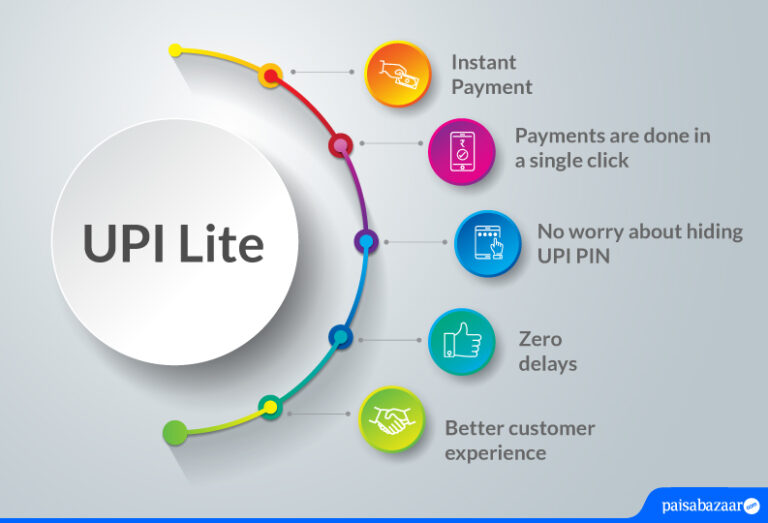
Do you face delays due to slow network speed while making payments through UPI often? Do you make small payments up to Rs. 200 regularly? Is your account statement full of small transactions made on a daily basis? If any of your answers to these questions is in affirmative, NPCI has provided a solution to your concerns. NPCI has launched UPI Lite, a payment solution that will let people make low-value transactions below Rs. 200 through UPI in no time.
You must be wondering how UPI Lite will solve most of our concerns. Let us take you through the whole concept of introducing this facility. The purpose behind introducing this facility is to make low-value transactions easier for users. This mode of doing transactions is quite convenient and hassle-free. UPI Lite is an on-device wallet that offers a simple and customer-friendly interface. Transactions done through this medium are faster, user-friendly, and compatible with all banks. Money can be transferred without using UPI PIN, which makes sure that the money is transferred instantly to the other bank account.
As recommended by RBI, this service will support financial transactions without hitting bank servers every time. Below-mentioned are the key transactions and usage parameters defined to use UPI Lite:

Get Free Credit Report with monthly updates. Check Now
Creating UPI Lite account is easy, you just have to open your BHIM or Paytm app and this account can be simply activated from these accounts. If you do not have BHIM, PhonePe, Paytm, etc. You just have to download the app from play/app store and follow the below-mentioned steps to activate this service:
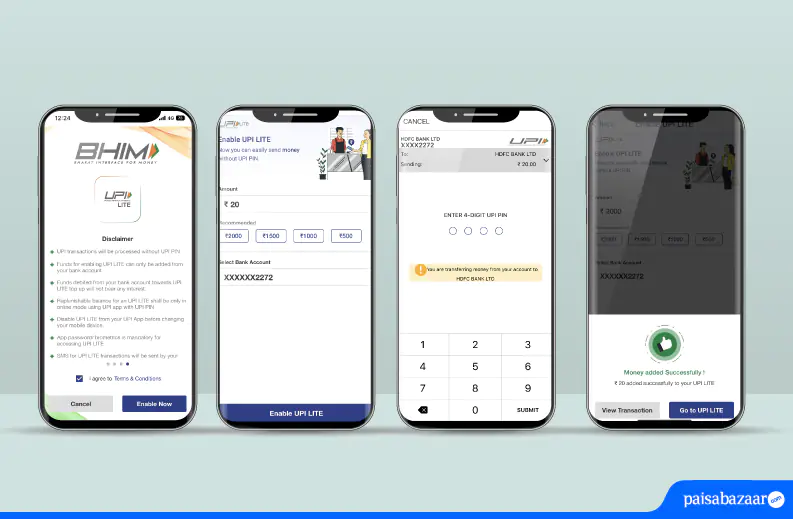
Step 1: Upon downloading the app, set up the app and accept the required terms and conditions to register
Step 2: Create your account by selecting your bank account linked to UPI and add value to your account
Step 3: Enter your UPI PIN to authenticate the transaction
Step 4: Once your UPI PIN is verified, your UPI Lite account will be created
Once your UPI app is set up and money is added to the UPI Lite account, you can start availing its services. Making payments from this wallet account is quite feasible now and requires just a click. As the amount transferred through this platform is enhanced from Rs. 500 to Rs. 1000 per transaction, NPCI has enabled one-touch payment to speed up your transactions without requiring the PIN to authenticate the transaction. The below-mentioned steps explain how to make transactions via this facility:
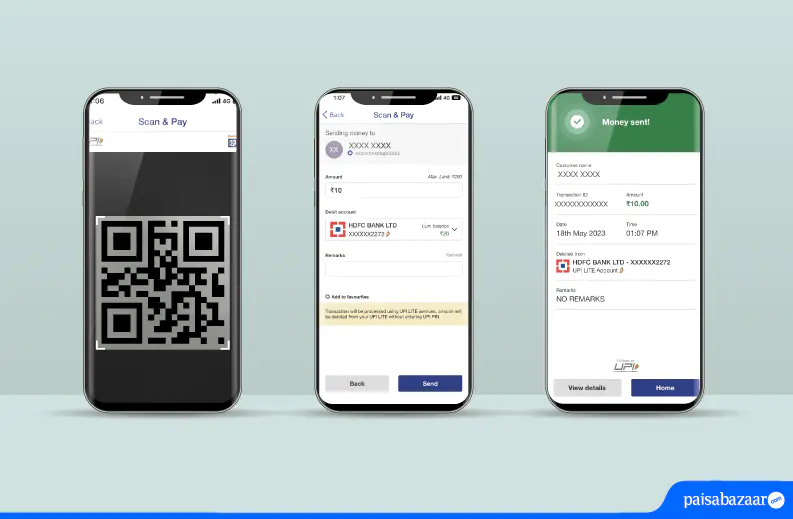
Step 1: Open UPI Lite app and scan the QR code
Step 2: Add the amount that needs to be paid to the merchant
Step 3: Click on ‘Pay Now’ to complete the transaction
Step 4: Upon clicking on ‘Pay Now’, your transaction will be completed and ‘Payment done’ will be displayed on the screen with the details of the payment made
Note: UPI Lite payment system will not operate on ‘jail broken’ devices.
Get Free Credit Report with monthly updates. Check Now
UPI Lite payment method will provide below-mentioned benefits:
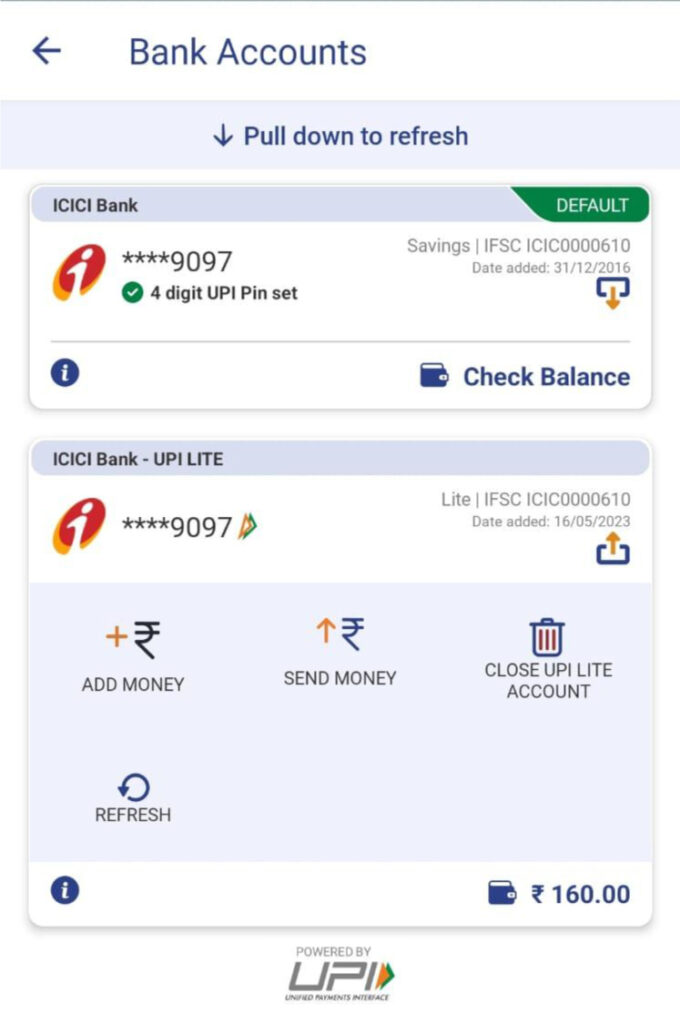
To disable your UPI Lite account is very easy. Just click on your all active UPI accounts in your app. You can then select an account from which you want to disable this service. There will be an option to disable UPI Lite account as shown in the image below.
| AU Small Finance Bank | Axis Bank Limited |
| Canara Bank | Central Bank of India |
| HDFC Bank | ICICI Bank |
| Indian Bank | Kotak Mahindra Bank |
| Paytm Payments Bank | Punjab National Bank |
| UCO Bank | State Bank of India |
| Union Bank of India | Utkarsh Small Finance Bank Limited |
Get Free Credit Report with monthly updates. Check Now
Q. How much time does it take for UPI Lite Top-up?
Ans. UPI- Lite Top-Up does not take time at all. It is a real-time process.
Q. I have changed my mobile device, will I be able to access my UPI Lite balance on my new device?
Ans. It is important to note that you need to disable UPI Lite account in your previous device in order to activate it in your new device. Your account will not be synced automatically in your new device. In a new device, you will have to register for this service again.
Q. Will I get my money back on disabling UPI Lite account?
Ans. Yes. Your money will be refunded back to your savings account after disabling your UPI Lite account.
Q. How will UPI LITE be effective for the banking ecosystem?
Ans. UPI Lite will ensure that there is less load on the banking system while doing small-value transactions. It will help banks in reducing traffic digitally because major transactions done these days are from UPI. This facility will assist banks in getting off the load of doing small-value transactions.
Q. Will my passbook display UPI Lite transactions?
Ans. No. Your passbook will not have UPI Lite transaction entries. However, you will receive an SMS from your bank upon doing such transactions. Only wallet top-up transaction details will be entered in the passbook.
Q. Will there be any charges for using this services?
Ans. No. The service will not attract any charges.
Q. Do I need to download BHIM app to avail this service?
Ans. You can avail this facility on most of the UPI apps. However, if you want to use this service on BHIM, you can download it by clicking here for android.
Q. Can I activate UPI Lite account again if I have deactivated it?
Ans. Yes, you can activate and deactivate this account any number of times depending upon your convenience.