Download the
Paisabazaar app Today!
Paisabazaar app Today!
Get instant access to loans, credit cards, and financial tools — all in one place

Win Assured Cashback

Our Advisors are available 7 days a week, 9:30 am - 6:30 pm to assist you with the best offers or help resolve any queries.


Get instant access to loans, credit cards, and financial tools — all in one place

Scan to download on



 Personal Loan
 Business Loan
 Home Loan
 Other Loans


Our Advisors are available 7 days a week, 9:30 am - 6:30 pm to assist you with the best offers or help resolve any queries.
600 or 750? What's your credit
score? Check for FREE.


Let’s Get Started
 +91
+91
The entered number doesn't seem to be correct
Customers of State Bank of India are offered with mobile banking facilities via apps like SBI YONO and BHIM SBI Pay. SBI YONO (You Only Need One) and BHIM SBI apps enable its customers to avail banking services anytime and anywhere through their smartphones. Apart from these phone apps, customers can also make use of SBI SMS Banking with the help of their mobiles.
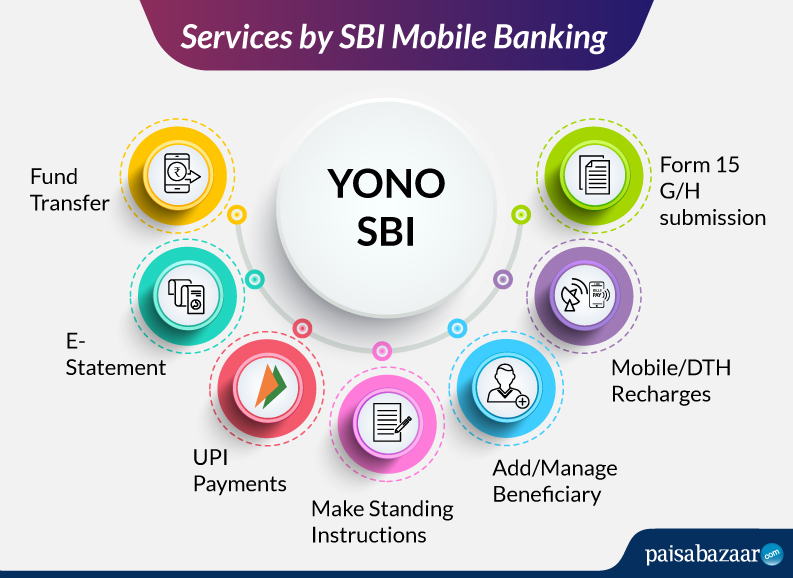
With the help of mobile banking, a variety of financial tasks have been simplified. Be it getting a simple account statement to keep their budget in check or to complete complex tasks like investing in mutual funds, everything can be done in a few clicks. SBI YONO does the exact same job – bringing banking at your fingertips.
| Account Summary | Mini Statement | mPassbook |
| eStatement Download | e-Statement Subscription | View Bank Account Details |
| Fund Transfer (NEFT/RTGS/IMPS/UPI) | Quick Transfer & Donations | Send mCash via mobile or email ID |
| Schedule Transactions | Add/Manage Beneficiary | Open eDeposits |
| Mobile Recharge | DTH Recharge | TDS Enquiry |
| Bill Payment | Manage/Schedule Bills | Submit Form 15G/15H |
| Get/Cancel MMID | Cheque Book Request/Stop Cheque | Online Nomination |

Get Free Credit Report with monthly updates. Check Now
SBI puts forth two mobile applications for mobile banking registration for its customers, viz. SBI YONO and BHIM SBI PAY. Where YONO is a holistic app bringing all types of banking services at the user’s fingertips, BHIM SBI PAY offers easy UPI-based transaction option. Let’s know about these apps in details.
SBI’s You Only Need One (YONO) app can be accessed using your debit card details or internet banking login details. After creating an account on it, you can create an mPIN for quick login. Follow the steps stated further to register yourself on SBI YONO app:
Step 1: Install SBI YONO from Google Play Store or App Store
Step 2: Open the app and click “Yes”, if you have internet banking activated
Step 3: On clicking “Yes”, you will be redirected to the login page. Enter your Internet Banking User ID and Password to access the YONO App
Step 4: If you don’t have Internet Banking login details, Click “No”
Step 5: Click on “Register for YONO with my ATM Card”
Step 6: Enter your CIG Number & Account Number in the fields provided. (These are mentioned in your passbook.)
Step 7: Enter the OTP sent to your registered mobile number and submit
Step 8: Now, to generate a username& password, enter your ATM card number and ATM PIN
Step 9: Create your password
To make it easier for the customers, a new feature, i.e. mPIN is introduced, which is a 4-6 digit number that is set by the consumer. Instead of logging in by username and password, this mPIN can be entered to access internet banking services.
SBI YONO or You Only Need One app is an all-in-one mobile application that eliminates the need to have any other app to carry most of the banking activities. Check the table below regarding the services you can avail using this application:
|
Particulars |
Details |
|
Account |
View account balance anytime |
|
YONO Pay |
|
|
eDeposits |
Create new FD/RD (FD of minimum Rs. 1,000) |
|
Cards |
|
| Loans | Check loans available (car loan, personal loan, home loan, etc.) |
|
Insurance |
|
|
Investments |
|
State Bank of India has collaborated with the BHIM UPI by NPCI to offers its customers with the UPI-based payment services.
Click Here: How to Register for BHIM SBI UPI
|
Particulars |
Details |
| Availability | Android and iOS devices |
| Transfers or Payments via | VPA, QR Code, Account No./IFSC, Aadhaar Number |
| Timings | 24×7 |
| Transaction Limit | Rs. 1 lakh/day or 10 transactions/day |
| Payment Types | Mobile recharge, post-paid bills, DTH recharge, Utility bills, etc. |
|
Other Services |
|
Get Free Credit Report with monthly updates. Check Now
Below mentioned are the Dos and Don’ts related to SBI Mobile Banking which should be followed by all existing customers.
State Bank of India allows the customers to access SBI mobile banking via SMS facility on their mobile devices. This comes handy when your internet connection is not working or your smartphone is compromised.
How to Register for SBI SMS Banking?
SBI SMS Banking is only for existing customers of the State Bank of India. Services available:
An activation code shall be shared via SMS after the approval of your mobile banking registration. You need to enter this activation code in the SBI mobile banking app to activate the mobile banking process. Further, you need to set your personal login password and start using the mobile banking services.
If you forget your SBI mobile banking password, it can still be changed even from the SBI YONO app. All you need to do is reset your password from the app by just tapping on ‘Forgot Password’ and follow the mentioned steps. You need to have your account and ATM card details handy, along with other required documents. Once you clear all the security questions on the app it shall direct you to set a new password and confirm it later with the MPIN to secure it further.
|
Send to 922344000 or 567676 |
|
| Purpose | SMS Format |
| To get User ID and default mPIN | MBSREG or MBREG |
| Change mPIN | SMPIN UserID OldMPIN New MPIN |
| Forgot mPIN | SFPIN UserID |
| Balance Enquiry | SBAL UserID MPIN |
| Mini Statement | SMIN UserID MPIN |
| Generate MMID | MMID UserID |
| Cancel MMID | MMIDCANCEL UserID |
| DTH Recharge | SDTH UserID MPIN ServiceProvider DTHSerialNo Amount |
| De-register from Mobile Banking Service | SDEREG or SDREG |
Know More: SBI SMS Banking
Get Free Credit Report with monthly updates. Check Now
SBI accountholders can withdraw cash from ATM without using SBI ATM cards. They can do so directly by placing a request through the cardless cash withdrawal facility through mobile banking. This process gets completed in two steps – first, by placing a request in the SBI YONO app and second, by completing the cash withdrawal by visiting the ATM.
Follow the below-mentioned steps for cardless cash withdrawal via YONO app:
Step 1: Login to the YONO app using your internet banking user ID and password or MPIN
Step 2: Now, select YONO cash option from the Home page or from YONO Pay in Home screen or from YONO Pay option on Hamburger Menu
Step 3: On the landing page of YONO Cash, under “New Request” tab, tap on the ATM option under YONO Cash
Step 4: Select the account from which the amount needs to be debited and enter the amount to be withdrawn and click on Next
Step 5: Now, you need to create your YONO Cash PIN for the specific transaction and tap on Next. The PIN will only be displayed on the screen at the time of creation and will not be allowed to share
Step 6: Review the transaction details, accept the Terms and Condition and click on Confirm
Step 7: A message will be displayed after successful completion of the transaction
Step 8: Your request is now registered on YONO and Transaction Reference Number will be sent to your registered mobile number via SMS
Follow the below-mentioned steps at the time of withdrawing cash from the ATM:
Step 1: Click on YONO Cash at the YONO Cash enabled ATM
Step 2: Now, enter the Transaction Reference Number received through SMS
Step 3: Enter the amount that needs to be withdrawn. The amount should be the same as initiated in YONO Cash request
Step 4: Enter the YONO Cash PIN that was created while initiating YONO Cash request
Step 5: Once the transaction is validated and authenticated, the cash will be dispensed from the ATM
Ans. It allows customers to carry out banking transactions on a 24×7 basis from any place with the help of a mobile phone.
Ans. SBI Bank mobile banking service is available for all SBI savings account and current account holders. Presently, this service is also extended to SME customers.
Ans. To activate SBI mobile banking for the first time, you need to visit the official SBI’s website and check for ‘Personal Banking’ section and click on ‘Continue to Login’. Next, you need to click on ‘New User Registration’ and enter all the required details. Generate the OTP and enter it by clicking on ‘Submit. Register via your ATM card to receive a temporary username. Create a login password to further login to your SBI net banking account.
Ans. To activate mobile banking in SBI via mobile, you need to send an SMS ‘MBSREG’ from your registered mobile to 9223440000 or 567676. Download the YONO app and change your mPIN to secure your own password.
Ans. To update your mobile number you need to login to www.onlinesbi.com. Then search for the Profile-Personal Details-Change mobile No.” under “My Accounts”. Further, select your Account number, enter the mobile number and click on ‘Submit’. The last two digits of the registered mobile number shall be displayed.
Ans. If you already have an account with SBI, then you are not required to submit any documents for SBI SMS banking.
Ans. Keeping your MPIN as alphanumeric ensures high-level security. Hence, it is advisable to keep it that way.
Ans. The MPIN needs to be a total of 6 characters. Make sure it is a combination of special characters and alphanumeric.
Ans. Yes, if mobile banking isn’t accessed for six months, it would automatically be deactivated. One needs to register again for availing the service.