Download the
Paisabazaar app Today!
Paisabazaar app Today!
Get instant access to loans, credit cards, and financial tools — all in one place

Win Assured Cashback

Our Advisors are available 7 days a week, 9:30 am - 6:30 pm to assist you with the best offers or help resolve any queries.


Get instant access to loans, credit cards, and financial tools — all in one place

Scan to download on



 Personal Loan
 Business Loan
 Home Loan
 Other Loans


Our Advisors are available 7 days a week, 9:30 am - 6:30 pm to assist you with the best offers or help resolve any queries.
100+ Credit Cards from Top Banks
Compare Best Offers
Completely Digital Process

Founded in 1985, Kotak Mahindra Bank provides a wide range of banking services and products to its customers. Account holders can also avail some of the banking services using the netbanking portal and mobile banking apps provided by the bank. Let’s check the services available at Kotak Mahindra Bank netbanking portal.
| Services offered by Kotak Bank Netbanking | ||
| View mini statement | Stop single/multiple cheques | Calculate growth of deposits |
| View deposit details | Transfer money | Schedule payments |
| File taxes | Access statements | Access certificates |
| Demand draft | Invest in Mutual Funds | Pay utility Bills |
| Recharge prepaid mobile / DTH | Book air, rail and bus tickets | Re-issue debit card PIN |
There are 3 ways to register for Kotak Mahindra Bank netbanking:
Customers can now register for Kotak Mahindra Bank netbanking online by following the steps mentioned below:
Step 1: Visit the official website of Kotak Mahindra Bank and click on “Login”.
Step 2: On the next page click on “Register for netbanking” option.
Step 3: Now enter the CRN / Customer ID or user name or forex card number. Confirm the captcha, accept the terms and conditions and tap on “Continue”.
Step 4: On the next page, verify the details by answering any 2 questions out of the 4 and click on “Continue”.
Step 5: Choose a method to generate password Kotak netbanking login password and click on “Continue”.
Step 6: Enter a new password for the Kotak netbanking login and click on “Submit” to use Kotak Netbanking.
A physical application form can also be submitted by visiting the bank branch. To do the same, account holders will be required to follow the steps mentioned below:
Step 1: Download and fill in the request form for channel access: Channel Access Request form for individuals; Channel Access Request form for limited companies, associations, trusts, partnerships, sole proprietorship and HUFs.
Step 2: Submit / Drop the completed form in the Branch or ATM drop box. Customers can also send the completed form by regular mail to – Customer Contact Center, Kotak Mahindra Bank Ltd., Post Box Number 16344, Mumbai – 400 013.
Account holders can call the Customer Contact Center – 1860 266 2666 (24×7) or + 91 22 6600 6022 for Kotak Bank netbanking registration.
For any further assistance regarding Kotak Mahindra netbanking registration or for any queries contact Kotak Bank Netbanking Customer Care.
Regenerate the password for netbanking if the customer forgets it or unlock it easily in just a few simple steps.
Step 1: To unlock the existing password on the netbanking login page, click on the link “Forgot / Blocked Password” to regenerate the password or on the link “Password Locked?”.
Step 2: Enter the user identification (CRN) or net banking nickname.
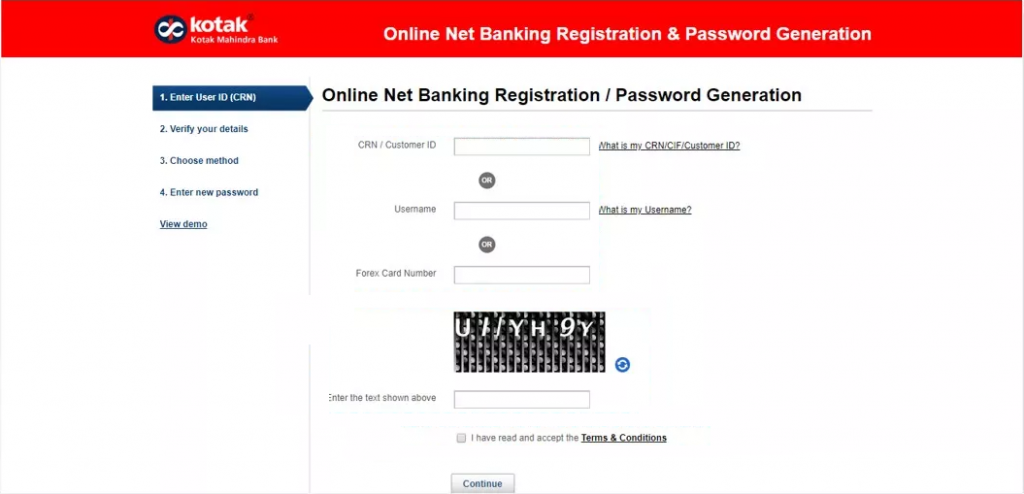
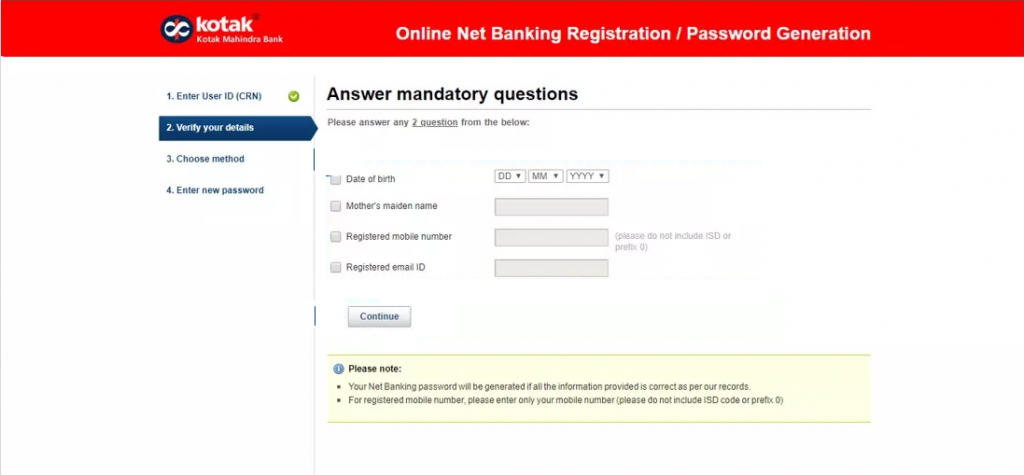
Step 3: Answer two compulsory questions.
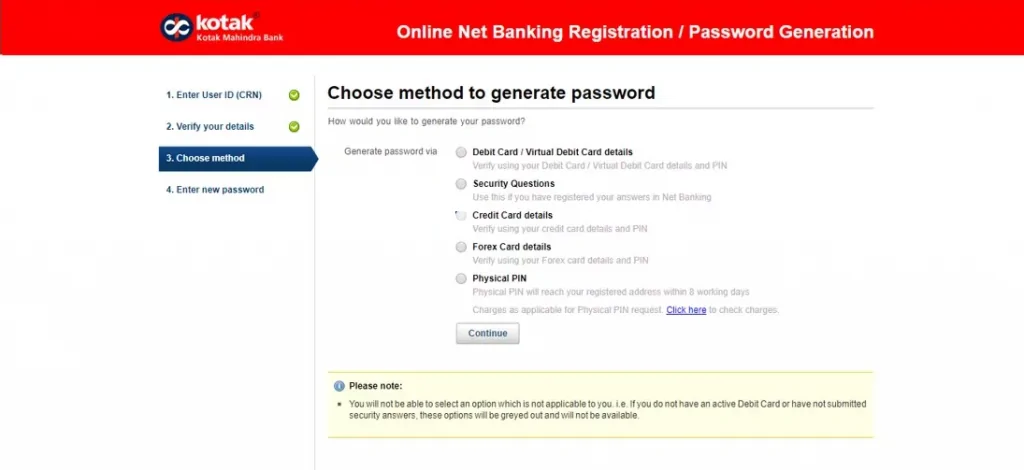
Step 4: Select any of the following methods for further verification:
Step 5: After verifying the debit card/secret questions/credit card, the customer must enter a 6-character password of their choice and on their preferred email ID and mobile number, the other 6-character password will be sent. If the password is unlocked, the existing password is immediately unlocked.
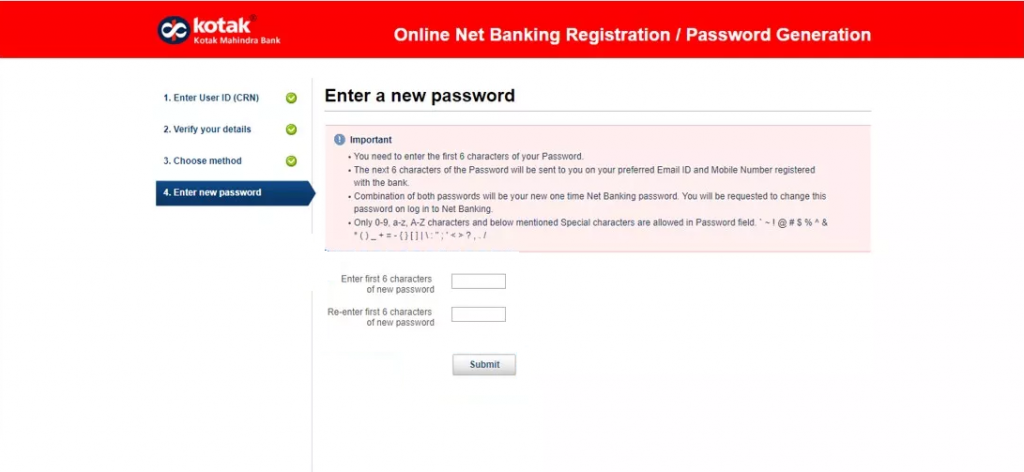
Step 6: Login to Kotak netbanking with the customer’s password of 6 characters, followed by the password of 6 characters sent from the bank’s end.
Steps to regenerate the online netbanking password for customers who did not set secret questions:
Step 1: Click the Forgot / Blocked Password link on the login page for Net Banking.
Step 2: Enter the user identification (CRN).
Step 3: Answer two compulsory questions.
Step 4: The customer must enter a 6-character password of their choice and on their preferred email ID and mobile number, the other 6-character password will be sent.
Step 5: Login to Kotak netbanking with the customer’s password of 6 characters, followed by the password of 6 characters sent from the bank’s end.
With Kotak netbanking portal, one can opt for any of the following modes to transfer funds within Kotak Mahindra Bank or to some other bank account. Account holders can make the fund transfer using:
Simply, login to the Kotak Mahindra Bank netbanking portal using the credentials provided and follow the steps mentioned below:
| Fund transfer mode | Transaction limit per beneficiary | Channel wise daily transaction limit |
| NEFT | Rs.5 lakh | Rs.10 lakh |
| RTGS | Rs.5 lakh | Rs.10 lakh |
| IMPS | Rs.2 lakh | Rs.2 lakh |
| One time fund transfer | Rs.50,000 | Rs.50,000 |
| To another Kotak bank account | Rs.5 lakh | Rs.10 lakh |
| Total transaction limit through netbanking | — | Rs.15.5 lakh |
With Kotak bank netbanking one can transfer the bill amount from the savings account to the credit card account by following the below mentioned steps:
Step 1: Register for Kotak netbanking and then go ahead with Kotak netbanking login.
Step 2: On the home page select “Credit Card” option.
Step 3: Select “Payments” option and then choose ‘Make Payment’ option.
One can check his/her account balance in a number of ways including Kotak mobile banking, netbanking, customer care etc. Here are the steps to check account balance using Kotak netbanking:
To know more about Kotak Mahindra Bank Savings Account, click on the button provided below:
Features available under Kotak Mahindra netbanking includes:
Kotak Mahindra Bank allows users to transfer funds from their Kotak Mahindra accounts to other third-party bank accounts.
Account holders can easily book a recurring or fixed deposit with Kotak netbanking. They can also execute tasks such as premature withdrawal online.
Account holders can view and update their profile details such as mobile number, email ID, correspondence address, PAN Card , Aadhaar Number, FATCA Declaration, etc. online instantly.
Account holders can also view their bank account balance, account activity and know the status of their cheque.
Kotak netbanking allows users to pay utility bills, credit card, recharge prepaid mobile / DTH using Kotak BillPay. Users can also recharge prepaid mobile phone and DTH accounts. In the case of life insurance policy, they can also switch funds and pay premium online.
The account holders are offered the facility to book Air, Rail and Bus tickets. Users can also book hotels online.
Users can apply for a cheque book, request for payment gateway registration and other transaction services. Re-issue debit card PIN, initiate/halt debit card, initiate/halt debit card for international usage and connect accounts.
Account holders can apply for a new debit card, image debit card, upgrade debit card. Not only this, account holders can also apply for a priority pass, card protection plan, Kotak Life Insurance policy and much more using the Kotak netbanking portal.
Users can opt to download digitally signed statements through “Statement” tab available on the Kotak Mahindra Bank netbanking portal.
With Kotak Net Banking, users can view important information such as securities available for Demat Accounts, Kotak Life insurance policy
Users can invest and redeem in Mutual Funds online and see their current Mutual Fund portfolio.
Q. How to transfer funds using IMPS on Kotak Netbanking portal?
A. Here are the steps to transfer funds using IMPS mode and through Kotak Mahindra Bank netbanking:
After the beneficiary is added just select the beneficiary and the payment mode as IMPS and go ahead with fund transfer.
Q. Who all are eligible for accessing Kotak netbanking?
A. At Kotak Mahindra Bank, all customers hold a current or savings account can register to access netbanking. They would be offered the facility to view and control their bank account using this online portal.
Q. Does Kotak netbanking offer a secure platform for banking activities?
A. Kotak Mahindra is equipped with advanced security management that ensures high-end safety for each of the online dealings. Every transaction has to pass a 256-bit SSL coded medium that is considered as the premium level of security designated for online transactions.
Q. How to generate customer ID for Kotak retail netbanking?
A. Here are the steps to generate customer ID for Kotak retail netbanking:
Step 1: To know the CRN, enter the current customer ID.
Step 2: Enter the verification code.
Step 3: Click on ‘Submit’.
Q. How to login into Kotak bank netbanking account using the Forex Card?
A. Check the steps for Kotak netbanking login using Forex card:
Step 1: Enter the Forex Card number and enter the netbanking password.
Step 2: Select from the dropdown menu where to land on the website.
Step 3: At last click on ‘Secure Login’.
 Limited Time Offer


 with Every Card
Choose a Card Matching Your Lifestyle
Please enter a valid full name
 +91
+91
The entered number doesn't seem to be correct
