Download the
Paisabazaar app Today!
Paisabazaar app Today!
Get instant access to loans, credit cards, and financial tools — all in one place

Win Assured Cashback

Our Advisors are available 7 days a week, 9:30 am - 6:30 pm to assist you with the best offers or help resolve any queries.


Get instant access to loans, credit cards, and financial tools — all in one place

Scan to download on



 Personal Loan
 Business Loan
 Home Loan
 Other Loans


Our Advisors are available 7 days a week, 9:30 am - 6:30 pm to assist you with the best offers or help resolve any queries.
600 or 750? What's your credit
score? Check for FREE.


Let’s Get Started
 +91
+91
The entered number doesn't seem to be correct
Now you can send money, pay bills, purchase gifts, view account statement, scan and pay and much more by using federal bank mobile banking services. Check different types of Federal Bank Mobile Banking apps below, along with their features and benefits and check how to register for mobile banking.
| Services offered by Federal Bank Mobile Banking Application | ||
| Accounts & Deposits | Term Deposit Enquiry | Merchant Solutions |
| Loan Account Enquiry | Card Services | Change PIN |
| View & Download Statements | Funds Transfer | Value-Added Services |
| Bank Account linking | Passbook Updation | Utility Bill/Recharge DTH/ Mobile/ School Fee Payment |
| Issued/Deposited Cheque Status | Scan and Pay | Manage Transaction Limit |
| Lodge Complaints | Appointment for Jewel Loan | Block Card |
Federal Bank, along with FedMobile, offers other mobile banking apps to its customers to cater to various services offered by them. Below are the Federal bank mobile banking applications:
| Federal Bank Mobile Banking Apps | Primary Features |
| FedMobile |
|
| FedBook Selfie |
|
| FedNet |
|
| FedCorp |
|
| FedAlert |
|
| BHIM Lotza UPI Payment |
|
| Federal Calendar |
|
|
FedMobile is the official mobile banking app provided by Federal Bank, which offers various features to the customers, like balance enquiry, fund transfer, booking tickets and paying bills.
| FedMobile by Federal Bank | Features |
| Account Management & Enquiry | Account details, Federal Bank Balance Enquiry, transaction history, set transaction limits |
| Deposit and Loans | Avail fixed deposit & recurring deposit online, Open/close term loans, avail loan against deposit/personal loan |
| Fund Transfer | Fund transfer, quick pay (without adding beneficiary), manage beneficiaries, credit card payment, scheduled transactions and scan & pay |
| Bookings | Hotel, bus, cab, event & movie tickets |
| Bill Payments & Recharges | Utility bill payments, mobile & DTH transactions, school fee payments |
| Other Services | Enable/disable/block cards, mutual funds, investments, request cheque book, shop on chat |
“FedBook Selfie” is an innovative and user-friendly app that helps users to keep a track of transactions in their accounts in real-time.
| FedBook Selfie | Features |
| Transaction Management | View updated passbook and real time transaction updates |
| Expense management | Track expenses, assign a category to each transaction |
| Additional Features | Receive account statement via mail, browse FAQs, open E-KYC account |
| Works Offline | Track expenses, check passbook or account balance & much more without internet connectivity |
| Open Account | Open Federal Bank account instantly using Fedbook Selfie app |
FedNet is the mobile app version of the official Federal Bank Net Banking.
| FedNet | Features |
| Bill payment | Mobile/DTH Recharge, School fee payment |
| Federal Bank Term Deposit | Open term deposit online using FedNet app |
| Manage accounts | Manage all the depository accounts using the Federal Bank Mobile Banking app |
FedCorp is designed for business entities to manage their banking transactions as per their requirements.
| FedCorp | Features |
| Account Management | For business entities – view balance, transaction history, bulk payments |
| Fund Transfer | Transfer funds (Intra Bank, NEFT & IMPS), manage beneficiaries, approve transactions, transaction status |
FedAlert provide customers with a seamless delivery of OTP and alerts messages from the Bank.
| FedAlert | Features |
| Communication Management | OTPs, push alerts, notifications |
| Security | Secure channel, resolve delayed message issues |
BHIM LOTZA links different bank accounts in a single app and thus makes banking experience more convenient.
| BHIM LOTZA UPI Payments App | Features |
| Manage Accounts | Link multiple accounts, transfer and receive money instantly via UPI/MMID, balance enquiry, transaction history |
| Utility Bills & Others | Pay utility bills, school fees, other payments & religious payments |
| Security | Secured transactions through UPI PIN |
With Federal calendar find train timings, PNR status, set reminders, sync with Google calendar and lot more.
| Federal Calendar | Features |
| Activity Planner | Set reminders, event management, sync with Google calendar |
| Calendar View | Day/month and year view |
| Other Features | Train timings, PNR enquiry, live cricket scores, world clock, birth star finder, location-wise day segments, sunrise/sunset time, lunar nodes, nakshatra, etc. |
Federal store provides a consolidated view of all mobile applications offered by the Federal Bank and keeps a track of all the account transactions.
| Federal Store | Features |
| Store | Access to all Federal Bank mobile banking applications |
| Scan and Pay | Transfer funds based on QR codes |
BHIM Aadhaar Pay is Aadhaar based payment interface which allows real time payment to Merchant using Aadhaar number of Customer.
| BHIM Aadhaar Pay | Features |
| Customer Payments | For small business/merchants – through Aadhaar verification |
| Payment Mode | Via biometric fingerprint scanner |
It is an app that updates its users on the prevailing interest rates offered by the Federal Bank.
| Fed NR Connect | Features |
| Foreign Exchange | Daily forex rates, update on interest rates, remittance tie-up with other banks |
| Account Management | Open NRI account |
| Other Features | Details of overseas presence, plan future goals, FD calculator to estimate the return |
This app has been developed for the cashiers at merchant establishments to carry out UPI payments. It enables customers to collect money as per their requirements.
| BHIM LOTZA Merchant App | Features |
| Fund Management | Designed for cashiers, accept payment from customers via UPI, available 24/7 |
| Security | Account and card number not displayed, no view of the main account to cashier |
| Payment Mode | Scan QR code |
Customers have to follow the below steps to register their accounts on FedMobile – the Federal Bank mobile banking application:
Step 1: Download the Federal Bank mobile banking application – FedMobile from the Google Play Store or Apple App Store.
Step 2: Open the Federal Bank mobile banking app and click on ‘Register’.

Step 3: Enter Federal Bank account number and registered mobile number. Click on ‘Next’ to continue.
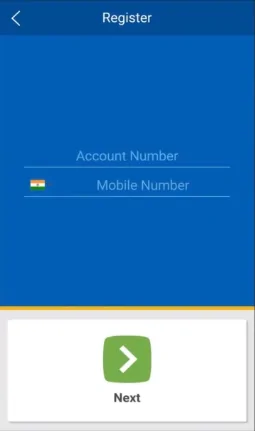
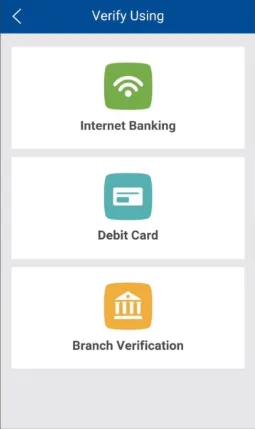
Step 4: On the next step, account holders need to choose the offline or online method to register them for Federal Bank Mobile Banking. Customers can opt to verify online by clicking on either “Internet banking” or “Debit card”. To verify offline, account holders can select “Branch verification” and continue.
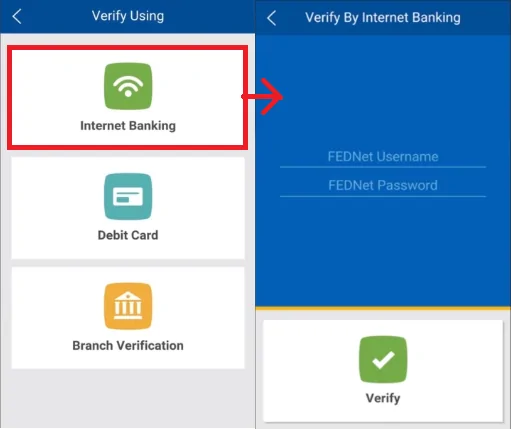
Internet Banking: Account holders who opt to verify using Internet Banking will have to provide FedNet Username and FedNet password and click on “Verify”.
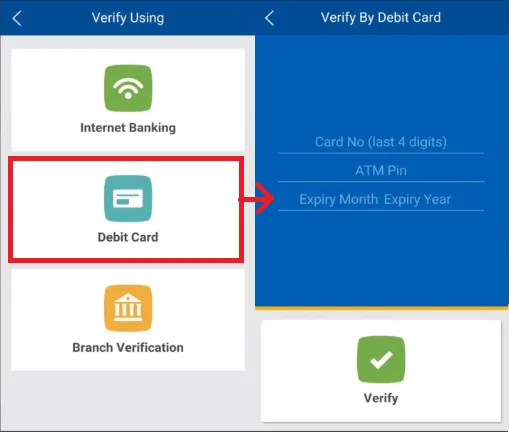
Debit Card: Customers who opt to verify using Federal Bank Debit Card will have to provide the “Federal Bank Debit Card number”, “ATM PIN”, “Expiry Month” & “Expiry Year” and click on “Verify”.
Branch Verification: To verify offline, account holders will be required to enter the “Register Token” and click on “Verify”.
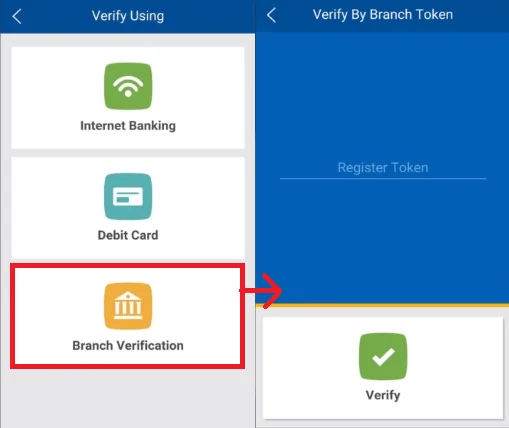
Step 5: After successful verification, account holders will be required to set a 4-digit MPIN for Federal Bank Mobile Banking app – FedMobile.
Federal bank has launched its AI-enabled chat bot ‘FEDDY’. It is equipped to answer all the banking queries on the go. To access FEDDY through WhatsApp, the users need to send an SMS to 8108030845 from their registered mobile number.
Accountholders can avail following facilities through WhatsApp banking:
Note: Federal Bank has not started fund transfer services via WhatsApp banking as of now.
It is worth noting that WhatsApp banking will be available only for those customers who have already registered their mobile number with the bank account. The accountholder should use WhatsApp operated using the registered mobile number only.
Ans. To download a Federal Bank account statement using FedMobile, you need to Login to the FedMobile app, tap on the side bar on the Home screen, and search for service requests. Further you need to tap on the ‘Statements’ to visit your account summary screen. Next, you need to select from multiple accounts and download/email statement. Finally, you need to select the account statement duration you want to generate and click on ‘Proceed’.
Ans. You can change/reset Federal Bank mobile PIN via three methods, such as by using branch token, debit card details or internet banking credentials.
Ans. Yes, for all transactions over Rs. 5,000, the account must be added as a beneficiary. Transactions under Rs. 5,000 can be done via quick pay.
Ans. Yes, account holder will be charged nominal service charges depending on the transaction amount. Details are furnished below.
|
NEFT/RTGS Charges |
||
| Type | Amount range (in Rs.) | Charge (in Rs.) per transaction |
| NEFT | 0 – 10,000 | 2 |
| 10,001 – 1,00,000 | 4 | |
| 100,001 – 2,00,000 | 14 | |
| Above 2,00,000 | 20 | |
| RTGS | 200,000 – 5,00,000 | 25 |
| Above 5,00,000 | 45 | |
Ans. For quick one-time fund transfers, customers have the option of “Quick Pay” where funds can be directly transferred without adding other accounts as beneficiary. The transaction limit for this option can also be set by the customers under the “Quick Pay Limit” option available on the application.
Ans. MMID or Mobile Money Identification Number is a 7-digit number. It is like a unique identification number that is a combination of the bank account number and the phone number
Ans. Limit for bill payments in FedMobile is Rs.10000.