Download the
Paisabazaar app Today!
Paisabazaar app Today!
Get instant access to loans, credit cards, and financial tools — all in one place

Get the app — instant card and loan offers!

Our Advisors are available 7 days a week, 9:30 am - 6:30 pm to assist you with the best offers or help resolve any queries.


Get instant access to loans, credit cards, and financial tools — all in one place

Scan to download on


 Personal Loan
 Business Loan
 Home Loan
 Other Loans


Our Advisors are available 7 days a week, 9:30 am - 6:30 pm to assist you with the best offers or help resolve any queries.
It is very important to verify the validity of an Aadhaar Card and can be done easily online. The main purpose of validating an Aadhaar Card is to ensure whether the Aadhaar Number has been issued and is valid or not. As by verifying one of the most important documents these days, you can check the details like gender, age, etc. of the Aadhaar Cardholder. However, if there’s any discrepancy in the Aadhaar Card, you can immediately intimate The Unique Identification Authority of India (UIDAI) via a toll-free number or by writing an email as well.
The purpose of Aadhaar verification is to ensure that it serves as a universally accepted KYC document. Moreover, it also aids in availing various government subsidies. Let us now know everything about the Aadhaar Card Validity in detail.

Get Free Credit Report with monthly updates. Check Now
Once an Aadhaar Card is issued to you, it is valid for the lifetime. However, in case of minors, the Aadhaar Card to children who are below the age of five years is blue in colour and is known as Baal Aadhaar. Thus, once the child attains the age of five years, the Aadhaar Card is also required to be updated. To know more about Baal Aadhaar, click here.
The Government of India has deactivated various Aadhaar Cards due to reasons relating to the authenticity, possession of more than one Aadhaar Card in the same name, etc. Whether your Aadhaar Card is still valid or not you can now verify it online through the ‘The Unique Identification Authority of India (UIDAI) official portal. All you have to do is follow a simple and hassle-free process as mentioned below:
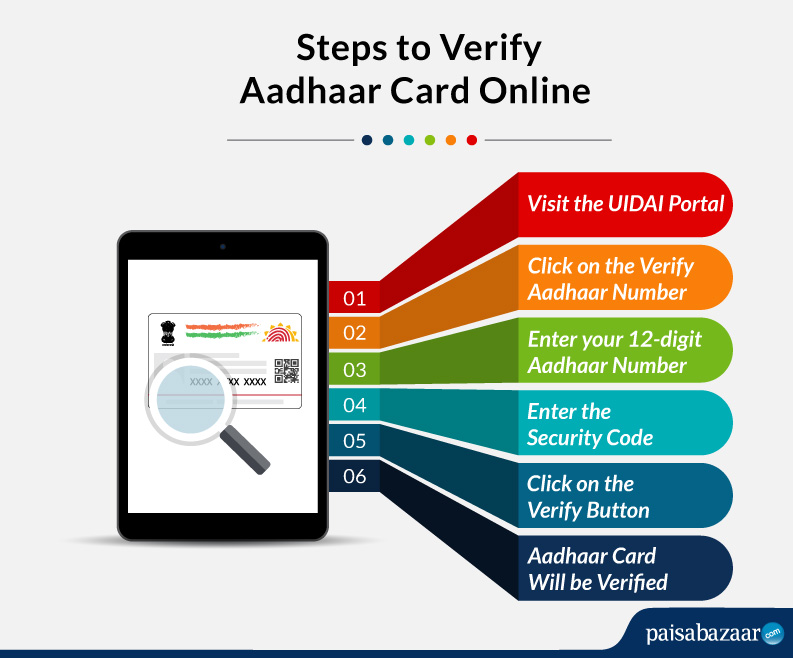
Step 1: Visit the official website of UIDAI i.e. https://uidai.gov.in/
Step 2: You need to choose the option ‘Aadhaar services’ available at the bottom of the page
Step 3: Once done, click on the ‘Verify an Aadhaar Number’ option
Step 4: Now, a new page for Aadhaar Verification will appear on your screen
Step 5: You need to enter the 12-digit Unique Identification Number, i.e. Aadhaar Number
Step 6: Enter the ‘Captcha Verification’ code
Step 7: Now, click on the ‘Proceed to Verify’ option
Step 8: Your Aadhaar verification will be completed
For the process of Aadhaar Card Verification, you are not required to submit any documents. Since the data is already available in the database of the Unique Identification Authority of India (UIDAI), the verification of documents will be done automatically.
There are various reasons due to which the Unique Identification Authority of India (UIDAI) deactivates an Aadhaar Card such as failure to link Aadhaar-PAN Card, not submitting the valid documents and details, and more. To know whether your Aadhaar Card is deactivated or not, follow these steps mentioned below:
Step 1: Visit the official website of UIDAI-https://uidai.gov.in/
Step 2: Click on the ‘Verify Aadhaar Number‘ option under the ‘Aadhaar Services’ tab on the homepage
Step 3: You can verify your Aadhaar by entering the 12-digit Aadhaar number and the security code
Step 4: Now, click on the ‘Verify‘ button to know if your Aadhaar card is valid or deactivated.
Note: If a green tick appears, your Aadhaar card has not been deactivated and it is still valid.
Aadhaar Card Verification is needed for the following reasons:
The Unique Identification Authority of India issues a 12-digit unique identity number to all the citizens of India by taking into account a person’s biometric details such as iris scan and fingerprints, and demographic information like date of birth and address. However, it is not a citizenship document rather it serves as the proof of identity and proof address to avail various government-related subsidies.