Download the
Paisabazaar app Today!
Paisabazaar app Today!
Get instant access to loans, credit cards, and financial tools — all in one place

Win Assured Cashback

Our Advisors are available 7 days a week, 9:30 am - 6:30 pm to assist you with the best offers or help resolve any queries.


Get instant access to loans, credit cards, and financial tools — all in one place

Scan to download on



 Personal Loan
 Business Loan
 Home Loan
 Other Loans


Our Advisors are available 7 days a week, 9:30 am - 6:30 pm to assist you with the best offers or help resolve any queries.
Customers of Indian Overseas Bank can transfer funds through UPI as well as using the bank’s BHIM IOB UPI app and other third-party applications. This page discusses about registration for BHIM IOB UPI, transfer limit through this app, sending and receiving money, and other details.
600 or 750? What's your credit
score? Check for FREE.


Let’s Get Started
 +91
+91
The entered number doesn't seem to be correct
Unified Payments Interface (UPI) is a real-time payment solution that supports easy and secure fund transfers between bank accounts. This facility allows customers to link multiple bank accounts to one UPI application which makes it easier for customers to make seamless fund transfers from one place. Through UPI, payments can be done by using UPI ID, phone number, account number and IFSC or by scanning QR code. On this page, we will learn about UPI services offered by Indian Overseas Bank – BHIM IOB UPI.
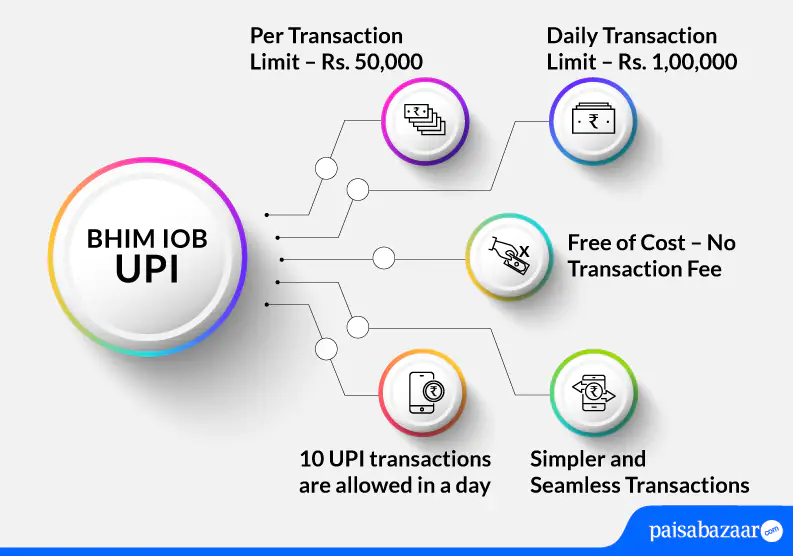
Indian Overseas Bank allows its customer to make UPI transactions through BHIM IOB UPI. The app allows account holders to send and receive money just by using their smartphones. The facility does not require the receiver to disclose his/her account details. Funds can be transferred via BHIM IOB UPI just by knowing the VPA of the receiver.
Also Read: Unified Payments Interface
Following are the features offered by BHIM IOB UPI:

Get FREE Credit Report from Multiple Credit Bureaus Check Now
| Type of Transaction | Transaction Limit |
| First transaction after setting UPI PIN | Rs. 5,000 within 24 hours |
| Per transaction limit | Rs. 50,000 |
| Per day total transactions limit | Rs. 1,00,000 |
| Maximum number of transactions in a day | 10 |
| Maximum collect request duration limit | 45 days |
| IPO Limit | Rs. 5,00,000 |
| For categories like Capital Markets , Collections, Insurance, Foreign Inward Remittances | Rs. 2,00,000 |
BHIM IOB UPI allows customers to create a VPA, link accounts and set a PIN to carry out UPI transactions. The below-mentioned steps explain the process of registering on BHIM IOB UPI:
Step 1: Download and install BHIM IOB UPI app from Google Play Store or Apple Store.
Step 2: Tap on ‘Get Started’ and allow BHIM IOB UPI to access your device’s location, contacts, etc. as asked on the device while registering.
Step 3: Verify your mobile number. The bank will send an SMS containing OTP to your registered mobile number for verification.
Step 4: Upon verifying your mobile number, on the next page, add details such as your first and last name and your email id. Tap on ‘Proceed’.
Step 5: Set your 6-digit app passcode. On the next page, tap on ‘Proceed’ with the suggested UPI ID or create a UPI ID of your choice.
Step 6: On the next page, select your bank account and click on ‘Next’ (Please note that the selected account will be set as your primary account to send and receive money).
Step 7: Verify account using your debit card, set your 6-digit UPI PIN, and tap on ‘Proceed’.
Step 8: Enter the OTP received on your registered mobile number. On the next page, set 6-digit UPI PIN which you will use to make UPI transactions and confirm the PIN.
Step 9: Your registration will be done successfully.
Get FREE Credit Report from Multiple Credit Bureaus Check Now
Step 1: Login to BHIM IOB UPI App
Step 2: Tap on the ‘Send Money’ option available on the home screen
Step 3: Enter the UPI ID of the receiver and tap on the arrow on the right side of the screen.
Step 4: Enter the UPI PIN and send money
Below-mentioned are the steps that will help you collect money using BHIM IOB UPI App:
Step 1: Login to BHIM IOB UPI application and tap on ‘Request’ option on the dashboard.
Step 2: Enter the payee’s UPI ID and tap on ‘Verify’.
Step 3: Enter the amount, request expiry date and tap on ‘Proceed’.
Step 4: The request to collect money will be sent to the payer.
Once the payer accepts the request, money will be debited from his/her account and credited to your UPI-linked default bank account.
Alternatively, customers can also raise a complaint by logging in to the BHIM IOB UPI. The below-mentioned steps explain how the customer can do so:
Step 1: After logging in to the BHIM IOB UPI, tap on history and view all your recent transactions.
Step 2: Select the disputed transaction and click ‘Raise Dispute’ button.
Step 3: Select the type of dispute and enter remarks. Tap on ‘Submit’.
Also Read: Indian Overseas Bank Customer Care
Get FREE Credit Report from Multiple Credit Bureaus Check Now
Q. Is it possible to link more than one account to a single virtual payment address?
Ans. Yes. You can link more than one account to a single virtual payment address.
Q. How can I reset my UPI PIN?
Ans. In case you forget your UPI PIN. You can re-generate a new PIN under bank account. Select your account from the linked account list under ‘Bank Account’ and tap on ‘Reset UPI PIN’ option. Provide the details of your Debit (ATM) card and create a new PIN using the OTP in the next screen.
Q. Is there any capping on requesting money through UPI in Indian Overseas Bank?
Ans. Yes. There is a capping on requesting money through UPI in Indian Overseas Bank. For P2P the collect request has been capped at Rs. 2,000 per request with a maximum number of 5 transactions per day.
Q. Is it possible to transfer money abroad using BHIM IOB UPI?
Ans. No. You cannot transfer money abroad using BHIM IOB UPI.
Q. Is it possible to link mobile wallet to BHIM IOB UPI>
Ans. No. You cannot link mobile wallet to BHIM IOB UPI. You can only add bank accounts.
Q. Is it mandatory for a beneficiary to register for UPI for receiving funds?
Ans. In case the funds are being transferred to a beneficiary through VPA & QR code, the beneficiary needs to register with UPI. However, if the fund transfer is through account + IFSC, there is no need for beneficiary to register with UPI.
Q. Can I link NRE/NRO accounts in BHIM IOB UPI?
Ans. No. BHIM IOB UPI does not allow you to link NRE/NRO accounts. You can link Indian Overseas Bank savings account and other bank accounts that operate within India.