Download the
Paisabazaar app Today!
Paisabazaar app Today!
Get instant access to loans, credit cards, and financial tools — all in one place

Win Assured Cashback

Our Advisors are available 7 days a week, 9:30 am - 6:30 pm to assist you with the best offers or help resolve any queries.


Get instant access to loans, credit cards, and financial tools — all in one place

Scan to download on



 Personal Loan
 Business Loan
 Home Loan
 Other Loans


Our Advisors are available 7 days a week, 9:30 am - 6:30 pm to assist you with the best offers or help resolve any queries.
600 or 750? What's your credit
score? Check for FREE.


Let’s Get Started
 +91
+91
The entered number doesn't seem to be correct
Union Bank Net Banking is an electronic payments portal which enables the Union Bank account-holders to access their account online, transfer funds, open deposits, manage trading accounts and a lot more. With digital banking portals, the bank promotes 24×7 convenient banking at any time and from anywhere. But, net-banking is only accessible by customers who have registered for the service at the bank. Let us find out more about Union Bank Net-banking service.
Union Bank net-banking is not just making financial transactions easy but also making banking convenient. Here are some of the primary services provided by Union Bank on its net-banking portal.
| Services Available at Union Bank Net Banking | ||||
| View/Update Account Details | View Account Statements | View Mini Statement | Fund Transfer within Union Bank | Fund Transfer to other bank’s account |
| Update Nomination & PAN Details | Update Aadhaar Card Details | Change Log-in Password | Demand Draft Requests | NPS Payment |
| Online Loan Application | Open Fixed/Recurring Deposits | Union e-Tax Payments | Utility Bill Payments | NEFT/RTGS Timing & Charges |
| Online Account Opening | Branch/ATM Locator | Invest in Government Schemes | Generate CIBIL Score | Instant Personal Loans |
| View Settlement Calendar E-instruction | Manage Demat Account | Book Train Tickets | Avail Insurance | Online Locker |
| Manage Trading | Make Donations | Invest in Mutual Funds | Make Credit Card Bill Payments | SMS Banking |
Any Union Bank account-holder can apply for net-banking through the given sources:
Here are the steps of activating Union Bank Net-banking through Self User Creation module-
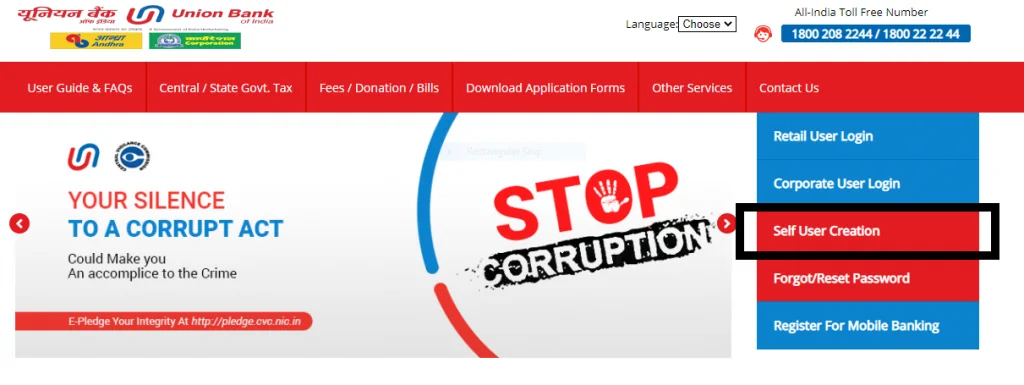
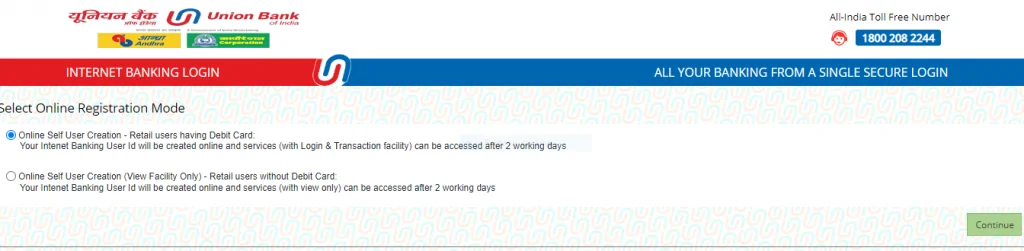
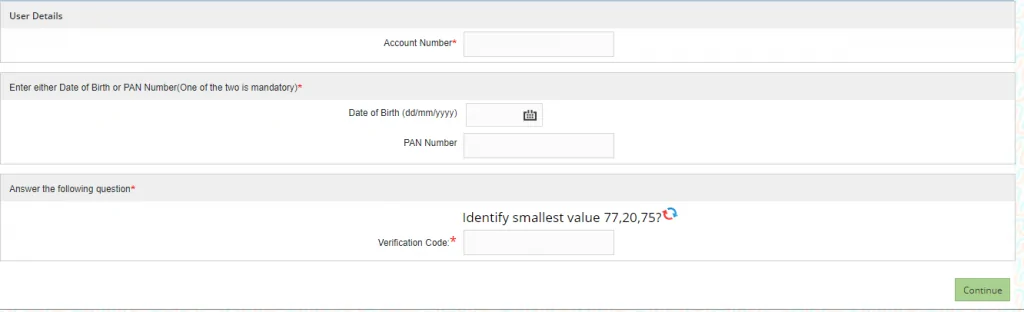
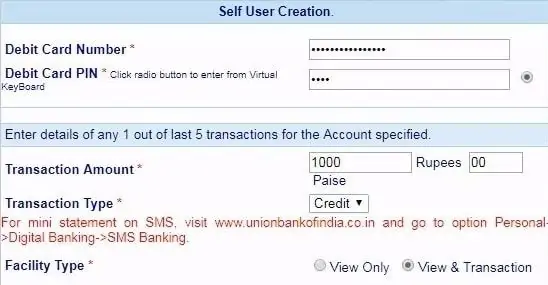
It takes around 24 hours for the bank to validate your request and register your account for net-banking services. A confirmation message will be sent to your registered mobile number once the process has been completed. You can log-in to Union Bank Net-banking with your user-ID and password after 48 hours.
Also Read: Union Bank Mobile Banking
In case you want to reset/change your Union Bank Net-banking password, follow these steps-
You can also get a printed password through courier. Select the option for print password on the page and continue.
To enable or disable your net-banking password, the following steps should be followed from user’s registered mobile number-
SMS (for retail users):
SMS (for corporate users):
Enabling password via call centre-
Some of the key advantages of Union Bank net-banking are-
National Electronic Fund Transfer (NEFT) service enables the users to transfer funds from anywhere to any NEFT-enabled bank in India. This service is time-bound at the bank but, it can be availed at any time from anywhere using net-banking. Here is how one can transfer funds via NEFT using Union Bank Net-banking:
Step 1: Log-in to the official net-banking website of Union Bank
Step 2: From the main menu, select ‘Transfers’ and then click on ‘NEFT/RTGS’
Step 3: Select the ‘Make a New Payment’ option
Step 4: If you have already added the beneficiary, enter his/her details and proceed.
(If you haven’t added the beneficiary then click on ‘Register Beneficiary’. Then, add beneficiary details such as name, account number, IFSC code, branch details, etc. Click on ‘Add Payee’ and confirm the beneficiary. Post that, a tracker ID will be sent to the payee’s registered mobile number via SMS.)
Step 5: Enter all the required information and click ‘Pay’
Step 6: Now, enter your transaction password and then ‘Validate’ details
Step 7: After a successful transfer, a confirmation message will be sent to your registered mobile number
Follow the given steps to pay your credit card bill through NEFT on Union Bank Net-banking website-
For any net-banking related queries or complaints, you can dial the Union Bank Net-banking customer care number, available 24×7:
Q. How can I use Union Bank internet banking?
To use Union Bank Net- banking, you must have an operating account in any bank or a financial institution. You can use the Self User Creation system available on the net-banking website to generate your user ID and passwords. Or, you can download the net-banking application form from Union Bank’s net-banking website or visit the bank and fill in the form.
Q. Can I change my Union Bank Net-banking password?
Once you have logged in for the first time, it is mandatory to change the password which is issued by the bank. You can change the transaction as well as login password anytime.
Q. What precautions should be taken while using Union Bank Internet Banking?
While using Union Bank Net-banking, you must make sure of a few things-
Q: Can account holders avail banking facilities on their mobile phone as well?
Yes, Union Bank provides Union Bank Net-banking app using which the customers can avail all the banking facilities on-the-go. Account-holders can download the Union Bank Mobile App from the Google Play Store or Apple App Store.
Q: Does Union Bank charge for Internet Banking?
No, the bank does not charge the customer for availing internet banking facilities. However, if one opts for funds transfer to other accounts via NEFT, RTGS or IMPS, the charges are decided by the individual member banks.