Download the
Paisabazaar app Today!
Paisabazaar app Today!
Get instant access to loans, credit cards, and financial tools — all in one place

Win Assured Cashback

Our Advisors are available 7 days a week, 9:30 am - 6:30 pm to assist you with the best offers or help resolve any queries.


Get instant access to loans, credit cards, and financial tools — all in one place

Scan to download on



 Personal Loan
 Business Loan
 Home Loan
 Other Loans


Our Advisors are available 7 days a week, 9:30 am - 6:30 pm to assist you with the best offers or help resolve any queries.
Customers of Paytm Payments Bank can transfer funds through the bank’s Paytm app. Customers holding accounts in other banks can also link their account to Paytm for making UPI transactions. The page explains about registration on Paytm, transfer limit through this app, sending or receiving money and other details.
600 or 750? What's your credit
score? Check for FREE.


Let’s Get Started
 +91
+91
The entered number doesn't seem to be correct
UPI has eliminated the need to transfer money by using bank account details of the beneficiary. Transferring money through UPI only requires the UPI ID/mobile number/UPI QR code of the user which is unique for all users. UPI ID acts as a VPA (Virtual Payment Address) for making online transactions/transferring money. On this page, we will study more about Paytm Payments Bank UPI.
Paytm Payments Bank offers Paytm application which allows customers to make UPI transactions by selecting a saved contact on the phone/entering the mobile number, scanning the UPI QR code of the receiver, entering the UPI ID, or entering the account number and IFSC. It is to be noted that customers can link their other bank accounts as well to Paytm to avail UPI services. The application is free of cost and allows customers to send/receive money, pay bills, pay at stores, etc. Let us discuss in detail about this application.
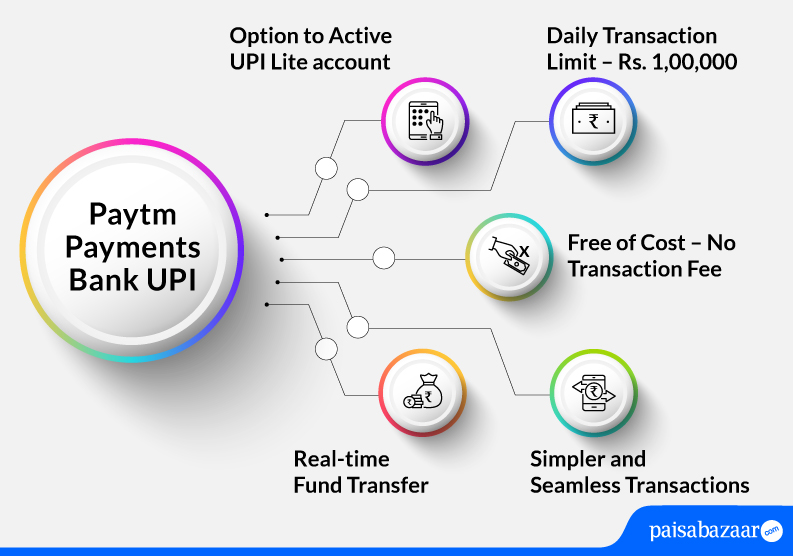
Below-mentioned are the features of Paytm Payments bank UPI:
Also Read: Unified Payments Interface

Get FREE Credit Report from Multiple Credit Bureaus Check Now
| Type of Transaction | Transaction Limit |
| Transaction limit per day | Rs. 1,00,000 |
| Per transaction limit | Rs. 1,00,000 |
| Maximum number of transactions allowed in a day | 20 10 (from Paytm App) |
| IPO limit | Rs. 5,00,000 |
| For categories like Capital Markets, Collections, Insurance, Foreign Inward Remittances | Rs. 2,00,000 |
Paytm Payments Bank accountholders get the facility to use UPI through the Paytm app. Customers can enlist savings accounts of other banks as well on this application to make UPI payments. The below-mentioned steps explain how one can register on Paytm UPI.
Step 1: Download Paytm UPI application from Google Play Store or Apple Store.
Step 2: Enter your mobile number. As you enter your mobile number, an SMS will be sent to you on your mobile for verification. Please note that you must enter the mobile number that is registered with the bank else, your details will not be fetched.
Step 3: On the next page, tap on the ‘Link my Bank Account’ option.
Step 4: If registering for the first time, the application will ask you to set up your UPI PIN. You will require your debit card details for setting up your UPI PIN.
Step 5: Your account is now linked to the application.
The application allows you to transfer money through various methods. While transferring money through Paytm, you can even change your bank account if you have added multiple bank accounts. Following are the ways by which you can transfer funds through Paytm:
This UPI mode of sending money is the most preferred because you can send/receive money just by sharing your mobile number. It is to be noted that the mobile number to send/receive funds must be registered with the bank. Following are the steps to transfer money through mobile number:
Step 1: Open your Paytm app.
Step 2: On the home screen, tap on ‘To Mobile or Contact’ option.
Step 3: Enter the mobile number of the receiver or choose the mobile number from your contact list if you have already saved the mobile number of the receiver.
Step 4: Upon adding the mobile number, a screen will appear in front of you. Add the amount and choose the bank account from which you want to pay. Tap on ‘Pay’.
Step 5: Enter your UPI PIN and click on ‘Submit’.
Step 6: Funds will be transferred.
UPI QR codes are unique QR codes assigned to each user for his/her bank account. As soon as you scan the QR code of the merchant/receiver, the linked bank account details will be fetched and you can make payment on the same. Following steps explain how you can transfer funds by scanning the UPI QR code:
Step 1: Open your Paytm app.
Step 2: On the home screen, tap on ‘Scan & Pay’ option. Scan the UPI QR code and choose the bank account from which you wish to make the payment.
Step 3: Enter the UPI PIN and click on ‘Submit’.
Step 4: Your transaction will be successful.
Get FREE Credit Report from Multiple Credit Bureaus Check Now
UPI ID is a unique identity for every UPI user. It is also called as VPA (Virtual Payment Address). The payments service provider provides UPI ID to individuals. This mode allows customers to transfer/receive money just by using the UPI ID. Following steps explain how one can transfer money using UPI ID:
Step 1: Open your Paytm app.
Step 2: On the home screen of the app, tap on ‘To UPI Apps’ option.
Step 3: On the next page. Select ‘To UPI ID’ and enter the UPI ID of the receiver in the box provided.
Step 4: As you enter the UPI ID of the receiver, the app will fetch the details of the receiver.
Step 5: Tap on ‘Pay Now’ option and choose the bank account from which you wish to send the money.
Step 6: Enter your UPI PIN and click on ‘Submit’.
Step 7: Your transaction will be successful.
It is better to transfer funds using UPI ID or mobile number because these are easy ways to transfer funds. However, you can still transfer funds using bank account details of the receiver by following the steps mentioned below:
Step 1: Open your Paytm app.
Step 2: On the home screen, tap on ‘To Bank or Self Account’ option.
Step 3: On the next page select ‘Enter Bank Account Details’ option.
Step 4: Select the name of the bank to which money needs to be transferred. Add the account number, and IFSC. Tap on ‘Proceed’.
Step 5: Once you tap on ‘Proceed’, the app will ask you to enter account holder’s name and then re-enter account number. Tap on ‘Proceed to Pay’.
Step 6: On the next page, choose the account from which you wish to send money. Tap on ‘Pay’.
Step 7: Enter your UPI PIN and tap on ‘Submit’.
Step 8: Your transaction will be successful.
To raise a complaint in Paytm regarding UPI transactions, customers can follow the below-mentioned steps:
Alternatively, customers can call on 0120-4456-456.
Get FREE Credit Report from Multiple Credit Bureaus Check Now
Q. While I was setting up my UPI account in Paytm, my verification got failed. What could be the reason?
Ans. If you are not setting up the account with your registered mobile number in the bank, your verification will fail. In case you have dual sim, you need to ensure that you set up the account with the registered mobile number.
Q. While setting up my UPI account, I could not find my bank details at the time of linking my account. What should I do?
Ans. In such a case, you need to check with your bank if the bank works with UPI. If the bank does, you need to contact Paytm support.
Q. Is there a possibility that someone will be able to access my account details if they have my UPI ID?
Ans. No. Nobody can access your account details with UPI ID. The transactions that happen through UPI ID are safe and secure in a highly encrypted format.
Q. How can I check my account balance in Paytm app?
Ans. To check your account balance in Paytm bank, open your Paytm app and on the home screen of the app, tap on ‘Balance & History’. Choose the account you want to check balance of. Enter your UPI PIN. Your account balance will be displayed on your screen.
Q. Can I send money to an NRI account from Paytm?
Ans. No. You cannot send money using Paytm to an NRI account. The money can only be transferred to bank accounts registered with Indian Banks that are a part of UPI system.