Download the
Paisabazaar app Today!
Paisabazaar app Today!
Get instant access to loans, credit cards, and financial tools — all in one place

Win Assured Cashback

Our Advisors are available 7 days a week, 9:30 am - 6:30 pm to assist you with the best offers or help resolve any queries.


Get instant access to loans, credit cards, and financial tools — all in one place

Scan to download on



 Personal Loan
 Business Loan
 Home Loan
 Other Loans


Our Advisors are available 7 days a week, 9:30 am - 6:30 pm to assist you with the best offers or help resolve any queries.
Customers of Equitas Small Finance Bank can transfer funds through UPI using BHIM Equitas UPI app and other third-party applications. On this page, we will understand how one can register for the BHIM Equitas UPI, transfer funds through the app and other details.
600 or 750? What's your credit
score? Check for FREE.


Let’s Get Started
 +91
+91
The entered number doesn't seem to be correct
UPI (Unified Payments Interface) allows customers to make payments in real-time just by using their smartphones any time of the day. This is a single application to access multiple bank accounts. The user can send or receive money just by using this application from their savings account or current account. This has eliminated the need to go to the bank again and again to send or receive money.
BHIM Equitas UPI allows customers and non-customers of Equitas Bank to make UPI payments through this application. Users can transfer money from any bank to another bank just by using VPA and no other account details. Let us learn more about BHIM Equitas UPI.
Also Read: Unified Payments Interface

Get FREE Credit Report from Multiple Credit Bureaus Check Now
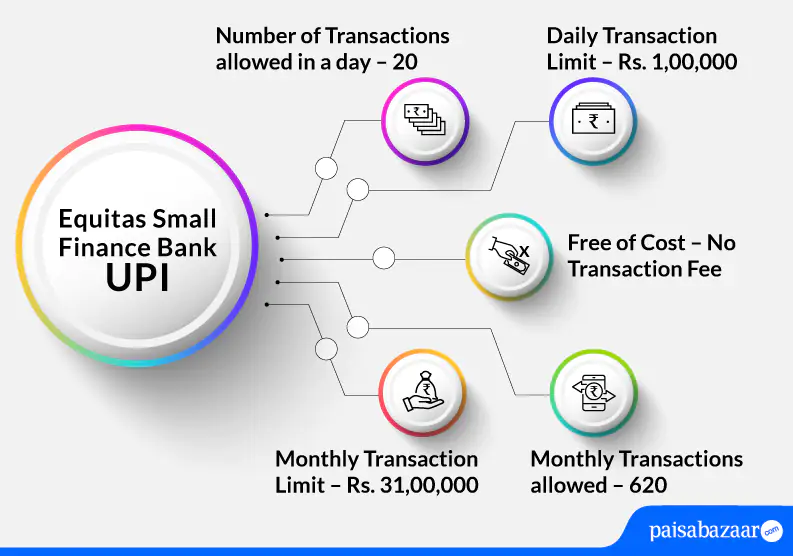
| Type of Transaction | Transaction Limit |
| Per transaction limit | Rs. 1,00,000 |
| Daily transaction limit | Rs. 1,00,000 |
| Number of transactions allowed through BHIM Equitas UPI App per day | 20 |
| Monthly transaction limit | 31,00,000 |
| Monthly transactions allowed | 620 |
| Number of transactions allowed through third-party application | 20 |
| IPO limit | Rs. 5,00,000 |
| For categories like Capital Markets, Collections, Insurance, Foreign Inward Remittances | Rs. 2,00,000 |
Customers of Equitas Small Finance Bank can use BHIM UPI app to avail UPI services. The below-mentioned steps how one can register their Equitas Small Finance Bank account on BHIM UPI:
Step 1: Download the BHIM UPI app from Google Play Store or Apple Store and install the app in your phone.
Step 2: Choose your preferred language.
Step 3: Allow BHIM application to send and view SMS messages and verify your mobile number (Add the number that is registered with your bank account).
Step 4: Set your passcode to access the application.
Step 5: Using bank option, link your bank account.
Step 6: Set your UPI PIN. To do so, you will require the last 6-digits of your debit card and expiry date.
Step 7: Enter the OTP received on your registered mobile number and then enter your new PIN. Confirm your PIN and tap on ‘Submit’.
Step 8: On the dashboard, tap on ‘Profile’ section and on the next page, create your UPI ID.
Step 9: Once you do so, your UPI ID will be created and you can avail UPI services on the BHIM app.
Get FREE Credit Report from Multiple Credit Bureaus Check Now
Customer can send money through BHIM UPI app in three ways namely – using VPA, using mobile number, and using Account No & IFSC. The below-mentioned steps explain how can one send money through VPA:
Step 1: Open the BHIM UPI app and login with the passcode.
Step 2: On the dashboard, tap on ‘Send’ money option.
Step 3: Enter the VPA of the receiver and tap on verify to check the name of the receiver.
Step 4: Details of the receiver will be fetched from the bank. Enter the amount and tap on ‘Pay’.
Step 5: Enter the UPI PIN to complete the transaction.
Step 6: Your transaction will be successful.
The application offers different ways to receive/collect money. However, the below-mentioned steps explain how one can receive/collect money through mobile number:
Step 1: Open the BHIM UPI app and login with the set passcode.
Step 2: On the dashboard, tap on ‘Receive Money’ option.
Step 3: Enter the mobile number of the payer and tap on verify to check the name of the payer.
Step 4: Once the details of the payer are reflected, verify the details and enter the amount that needs to be received.
Step 5: Upon doing so, you will receive the confirmation of the request.
Step 6: Your request to collect money will be sent to the payer. Once, the payer accepts the request, you will be notified.
Get FREE Credit Report from Multiple Credit Bureaus Check Now
Equitas Small Finance Bank customers can make UPI payments even through WhatsApp. Mentioned below are the steps to know how one can use WhatsApp to make UPI payments:
Step 1: Open your WhatsApp and go to WhatsApp settings.
Step 2: Tap on ‘Payments’.
Step 3: Verify your mobile number. Upon doing so, an auto SMS will be triggered for verification.
Step 4: Select Equitas Bank and account to be linked.
Step 5: Enter the last 6-digit of your debit card and the expiry date.
Step 6: Enter the OTP received on your registered mobile number and 6-digit UPI PIN.
Step 7: Select the contact you want to send money to and click on ‘Payments’.
Step 8: Verify the details and enter the amount that needs to be sent.
Step 9: You will receive payment confirmation on WhatsApp.
In case customers face any issues regarding UPI services in Equitas Bank, they can contact customer care at 1800-103-1222.
Suggested Read: Equitas Small Finance Bank Customer Care
Get FREE Credit Report from Multiple Credit Bureaus Check Now
Q. I entered a wrong PIN while making a transaction and now I am unable to do UPI transactions. What should I do?
Ans. Upon entering the wrong UPI PIN multiple times, firstly, your transaction will fail. Secondly, the bank may temporarily block sending money through UPI from your account. Hence, you should wait for the bank to unblock this service and then you may try doing your transaction again.
Q. What are the different ways of transferring funds through UPI?
Ans. The different ways to transfer funds through UPI are:
Q. Is it possible to stop a payment done through UPI?
Ans. No. Once the payment has been initiated through UPI, there is no way to stop that payment.
Q. I have changed my mobile number, will I be able to use UPI on this number?
Ans. In such a case, you will have to re-register for UPI services.
Q. Will I have to re-register for UPI services if I change my carrier?
Ans. No. You can continue using your UPI services as usual if you change your carrier.