Download the
Paisabazaar app Today!
Paisabazaar app Today!
Get instant access to loans, credit cards, and financial tools — all in one place

Win Assured Cashback

Our Advisors are available 7 days a week, 9:30 am - 6:30 pm to assist you with the best offers or help resolve any queries.


Get instant access to loans, credit cards, and financial tools — all in one place

Scan to download on



 Personal Loan
 Business Loan
 Home Loan
 Other Loans


Our Advisors are available 7 days a week, 9:30 am - 6:30 pm to assist you with the best offers or help resolve any queries.
Customers of Central Bank of India can transfer funds through UPI using the BHIM Cent UPI and other third-party applications. On this page, we will understand how one can register on BHIM Cent UPI, transfer funds and other details.
600 or 750? What's your credit
score? Check for FREE.


Let’s Get Started
 +91
+91
The entered number doesn't seem to be correct
UPI (Unified Payment Interface) is a payment platform developed by NPCI. The platform allows customers to transact through different bank accounts at one place. The facility can be availed just by a smartphone and a registered mobile number with the bank. Central Bank of India UPI allows account holders to send/receive money through UPI using the BHIM Cent UPI app or any other third-party UPI app.
Also Read: Unified Payments Interface
Central Bank of India offers BHIM Cent UPI app to the customers of Central Bank of India to access UPI services. Customers can manage their UPI account from this application easily. The application allows you to link multiple bank accounts at one place. The application can be used to perform all transactions needs of customers ranging from sending money, making online purchases, bill payments to receiving money. All the transactions can be done using a VPA (Virtual Payment Address).
BHIM Cent UPI can be accessed globally in countries like UAE, Nepal, Bhutan, and Singapore. Customers of Central Bank of India traveling to these countries can make UPI payments just by scanning the UPI QR code of the merchant.
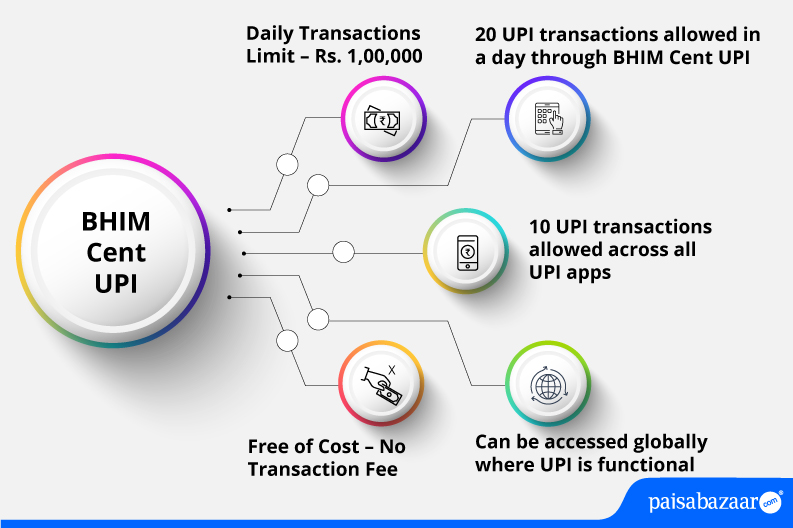
Central Bank of India provides BHIM Cent UPI app which is dedicated for the use of UPI. Let us know about the features offered by this application:

Get FREE Credit Report from Multiple Credit Bureaus Check Now
| Type of Transaction | Transaction Limit |
| Daily transaction limit | Rs. 1,00,000 |
| Per transaction limit | Rs. 1,00,000 |
| International limit per transaction | Rs. 10,000 |
| Total number of transactions allowed in a day through BHIM Cent | 20 |
| Total number of transactions allowed across all UPI apps | 10 |
| International spending limit per day | Rs. 25,000 |
| IPO limit | Rs. 5,00,000 |
| For categories like Capital Markets, Collections, Insurance, Foreign Inward Remittances | Rs. 2,00,000 |
Central Bank of India savings account holders and other bank accountholders can transfer funds using the app. Following steps explain how to register on BHIM Cent UPI app:
Step 1: Download and install BHIM Cent UPI from Google Play Store or Apple Store.
Step 2: Open the app and verify your registered mobile number.
Step 3: Read terms of use and tap on ‘Accept’. Your number will be verified.
Step 4: Enter the required user information and tap on ‘Submit’.
Step 5: Set application password and confirm your application password on the next screen.
Step 6: Add your payment address, select your bank account, and tap on ‘Next’ to proceed.
Step 7: Enter last 6-digits of your debit card, expiry date, year and tap on ‘Submit’.
Step 8: Enter the OTP received on your registered mobile number and set MPIN for transactions. Tap on ‘Submit’.
Step 9: Your UPI ID will be created successfully.
BHIM Cent UPI app offers various options to send money. However, we have discussed how one can send money using the UPI ID of the payee. It is to be noted that to instantly send money to the merchant, the customer can send by scanning the UPI QR code of the merchant.
Step 1: Log in to the BHIM Cent UPI app by entering your application passcode.
Step 2: On the home screen, tap on ‘Send’ option.
Step 3: Select your UPI ID and mode of payment.
Step 4: If you select mode of payment as ‘UPI ID’, you need to add payee’s UPI ID and the amount that needs to be sent. Tap on ‘Verify’.
Step 5: On the next page, check all the details and tap on ‘Transfer’ to send money.
Step 6: Enter your UPI PIN. The amount will be successfully sent to the payee’s account.
Get FREE Credit Report from Multiple Credit Bureaus Check Now
Step 1: Log in to the BHIM Cent UPI app and tap on ‘Receive’ option on the home screen.
Step 2: On the next page, enter details of the payer, the amount to be requested, and validity of the collect request. Tap on ‘Request’.
Step 3: Your transaction to collect money will be sent successfully to the payer.
Once the payer approves the request, money will be debited from the payer’s bank account and credited to your default bank account.
Also Read: Central Bank of India Customer Care
Q. Do I need to register for making UPI transactions?
Ans. Yes, before making transactions, you need to register on UPI and link your bank accounts.
Q. Can I transfer money abroad using UPI in Central Bank of India?
Ans. Currently, the bank allows only domestic transactions.
Q. Is it possible to stop UPI transaction once initiated?
Ans. No. Once your initiate UPI transaction, it cannot be stopped because settlement is done in real-time.
Q. While doing a UPI transaction, my account was debited but the transaction failed, what should I do?
Ans. If your account has been debited and the transaction has been failed, the amount will be refunded to your account in a few minutes. In case of further issues, you can lodge a complaint with the bank.
Q. Is it possible to keep more than one Virtual Payment Address for an account in Central Bank of India?
Ans. Yes. For a given account, you can keep up to ten virtual addresses in Central Bank of India.