Download the
Paisabazaar app Today!
Paisabazaar app Today!
Get instant access to loans, credit cards, and financial tools — all in one place

Win Assured Cashback

Our Advisors are available 7 days a week, 9:30 am - 6:30 pm to assist you with the best offers or help resolve any queries.


Get instant access to loans, credit cards, and financial tools — all in one place

Scan to download on



 Personal Loan
 Business Loan
 Home Loan
 Other Loans


Our Advisors are available 7 days a week, 9:30 am - 6:30 pm to assist you with the best offers or help resolve any queries.
600 or 750? What's your credit
score? Check for FREE.


Let’s Get Started
 +91
+91
The entered number doesn't seem to be correct
Bank of India provides its account holders the facility to transfer funds online through UPI. It operates a mobile banking app – BOI Mobile, where most of the facilities related to banking can be accessed. However, UPI facility has not been integrated in the app. The bank provides a separate app for this facility – BHIM BOI UPI. Android users can download BHIM BOI UPI app from Google Play Store and iPhone users can download it from the App Store free of cost. The Bank of India UPI app can be used for making instant payments and raise payment requests as well. Let us understand more about this service below.
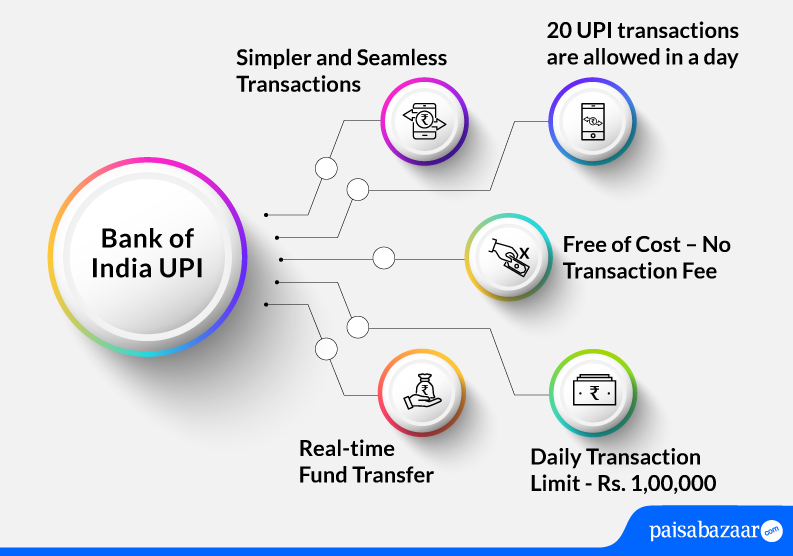
UPI (Unified Payments Interface) is a real-time payment platform that allows account holders to transfer funds from one account to another. It is a safe and secure way to transfer money and can be accessed 24×7. The facility is provided free of cost. It helps users make instant payments or request for money in real time.
The BHIM BOI UPI app is a fund transfer and payments platform for users who have an account in Bank of India. They can directly link their accounts in this app and thereby make instant fund transfers without having to resort to the lengthy processes of net banking or feeding in the card details.
To transact using the BHIM BOI UPI app, all the users must create a secure banking UPI PIN which is necessary for performing financial transactions in the app and to keep the account safe.
Bank of India offers the below-mentioned UPI features to its users and customers:
Bank of India supports below-mentioned types of UPI transactions:
The limit to transact via UPI is set by NPCI. However, it may vary from bank to bank. The UPI limit per day for BHIM BOI UPI is Rs. 1,00,000.

Get FREE Credit Report from Multiple Credit Bureaus Check Now
Given below are the steps following which you can set-up BHIM BOI UPI App:
Step 1: Go to Google Play Store or Apple Store and ‘Install’ BHIM BOI UPI app
Step 2: Open the app and click on the ‘Send SMS’ option to verify your device phone number
Step 3: Enter your first name, last name, email-id, security question, and answer in the fields provided on the screen. Click on the ‘Submit’ button.
Step 4: Now, you have to set your application password. This password is not your UPI PIN but a passcode to keep the application safe
Step 5: The next screen will show your dashboard with options like send money, request money, payment address, transaction details, side drawer/navigation menu, notification options, etc.
Step 6: After this, create a ‘New Payment Address’ in the format- xxxxxx@boi . This is a unique identifier used while sending/receiving money instead of sharing bank details. Click on the ‘Next’ button
Step 7: Once the VPA has been created, you will have to link it to your bank account. This eliminates the need for adding beneficiary by feeding in the IFSC Code. Different banks are listed on the screen. Select your bank and proceed
Step 8: Once the account has been successfully linked, you are ready to use your VPA to make and receive payments or do any other transactions
Step 1: Log-in to BHIM Bank of India UPI App
Step 2: Select the ‘Send Money’ option available on the dashboard
Step 3: Select the address and account from which you want to send money
Step 4: If the beneficiary is added in your Payee list, select and enter the amount which you want to send. Click to ‘Submit’.
Step 5: Enter the UPI PIN and send money
Step 1: Log-in to your BHIM Bank of India UPI App
Step 2: Select the ‘request money’ option on the dashboard
Step 3: Select from address and your bank account
Step 4: Enter the Virtual Payment Address of the sender
Step 5: Enter the amount you want to request and minimum payable amount
Step 6: Set an expiry date which ranges from 5 minutes to 1 day
Step 7: Click on the ‘Request’ button
A payment request will be sent to the payee’s UPI app and a push notification is also displayed in the app. A confirmation is sent to your registered mobile number as well. The requested amount will be credited into your account once the payer has accepted your request and transferred the amount.
Get FREE Credit Report from Multiple Credit Bureaus Check Now
Financial Transactions
Non-financial Transactions
Also Read: Bank of India Customer Care
Q. How does UPI work?
Ans. The purpose of the Unified Payment interface is to make peer-to-peer instant money transfer possible with the assistance of the two-step authentication process enabled by a single click. To ensure the effortless transfer of funds from one bank account to another, UPI makes use of Immediate Payment Services or IMPS and Aadhaar Enabled Payment System (AePS). The application works for both paying and receiving money. It is equally effective for over the counter transactions or payments to be made by scanning QR codes.
Q. Can I change my application password?
Ans. Yes, you can change your application password. Click on the ‘Forgot PIN’ option on the login screen, answer the security question and change your PIN.
Q. Can I send money using Bank of India UPI app to someone who doesn’t have UPI ID?
Ans. Yes, you can send money to someone with no UPI ID by selecting the ‘Account’ option on the Send Money screen and provide his bank account and IFSC to process the transaction. With this, the money gets credited to the receiver’s account directly.
Q. How many UPI transactions can I perform in a day?
Ans. Maximum 20 transactions can be done in a day using BHIM BOI UPI.
Q. What is the format of Bank of India UPI ID?
Ans. The format of Bank of India UPI ID is “xxxxxx@boi”. Bank of India UPI ID example is abcdef101@boi.
Q. Can I use Union Bank of India UPI for Bank of India UPI transaction?
Ans. No, you cannot use Union Bank of India UPI for Bank of India UPI transaction because these are two different banks. You need to have unique UPI ids for different bank accounts. Single UPI ID cannot be used for multiple bank accounts.
Q. What is the Bank of India UPI limit?
Ans. Customers of Bank of India can transfer Rs. 1,00,000 per day through UPI.