Download the
Paisabazaar app Today!
Paisabazaar app Today!
Get instant access to loans, credit cards, and financial tools — all in one place

Get the app — instant card and loan offers!

Our Advisors are available 7 days a week, 9:30 am - 6:30 pm to assist you with the best offers or help resolve any queries.


Get instant access to loans, credit cards, and financial tools — all in one place

Scan to download on


 Personal Loan
 Business Loan
 Home Loan
 Other Loans


Our Advisors are available 7 days a week, 9:30 am - 6:30 pm to assist you with the best offers or help resolve any queries.
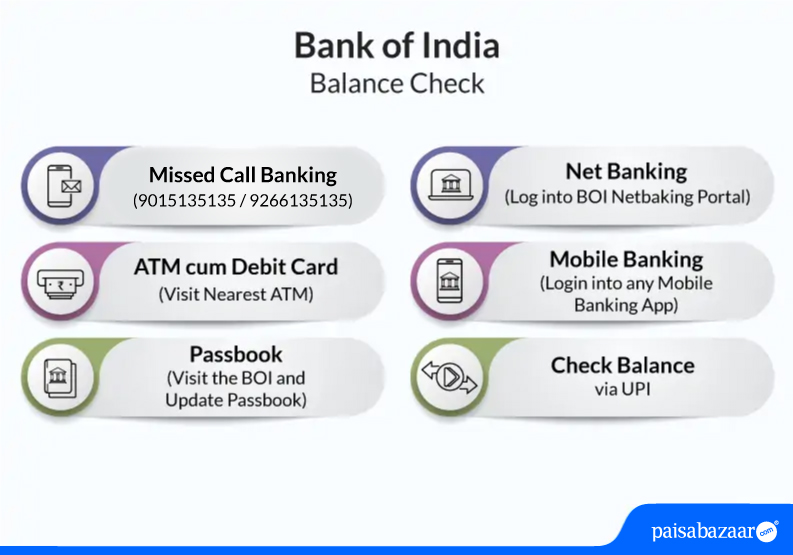
Bank of India (BOI) accountholders can check Bank of India account balance using mobile, netbanking and SMS. Read ahead to know the steps to check BOI account balance through various methods such as SMS, netbanking, mobile banking, phone banking, ATM and passbook.
Bank of India (BOI) offers a wide range of banking facilities and products to its customers, such as loans, credit cards, deposit options, savings and current accounts, investment products, etc. To keep account holders updated with their finances, BOI provides various facilities to check their account balances. From account opening to making payments, it allows its customers to avail banking services using its net banking, mobile banking, and SMS services. Let us learn about the different account balance check options and other ways for bank balance enquiry using mobile, net banking, SMS banking, and WhatsApp.

Customers of Bank of India can call the below-mentioned customer care toll-free number to check their account balance:
Click here to get the complete list of overseas contacts
Customers of Bank of India can give a missed call on the below-mentioned numbers to know their account balance:
Customers who keep their bank account passbooks updated can see their Bank of India (BOI) passbook to check their account balance. Since the passbook keeps a record of both the debit and credit transactions, an account holder can see his complete account statement right from the day of account opening using a passbook. For each passbook update, the customer needs to visit the bank branch. This method of balance enquiry has fallen out of favor since internet-savvy customers now want to check their account balances using more convenient options.

Bank of India balance check can also be performed by visiting a Bank of India ATM. It is a fairly simple process. Here are the steps to follow:
To check their last few transactions in the account, they can carry out the same steps and use the mini-statement option. The ATM will print a receipt containing the details of the last 10 account transactions.
BOI account holders can also visit non-BOI ATMs or third-party ATM services to check their account balance. Since the Reserve Bank of India (RBI) has limited the number of free transactions per ATM card, use this service wisely if you do not want to pay the transaction charges. If you choose this option from a non-BOI ATM, the charges might be higher.
Given below are some ways in which you can check your bank account balance online-
Accountholders of Bank of India savings accounts who have registered for net banking can use their net banking login ID and password to log into the BOI website. Net banking and mobile banking credentials are the same. The bank’s website offers a range of banking facilities to its customers including Bank of India account balance checks, account statements, funds transfers, etc.
BOI provides its electronic passbook which can be used for generating your account statements. It allows the account holders to download the statement in PDF format on mobile. One can also send the account statement in the form of an email to the registered email address. However, one needs to register for BOI net banking or mobile banking to avail this facility.
BOI offers StarConnect mobile banking app to both its domestic as well as international customers.

Here are the ways in which BOI account holders can check their account balance using their mobile phones:
Bank of India gives customers an option to check their savings account balance via SMS. Customers need to avail the Star Connect Mobile Banking on SMS facility to get their account balance via SMS. Here are the steps they need to follow:
After setting the password you can use the facilities listed below:
Send the SMS
| Account | Request | SMS Format |
| Primary Account | Balance Enquiry | BAL XXXX |
| Mini Statement | TRANS XXXX | |
| Other Account | Balance Enquiry | BAL XXXX <Account Number> |
| Mini Statement | TRANS XXXX <Account Number> |
*XXXX is the 4-digit SMS Password set through the Star Connect Mobile banking Link.
Note: This service is temporarily unavailable.
The bank offers a mobile banking facility to its customers through an amazing mobile app, BOI BTM.
Bank of India account holders can also download the Android app BOI StarToken to carry out banking transactions.
Also Read: UPI – Unified Payment Interface
Here’s how to check BOI balance online through WhatsApp banking:
Additional services offered through BOI Whatsapp banking are as follows:
Customers of Bank of India can avail more services through WhatsApp banking.
Also Read: Bank of India Customer Care
Customer ExperienceWhat is the best method for Bank of India balance enquiry online? To check my balance online in the Bank of India, I have been using the BOI Mobile app. I find it extremely easy to check my balance in the app whenever I am on the go. I use the app to avail other banking services as well. Recently, I used the app to transfer funds and much more. I would highly recommend using this service. What is the best method for a Bank of India balance check offline? To know my balance online in the Bank of India, I use the missed call service provided by the bank. I simply give a missed call on 9266135135 from my registered mobile number and receive my account balance instantly. -Ruchi Gulia, Bank of India customer for the past 1 year |

Ans. You can use the Star Mobile application to view your last 5 transactions in your Bank of India account. Open the application, click on view balance, select your account, and enter the password to proceed. Also, you can view your transaction by sending TRANS <SMS Password><Account Number> to +919810558585. (This service is temporarily unavailable).
Ans. Customers of Bank of India can give a missed call at 9266135135 from their registered mobile number to know their account balance.
Ans. No, if you are an account holder then you can check your account balance via SMS from an overseas number by SMS ‘BAL’ to 09223766666′ from your registered mobile number.
Ans. There is no minimum or maximum limit to use the bank’s missed call service to check your account balance. However, even one missed call from your registered mobile number shall provide the required information and the details shall not change until the next transaction.
Ans. Yes, you are required to inform the bank regarding your registered mobile number change to continue with the UPI, mobile banking, net banking, and SMS banking services. The changed mobile number has to be informed by filling out a form by visiting your nearest bank branch.
Ans. You can check your account balance using your mobile phone by sending an SMS- BAL<4-digit SMS password> to +91-9810558585.
Ans. You can check your account balance by visiting the nearest bank branch or ATM, by using net banking services, or checking your updated passbook.
Ans. To get a BOI mini statement by missed call, you can dial 09015135135/09266135135 or you can type ‘TRANS<4-digit SMS password’ and send it to +919810558585 from your registered mobile number.
Ans. BOI SMS service is free of cost for the customers.
Ans. To enquire about your Bank of India account balance, you can call the bank’s toll-free number 1800-103-1906. It is to be noted that your number must be registered with the bank to avail this service.
Ans. To register or change your mobile number with the bank, you will have to fill out a form at your branch and deposit it to the concerned officer. This service uses the mobile number which is associated with your bank account. So, if you wish to make respective changes, the same will be applied to your bank account as well.
Ans. Bank of India balance check missed call numbers are – 9266-135-135 and 9015-135-135. You can call on these numbers using your registered mobile number to check your account balance.
Ans. No, there are no charges to check your BOI account balance via missed call.
Ans. You can avail your account statement and know your balance via the Bank of India WhatsApp banking number – +91-8376006006.
Ans. You can visit the nearest bank branch and fill out the mobile number registration form to avail various account services on your mobile and online.
Ans. Yes, you can check the balance of your BOI joint account separately through various channels including internet banking, mobile banking etc. However, even though you can access and view your joint account balance separately, all joint account holders have access to the same information.