Download the
Paisabazaar app Today!
Paisabazaar app Today!
Get instant access to loans, credit cards, and financial tools — all in one place

Win Assured Cashback

Our Advisors are available 7 days a week, 9:30 am - 6:30 pm to assist you with the best offers or help resolve any queries.


Get instant access to loans, credit cards, and financial tools — all in one place

Scan to download on



 Personal Loan
 Business Loan
 Home Loan
 Other Loans


Our Advisors are available 7 days a week, 9:30 am - 6:30 pm to assist you with the best offers or help resolve any queries.
600 or 750? What's your credit
score? Check for FREE.


Let’s Get Started
 +91
+91
The entered number doesn't seem to be correct
With the advent of internet banking, financial providers have successfully handed banking services to their customers. Banking performed with the help of internet is termed as internet banking. You can now bank using your smartphone, tab, or laptop. However, the procedure of internet banking may vary from one bank to the other. The internet banking facility from Allahabad Bank allows its users to use banking services in a hassle-free manner. Allahabad corporate net banking allows companies and corporate customers to avail net banking services directly from their offices.
Retail banking directly deals with retail customers. Retail banking is also termed as personal banking or consumer banking. This banking facility is available to the general public, and the branches for personal banking are in abundance available in almost all major cities. Corporate banking, on the other hand, is also termed as business banking. This type of banking is for the corporate customers to manage the large-scale fund influx and efflux efficiently. Corporate banking is the major source of profit for almost all banks. Allahabad Bank is one such financial provider that offers the facility of both retail internet banking and corporate internet banking to its customers.
You can activate the corporate internet banking facility by Allahabad Bank by following the steps mentioned below:
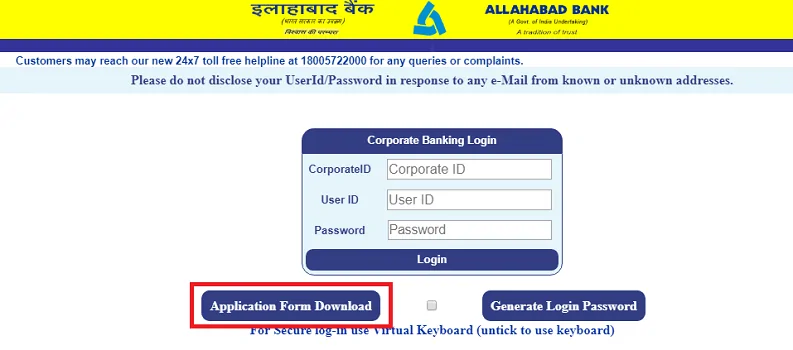
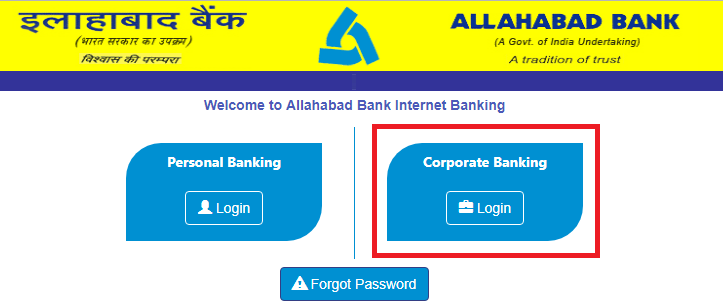
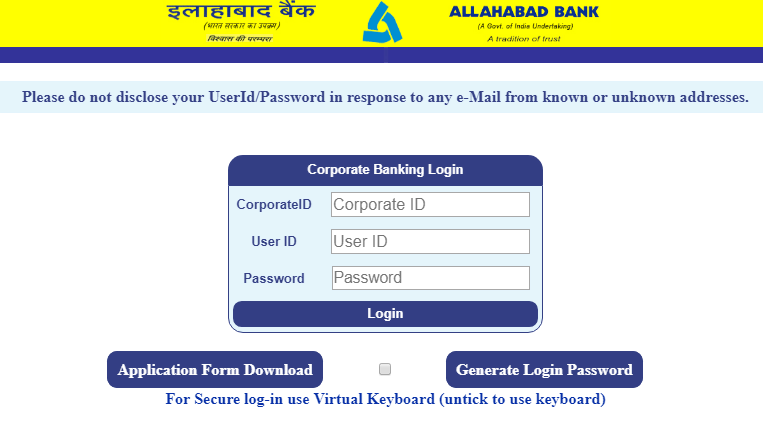
You need to enter your corporate ID, user ID, and password every time you wish to login to your internet banking portal from Allahabad Bank. Also, it is advised to change your login password and transaction password every 90 days to maintain security and prevent any misuse of your bank account.
To avail the net banking facility from Allahabad Bank, you need to remember your login password. However, in case you forget your login password for logging in to the Allahabad Bank net banking account, you can regenerate your login password by following the steps mentioned below:
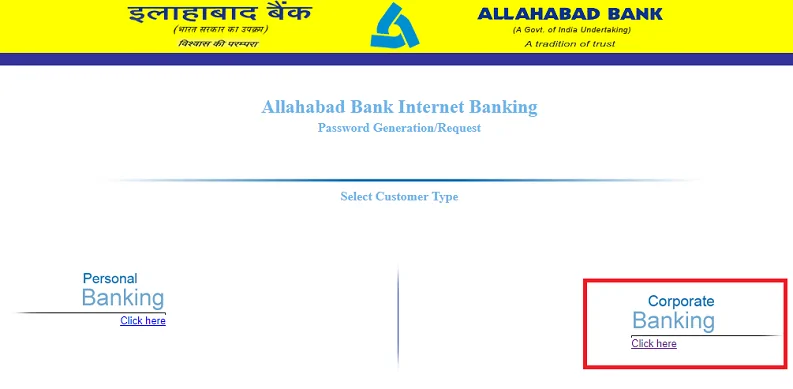
After you finish any of the steps mentioned above, you will receive your login password from your branch of Allahabad Bank. Also, your transaction password will be sent to your address registered with your Allahabad bank branch.
Every bank and the financial provider have fixed specific terms and conditions to use the net banking facility. The Allahabad Bank has set the following terms and conditions to use its net banking facility:
Allahabad Bank allows its customer to enjoy internet banking conveniently and easily. Below mentioned are the category and the features available with the internet banking facility from Allahabad bank:
| Sr. No. | Category | Features |
| 1. | Account Services | i. Summary of all accounts in the bank |
| ii. Account statements | ||
| iii. Aadhar linking | ||
| iv. Cheque book request | ||
| 2. | Payments / Fund Transfer | i. Fund transfer within the bank |
| ii. Fund transfer to other banks | ||
| iii. Beneficiary management | ||
| iv. IMPS enables transfer | ||
| v. NEFT/RTGS transfer and inquiry | ||
| vi. Scheduled payment inquiry | ||
| vii. Mobile banking registration | ||
| 3. | Deposit Accounts | i. Account opening for FD, RD, etc. |
| ii. Account closing | ||
| iii. Open PPF | ||
| 4. | Payment Instruction | i. Standing instructions for transferring a fixed sum for a specific time on a fixed date |
| ii. Stop payment on a cheque number. You can also revoke the stop instruction. | ||
| iii. Pay tax option available for Maharashtra state tax payment. For other states, you need to visit the state government tax portal. | ||
| iv. Download duplicate tax payment receipts for a successful attempt of tax payment. | ||
| v. View tax credit from form no. 26AS. | ||
| vi. Direct login to e-filing portal. | ||
| 5. | ATM Services | i. Generate ATM PIN |
| ii. Block ATM card in case of misplacing or theft. | ||
| 6. | Password Management | i. Change login password |
| ii. Change transaction password | ||
| iii. Generate new transaction password | ||
| iv. Get new login password by clicking on forgot password | ||
| 7. | Payment History | i. Check online payment status |
| 8. | Mails | i. Directly contact internet banking administrator |
| 9. | Security | i. Register GRID cards for second-factor authentication |
| ii. Avail additional security via digital certificate | ||
| 10. | Miscellaneous facility | i. Write your feedback for better services |
| ii. Provide contact details registered with the bank. Update the personal details when needed. | ||
| iii. Change the appearance and color of the internet banking portal as per your preference. | ||
| iv. View and verify login history |
What are the banking services provided by Allahabad corporate net banking?
You can perform the following tasks using the net banking of Allahabad bank:
What are the available types of fund transfer with Allahabad corporate net banking facility?
You can avail the following types of fund transfer using the Allahabad bank net banking services:
Retail banking directly deals with retail customers. Retail banking is also termed as personal banking or consumer banking. This banking facility is available to the general public, and the branches for personal banking are in abundance available in almost all major cities. Corporate banking, on the other hand, is also termed as business banking. This type of banking is for the corporate customers to manage the large-scale fund influx and efflux efficiently. Corporate banking is the major source of profit for almost all banks. Allahabad Bank is one such financial provider that offers the facility of both retail internet banking and corporate internet banking to its customers.
You can activate the corporate internet banking facility by Allahabad Bank by following the steps mentioned below:
You need to enter your corporate ID, user ID, and password every time you wish to login to your internet banking portal from Allahabad Bank. Also, it is advised to change your login password and transaction password every 90 days to maintain security and prevent any misuse of your bank account.
To avail the net banking facility from Allahabad Bank, you need to remember your login password. However, in case you forget your login password for logging in to the Allahabad Bank net banking account, you can regenerate your login password by following the steps mentioned below:
After you finish any of the steps mentioned above, you will receive your login password from your branch of Allahabad Bank. Also, your transaction password will be sent to your address registered with your Allahabad bank branch.
Every bank and the financial provider have fixed specific terms and conditions to use the net banking facility. The Allahabad Bank has set the following terms and conditions to use its net banking facility:
Allahabad Bank allows its customer to enjoy internet banking conveniently and easily. Below mentioned are the category and the features available with the internet banking facility from Allahabad bank:
| Sr. No. | Category | Features |
| 1. | Account Services | i. Summary of all accounts in the bank |
| ii. Account statements | ||
| iii. Aadhar linking | ||
| iv. Cheque book request | ||
| 2. | Payments / Fund Transfer | i. Fund transfer within the bank |
| ii. Fund transfer to other banks | ||
| iii. Beneficiary management | ||
| iv. IMPS enables transfer | ||
| v. NEFT/RTGS transfer and inquiry | ||
| vi. Scheduled payment inquiry | ||
| vii. Mobile banking registration | ||
| 3. | Deposit Accounts | i. Account opening for FD, RD, etc. |
| ii. Account closing | ||
| iii. Open PPF | ||
| 4. | Payment Instruction | i. Standing instructions for transferring a fixed sum for a specific time on a fixed date |
| ii. Stop payment on a cheque number. You can also revoke the stop instruction. | ||
| iii. Pay tax option available for Maharashtra state tax payment. For other states, you need to visit the state government tax portal. | ||
| iv. Download duplicate tax payment receipts for a successful attempt of tax payment. | ||
| v. View tax credit from form no. 26AS. | ||
| vi. Direct login to e-filing portal. | ||
| 5. | ATM Services | i. Generate ATM PIN |
| ii. Block ATM card in case of misplacing or theft. | ||
| 6. | Password Management | i. Change login password |
| ii. Change transaction password | ||
| iii. Generate new transaction password | ||
| iv. Get new login password by clicking on forgot password | ||
| 7. | Payment History | i. Check online payment status |
| 8. | Mails | i. Directly contact internet banking administrator |
| 9. | Security | i. Register GRID cards for second-factor authentication |
| ii. Avail additional security via digital certificate | ||
| 10. | Miscellaneous facility | i. Write your feedback for better services |
| ii. Provide contact details registered with the bank. Update the personal details when needed. | ||
| iii. Change the appearance and color of the internet banking portal as per your preference. | ||
| iv. View and verify login history |
What are the banking services provided by Allahabad corporate net banking?
You can perform the following tasks using the net banking of Allahabad bank:
What are the available types of fund transfer with Allahabad corporate net banking facility?
You can avail the following types of fund transfer using the Allahabad bank net banking services: