Download the
Paisabazaar app Today!
Paisabazaar app Today!
Get instant access to loans, credit cards, and financial tools — all in one place

Win Assured Cashback

Our Advisors are available 7 days a week, 9:30 am - 6:30 pm to assist you with the best offers or help resolve any queries.


Get instant access to loans, credit cards, and financial tools — all in one place

Scan to download on



 Personal Loan
 Business Loan
 Home Loan
 Other Loans


Our Advisors are available 7 days a week, 9:30 am - 6:30 pm to assist you with the best offers or help resolve any queries.
You require an ATM PIN to ensure safe and secure transactions, on your PNB Debit Card. The Personal Identification Number (PIN) is required at the time of cash withdrawals, online and offline transactions, and Point of Sale (POS) transactions. All these transactions are authenticated and complete only after you enter the unique four-digit debit card PIN. The bank offers various modes that enable you to generate the ATM PIN via the one-time GREEN PIN OTP, for your new debit card, or to regenerate the ATM PIN for your existing debit card.
100+ Credit Cards from Top Banks
Compare Best Offers
Completely Digital Process


 Limited Time Offer
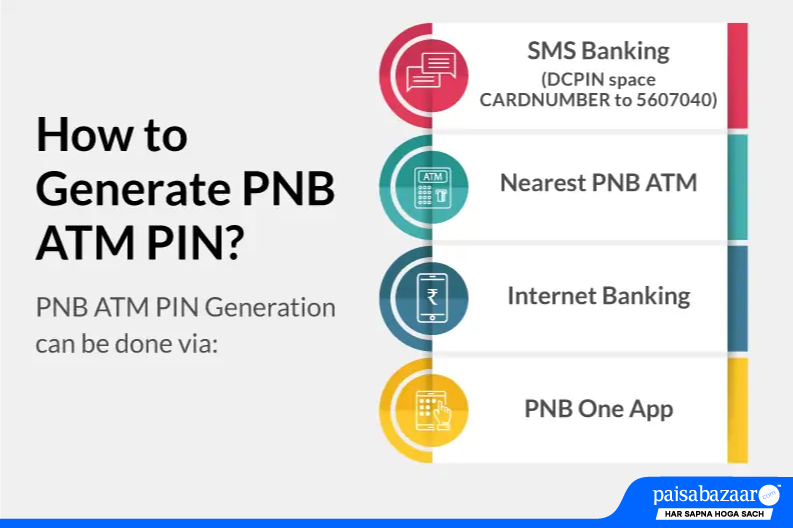
For PNB Debit Card PIN Generation, you require the GREEN PIN. The PNB Green PIN, is a one-time OTP, in 6 numeric digits, that is sent to you at the time of card issuance on your registered mobile number with the Punjab National Bank. This PIN is valid for 72 hours for generating the ATM PIN. Click here to know how to generate PNB ATM PIN for the first time.
You might also require the GREEN PIN to regenerate your debit card PIN if you are an existing customer. Click here to know how to regenerate your PNB Debit Card PIN. In all scenarios, GREEN PIN is mandatory for PNB Debit Card PIN Generation.
| New to Cards? Why don’t you check the best credit cards in India, to maximize your savings and rewards? Apply Now to find the right card for you! |
To set your PNB Debit Card PIN via ATM, you can follow the below steps:
To generate your PNB ATM Card PIN, via Internet Banking, you can follow the steps mentioned below:
|
Debit cards come along with great benefits, but credit cards can offer you more! Get extensive rewards, cashback, offers, and discounts on all your purchases, by getting the right credit card for you. Click here to check pre-approved card offers! |
You can use the Punjab National Bank’s mobile banking app- PNB One App, to generate a PNB ATM Card PIN. For this, you can follow these steps:
If you are an existing customer, you might want to set a duplicate PIN or regenerate your PIN for an existing card, in certain scenarios. Here, as well, you require the 6-digit GREEN PIN. In that case, (or in case you have not used your GREEN PIN within 72 hours), you can send an SMS DCPIN space CARD NUMBER to 5607040 or 9264092640 from your registered mobile number. Post PIN generation, you can follow the similar steps as mentioned above for the first time PNB Debit card PIN generation.
Exclusive Card Offers from India’s top banks are just a click away
Error: Please enter a valid number
You can generate PNB Debit Card PIN via Internet Banking for PNB’s mobile banking app- PNB One App. You can check how to generate PNB ATM Card PIN via Internet Banking, and how to generate PIN ATM Card PIn via Mobile Banking. In both cases, and all cases, you require the PNB GREEN PIN, to generate your Debit Card PIN for the first time or to regenerate it while using the card for a while.
You can generate the PIN for your PNB ATM Card, offline as well, using your PNB GREEN PIN, by visiting the nearest PNB ATM. Click here to check the steps.
In case you face any issue in setting up your Debit Card, you can visit the nearest Punjab National Bank branch, or you can contact the bank at their paid customer care number at 0120-2490000 or at Toll-Free numbers 1800-1800/1800-2021.
You shall require your PNB debit card number, its Expiry date and CVV, Customer ID / Account details and registered mobile number for OTP verification.
No, PNB does not charge any fee for changing or generating new PIN.
If you have entered the wrong PIN multiple times and your card gets blocked, then you shall have to wait patiently for 24 hours for auto-reset or contact PNB customer care / branch for assistance.
Limited Time Offer
 with Every Card
Choose a Card Matching Your Lifestyle
Please enter a valid full name
 +91
+91
The entered number doesn't seem to be correct
