Download the
Paisabazaar app Today!
Paisabazaar app Today!
Get instant access to loans, credit cards, and financial tools — all in one place

Win Assured Cashback

Our Advisors are available 7 days a week, 9:30 am - 6:30 pm to assist you with the best offers or help resolve any queries.


Get instant access to loans, credit cards, and financial tools — all in one place

Scan to download on



 Personal Loan
 Business Loan
 Home Loan
 Other Loans


Our Advisors are available 7 days a week, 9:30 am - 6:30 pm to assist you with the best offers or help resolve any queries.
UAN activation or UAN registration is required to avail EPF services online, such as EPF withdrawal, checking EPF balance or PF loan application. Read the complete article to know how to generate and know your UAN, documents required for EPFO UAN activation, UAN activation process, its importance/benefits and more.
UAN or Universal Account Number is a unique identification number allotted to every member of EPFO by the Ministry of Labour and Employment. A member can have only one UAN during his service period, but multiple EPF account numbers and member IDs associated with every job he switches are linked to this single UAN. By activating and registering your UAN, you can gain seamless access to your EPF account- transfer funds, opt for online withdrawals, etc.
| UAN Activation Process | ||
| Generate UAN | How to Know Your UAN | UAN Activation Online Process |
| Documents Required for UAN Activation | Importance of UAN | UAN Activation FAQs |
UAN or Universal Account Number is a unique identification number allotted to each and every member of EPFO by the Ministry of Labour and Employment. A member can have only one UAN during his service period but multiple EPF account numbers and member IDs associated with every job he switches linked to this single UAN. By activating and registering your UAN, you can gain seamless access to your EPF account- transfer funds, opt for online withdrawals, etc.

When an employee joins the service sector for the first time, the employer has to get the UAN generated for him if the company has 20 or more employees. In case a UAN has been assigned to the employee in the previous organization, he has to furnish the details to the new employer.
In order to get a new UAN generated for the employee, the employer has to follow these steps:
Also Check: Online SIP Calculator
Once the UAN is generated and EPF account is linked with it, the employer generally provides the UAN and PF details to the employee. However, you can easily find out your UAN online by following a few simple steps mentioned below:
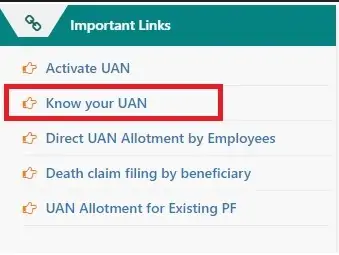
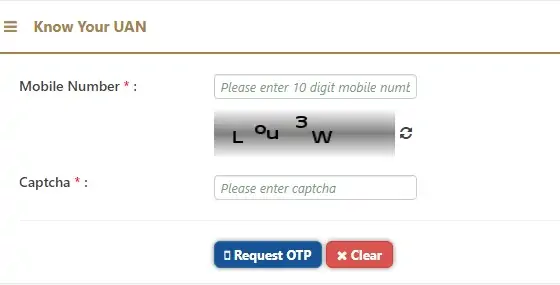
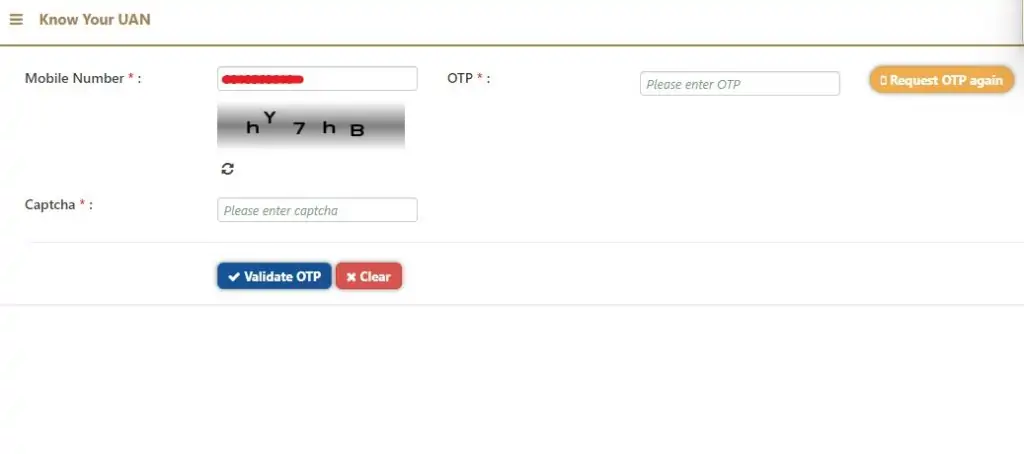
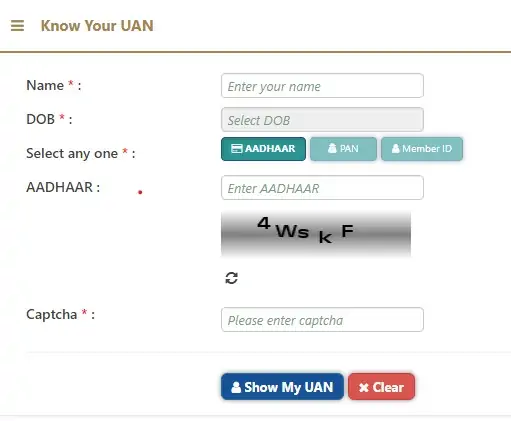
Image courtesy: EPFO Member Portal
Moreover, you can also retrieve your UAN offline by checking your monthly salary slip or contact your HR department or employer for the same.

Before you use the EPFO portal to avail any online service related to EPF, you have to register or activate your UAN. Without activation, you cannot avail any online facility provided by EPFO.
Here is a step-by-step guide on how to activate UAN online, i.e. for UAN activation online/UAN registration:
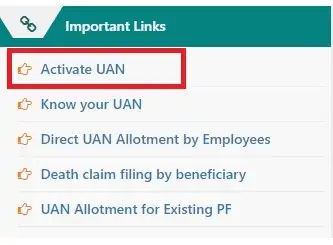
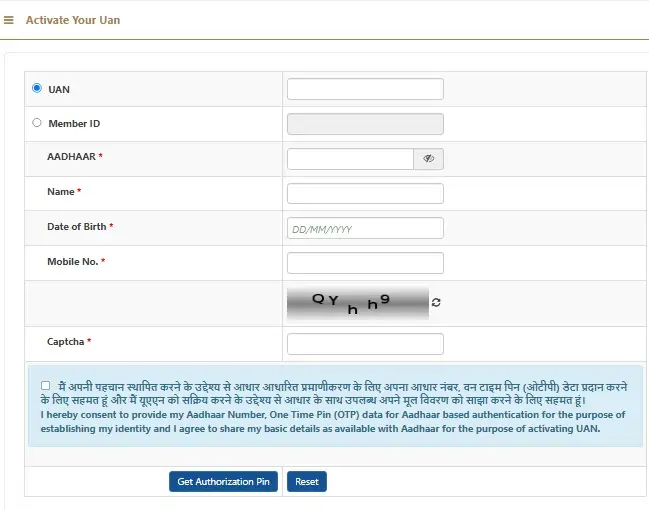
Read More: UAN Login, UAN Member e-Sewa Portal and UAN Services
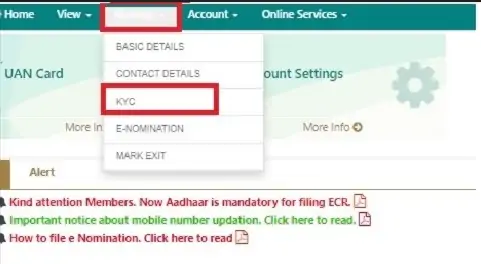
Once you login to your EPF account, you have to seed your details in UAN. Follow these steps to link your UAN with Aadhaar:
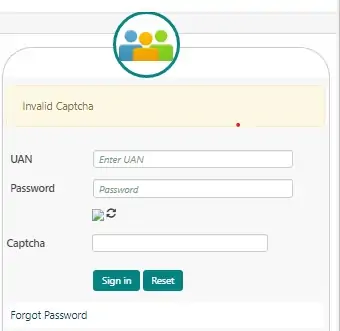

Following documents have to be provided at the time of UAN activation (this is usually taken from you by your employer when you join the service):
Also Check: Daily SIP Calculator
After the introduction of UAN, different member IDs or EPF account numbers associated with every job that you switch are linked to a single UAN. Earlier employees had to manually transfer their PF account to a new one each time they switched their job using the “One Member – One EPF Account” service available on the member portal. However, starting April 1st 2024, EPFO automatically transfers existing EPF accounts of member employees to new accounts every time they make a job switch without filling up a form or raising a request.
UAN activation/UAN registration has a number of benefits for employees. Some of them are mentioned below:
Given below are a few common issues that an employee may face during UAN registration along with their solutions:

UAN registration is done for availing online services provided by EPFO. So, PF UAN activation/registration is done only online.
An organisation with 20 or more employees has to generate UAN for its employees (with a salary of Rs. 15,000/- and above). Both contractual, as well as full-time employees, can avail UAN facilities online after activation.
You cannot transfer funds or claim PF withdrawal if your Aadhaar is not linked with UAN. You have to mandatorily seed your Aadhaar with UAN.
UAN has to be activated only once. You do not have to re-activate it every time you switch jobs.
No, UAN registration is free of cost and you do not have to pay any fee to activate it.
There is no provision to activate UAN through SMS as of now. You have to do it online by visiting the EPF member portal/UAN activation portal.
Once you complete the online UAN activation process, UAN activation happens almost immediately.
There is no need to activate your UAN again in case you have already done it once.
You can get your UAN from your employer who usually generates it for you. Your UAN itself acts as your login ID, while when you activate your UAN, a password is sent to your registered mobile number that you can use for the first login. Even though this password can be used for subsequent logins, it is advisable to change the same after the initial login.
As of now you can only activate your UAN using the EPF member portal online.
Your UAN remains inactive until you register or activate it online by visiting the EPFO member portal. In order to avail any online service related to EPF, you need to first register or activate your UAN online.
No, UAN is not automatically activated. It needs to be done online via the EPF member portal.
In case two Universal Account Numbers or UANs are allotted to you, it could be because your previous employer did not file your date of exit and the transfer of service to your current establishment was also made. In such a situation, you should immediately report the issue to your employer as well as EPFO so that your old UAN can be deactivated and the previous EPF corpus is transferred to the new PF account.
Initially your employer generates UAN for you and provides the UAN and PF details to you. In case, you UAN is generated but not been provided to you yet, you can either contact the HR department or look for it in your salary slip. You can also retrieve it online via the EPFO website using the “Know your UAN” service.
Listing all previous EPF Member IDs under a single UAN enables employees to track their entire EPF history in one place. It also simplifies all EPF transfers between jobs and ensures that all accounts are linked for easy fund management.
In case you forget your UAN, you can use the “Know your UAN” service available on the EPFO website to retrieve your UAN online. You can also look for your UAN on your salary slip or contact the HR department of your office for the same.
UAN registration and UAN activation refer to the same thing. Once you have successfully registered your UAN, you are not required to carry out any other activation process.
To withdraw your EPF amount online, you need to use your UAN and login to the member portal and raise a withdrawal request.
Yes, you can change the mobile number linked to your UAN by logging into the EPFO member portal and using the “Change Mobile Number” option under the Contact Details section under the Manage tab.
If your UAN is already assigned, all you need to do is activate your UAN using the UAN activation/registration service available on the website.
You can check the status of your UAN using the “Know your UAN” service available on the EPFO portal.
You can update your Aadhaar and PAN details in your UAN account by logging into the member portal, clicking on the “KYC” option under the Manage section and filling in the relevant KYC details.
Every organisation which has a minimum of 20 employees requires employers to get UAN generated for its employees. Moreover, employees having a UAN are required to complete UAN registration/activation online in order to access various EPFO related services.
You can retrieve your lost UAN online using the “Know your UAN” service available on the member portal. You can also find out your UAN offline using your salary slip or contact your HR department.