Download the
Paisabazaar app Today!
Paisabazaar app Today!
Get instant access to loans, credit cards, and financial tools — all in one place

Win Assured Cashback

Our Advisors are available 7 days a week, 9:30 am - 6:30 pm to assist you with the best offers or help resolve any queries.


Get instant access to loans, credit cards, and financial tools — all in one place

Scan to download on


 Personal Loan
 Business Loan
 Home Loan
 Other Loans


Our Advisors are available 7 days a week, 9:30 am - 6:30 pm to assist you with the best offers or help resolve any queries.
UAN member portal or EPFO member e-sewa portal is a one-stop platform for using EPF services online and accessing EPF requests. Read the complete article to know how to find your UAN, how to login to the UAN member portal and access the various services available on the platform.

Get your Free Credit Score with Monthly Updates

Let’s Get Started
 +91
+91
The entered number doesn't seem to be correct

You become a member of the EPFO if you are a salaried employee and are required to make mandatory contributions. Every beneficiary of the Employees’ Provident Fund (EPF) scheme is allotted a 12-digit Universal Account Number (UAN) by the Ministry of Employment and Labour under the Government of India, through which one can manage all linked PF accounts.
You can use this UAN to login to the UAN member portal and avail all services online. It allows an employee to connect all his PF accounts across different organisations and access them on a single platform, that is, the UAN login portal. On this EPFO member portal/EPF portal, a member of EPF can find his KYC details, service record, UAN card, etc. The transfer and withdrawal of the provident fund amount have also become easier with the EPF member e-Sewa portal.

Get Free Credit Score with monthly updates. Check Now
UAN member portal or the EPFO member e-Sewa portal is EPFO’s online portal for EPF members, including both employers and employees. Employers can login to access various services, such as approving KYC details of the employees. Employees can use the UAN portal to perform KYC, view and/or download the UAN card, make withdrawal requests, etc.
|
UAN Member Portal Registration, Login Process & Services |
||
| UAN Member Portal for Employees | UAN Member Portal for Employers | Register at UAN Member Portal |
| Reset Password at UAN Member Portal | Know your UAN Status | UAN Login Process |
| UAN Member e-Sewa Portal Services | UAN Customer Care | UAN Login Portal FAQs |
Given below are the steps to login to the UAN Member Portal or EPO member portal login for employees:
Once you have logged in, you will be able to view your UAN Card, Profile and Service History.
It is necessary to have an activated UAN for all employees so that they can access services related to EPF online.
The UAN member portal for employees allows them to register, perform KYC, verify, access UAN card, withdraw funds and apply for pension online.
To perform EPF account transfers or withdraw funds, one needs to link the UAN with Aadhaar card, PAN card and default bank account which can be done easily through the UAN Member e-Sewa portal or EPF employee login portal.
Here’s how you can activate UAN to access EPF-related services online in a few steps:
The process for employers to log in to the EPFO portal is almost similar to that of the employees. Below-mentioned are the steps for EPFO employer portal login:
The prerequisite for the above processes is that the establishment or the employer must have registered the establishment online through Shram Suvidha Portal.
You need to activate your UAN before logging into UAN Login Portal. You have to follow the steps mentioned below :
Read more on UAN Registration/UAN Activation
Get your Credit Report with Complete Analysis of Credit Score Check Now
In order to know your UAN status, an employee with an EPF account can follow the steps given below:
Follow these steps to reset your EPF member login password or EPF portal member:
The EPF UAN Login Portal offers you comprehensive services related to your EPF account. Here’s all you can do –
On the portal, you can view information related to your EPF Account. There are four types of information you can view on the EPF member portal –
1. Profile- Your complete EPF profile is available on the Portal. You can check the same under the ‘View’ tab.
Clicking on ‘Profile’ will lead you to your profile page which contains information such as-
Out of the above information, only the mobile number and email ID can be edited by you.
2. Service History
A person is allotted only one UAN in his lifetime regardless of the number of companies he/she changes. Hence, the same UAN is to be fed by different companies into the system so that the person’s entire EPF contribution can be managed systematically and in a more transparent manner.
Although the UAN remains the same throughout, every organization you work with has to create a new PF account under the same UAN. The “Service Details” section of the website will show the following information for all organizations you have previously worked with including the one you are currently working with-
3. UAN Card
The UAN Card can also be viewed and downloaded from the UAN login Portal. This facility is also available under the ‘View’ menu. This card can also be downloaded and presented at the PF office at the time of offline withdrawal or transfer.
4. EPF Passbook
Under the ‘View’ menu, passbook option is also made available. However, this facility is not available on the member portal. For viewing your UAN member portal passbook, you will have to visit the website- www.epfindia.gov.in and follow the steps given below:
Apart from just viewing the information as given above, you can also manage and modify a few of the details on your own.
1. Basic Details
This section lets you modify your basic details such as your name, date of birth, gender, employer using Aadhaar based authentication.
2. Email ID and Mobile Number Registration (Contact Details)
You can manage your contact details on the member website. For changing the contact number, an authorization pin will be sent to the new number. Once you fill the pin in the space provided, your mobile number will be updated. Similar steps have to be followed to update a new email ID on the EPF UAN Member Login Portal.
3. KYC
A member of EPF can also update other KYC details such as –
KYC details are first verified with the concerned authorities and then updated against the member’s UAN.
4. E-Nomination
You can use the e-nomination option to add a nominee to your EPF account.
5. Mark Exit
Your former employer needs to mark exit on the EPFO portal so that you can apply for an online transfer. However, in case your exit is not marked by the employer, you can self-update your date of exit online via the EPF member portal by following the steps given below:
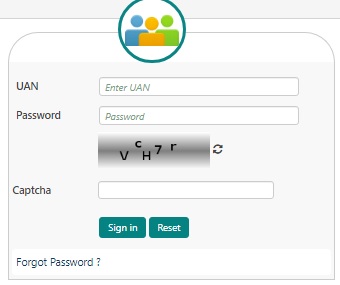
Step 1: Log in to the EPFO member portal using your UAN and password
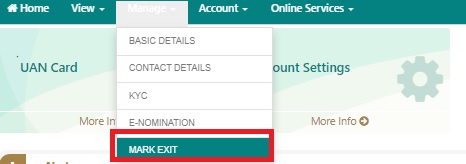
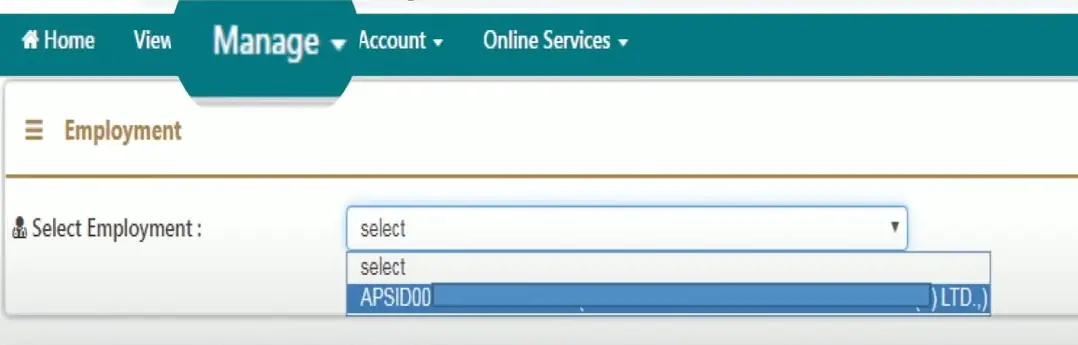
Step 2: Click on the Manage tab and select “Mark Exit”
Step 3: From Select Employment dropdown, choose PF account number
Step 4: Enter Date of Exit and Reason for Exit
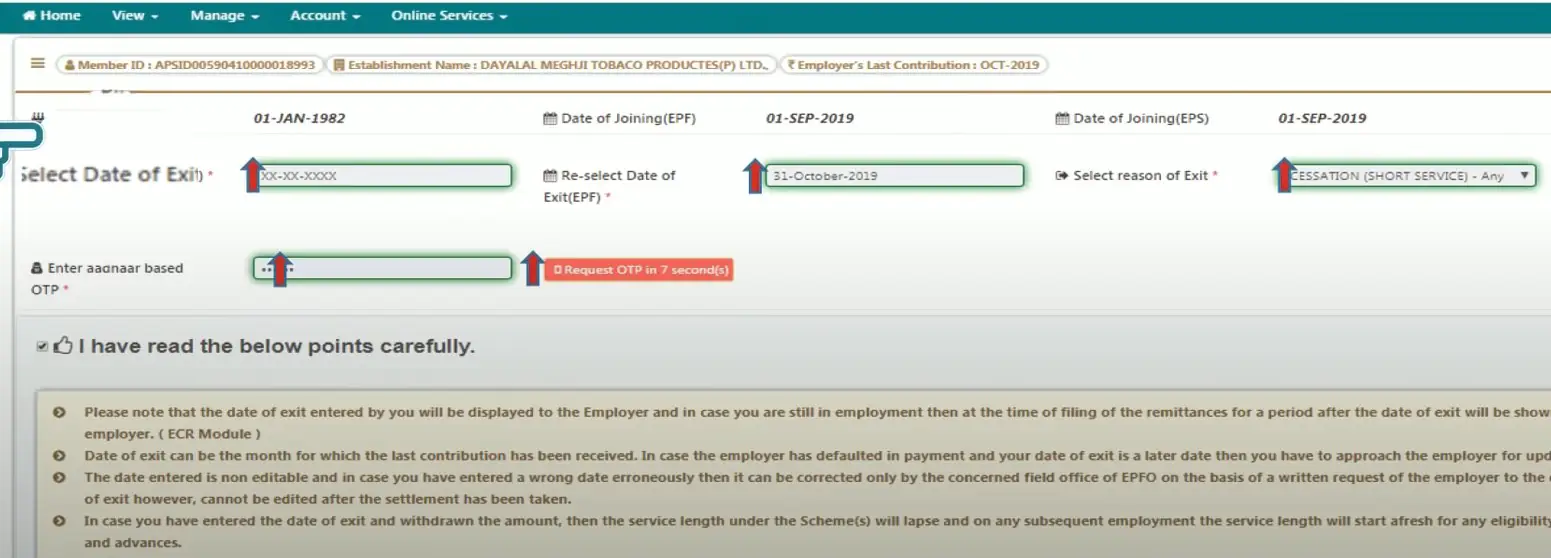
Step 5: Click on “Request OTP” and enter the OTP received on Aadhaar linked mobile number
Step 6: Select the check box, click Update” and then click “OK” to get a notification that your date of exit is updated successfully.
Note:
This option lets you manage your EPF account, that is, change/resent your EPF account password using Aadhaar-based OTP authentication.
Various online services can also be availed such as-
1. Claim (Form 31, 19,10C & 10D)
With effect from February 2017, the Employees’ Provident Fund Organization (EPFO) has introduced new composite claim forms to facilitate the full or partial withdrawal of PF. This claim section consists of three forms – Form 31, 19 and 10C. However, an employee must note that for the purpose of claiming full/partial withdrawal through the Composite Claim Form, Aadhaar must be linked to UAN.
Know more about EPF Composite Claim Form
2. Transfer Request
You can also request the transfer of your PF amount from the previous account into the current one. Before applying for a PF transfer on the Portal, you should make sure that-
Employees should know that only one transfer request can be claimed on the previous PF account.
3. Track EPF Claim Status
One can also track the EPF claim status on the UAN Login Portal. If you have requested a claim, the status can be checked in the ‘Track Claim Status’ section. You do not have to enter any acknowledgement number or PF account number.
Your Credit Score Is Now Absolutely Free Check Now
If a member of EPF is facing difficulty in logging into the Member Portal/UAN portal login, he/she can reach out to the customer care team of UAN. The customer support team can be reached via:
Please note that the help desk service is available from 9:15 AM to 5:45 PM.
1. UAN remains the same even when if you change jobs
It is difficult to maintain several PF accounts under different employers and hence the UAN was brought to action to keep consolidated information about all Provident Funds.
When you change jobs, you just need to notify your UAN number to your new employer. The new PF account is then linked to your UAN, if your account is old then you need to link PF with UAN.
2. Your UAN number is assigned and stays with your employer
Generally, the employers inform the UAN as they credit the amount to Provident Fund accounts. In case they don’t, you can know your UAN yourself by logging in to the EPFO UAN Member Portal.
It is possible if your PAN, Aadhaar, and mobile numbers are linked with UAN.
3. UAN provides ease in changing personal details
One may need to change or update the contact and address details when one changes the job or shifts to a new city. With UAN, the process becomes easier as all details are in one place that just needs to be edited.
4. UAN helps in convenient money withdrawal
When all PF accounts, even the previous ones with old jobs are registered under one UAN, the money withdrawal becomes very convenient for the employee. Thus, it gives a simplified system to save time and keep track of payments and withdrawals.
Here are a few key advantages of UAN to the employees:
Less Employer Involvement in withdrawals of PF: With UAN, employer involvement has been reduced as the PF of the old organization will be transferred to the new PF account once KYC verification is complete.
Fund Transfer Not Required: The employee needs to give his UAN details and KYC to the new employer and the old PF is transferred to the new PF account once the verification is done.
Easily Managed by SMS alerts: Employees receive SMS whenever a contribution is made by the employer after registering at the UAN portal.
UAN is important because when an employee changes jobs, he only needs to update his employer about the same and link the new PF account to it. It helps in keeping all PF account details in one place, and also makes withdrawals easier.
The URL of the UAN member portal/EPF portal is- https://unifiedportal-mem.epfindia.gov.in/memberinterface/
Visit the EPFO website, login to the account using UAN and password, go to the ‘Manage’ section and click on KYC details when a page opens up where you can link a number of documents to your UAN. Link your Aadhaar Number here.
Before you perform the UAN member portal login/EPF member portal login, you will have to activate your UAN at the UAN login portal. When you do that, a password will be sent to your registered mobile number, which should be used for the first UAN portal login.
It can also be used later, but it is advisable to change the password after the first EPF home login/EPFO portal login.
Yes, you can view as well as download your UAN Card in the “View” section at the UAN login portal/EPFO unified portal.
No. This facility is not yet provided on the UAN Member Portal. Members will have to visit- www.epfindia.gov.in to check their passbook.
All member IDs assigned to the person will be mentioned under the ‘Service Details’ section on the UAN Member Portal. This simplifies transfer and withdrawal claims for the member.
Yes, these two details can be changed by the user at the UAN login portal. An authorisation pin will be sent to the new mobile number/email ID to activate the same.
PAN Card, Aadhaar Card, Bank Account Number and Passport details are accepted for KYC update on the UAN Member Portal/EPFO unified portal.
When you make a claim using the Claim Forms for crediting the PF amount to your bank account/transferring the money from PF account into your bank account, then the PF Officer checks the claim, approves it and then only the money is credited.
Settled means approved & your claim is dispatched by the officer, it will reflect in the bank account soon. It, however, does not mean that money is credited. It shows pending if it is under the process of approval.
No, you have to quote your existing UAN to the new employer so that the new PF account can be linked to the same.
On the EPFO website, log in to the account using your UAN number. Under the tab “Manage”, click on the option “Modify Basic Details”.
One needs to enter the linked Aadhaar Number and then she/he can proceed with the entry of the details like name, gender and date of birth as per Aadhaar records.
As mentioned above, once you login to an EPF account using UAN, under the ‘Manage’ section, click on ‘Modify Basic Details’ and you can change your D.O.B.