Download the
Paisabazaar app Today!
Paisabazaar app Today!
Get instant access to loans, credit cards, and financial tools — all in one place

Get the app — instant card and loan offers!

Our Advisors are available 7 days a week, 9:30 am - 6:30 pm to assist you with the best offers or help resolve any queries.


Get instant access to loans, credit cards, and financial tools — all in one place

Scan to download on


 Personal Loan
 Business Loan
 Home Loan
 Other Loans


Our Advisors are available 7 days a week, 9:30 am - 6:30 pm to assist you with the best offers or help resolve any queries.
The UAN or Universal Account Number is portable and remains unchanged throughout an employee's professional life unlike his member ID that changes whenever he changes his job. All of the employee's member IDs are linked to a single UAN and eases the process of EPF transfer and withdrawals.
600 or 750? What's your credit
score? Check for FREE.


Let’s Get Started
 +91
+91
The entered number doesn't seem to be correct
UAN or Universal Account Number is a 12-digit unique identification number allotted by EPFO to all salaried employees who contribute a part of their income towards EPF. Each member of the EPFO is issued a UAN that remains unchanged throughout the employee’s professional life. However, the employee is allotted a new PF account number each time he changes his job and each of these PF accounts are linked to a single UAN. So the UAN helps you track all your EPF contributions, check your EPF balance, transfer/withdraw funds from your PF account online with the click of a few buttons, etc.
Read on to know key details about how to get and activate your UAN, advantages of UAN for employees, UAN helpdesk and more.
When a person joins the workforce for the first time, the employer has to get the UAN generated for him if the organisation has 20 or more employees. In case the employee had already been assigned a UAN in the previous organization, he has to furnish the same to the new employer. The employer needs to follow the below mentioned steps to get a new UAN generated for the employee:
The employer can also link the PF account with UAN of the employee. In case the employee has been granted a UAN in the previous organisation and the current employer requests for a new UAN from EPFO, then EPFO will provide the existing UAN of the employee and not generate a new UAN. However, this will happen only if the employee had linked his UAN with Aadhaar card.
Before you use the EPFO portal to avail any online service related to EPF, you have to register or activate your UAN. Without activation, you cannot avail any online facility provided by EPFO. You have to follow the steps mentioned below for UAN activation/registration:
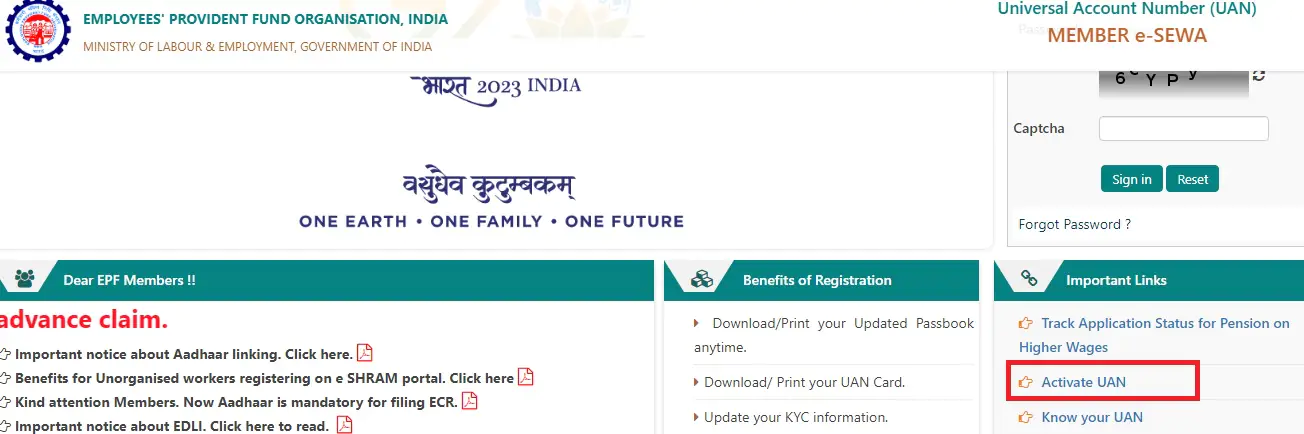
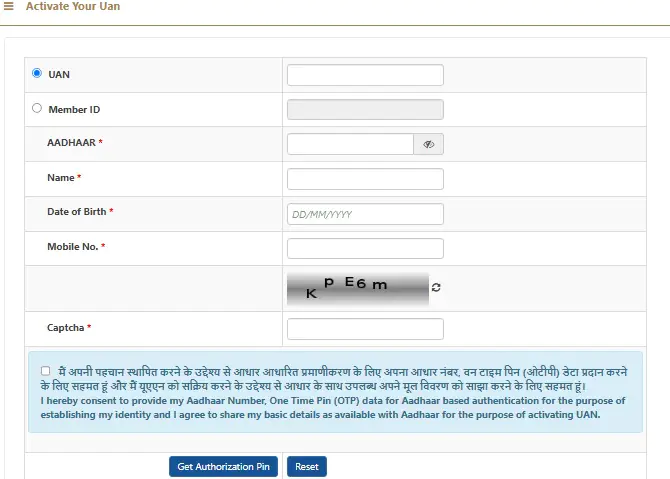
Know More: UAN Login, UAN Member e-Sewa Portal and Services Available
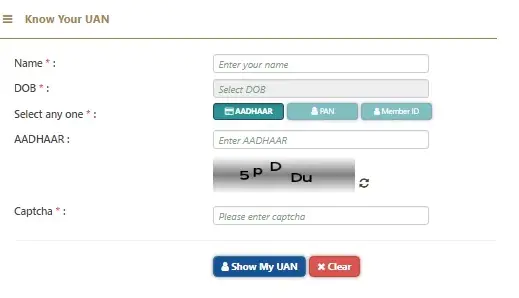
Once the UAN is generated and the EPF account is linked with it, the employer usually provides the UAN and PF details to the employee. However, you can check the status of your UAN or know your UAN by following the steps given below:
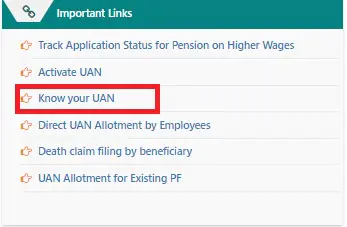
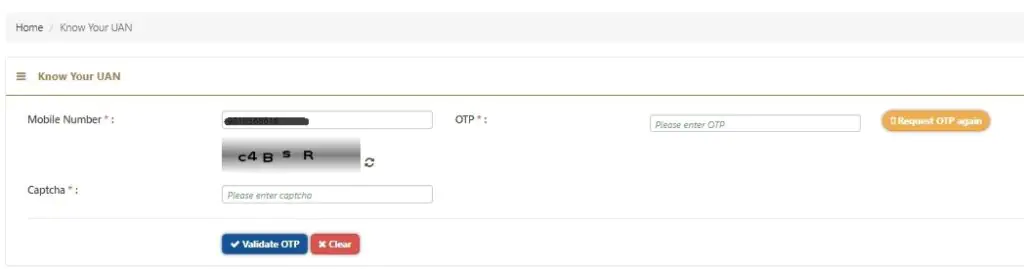

Get Your Latest Credit Score in Just 2 minutes Check Now
To conduct a secure UAN registration, you must provide the following documents-
As stated above, UAN is a 12-digit unique identification number that is allotted to all salaried employees who contribute a part of their income towards EPF. The UAN remains the same throughout an employee’s professional life. However, a new member ID is allotted each time an employee changes his job and all the member IDs of the employee are linked to a single UAN. Thus, the UAN helps you track your total EPF contributions, under the previous as well as the current employer(s), all in one place. Also, since all PF accounts of an employee are assembled together under a single umbrella-UAN, PF withdrawal, transfer, etc. have become much easier and hassle-free.
Once your UAN is activated, you can login to the UAN Member e-SEWA Portal and access various services such as view your UAN card, profile and service history. Here is a step-by-step guide to login to the EPFO member portal:
Know More: EPF Registration, Login, Password Reset
When the employee switches his company, he can either withdraw or transfer his funds. But since the whole process was so tedious, usually people didn’t utilize their PF. After the implementation of UAN, the task has been made easier in the following ways:-
Read More: EPF Withdrawal Rules
Get Free Credit Score with monthly updates Check Now
The UAN can be very helpful in managing your PF account:
To transfer your EPF online, you need to follow the steps given below:
Note: The employee need not download the Transfer Claim Form (Form 13). In certain cases, the employee has to submit this form to the employer to complete the EPF transfer process.
Click here, to read more on EPF Online Transfer.
Here are some of the benefits of UAN for both employees and employers:
A separate UAN helpdesk is available on EPFO’s website under which there are different sections related to different queries of the visitors. The two broad segments are- Help and Claim. ‘Help’ caters to the queries of employees and employers regarding EPFO office locations, UAN, Services, Grievances etc. On the other hand, ‘Claim’ caters to various claim forms available for the users such as Composite Claim form (Aadhaar), etc.
Members can access this help desk, available 24×7, to get clarity against the related queries and doubts.
Get Your Latest Credit Score in Just 2 minutes Check Now
Q1. What will happen to UAN in case of a change in job?
Ans. When you change the job, you need to give the UAN to the new employer. The employer links the new PF account to it. The UAN remains the same throughout the employee’s career.
Q2. What information does the UAN card hold?
Ans. The UAN card contains the information about the universal account number and the KYC details (if verified by the employer) on the front. The rear side of the card has the recent five member IDs and EPFO helpdesk contact numbers.
Q3. How to transfer old EPF accounts and connect them to UAN?
Ans. Once the current EPF account is linked with UAN, you can link all the old EPF accounts online and check the status of transfer requests as well.
Q4. What to do if two UANs get allotted?
Ans. In this case, the employee has to inform the EPFO helpdesk immediately. After all the necessary verification, the old UAN gets blocked.
Q5. What can be done if wrong information is mentioned on your EPF card?
Ans. If you want to change your father’s name, your name or DOB, it can be done by presenting valid documents to the current employer. Also, the same can be communicated to the EPFO helpdesk to get the necessary changes done on the UAN card.
Q6. How to link Aadhar with UAN?
Ans. There are different ways to link Aadhaar with UAN. You can use Umang App, biometric credentials on e-KYC Portal or OTP verification on e-KYC Portal of EPFO to link Aadhar.
Q7. What to do if UAN update is pending at field office?
Ans. At times the UAN update process is delayed at the hands of the authorities. However, you can request the concerned commissioner or register a complaint under EPFIGMS portal.
Q8. Why is my UAN KYC pending?
Ans. It generally takes 3 to 5 days for the related documents to be viewed and approved. If your UAN KYC is pending for more than 7-8 days, you can file a complaint or reach the regional EPFO officer through the help desk online or call 1800 118 005 or 14470 (toll-free).
Q9. I forgot my UAN, how to retrieve it?
Ans. You can recover your UAN if you have linked the same with your Aadhaar card or PAN Card. Go to EPFO homepage>For Employees>Member UAN/Online Service>Know UAN status>Enter Details> Request OTP>Enter OTP>Enter Details>Click on Show My UAN.