Download the
Paisabazaar app Today!
Paisabazaar app Today!
Get instant access to loans, credit cards, and financial tools — all in one place

Win Assured Cashback

Our Advisors are available 7 days a week, 9:30 am - 6:30 pm to assist you with the best offers or help resolve any queries.


Get instant access to loans, credit cards, and financial tools — all in one place

Scan to download on



 Personal Loan
 Business Loan
 Home Loan
 Other Loans


Our Advisors are available 7 days a week, 9:30 am - 6:30 pm to assist you with the best offers or help resolve any queries.
600 or 750? What's your credit
score? Check for FREE.


Let’s Get Started
 +91
+91
The entered number doesn't seem to be correct
| To invest in NPS through Paisabazaar, Click Here |
| Already have an NPS account through us? For Subsequent Contribution, Click Here To Set up SIP, Click Here |
Note: The information on this page may not be updated. For latest information, click here.
The National Pension System (NPS), earlier known as the New Pension System, was initially introduced for the benefit of government employees eligible for government pension. However, necessary amendments were made to the policies of the scheme eventually making it available for all the Indian residents. NPS is a mandatory pension scheme for all government employees but an optional pension plan for others.
It is important to be familiar with the entire registration process and details for the general public under the all citizens NPS plan. Given below is a detailed description of how you can register for NPS online, how to fill the registration form, ways to login into your NPS account and more:
New NPS subscribers can register themselves online as well as offline. The NSDL website allows the individuals to access the online NPS registration process.
Alternatively, you can fill the NPS registration form and submit it at the nearest NPS Point-of-Presence (PoP). PoPs majorly includes all the banks in India.
| Click here to download the complete List of NPS PoP |
You can generate physical NPS registration form from the NPS PoP or download it from the links given below:
| Download NPS Registration Form Online |
After filing the entire form, you must attach all the supporting documents along with a cheque/DD for initial contribution and submit it at the nearby PoP. Or, you can send the form with documents and contribution to:
NSDL e-Governance Infrastructure Limited,
1st Floor, Times Tower,
Kamala Mills Compound,
Senapati Bapat Marg,
Lower Parel, Mumbai – 400 013
Tel. (022) 2499 3499
Fax (022) 2495 2594/ 2499 497
After downloading the PDF file of the NPS registration form, you are required to print the form to fill the details. Here is the registration form which the subscriber needs to fill:
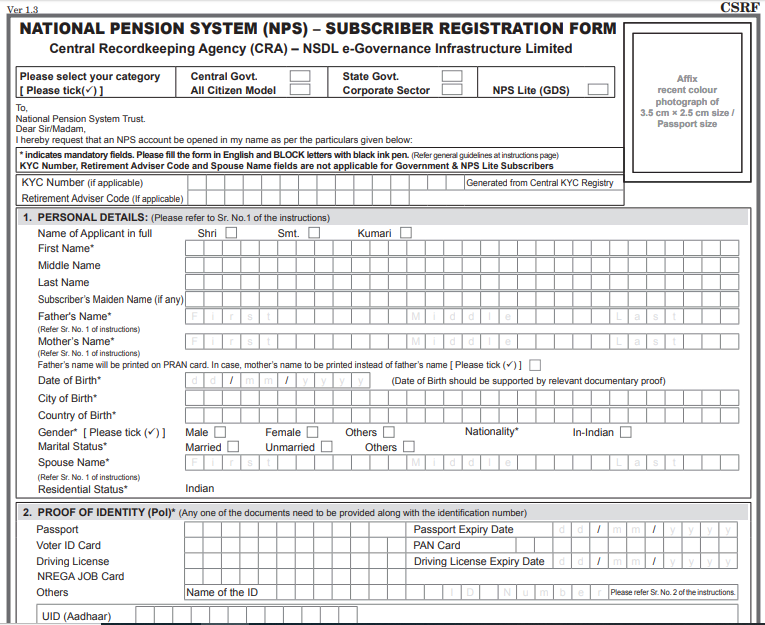
Some of the key details that you need to provide when filling out the NPS registration form are as follows:
| To invest in NPS through Paisabazaar, click here |
| Paisabazaar NPS Subsequent Contribution – click here |
You can log-in and access your NPS account through NSDL portal, Karvy website or Bank website. Many major banks have provided an option on their respective online banking website for NPS subscribers which, for now, directs the users to either the Karvy NPS Portal or the NSDL NPS Portal depending on which provider the bank is registered with. Hence, there is currently no separate bank-wise NPS Login portal for use by subscribers of the National Pension System. Given below are the different ways to login-
To login to NSDL Portal, you will need to generate your IPIN using PRAN (Permanent Retirement Account Number).
This will generate your IPIN which is further used to login to NSDL portal. Here are steps that follow-
Step 1: Log-in to the NSDL eNPS home page and click on the “Login with PRAN/IPIN”.
Step 2: Now, you will get redirected to the NPS login page where you can use PRAN and IPIN to sign into your NPS account.
NSDL is perhaps the most commonly used portal for online NPS subscribers, you can also sign-up using the Karvy NPS Portal.
Step 1: Go to the website and click on ‘Login for Existing Subscriber’.
Step 2: Enter your PRAN and Password to log-in. If you are a new user, you can generate the password by clicking on ‘Generate/Reset Password’.
If you are an existing user, you will be redirected to your account. However, new users will get directed to the following page. On this page, you will have to provide PRAN and Date of Birth along with captcha to generate an OTP sent to your registered mobile number. A new password can be set after confirming the “generate new NPS account password” request using OTP.
If you are logging into your Karvy NPS Account for the first time, you can set a new password by clicking the generate password link as shown below:
Once a password has been set, you can log into your Karvy NPS account online using the PRAN and new password.
In case you have forgotten your NPS login password, you can reset the same by following a procedure similar to the one for generating a new login password for your NPS account.
If you are seeking assistance or have queries regarding your NSDL NPS account or Karvy NPS account, you can call up the NPS Helpline Numbers and contact number provided below:
| Office Location/Type | NPS Helpline Numbers |
| Mumbai (Head office) | Telephone – (022)2499-3499
Fax – (022) 2499-4974 / (022) 2495-2594 |
| NPS Grievance Redressal Officer (Level 1) | (022) 2499-3499 |
| NPS Chief Grievance Redressal Officer (Level 2) | (022) 2495-2594 |
| NPS Exit Grievance Escalation (Level 1) | (022) 2499-4274 |
| NPS Exit Grievance Escalation (Level 2) | (022) 2499-4974 |
| Kolkata (NPS Branch Office) | Telephone – (033) 2290-1396 / (033) 2281-4461
Fax – (033) 2289-1945 |
| Chennai (NPS Branch Office) | Telephone –( 044)2814-3917/( 044)2814-3918
Fax – (044) 2814-4593 |
| New Delhi (NPS Branch Office) | Telephone-(011) 23705418 / (011) 2335 3817
Fax- (011) 2335 3756 |
| Ahmedabad (NPS Branch Office) | Telephone – (079)2646-1376
Fax – (079) 2646 1375 |
In case you want to check you NPS account balance on the go, you have the option of using the NSDL NPS App which is free to download for Android as well as iOS devices.
Q.1: How can I check my NPS account balance online?
Ans: `You can check your accumulated account balance till date online on NSDL portal or Karvy website. To avail the facility, login using your id and password along with PRAN.
Q.2: What is PRAN and PRAN Kit?
Ans: Once registered, the NPS subscriber receives a PRAN card with his/her name, Father’s name, Photograph and Signature and subscriber’s date of birth. This card proves the completeness of all information on the CRA system. The PRAN kit consists of a PRAN card, subscriber’s details and an information booklet.
Q.3: What is IPIN?
Ans: IPIN is a password used to access your NPS account.
Q.4: How can I reset my IPIN online?
Ans: Follow these instructions to change your IPIN-
You will receive an OTP on your registered number or email address. Enter the OTP and submit to reset your password.
Q.5: Can I avail NPS services online?
Ans: Yes, there are some NPS related services which can be availed online. Here are the services-
Q.6: How to request for a duplicate PRAN card?
Ans: In case you have lost or damaged your PRAN card, you can fill the S2 form to the nearby PoP-SP. After all the verification is done, the POP/POPSP will enter your concern and authorize the request in the CRA system. Eventually the request is processed and a duplicate PRAN card is sent to the subscriber.
Q.7: How can I change NPS account details?
Ans: Account details such as change / correction in personal details, nomination details, bank details, reissue of I-PIN/T-PIN/PRAN Card can be changed by requesting the same to the POP-SP. You can also update your photograph and signature by submitting a written request to the POP-SP. Following forms must be submitted, each for different purpose-
Some details can be changed via NPS Mobile app available for android as well as iphone.
Q.8: What are the services available on the NPS app?
Ans: NPS mobile app allows you to manage/access your NPS account easily anytime/anywhere. Here are the NPS related services available on the app-
The NPS application can be downloaded for android or iphone from google playstore or apple store.