Download the
Paisabazaar app Today!
Paisabazaar app Today!
Get instant access to loans, credit cards, and financial tools — all in one place

Get the app — instant card and loan offers!

Our Advisors are available 7 days a week, 9:30 am - 6:30 pm to assist you with the best offers or help resolve any queries.


Get instant access to loans, credit cards, and financial tools — all in one place

Scan to download on


 Personal Loan
 Business Loan
 Home Loan
 Other Loans


Our Advisors are available 7 days a week, 9:30 am - 6:30 pm to assist you with the best offers or help resolve any queries.
Find out how to check your EPF claim status online and offline. Know the step-by-step process to track your PF claim status/UAN claim status online via EPFO Member Portal, EPF website or UMANG App along with the EPF claim process.
Get your Free Credit Score with Monthly Updates


Let’s Get Started
 +91
+91
The entered number doesn't seem to be correct
EPF members can submit the withdrawal or transfer claims both online and offline. They can also check their EPF claim status online, no matter how they have filed their application. The easiest way to check EPFO Claim Status is by logging into the UAN Member Portal or by visiting the official webite of EPFO.

Get Your Latest Credit Score in Just 2 minutes Check Now
On this page:
EPFO claim status can be checked online via any of the following means given below:
Members can check the status of their ‘online’ withdrawal/transfer claims or check PF claim status through UAN member portal by following the steps given below –
Step 1: Log in to the UAN Member Portal with your UAN and Password.
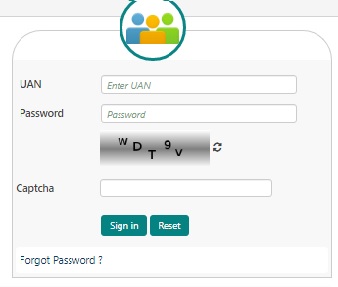
Step 2: Click on the ‘Online Services’ tab and a drop-down will appear.
Step 3: Click on the third option- ‘Track Claim Status’
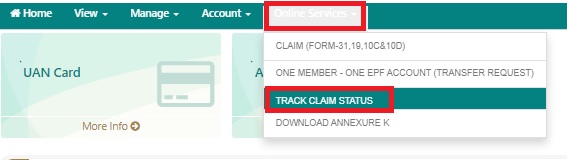
Step 4: The status of your online withdrawal/transfer claim will appear on the screen.
Since you have applied for it through the same portal, there is no need to enter your UAN or PF Account Number or Member ID. Your PF claim process will automatically be synced once the same is updated.
Read More: EPFO Login Portal : Registration, Password Reset & Services
Follow the steps given below to track EPFO claim status online using your UAN and password –
Step 1: Click on https://passbook.epfindia.gov.in/MemClaimStatusUAN/ to get redirected to the ‘EPF Passbook & Claim Status‘ page
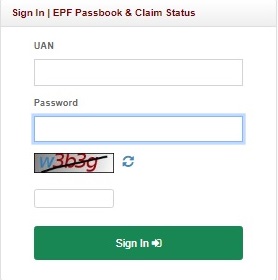
Step 2: On this page, enter your UAN, EPFO member password and captcha code.
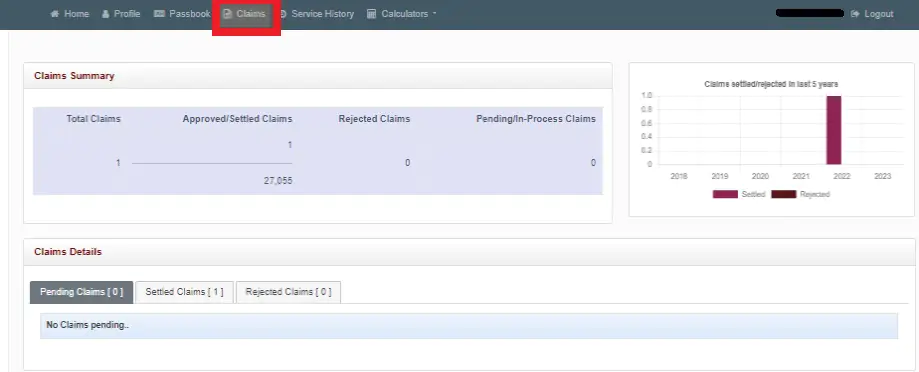
Step 3: Click on the “Claims” tab to view the status of all your claims- approved/settled claims, pending/in-process claims and rejected claims.
Get Your Latest Credit Score in Just 2 minutes Check Now
EPF members can check PF transfer/withdrawal claim status online through the app as well. However, the member should have his mobile number updated with his UAN.In case you want to check PF claim status through UMANG app, follow the steps mentioned below:
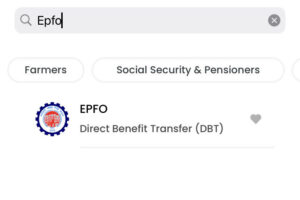
Step 1: Open the UMANG app and search for EPFO under the ‘All Services’ section
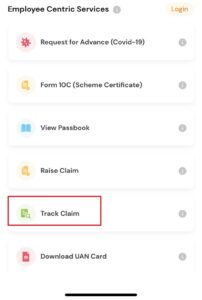
Step 2: Under “Employee Centric Services”, select the “Track Claim” option
Step 3: Now enter your UAN and click on “Get OTP”.
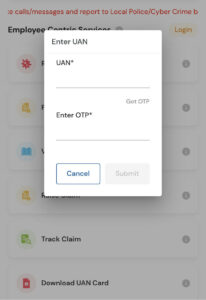
Step 4: Now enter the OTP and click on the “Submit” button.
Step 5: All claims made for the UAN will be displayed. Tracking ID, claim type, raised claim date and the UAN claim status is mentioned for each claim made till date.
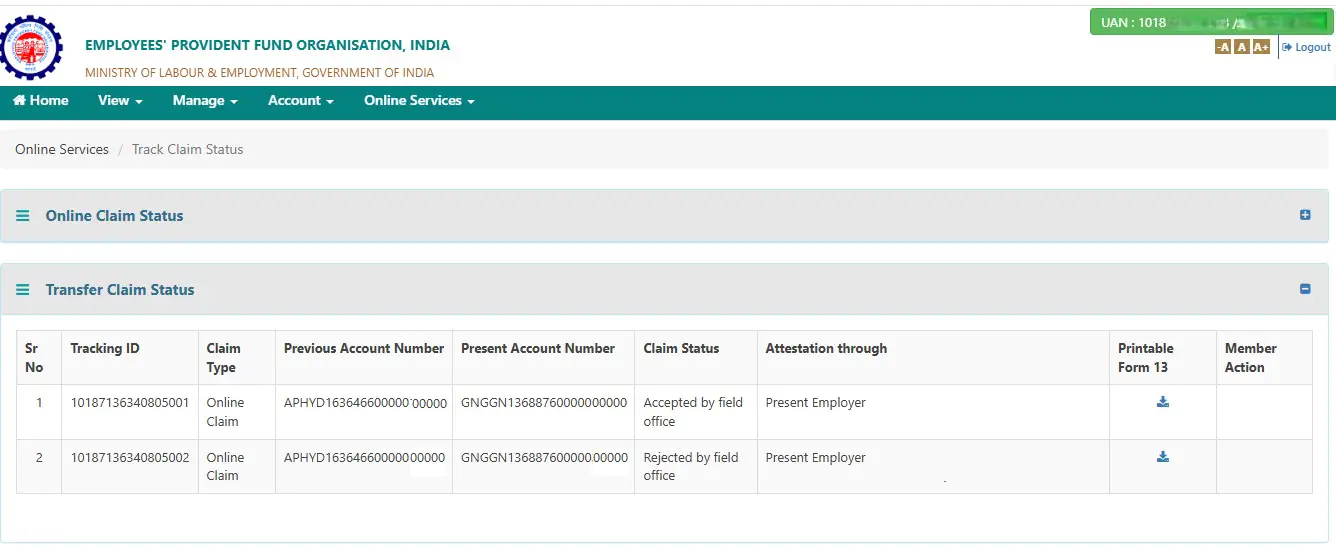
You can check the status of your EPF transfer claim online via the EPFO website by following the steps given below:
Step 1: Log in to the UAN Member Portal using your UAN and password.
Step 2: Click on the ‘Online Services’ tab and select the third option- ‘Track Claim Status’
Step 3: Scroll down to see the details relating to “Transfer Claim Status”
EPF claim status can also be checked offline via the following methods:
Make sure that you have your PF Account Number or UAN ready as the helpline officer will ask for the same to check the status of your claim.
Get Free Credit Score with monthly updates Check Now
Different claim status convey different meanings since EPF withdrawal is a step by step process and thus, there are different stages of EPF claim status such as the ones described below:
|
EPF Claim Status |
Meaning |
| Payment under process/ pending/ in-process |
|
| Settled |
|
| Rejected | Your claim could be rejected by your previous or current employer due to various reasons such as:
|
| Not available | Claim is not processed yet |
Read more on EPF Withdrawal and Claims
In order to withdraw money from EPF or claim money from the same, you need to submit the claim forms. PF Withdrawal Forms are therefore those forms through which you can claim the money and these forms differ on the basis of age, reason for claiming the withdrawal and if you are in service or not.
Forms as 19, 31 and 10 C were used for making these claims but now there is a composite form that has replaced these. All it requires is the UAN and Aadhar details of the person.
One can apply for EPF Claim either offline or online.
– The new composite claim form needs to be filled and submitted to the respective jurisdictional EPFO office.
– It doesn’t need attestation of the employer if Aadhar details are updated. Otherwise, the new composite form (Non-aadhaar) should be submitted with the attestation of the employer.
– One needs to log in with UAN at EPFO Member Portal. First, update and verify KYC under the ‘Manage’ section and then under ‘Online Services’ Go to Claim (Form 31, 19 & 10C) from the drop-down menu.
– As all details are displayed, verify your bank account using the last 4 digits of the account number and then click on ‘Yes’ to the Certificate of Undertaking.
Denied a Loan? Could be Because of Low Credit Score! Check Now
There is no option to cancel an EPF Claim request online. One may contact the EPFO-Regional Office at the earliest to cancel an EPF withdrawal request raised online.
EPF claim status refers to the latest information available about your EPF withdrawal or transfer application. It helps you have a fair idea about the progress of the claim process and proactively address errors or delays, in case any.
It means it has been accepted and processed by the Employee Provident Fund Organisation and it has already transferred the money to the bank or will do it soon.
It simply means that your claim has not yet been processed and thus there is nothing to show in the claim status as it is still pending with authorities. Therefore, the portal is not updated.
There can be various reasons for claims to be rejected by the previous or present employer as details mismatch or signature mismatch or if the signed claim printout has not been submitted within 15 days after making the online claim. In case one is unable to do so he must inform the authorised employer.
In online mode, it takes 5-30 days and in offline mode, it takes 20-30 days to get the money into the account. Once EPF settles the account the EPF site shows the message about the account being settled with the date of NEFT amount.
When EPF claim status shows payment under process, it means your claim is in process and it will show as claim settled once EPFO sends money to your bank account.
It shows when you have claimed EPF under Form 19 and is under process; it will be settled once EPFO transfers money into the employee account through NEFT.
EPFO members need to have an active UAN and their Aadhaar, PAN and bank details updated at the UAN portal to raise an EPF claim online.
Yes, EPFO sends alerts via SMS on the member’s registered mobile number in case of the following instances:
The claim may be delayed or even rejected in case your details are incorrect. Your withdrawal claims may also be rejected in case your Aadhaar and UAN are not linked.
Irrespective of the deceased person being still in service or not, the nominee or legal heir can claim PF using Form 28 and Pension using 10D, whether the employee was less than 58 years or above 58 but had completed 10 years of service.
In case, the deceased employee was 58 years old but has less than 10 years of service, then the claimant needs to apply for Composite Form for Pension Fund. The claimant can also settle EDLI amount using Form 51F.
You can check if your EPF claim has been approved or not either online or offline. To check your EPF claim status online, you can use the UAN member portal, EPFO website or UMANG app. To know your EPF claim status offline, you can send an SMS in the format EPFOHO UAN LAN to 7738299899 or call on 14470/1800118005.
To file an EPF claim online, it is necessary to link your UAN with Aadhaar. You employer can deposit funds andf file ECR challans only when your PF account is linked with Aadhaar.
No, you cannot withdraw the EPF amount unless you are unemployed from your current organisation. In case you are unemployed for one month you can withdraw 75%, whereas, the remaining 25% can be withdrawn after two months.
You need an active UAN, bank details linked with UAN and PAN and Aadhaar details to initiate EPF claims online.