Download the
Paisabazaar app Today!
Paisabazaar app Today!
Get instant access to loans, credit cards, and financial tools — all in one place

Win Assured Cashback

Our Advisors are available 7 days a week, 9:30 am - 6:30 pm to assist you with the best offers or help resolve any queries.


Get instant access to loans, credit cards, and financial tools — all in one place

Scan to download on



 Personal Loan
 Business Loan
 Home Loan
 Other Loans


Our Advisors are available 7 days a week, 9:30 am - 6:30 pm to assist you with the best offers or help resolve any queries.
600 or 750? What's your credit
score? Check for FREE.


Let’s Get Started
 +91
+91
The entered number doesn't seem to be correct
UPI or Unified Payment Interface is a mobile payment system that offers people a platform to instantly send and receive money using their smartphones. This fund transfer technology is designed to provide its users with a faster, safer, and hassle-free way to make transactions from one account to another. HDFC Bank allows accountholders to transfer/receive funds online through this service using their mobile banking app. Let us know more about HDFC Bank UPI in detail below.
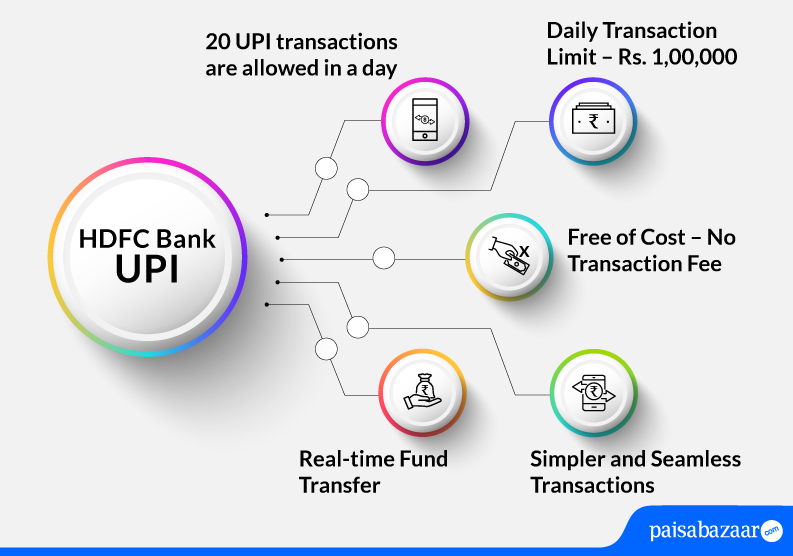
HDFC Bank has integrated the UPI payment system into existing mobile banking app – HDFC Bank Mobile Banking. HDFC Bank’s accountholders can transfer money instantly to anyone, anytime and from anywhere across the country without having to re-enter the details of the beneficiary in each transaction.
Read More: UPI (Unified Payments Interface)
The below-mentioned are the features offered by HDFC Bank UPI:

A Good Credit Score ensures you manage Your Finances Well Check Now
It is to be noted that the limit to transact through UPI is set by NPCI.
Given below are the steps following which you can set-up UPI in the HDFC Bank mobile banking app:
Step 1: Download HDFC mobile banking app from the play store
Step 2: Login using your customer ID and password
Step 3: Tap on UPI payment from your registered mobile number and click on ‘Accept & Continue’ on the next page
Step 4: Enter the UPI ID of your choice and add your bank account to start making payments
Step 5: An OTP request will be placed for authenticating the request
Step 6: Once the request is authenticated, your account will be added for UPI transactions and you can start your transactions immediately.
A Good Credit Score ensures you manage Your Finances Well Check Now
Step 1: Open your HDFC Bank’s mobile banking and click on ‘BHIM UPI Payment’ option on the home screen
Step 2: Tap on ‘Send Money’ and choose from the given options to send money
Step 3: You can either pay via UPI ID of the beneficiary, Account No. & IFSC, or Mobile No. & MMID
Step 4: Enter the amount and other details as asked
Step 5: Enter the 4-digit UPI PIN and proceed to pay
Step 1: Login to your HDFC Bank’s mobile banking app
Step 2: Tap on ‘BHIM UPI payment’ option on the home screen
Step 3: On the next page, click on ‘Request Money’ option
Step 4: Enter the details of the payer such as payer’s UPI ID, amount and description
Step 5: Add the expiry duration of the initiated transaction and initiate the request
HDFC Bank’s PayZapp allows customers to make transactions via UPI, linked debit and credit card of any bank. Customers can enjoy doing transactions conveniently. The app offers fast and secure way of making payments. The app offers services mentioned below:
Also Read: HDFC Bank Customer Care
Get Free Credit Report with Complete Analysis of Credit Score Check Now
Customers of HDFC Bank can link their HDFC RuPay credit cards to BHIM UPI app and make UPI transactions. The facility has made it convenient for users to make UPI transactions from their RuPay credit card.
Following HDFC Bank RuPay credit cards can be linked to UPI apps:
Q. Is it possible to registerfor UPI without registering my mobile number in HDFC Bank?
Ans. No. UPI ID is linked to your mobile number. You will have to register your mobile number with the bank to register for UPI.
Q. Where can I see my UPI transactions?
Ans. You can view your UPI transactions under ‘Transaction History’ tab under ‘UPI Payments’. You can also view the same in Net Banking and HDFC Bank statement.
Q. What is the process to raise a dispute for a particular UPI transaction?
Ans. To raise a dispute for a particular UPI transaction, you can go to ‘Transaction History’ and click on ‘Raise Dispute’ option and select the dispute type.
Q. What if I exceed the maximum number of incorrect PIN tries?
Ans. You get 3 attempts to input the correct UPI PIN while doing UPI transactions. If you enter the wrong PIN for three consecutive times, your account will get blocked for 24 hours for any debit UPI transactions. However, credit transactions will still remain active. Alternatively, you can reset your UPI PIN immediately to continue doing debit UPI transactions.
Q. Is it possible to deactivate or de-register from UPI?
Ans. Yes. It is possible to deactivate from UPI. However, once the UPI ID is de-registered the same UPI ID cannot be retrieved or re-used.