Download the
Paisabazaar app Today!
Paisabazaar app Today!
Get instant access to loans, credit cards, and financial tools — all in one place

Get the app — instant card and loan offers!

Our Advisors are available 7 days a week, 9:30 am - 6:30 pm to assist you with the best offers or help resolve any queries.


Get instant access to loans, credit cards, and financial tools — all in one place

Scan to download on


 Personal Loan
 Business Loan
 Home Loan
 Other Loans


Our Advisors are available 7 days a week, 9:30 am - 6:30 pm to assist you with the best offers or help resolve any queries.
Get your FREE Credit Report with monthly updates


Let’s Get Started
 +91
+91
The entered number doesn't seem to be correct
Permanent Account Number (PAN) is a 10-digit unique identification number allotted to the taxpayers or assessees in India. PAN is a mandatory requirement for filing income tax returns by any taxpayer. All the tax-related information pertaining to the taxpayer is recorded against the PAN allotted to the respective taxpayer. It is a unique number allotted to the taxpaying individuals or entities; hence, two persons cannot have the same PAN.
Moreover, The Income Tax Department runs a Tax Information Network (TIN) for the purpose of modernizing the current system for collecting, processing, monitoring, and accounting of the direct taxes established by NSDL e-Governance Infrastructure Limited on behalf of the Income Tax Department and offers various services and PAN Card is one such service. Let’s discuss in detail about the NSDL PAN Card.

Get FREE Credit Report from Multiple Credit Bureaus Check Now
Services offered by TIN NSDL are inclusive of all the benefits offered online. Applicants or users can easily redeem the services offered by the entity. Primary services offered by TIN NSDL through online mode are mentioned below:
1. Tax Deduction and Collection Account Number (TAN): As TAN is a prerequisite where individuals can file TDS/TCS returns, certificates, and challans, on the TIN NSDL website, users can avail the TAN services including
2. Permanent Account Number (PAN): TIN provides the below PAN services:
3. Annual Information Return (AIR): All the high-value transactions should be covered under Annual Information Return as per the provisions of the Income Tax Act. Applicants on the TIN NSDL website can register, track, and change/renew AIR along with Digital Signature Certificate and others.
4. Account office Identification Number (AIN): Account offices can apply for AIN online on the NSDL website and also can view/download the Book Identification Number (BIN), upload 24G and update the information through online mode.
There are some of the secondary services offered by TIN NSDL for applicants which offer various solutions in categories such as:
TIN NSDL apart from providing various online services also offers the facility of finding a TIN Facilitation Centre to the individuals in their locality which has a biometric-based facility to authenticate Aadhaar along with the acceptance of PAN Card application.
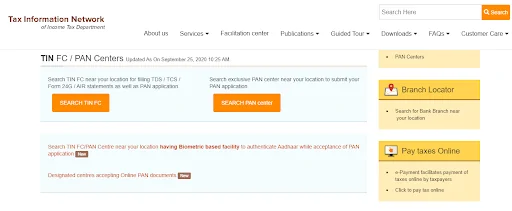
Application for Permanent Account Number can be made in 2 ways i.e online at the NSDL website or by applying at any of the district level PAN agencies. If you are an Indian citizen you need to fill Form 49A and if you are a Non-Resident Indian, you need to fill form 49AA to obtain a new PAN.
Follow the steps mentioned below to apply for PAN Card online through NSDL:
Step 1: Go to the official portal of NSDL
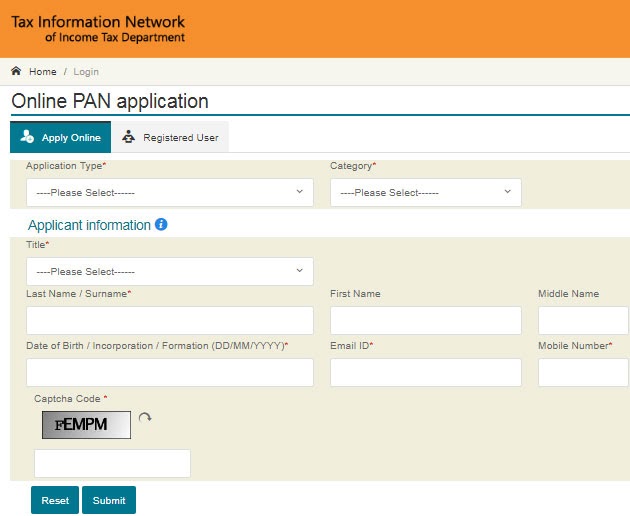
Step 2: From the ‘Application Type’ drop-down menu, select ‘New PAN for Indian citizens (Form 49A) or New PAN-Foreign Citizen (Form 49AA)’ option
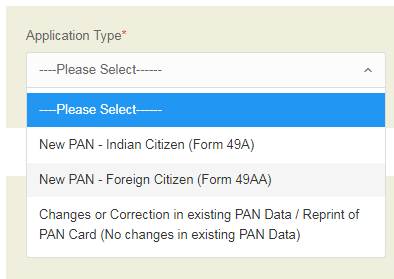
Step 3: Now, you need to select the ‘Category’ from the drop-down menu
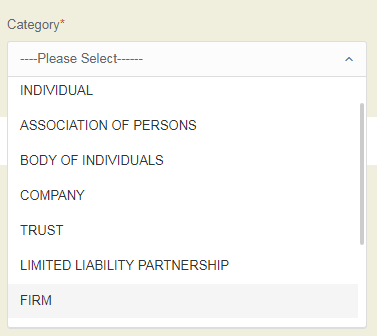
Step 4: Fill in all the required details such as your name, date of birth, email address, and your mobile number in the PAN form
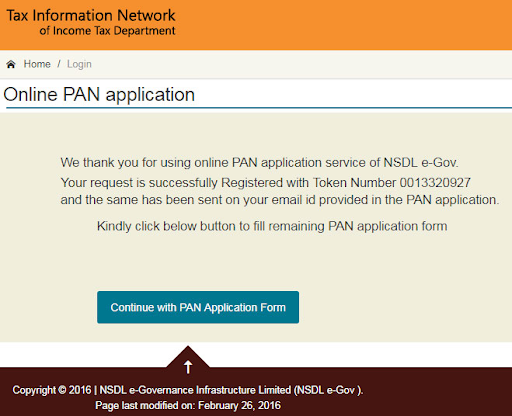
Step 5: A token number will be issued to you for the successful completion of your registration and then you need to click on the ‘Continue with the PAN Application Form’ button
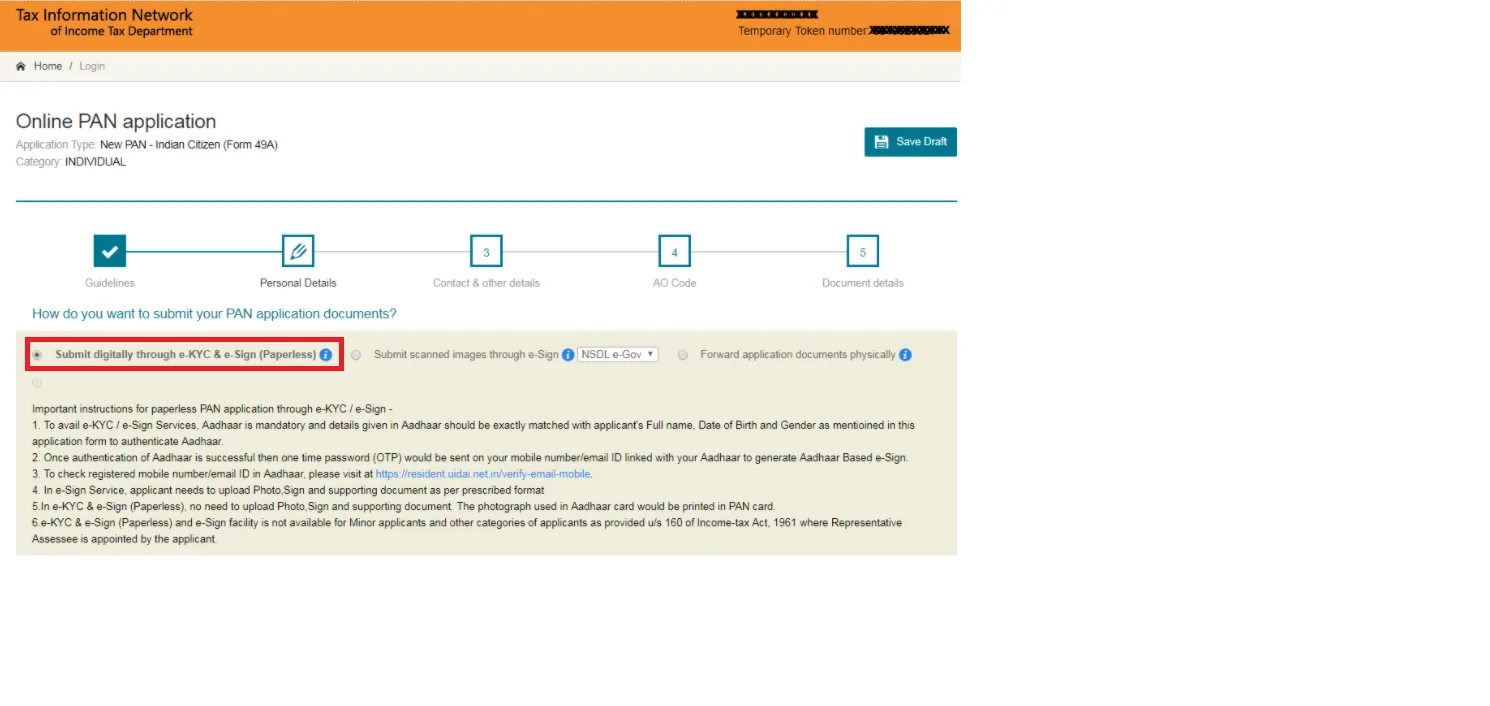
Step 6: A new page will appear on your screen to submit your PAN application. Out of the three options, choose the first one i.e. ‘Submit digitally through e-KYC & e-Sign (paperless)’ option
Step 7: You have to enter details such as your contact details, etc.
Step 8: Once done, enter your Area Code, AO Type, and other details to proceed further
Step 9: You are not required to submit the documents as all the details will be taken from your Aadhaar Card automatically. Tick mark the declaration to proceed further
Step 10: In case there are any errors in the form, it will appear on the screen. If no changes, click on the ‘Proceed’ button
Step 11: You will be redirected to the payment section where you have to make payment through payment options like demand draft/net banking/debit/credit card
Step 12: After the payment is successfully done, an acknowledge form will be sent along with the 15-digit acknowledgment slip
Step 14: Take a print of this acknowledgment form, attach your two recent passport size photographs and sign in the space provided on the acknowledgment form
Step 15: Enclose all the documents (self-attested) mentioned in the form along with the Demand draft (if the payment was done in this mode) and the acknowledgment form
Step 16: Now, post it to the NSDL address mentioned below along with all the documents-
Income Tax PAN Services Unit,
NSDL e-Governance Infrastructure Limited,
5th floor, Mantri Sterling, Plot No. 341,
Survey No. 997/8, Model Colony,
Near Deep Bungalow Chowk, Pune – 411016
Alternatively, you can opt for digital submission of the form through the paperless online application of updating PAN Card the facility of eSign (i.e. Aadhaar based e-Signature) and Digital Signature Certificate (DSC) has been provided to enable PAN applicants to furnish the application for PAN online.
Note: You must label the envelope as ‘APPLICATION FOR PAN— N-Acknowledgement Number’
Once the Aadhaar authentication is successfully completed, a One Time Password (OTP) will be sent on your registered mobile number/email ID linked with Aadhaar Card to generate the Aadhaar-based e-Sign
Following is the process for making an offline PAN application:
Applicants can choose the offline method as well to apply for the PAN card. They can visit a nearby TIN NSDL centre and follow the steps:
Step 1: Download and print the PAN Application form from the official website of NSDL (Form 49A or Form 49AA)
Step 2: Fill the form with all the mandatory details and affix two passport size photographs on the form
Step 3: Make the payment in the form of demand draft in favor of ‘NSDL – PAN’
Step 4: Attach self-attested photocopies of supporting along with the form
Step 5: Mention ‘APPLICATION FOR PAN-N-Acknowledgement Number’ superscripted on the envelope of the application form. The application has to be sent to-
Income Tax PAN Services Unit,
NSDL e-Governance Infrastructure Limited,
5th floor, Mantri Sterling, Plot No. 341,
Survey No. 997/8, Model Colony,
Near Deep Bungalow Chowk, Pune – 411016
On successful processing of the application, PAN will be generated and sent to the residential address of the applicant.
Also Read: UTITSL PAN Card
NSDL also facilitates online tracking of PAN applications. The same can be done through the NSDL website where application status and payment status both can be checked.
Follow the steps mentioned below to track the status of your PAN Card application through the NSDL portal:
Step 1: Visit the official website of NSDL i.e. https://tin.tin.nsdl.com/pantan/StatusTrack.html
Step 2: Click on the ‘Track your PAN/TAN Application Status’ option
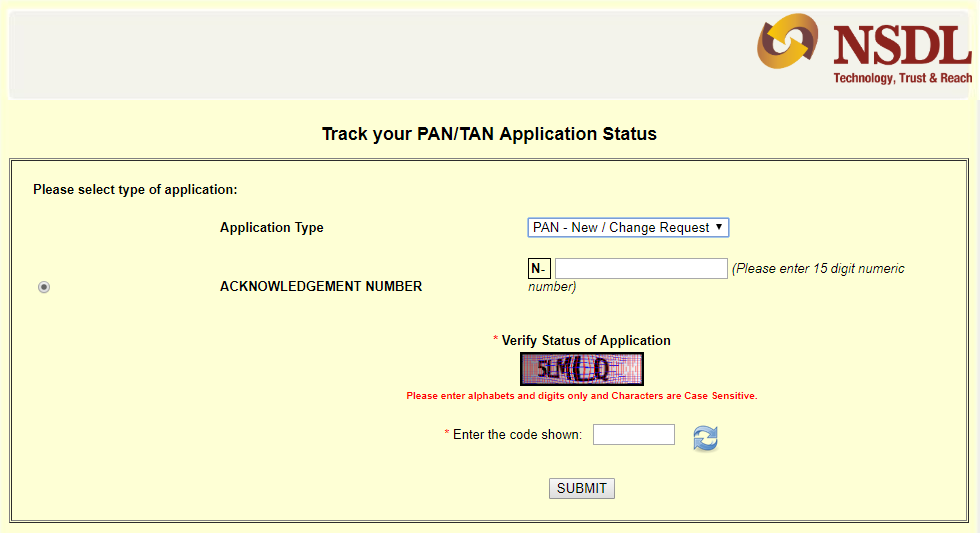
Step 3: Select the application type i.e. PAN – new/change request
Step 4: Enter the 15 digit acknowledgement number
Step 5: Enter the verification code
Step 6: Click on the ‘Submit’ button to view application status
There are various other options available to track the status of your PAN Card Application such as without acknowledgement number, through Aadhaar Card, etc.
Read more at: How to Track PAN Card Status
Get FREE Credit Report from Multiple Credit Bureaus Check Now
Q. Are there any charges for obtaining a PAN Card Application form from NSDL website?
Ans. No, you can download the PAN Card Application form free of cost from the official website of NSDL.
Q. What are the Charges for Applying for a PAN Card through NSDL?
Ans. The charges for applying for PAN is Rs. 107 (including taxes) for Indian communication address and Rs. 1017 (including taxes) for foreign communication address. However, do note that these charges are applicable when you apply for PAN by visiting a PAN centre or when you apply online but submit the PAN documents physically. To find out the complete list of PAN card fees and charges, click here.
Q. I am unable to make payment for PAN Card Online through net banking. Is there any other option available?
Ans. When applying for a PAN Card through NSDL, in case you are unable to make payment through net banking, you can opt for other options such as debit card/credit, demand draft, UPI.
Q. Can I apply for more than one PAN Card through the NSDL portal?
Ans. No, it is illegal to have more than one PAN Card. Hence, you cannot apply for it through the NSDL portal or any other PAN authority. Also, you will be levied a penalty of Rs. 10,000.
Q. Is it mandatory to link a PAN Card with an Aadhaar Card?
Ans. Yes, it is mandatory to link a PAN Card with an Aadhaar Card and the deadline for the same is 30th June 2023.
Q. Can I check my PAN card application status without an acknowledgement number on NSDL?
Ans. No, you cannot check/track the PAN Card Application through Name and Date of Birth as this facility is no longer available at NSDL.
Q. Is it mandatory to provide an Aadhaar Card for availing services such as e-KYC/e-Sign?
Ans. Yes, it is mandatory to provide an Aadhaar Card for availing the e-KYC/e-Sign.