Download the
Paisabazaar app Today!
Paisabazaar app Today!
Get instant access to loans, credit cards, and financial tools — all in one place

Get the app — instant card and loan offers!

Our Advisors are available 7 days a week, 9:30 am - 6:30 pm to assist you with the best offers or help resolve any queries.


Get instant access to loans, credit cards, and financial tools — all in one place

Scan to download on


 Personal Loan
 Business Loan
 Home Loan
 Other Loans


Our Advisors are available 7 days a week, 9:30 am - 6:30 pm to assist you with the best offers or help resolve any queries.
600 or 750? What's your credit
score? Check for FREE.


Let’s Get Started
 +91
+91
The entered number doesn't seem to be correct
NPCI launched UPI to provide a safer and more convenient online payment system to Indians. Axis Bank provides the facility to make or receive UPI payments using their own app or any other third-party UPI app. This offers customers the convenience of making and receiving payments in no time without sharing their bank account details. The facility to carry out transactions without sharing bank details makes the accounts safer and less prone to online fraud. On this page, we will understand the UPI services offered by Axis Bank and BHIM Axis Pay UPI app.
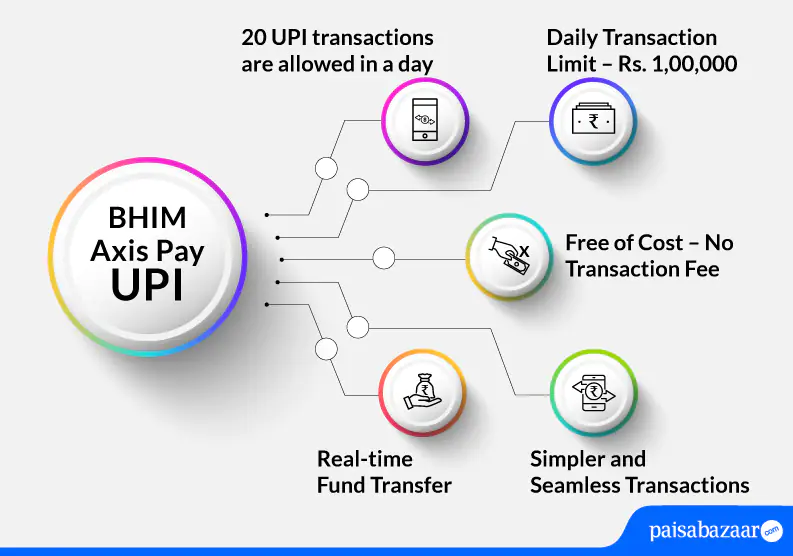
The BHIM Axis Pay UPI app allows customers to link any bank account with their UPI ID. The facility lets users send and receive money easily and in a secure manner. Axis Bank ensures that payments through this channel are simple be it your mobile recharge, UPI payments, paying your bills, etc.
Following mentioned are the platforms through which Axis Bank provides UPI services to customers:
Apart from the above-mentioned platforms, Axis Bank has also partnered with the below-mentioned third party app providers to offer UPI services:
Also Read: UPI (Unified Payments Interface)
Below-mentioned are the features offered by BHIM Axis Pay UPI:
| Type of transaction | Transaction Limit |
| Daily transaction limit | Rs. 1,00,000 |
| Per transaction limit | Rs. 1,00,000 |
| Total number of transactions allowed in a day through bank’s apps | 20 |
| Total number of transactions allowed in a day through third-party apps | 10 |
| Transaction limit for new UPI users within 24 hours of registration | Rs. 5,000 |
| IPO mandate limit | Rs. 5,00,000 |
| Limit for users who have changed their SIM card or device | Rs. 5,000 within 24 hours |
| For iOS users, new user limit | Rs. 5,000 within 72 hours |
| For categories like Capital Markets, Collections, Insurance, Foreign Inward Remittances | Rs. 2,00,000 |

Get FREE Credit Report from Multiple Credit Bureaus Check Now
Following steps explain the process of registration on BHIM Axis Pay UPI:
Step 1: Download BHIM Axis Pay UPI app from Google Play Store or Apple Store and choose your preferred language.
Step 2: Verify your mobile number by selecting the mobile number registered with your bank and click on ‘Proceed’.
Step 3: Add your name, email id, set a 6-digit passcode for the app, re-enter the passcode and click on ‘Submit’.
Step 4: Select your bank and bank account.
Step 5: Set your VPA/UPI ID for the selected bank and tap on ‘Proceed’.
Step 5: Set your UPI PIN for the account using your debit card details and OTP.
Step 6: The registration will be done successfully.
Step 1: Login to BHIM Axis Pay UPI and on the home screen, select the bank account from which the transaction needs to be initiated.
Step 2: Tap on ‘Send’ option and on the next screen, enter the UPI ID of the Payee. Click on ‘Verify’.
Step 3: Add the amount that needs to be sent and tap on ‘Proceed to Pay’.
Step 4: Enter the UPI PIN. Money will be sent.
Step 1: Login to BHIM Axis Pay UPI and on the home screen, select the bank account from which the request to collect money needs to be initiated.
Step 2: Tap on the ‘Request’ option. Enter the payer’s UPI ID and click on ‘Verify’.
Step 3: Enter the amount, request expiry date and tap on ‘Proceed’.
Step 4: The request to collect money will be sent to the payer.
Once the payer approves the request, money will be debited from his/her account and credited to your UPI-linked default bank account.
If the customer comes across any issue while doing registration or transaction failure then he/she should follow the below-mentioned points before reaching out to the customer care executive:
If the customer is not able to resolve the issue by following the above-mentioned steps, he/she can reach out to the bank’s customer care team on
Also Read: Axis Bank Customer Care
Get FREE Credit Report from Multiple Credit Bureaus Check Now
Q. Who all can use Axis Pay?
Ans. Axis Bank customers and other bank customers can use Axis Pay.
Q. How many accounts can I add in BHIM Axis Pay UPI to receive money?
Ans. There is no limit on adding accounts for receiving money.
Q. I have forgotten my PIN for the account. What should I do?
Ans. In that circumstance, you can reset your UPI PIN using ‘Forgot UPI PIN’ option in the app. However, the moment you initiate to change the PIN in this app, the PIN will be changed in all UPI apps where the specific account is linked.
Q. What is the amount of money that I can receive through BHIM Axis Pay UPI?
Ans. You can receive 100 credits or Rs. 5,00,000 every 24 hours.
Q. Is UPI PIN and passcode same?
Ans. No. UPI PIN is set for each bank account that you link in BHIM Axis Pay. You need UPI PIN to authorize your UPI transactions. The passcode is set for your BHIM Axis Pay app at the time of registration to login to the app. For an Axis account, a customer would need to set a 6-digit UPI PIN which need not be the same as the 6-digit passcode.
Q. What is the expiry time of collecting funds through UPI in Axis Bank?
Ans. From the date of initiation of the transaction, you can set an expiry time from 1 to 45 days.
Q. I have formatted my device, what should I do to activate Axis Pay application again?
Ans. To activate Axis Pay again, you will have to download the app and register again. New registration transaction limit shall be applicable in this case as well.