Download the
Paisabazaar app Today!
Paisabazaar app Today!
Get instant access to loans, credit cards, and financial tools — all in one place

Win Assured Cashback

Our Advisors are available 7 days a week, 9:30 am - 6:30 pm to assist you with the best offers or help resolve any queries.


Get instant access to loans, credit cards, and financial tools — all in one place

Scan to download on



 Personal Loan
 Business Loan
 Home Loan
 Other Loans


Our Advisors are available 7 days a week, 9:30 am - 6:30 pm to assist you with the best offers or help resolve any queries.
Customers of Union Bank of India can transfer funds through UPI as well using the bank's Vyom app and other third-party apps. The page discusses about setting up the Vyom app, sending and receiving funds, UPI transaction limits and other details.
600 or 750? What's your credit
score? Check for FREE.


Let’s Get Started
 +91
+91
The entered number doesn't seem to be correct
UPI is an instant fund transfer facility developed by NPCI. Union Bank of India provides UPI facility to its customers to make UPI transactions through VYOM application. Customers can download Union Bank VYOM application from Google Play Store or Apple App Store.
In order to make UPI transactions, users must have his/her mobile number linked to their respective bank accounts. Customers of Union Bank of India can transfer funds by using VPA, QR code or account number and IFSC of the payee instantly. On this page, we will discover other aspects of Union Bank of India UPI.
Read More: UPI (Unified Payment Interface)
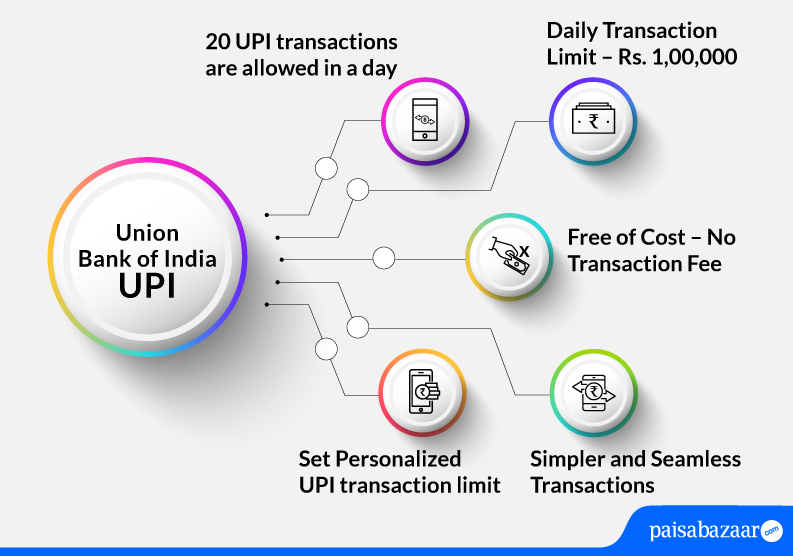
Union Bank of India offers below-mentioned UPI features:

Checking Credit Report monthly has no impact on Credit Score
Check Now
Union Bank of India supports below-mentioned types of UPI transactions:
The below-mentioned steps explain how to set-up Union Bank of India UPI app:
Step 1: Login to VYOM application with the 4-digit login PIN
Step 2: On the dashboard, tap on BHIM UPI and click on ‘Yes’ to create your UPI ID
Step 3: Link your bank account and tap on ‘Proceed’
Step 4: On the next page, select your bank and ‘Proceed’. Your UPI ID will be created
The following steps explain how to send money through BHIM UPI from Union Bank of India’s VYOM app:
Step 1: Login to VYOM app by entering your login PIN.
Step 2: Tap on ‘BHIM UPI’ on the home screen and then click on ‘Pay’.
Step 3: Select your UPI ID.
Step 4: Add payee’s UPI ID, amount that needs to be sent and remarks. Tap on ‘Confirm’.
Step 5: Enter the UPI PIN. The transaction will be successful.
Your Credit Score Is Now Absolutely Free
Check Now
The following steps explain how to send money through BHIM UPI from Union Bank of India’s VYOM app:
Step 1: Login to VYOM app by entering your login PIN.
Step 2: Tap on ‘BHIM UPI’ on the home screen and click on ‘Collect’.
Step 3: On the next page, enter details such as payer’s UPI ID, payee’s UPI ID, amount to be collected, expiry date and time of the transaction. Click on ‘Proceed’.
Step 4: Click on ‘Confirm’ on the confirmation page. The request to collect money will be sent.
Also Read: Union Bank of India Customer Care
Q.How many UPI IDs can be created in VYOM application?
Ans. A user can create a maximum of 3 UPI IDs in the VYOM application.
Q. What all types of accounts can I link to UPI?
Ans. Currently, you can link savings account, current account and overdraft accounts offered by Union Bank to UPI.
Q. Are there any charges on UPI transactions by Union Bank of India?
Ans. There are no charges levied by Union Bank of India for doing UPI transactions as of now.
Q. How much time will it take for a failed UPI transaction money to return to my bank account?
Ans. The failed UPI transaction will be reversed to your account in T+1 day.
Q. What is the process to register my RuPay credit card for UPI transactions?
Ans. Currently, RuPay credit card customers can link their Union Bank of India credit card for UPI transactions in BHIM/Paytm app. To know more, click here.
Q. Where can I activate my UPI Lite account?
Ans. Currently, you can activate your UPI Lite account in BHIM/Paytm app.
Q. How can I share the QR code of my account with other party for receiving funds?
Ans. You can share the QR code of your account from the option available on the home screen of BHIM UPI in the VYOM application.